


- Posts: 62
- Thank you received: 2
3 Post Moderation Rule for New Boarders (25 Jan 2021)
New boarders will have their posts moderated - Don't worry if you cannot see your post immediately.
FCPX Ram usage on my hardware and my workflow
- gloryhornetboi
-
 Topic Author
- Offline
- Senior Member
-

Less
More
17 Dec 2012 11:12 - 17 Dec 2012 11:17 #18861
by gloryhornetboi
FCPX Ram usage on my hardware and my workflow was created by gloryhornetboi
Thought i'd post this as some people might find it interesting, or, just relate and post their workflow issues/workarounds if they wanted to. I have a MacBook Pro (early 2011 model) with 16GB RAM and im running my software from the internal HD and my events/projects from a standard USB 2 external. My next upgrade, this week, is probably going to be the Buffalo thunderbolt external...
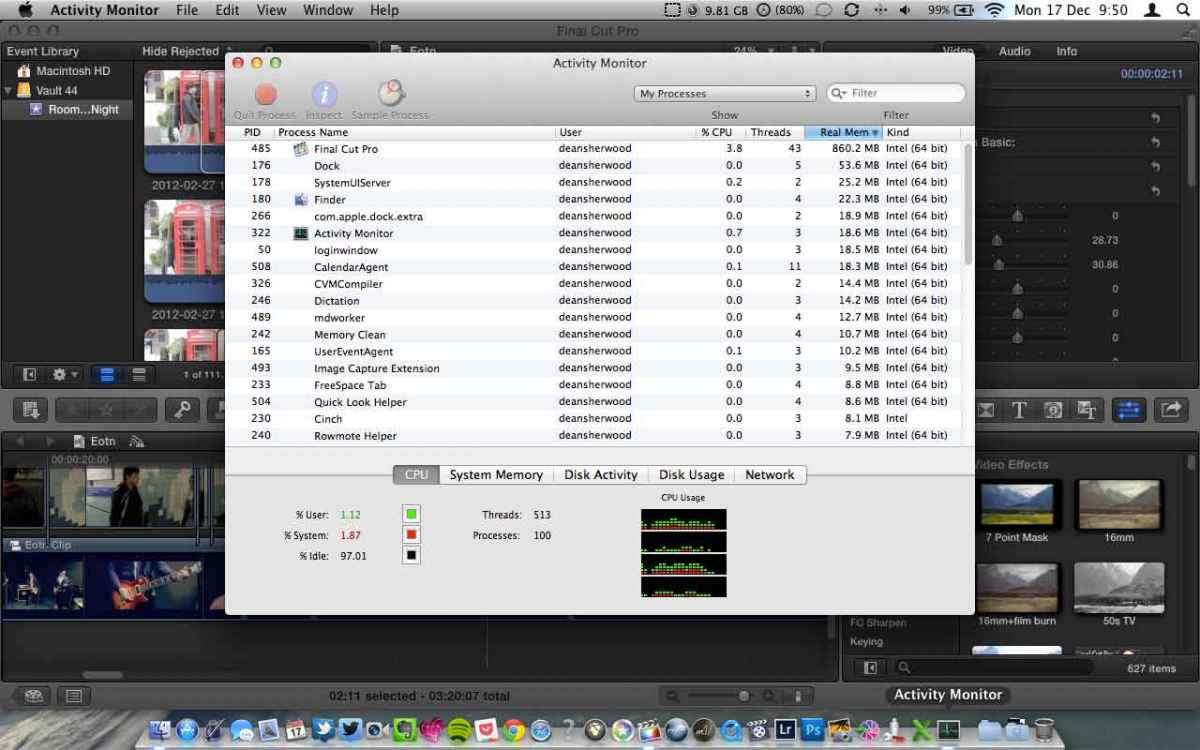
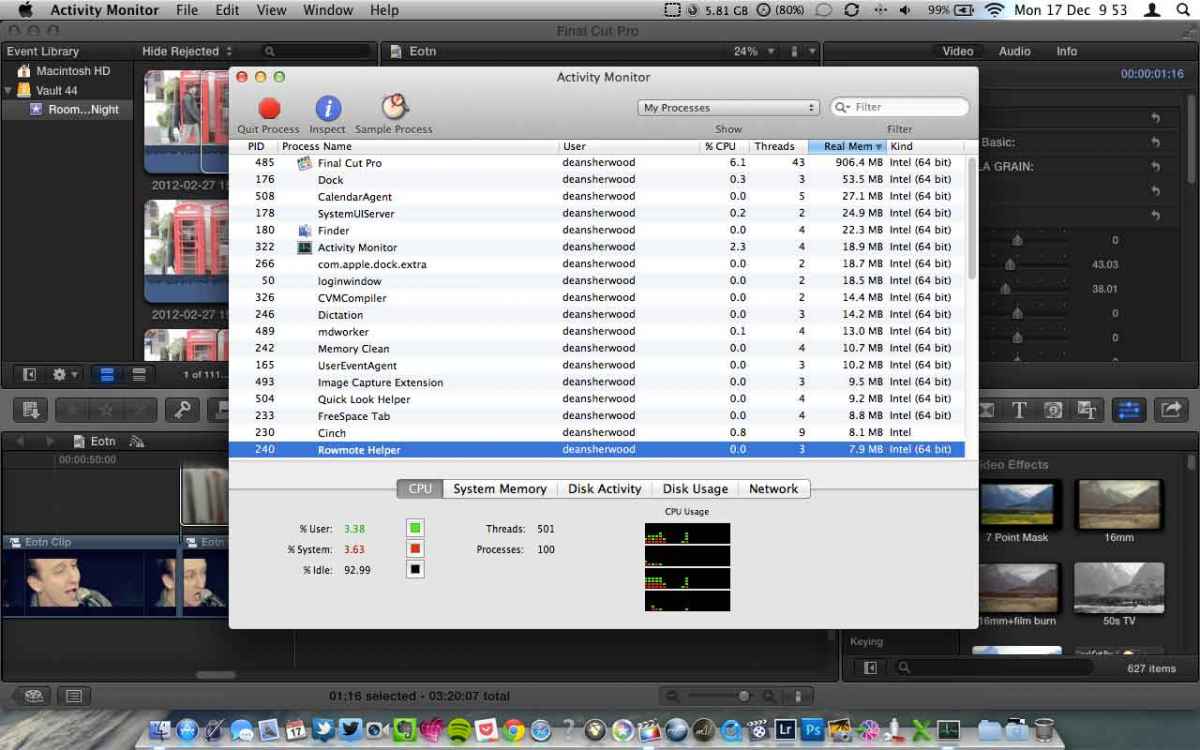
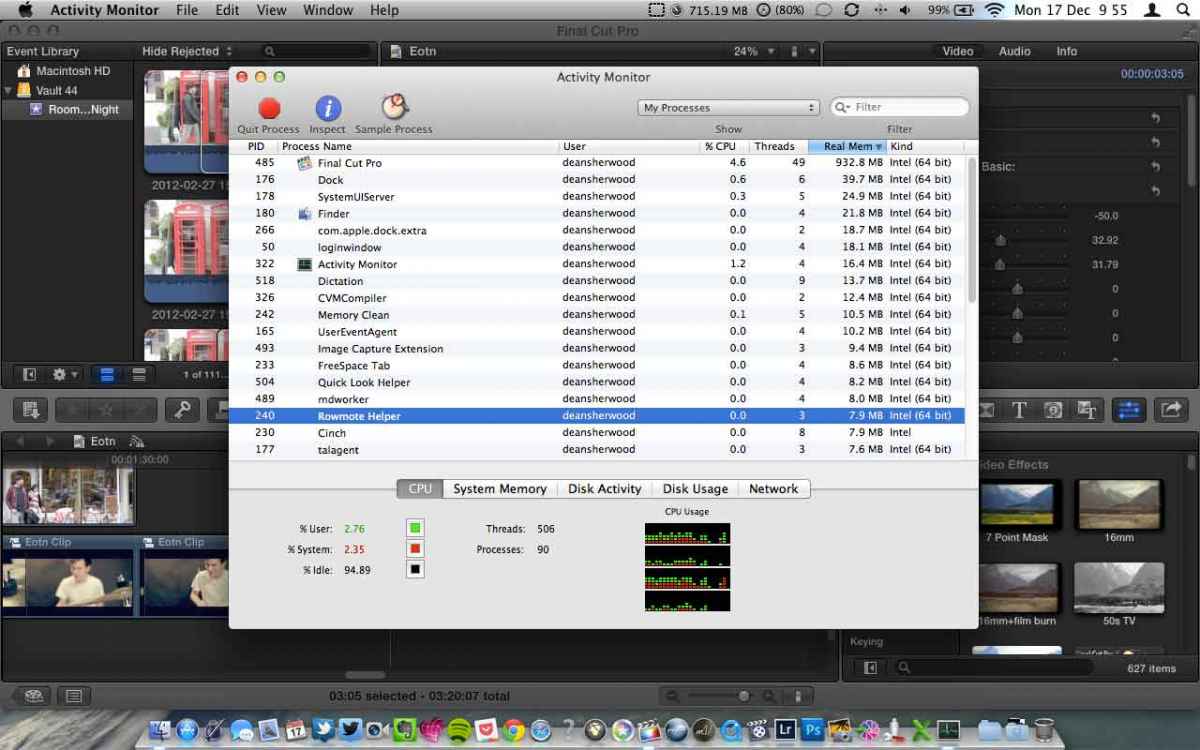
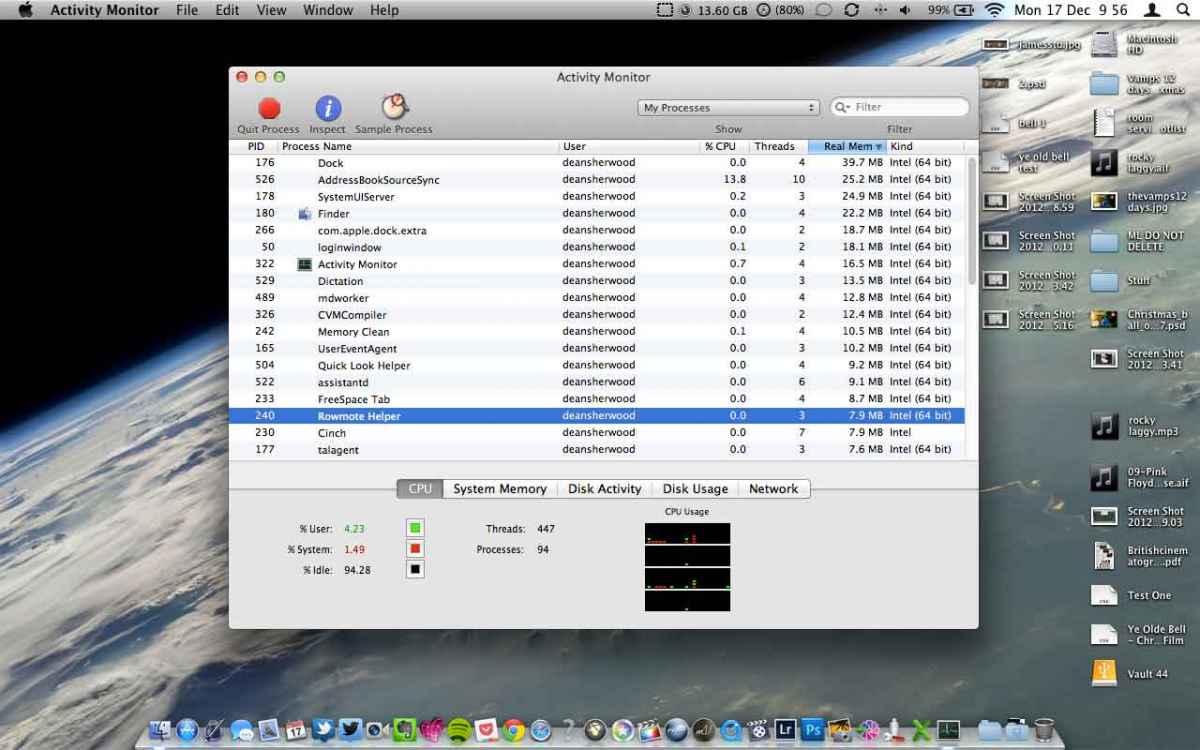
So here are screenshots over a small period of time this morning while I did some selective rendering (i.e. background rendering is off) on a music video i'm finishing. I have two third party plugins stacked, and as you can probably see, two story lines (or at least some connected clips throughout). As you can see from the top of the screen on my screenshots, FCPX gradually eats up the RAM on my machine, I never get that RAM back and therefore need to restart FCPX after maybe 4/5 renders of individual clips. One of the plugins is tonegrade, which i know is pretty intense on RAM when it renders. I love FCPX, but like most, i think, just wished it used RAM more efficiently when third party plugins (which we all know we need to get desired looks we want) ... The final screenshot shows the activity window once ive closed FCPX by the way
So here are screenshots over a small period of time this morning while I did some selective rendering (i.e. background rendering is off) on a music video i'm finishing. I have two third party plugins stacked, and as you can probably see, two story lines (or at least some connected clips throughout). As you can see from the top of the screen on my screenshots, FCPX gradually eats up the RAM on my machine, I never get that RAM back and therefore need to restart FCPX after maybe 4/5 renders of individual clips. One of the plugins is tonegrade, which i know is pretty intense on RAM when it renders. I love FCPX, but like most, i think, just wished it used RAM more efficiently when third party plugins (which we all know we need to get desired looks we want) ... The final screenshot shows the activity window once ive closed FCPX by the way

Last edit: 17 Dec 2012 11:17 by gloryhornetboi. Reason: images hadnt uplaoded...
Please Log in to join the conversation.

17 Dec 2012 15:34 - 17 Dec 2012 15:34 #18878
by BenB
Replied by BenB on topic FCPX Ram usage on my hardware and my workflow
It is loading up the databases of the events and projects you access. It will hold them there in case you go back to them for as long as A- the app is running, B- you still have more RAM to access.
I think you're assuming things about RAM that aren't true. FCP X does need a lot of RAM, but it will not interfere with other apps. Using a lot of RAM is good, makes an app snappier. No need to relaunch FCP X, just let it use the RAM it needs.
USB 2 drive? You're getting horrible performance whether you realize it or not. Going to a T'bolt drive will give you a huge performance boost. Plus moving all the Events and Projects off of you OS drive will also be a huge performance boost.
Yeah, FCP X isn't hardly touching the total RAM you've got installed. Let it access the RAM it needs, don't worry about it. You're getting worked up over something that is normal and isn't doing anything negative.
I think you're assuming things about RAM that aren't true. FCP X does need a lot of RAM, but it will not interfere with other apps. Using a lot of RAM is good, makes an app snappier. No need to relaunch FCP X, just let it use the RAM it needs.
USB 2 drive? You're getting horrible performance whether you realize it or not. Going to a T'bolt drive will give you a huge performance boost. Plus moving all the Events and Projects off of you OS drive will also be a huge performance boost.
Yeah, FCP X isn't hardly touching the total RAM you've got installed. Let it access the RAM it needs, don't worry about it. You're getting worked up over something that is normal and isn't doing anything negative.
Last edit: 17 Dec 2012 15:34 by BenB.
Please Log in to join the conversation.
- gloryhornetboi
-
Topic Author
- Offline
- Senior Member
-
Less
More
- Posts: 62
- Thank you received: 2
17 Dec 2012 15:48 #18879
by gloryhornetboi
Replied by gloryhornetboi on topic FCPX Ram usage on my hardware and my workflow
Thanks Ben! I restart the software because (using memory cleaner app) it shows that my RAM is used up and FCPX slows down rapidly, to the point my mac becomes unusable and I get spinning wheels etc. So what i'm doing is watching my 16GB ram in that app (you can see it happening gradually in the screenshots) go down to like 1GB and then I restart FCPX before everything comes to a halt. Hope that makes sense!?
I can't wait to get my thunderbolt drive!
I can't wait to get my thunderbolt drive!
Please Log in to join the conversation.
- gloryhornetboi
-
Topic Author
- Offline
- Senior Member
-
Less
More
- Posts: 62
- Thank you received: 2
17 Dec 2012 15:58 #18882
by gloryhornetboi
Replied by gloryhornetboi on topic FCPX Ram usage on my hardware and my workflow
Im on 10.8.2 and FCPX 10.0.7 Ben.
Please Log in to join the conversation.
18 Dec 2012 16:35 #18958
by BenB
Replied by BenB on topic FCPX Ram usage on my hardware and my workflow
Growing from 559 MB RAM to 933 MB RAM is nothing. That's a non-issue. The last screen shot shows no FCP running at all, BTW.
I don't think RAM is your issue. I'd like verification that your Mac actually has a USB 3.0 port on it. It sounds like you're getting USB 2.0 performance. I don't think Apple put USB 3.0 ports on MacBook Pros until the mid 2012. I think that's your issue.
I don't see any issues with your RAM, and highly doubt that's your problem. You're not even getting to 1 GB of RAM on a 16 GB RAM system. That's a non-issue. I think it's the drive's bandwidth bogging down. More specifically, the USB 2.0 port's bandwidth is slowing down.
I bet the T'bot drive solves your performance problems totally.
I don't think RAM is your issue. I'd like verification that your Mac actually has a USB 3.0 port on it. It sounds like you're getting USB 2.0 performance. I don't think Apple put USB 3.0 ports on MacBook Pros until the mid 2012. I think that's your issue.
I don't see any issues with your RAM, and highly doubt that's your problem. You're not even getting to 1 GB of RAM on a 16 GB RAM system. That's a non-issue. I think it's the drive's bandwidth bogging down. More specifically, the USB 2.0 port's bandwidth is slowing down.
I bet the T'bot drive solves your performance problems totally.
Please Log in to join the conversation.
- gloryhornetboi
-
Topic Author
- Offline
- Senior Member
-
Less
More
- Posts: 62
- Thank you received: 2
18 Dec 2012 17:18 #18962
by gloryhornetboi
Replied by gloryhornetboi on topic FCPX Ram usage on my hardware and my workflow
Am i looking into the memory cleaner app wrongly then Ben? The last screenshot was just to show how the RAM (at the top of the screen) goes back up once I shut down FCPX. It is USB 2, im getting my thuderbolt drive at the end of the week, cant wait!
Thanks for your views/answers
Thanks for your views/answers
Please Log in to join the conversation.
18 Dec 2012 17:42 #18964
by BenB
Replied by BenB on topic FCPX Ram usage on my hardware and my workflow
You're reading tiny amounts of RAM that do not matter. Ignore it. You're chasing shadows with that RAM stuff. So you are on USB 2, not USB 3 as your original post stated. THAT is your issue, NOT the RAM. USB 2 does not have a "sustained data rate" high enough for video editing properly. Ignore the RAM, it is not doing anything bad or wrong, simply ignore it, it is in now way an issue.
Please Log in to join the conversation.
- gloryhornetboi
-
Topic Author
- Offline
- Senior Member
-
Less
More
- Posts: 62
- Thank you received: 2
18 Dec 2012 17:47 #18965
by gloryhornetboi
Replied by gloryhornetboi on topic FCPX Ram usage on my hardware and my workflow
I said USB 2 
Please Log in to join the conversation.
18 Dec 2012 17:57 #18966
by BenB
Replied by BenB on topic FCPX Ram usage on my hardware and my workflow
Thought I had carefully reviewed that and saw USB 3. But yeah, USB 2 is the cause of many issues.
Please Log in to join the conversation.
- PaulMarcel
-
- Offline
- New Member
-

Less
More
- Posts: 18
- Thank you received: 2
19 Dec 2012 10:22 #19012
by PaulMarcel
Replied by PaulMarcel on topic FCPX Ram usage on my hardware and my workflow
I've noticed some good improvements in memory management in OSX 10.8.2. Most Lion releases were sieves.
When you're looking at the real memory column, that number only grows; only in some special cases can memory be reclaimed from a process (like memory mapped files).
10.8.2 seems to be much better at using free memory as a file cache and sometimes process cache. The lack of that was always a frustration to me in Lion days; I did, however, create a whole new vocabulary to express that. I digress...
Back to FCP, if you have the angle editor showing while playing back, you really chew up the disk bandwidth. For example, I currently have a project with just 2 cameras on a T-bolt raid-1. When I play it back, it does fine for awhile then bogs down and drops frames. When I stop playback, I get a warning that frames were dropped and a great suggestion that I should close the angle editor as those 2 videos are playing back along with the composed main timeline with effects and all that. I normally turn off the angle editor, but had forgotten that time and wondered why I had dropped frames.
You weren't playing back, but my example is to explain how all the cameras are live during playback and scrubbing. Once you exhaust the application's memory cache, you're relying on a relatively slow USB2 drive.
Get the T-bolt drive and turn the USB2 drive into a Time Machine drive; plenty fast for that.
When you're looking at the real memory column, that number only grows; only in some special cases can memory be reclaimed from a process (like memory mapped files).
10.8.2 seems to be much better at using free memory as a file cache and sometimes process cache. The lack of that was always a frustration to me in Lion days; I did, however, create a whole new vocabulary to express that. I digress...
Back to FCP, if you have the angle editor showing while playing back, you really chew up the disk bandwidth. For example, I currently have a project with just 2 cameras on a T-bolt raid-1. When I play it back, it does fine for awhile then bogs down and drops frames. When I stop playback, I get a warning that frames were dropped and a great suggestion that I should close the angle editor as those 2 videos are playing back along with the composed main timeline with effects and all that. I normally turn off the angle editor, but had forgotten that time and wondered why I had dropped frames.
You weren't playing back, but my example is to explain how all the cameras are live during playback and scrubbing. Once you exhaust the application's memory cache, you're relying on a relatively slow USB2 drive.
Get the T-bolt drive and turn the USB2 drive into a Time Machine drive; plenty fast for that.
Please Log in to join the conversation.
- gloryhornetboi
-
Topic Author
- Offline
- Senior Member
-
Less
More
- Posts: 62
- Thank you received: 2
19 Dec 2012 12:53 #19019
by gloryhornetboi
Replied by gloryhornetboi on topic FCPX Ram usage on my hardware and my workflow
Thanks Paul, I do see slowdown and dropped frames during multicam edits, on being an 8 angle i did recently, but it was still 'ok' and workable, and that was even from a snail like USB 2 drive! Looking forward to getting my T'bolt! 
Please Log in to join the conversation.
