


- Posts: 1
- Thank you received: 0
3 Post Moderation Rule for New Boarders (25 Jan 2021)
New boarders will have their posts moderated - Don't worry if you cannot see your post immediately.
Latest Update killed my project!
16 Dec 2012 09:11 #18817
by vinnylee
Latest Update killed my project! was created by vinnylee
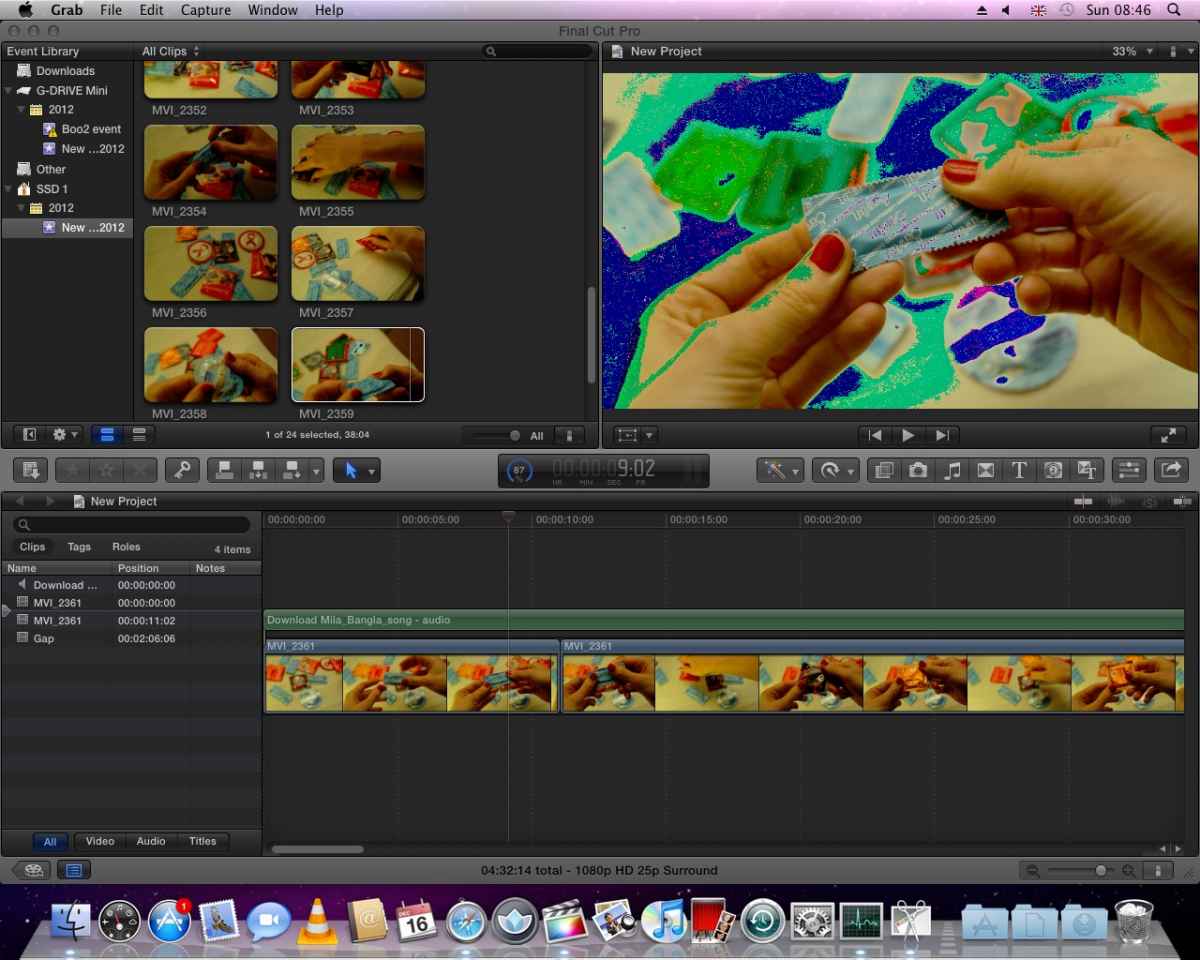
I just updated to FCPX 10.0.6 and now it tells me my graphics card isn't good enough first of all.. but before that my graphics card was supported and worked pretty much fine..
Now all my footage is strangely solarised and final cut is going really slow. and now I wish I hadn't updated.. I have to finish my project today! and its still messed up..
anything I can do to fix it quickly?
Mac Pro dual core, intel xeon, 250 GB SSD, 3 TB GB HDD, 3 GB RAM.
(screen shot attached)
Now all my footage is strangely solarised and final cut is going really slow. and now I wish I hadn't updated.. I have to finish my project today! and its still messed up..
anything I can do to fix it quickly?
Mac Pro dual core, intel xeon, 250 GB SSD, 3 TB GB HDD, 3 GB RAM.
(screen shot attached)
Please Log in to join the conversation.

16 Dec 2012 11:38 #18818
by Seanus
Sean Lander - Editing since 1982 - AVID 1991 - FCP 1999 - FCPX 2011
Replied by Seanus on topic Latest Update killed my project!
What graphics card do you have?
Only solutions I can think of are. Move project to a supported machine, run out and buy a new graphics card. Restore FCP X from a back up if you ever did one.
Only solutions I can think of are. Move project to a supported machine, run out and buy a new graphics card. Restore FCP X from a back up if you ever did one.
Sean Lander - Editing since 1982 - AVID 1991 - FCP 1999 - FCPX 2011
Please Log in to join the conversation.
- Lee Patterson
-

- Offline
- Elite Member
-

Less
More
- Posts: 239
- Thank you received: 20
16 Dec 2012 16:35 #18822
by Lee Patterson
Replied by Lee Patterson on topic Latest Update killed my project!
looks like the project opens ok. What happens if you output the edit? is that all screwy? What happens if you start a new project altogether, how does that look?
Can you screen grab the error message (cmd+shift+3) and post it?
Your audio is set to surround, is that correct?
Can you screen grab the error message (cmd+shift+3) and post it?
Your audio is set to surround, is that correct?
Please Log in to join the conversation.
16 Dec 2012 16:36 #18823
by cgbier
Replied by cgbier on topic Latest Update killed my project!
Is your GPU on the supported list, or did it just work before?
I had the same with my 5 year old iMac. The GPU wasn't supported from begin on, but it worked (somewhat) until 10.0.3 broke it. All in a sudden, I had the same "effects" you have.
I had the same with my 5 year old iMac. The GPU wasn't supported from begin on, but it worked (somewhat) until 10.0.3 broke it. All in a sudden, I had the same "effects" you have.
Please Log in to join the conversation.

16 Dec 2012 17:32 #18827
by BenB
Replied by BenB on topic Latest Update killed my project!
006 introduces new processes being routed to the GPU, thus its tolerance for unsupported GPU's is much decreased. Same happened in 003 (broadcast out, I think). Yes, get a good graphics card, you'll be glad you did.
You'll also want more than 3 GB of RAM, and a secondary internal drive for your Events and Projects. Do those three updates, your system will fly.
You'll also want more than 3 GB of RAM, and a secondary internal drive for your Events and Projects. Do those three updates, your system will fly.
Please Log in to join the conversation.
