


- Posts: 5
- Thank you received: 0
3 Post Moderation Rule for New Boarders (25 Jan 2021)
New boarders will have their posts moderated - Don't worry if you cannot see your post immediately.
Clip Duration Selection [CTRL-D] in EVENT BROWSER ISSUE
- sid.chander
-
 Topic Author
- Offline
- New Member
-

Less
More
10 Dec 2012 10:28 #18506
by sid.chander
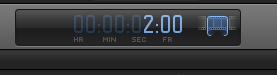
After setting the IN POINT in a clip in the event browser, i hit CTRL-D to set the duration to where my OUT POINT is going to be. But every time I do it the number of frames selected is 30 frames less than the value I entered.
example
I key in 2:30 [SECONDS:FRAMES] and the dashboard displays 2:00
My project is set to 29.97p
The source is also at a matching frame rate.
I don't have the same issue while marking the IN OUT using CTRL-D on the timeline.
Do help me out. Cheers.
example
I key in 2:30 [SECONDS:FRAMES] and the dashboard displays 2:00
My project is set to 29.97p
The source is also at a matching frame rate.
I don't have the same issue while marking the IN OUT using CTRL-D on the timeline.
Do help me out. Cheers.
Please Log in to join the conversation.

10 Dec 2012 11:26 #18508
by Seanus
Sean Lander - Editing since 1982 - AVID 1991 - FCP 1999 - FCPX 2011
Replied by Seanus on topic Clip Duration Selection [CTRL-D] in EVENT BROWSER ISSUE
If I'm understanding what you're saying CONTROL D sets the duration of the in and out point. Not the time code.
For example I set and IN point then hit Control D and type in 5.00. I know have 5 seconds selected.
Also if you are working in NTSC would 2.30 be the same as 3.00?
For example I set and IN point then hit Control D and type in 5.00. I know have 5 seconds selected.
Also if you are working in NTSC would 2.30 be the same as 3.00?
Sean Lander - Editing since 1982 - AVID 1991 - FCP 1999 - FCPX 2011
Please Log in to join the conversation.
- sid.chander
-
Topic Author
- Offline
- New Member
-
Less
More
- Posts: 5
- Thank you received: 0
10 Dec 2012 12:54 #18510
by sid.chander
Replied by sid.chander on topic Clip Duration Selection [CTRL-D] in EVENT BROWSER ISSUE
Yeah Seanus.
CONTROL-D sets the duration of the IN and OUT point wherever it is applied.
In the Event Browser and in the Timeline.
My issue is that it does not matter if I am in a NTSC project or a 23.98p project, the CONTROL - D command works correctly only on the timeline.
I can select 5 seconds by marking IN and hitting CONTROL - D and keying 5.00 and mark 5 seconds of a clip on the timeline, but if I mark the same clip in the event browser and type 5.00 i get "3:28" on my dashboard display and the clip selected is also of that length when added onto the timeline.
Still working on a fix for this.
CONTROL-D sets the duration of the IN and OUT point wherever it is applied.
In the Event Browser and in the Timeline.
My issue is that it does not matter if I am in a NTSC project or a 23.98p project, the CONTROL - D command works correctly only on the timeline.
I can select 5 seconds by marking IN and hitting CONTROL - D and keying 5.00 and mark 5 seconds of a clip on the timeline, but if I mark the same clip in the event browser and type 5.00 i get "3:28" on my dashboard display and the clip selected is also of that length when added onto the timeline.
Still working on a fix for this.
Please Log in to join the conversation.
10 Dec 2012 13:24 #18512
by cgbier
Replied by cgbier on topic Clip Duration Selection [CTRL-D] in EVENT BROWSER ISSUE
Handles for transitions maybe?
Please Log in to join the conversation.
10 Dec 2012 19:04 #18544
by Seanus
Sean Lander - Editing since 1982 - AVID 1991 - FCP 1999 - FCPX 2011
Replied by Seanus on topic Clip Duration Selection [CTRL-D] in EVENT BROWSER ISSUE
Well that is strange. I just tried it in my event and it seems to be working just fine.
Have you tried it with different footage?
Have you tried it with different footage?
Sean Lander - Editing since 1982 - AVID 1991 - FCP 1999 - FCPX 2011
Please Log in to join the conversation.
- sid.chander
-
Topic Author
- Offline
- New Member
-
Less
More
- Posts: 5
- Thank you received: 0
10 Dec 2012 19:32 #18545
by sid.chander
Replied by sid.chander on topic Clip Duration Selection [CTRL-D] in EVENT BROWSER ISSUE
@cgbier
I guess it's not the handles, because the same project was fine up until yesterday.
@Seanus
yeah seems the same to me!
I tried it with a 24p source in a 24p project and everything is fine, but the moment I get any 29.97fps source into a 29.97p project the same stuff happens!
But this does not happen if I use the 24p clip in the 29.97p project.
And it happens if I get any 29.97p clip in a 24p project!!
Seems like I'm having some issue in the event browser with all 29.97 clips..
I'm kinda in a daze now..
Have tried deleting the project, events and all the associated files and redone the same from scratch, yet this keeps happening with all the projects that I create.
FCP X 10.0.6, by the way. I didn't upgrade midway. Have been working on this project solely on 10.0.6.
Thnx for ur help guys.. Much appreciated
I guess it's not the handles, because the same project was fine up until yesterday.
@Seanus
yeah seems the same to me!
I tried it with a 24p source in a 24p project and everything is fine, but the moment I get any 29.97fps source into a 29.97p project the same stuff happens!
But this does not happen if I use the 24p clip in the 29.97p project.
And it happens if I get any 29.97p clip in a 24p project!!
Seems like I'm having some issue in the event browser with all 29.97 clips..
I'm kinda in a daze now..
Have tried deleting the project, events and all the associated files and redone the same from scratch, yet this keeps happening with all the projects that I create.
FCP X 10.0.6, by the way. I didn't upgrade midway. Have been working on this project solely on 10.0.6.
Thnx for ur help guys.. Much appreciated
Please Log in to join the conversation.

10 Dec 2012 20:31 #18556
by BenB
Replied by BenB on topic Clip Duration Selection [CTRL-D] in EVENT BROWSER ISSUE
Here's something you could try.
Create a folder called "Project Backup". COPY your Event and Project folders there, and MOVE with the FCP X 10.0.6 app itself. Install 10.0.7, let it update the databases, see if things work correctly.
If it causes any problems, you have your backups to replace everything with, and you're back to where you were in 10.0.6, nothing lost.
Create a folder called "Project Backup". COPY your Event and Project folders there, and MOVE with the FCP X 10.0.6 app itself. Install 10.0.7, let it update the databases, see if things work correctly.
If it causes any problems, you have your backups to replace everything with, and you're back to where you were in 10.0.6, nothing lost.
Please Log in to join the conversation.
