


- Posts: 6
- Thank you received: 0
3 Post Moderation Rule for New Boarders (25 Jan 2021)
New boarders will have their posts moderated - Don't worry if you cannot see your post immediately.
Major bug: Audio Levels incorrect on export
08 Dec 2012 00:50 #18406
by 2klodu95
Major bug: Audio Levels incorrect on export was created by 2klodu95
Here's what I'm trying to do and the frustrating results I'm getting from FCP X 10.0.3 to 10.0.7. The idea (and the client's specs) is to export a ProRes file with discrete audio channels. 24 in my case each being a discrete mono track. We've been doing this in FCP7 over 4 years now without any issues. When trying to replicate that same workflow inFCP X, I get incorrect results. So I ran a quick test to see if FCP X is messing with audio levels on share or export for those of us who deliver to the gazillion providers other than YouTube.
In FCP X, I import a mono (not stereo or dual-mono, just plain mono) reference tone at -20 dBFS. My project is set to surround (this is for multichannel projects).
In the timeline it plays at the the correct level" -20dBFS and all looks and sounds good. My file is 24 bit 48kHZ so is my project. I also have FCP X being monitored through a Videotek for measurements.

The imported tone is measured and confirmed to be at -20 dBFS on the Videotek, as well as in Audition CS6; straight from the file to eliminate any patch cord speculation:
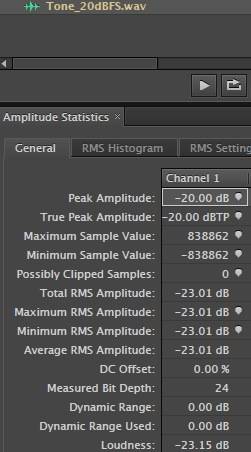
I assign a role called TONE to the audio clip and export role as separate file.
With PAN MODE set to NONE and channel configuration set to MONO I get an exported audio file that is 2.67 dB quieter than my original file.
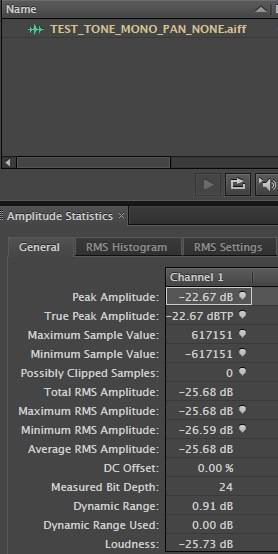
So I try a different approach: I set PAN MODE to Default and channel configuration to mono. I get a file that is 6.02 dB quieter than my original file.
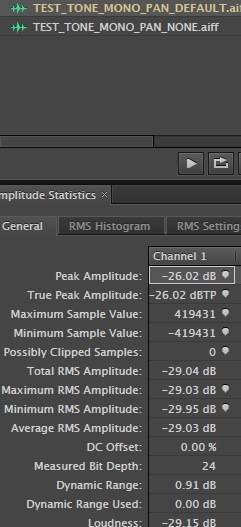
So last try: I set the channel configuration to CENTER and the PAN MODE to NONE. I get another file that is 6.02 dB quieter.
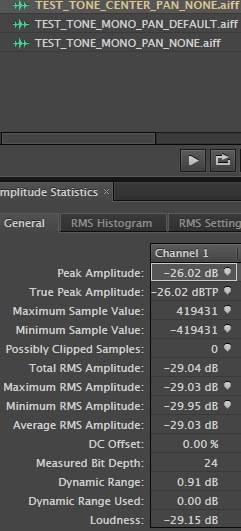
The logical outcome even with pan laws in mind, should be: you import an audio file at -20 dBFS, you verify that the audio levels are correct with the audio meters, you export it and you get an identical -20 dBFS audio file.
I do this all the time in FCP7: you set your audio channels to mono and set the pan law to 0 dB in your sequence settings. done.
So what is going on in FCP X? I know a whole bunch of post houses deliver files for broadcast. Do they all have these incorrect levels? Or do the editors compensate with a gain of 2.67db or 6.02 dB according to the audio configuration. Which mind you is unacceptable because if the FCP X meters say my reference tone is sitting at -20 dBFS then my exported file should be -20 dBFS not some arbitrary number.
I ran this test on multiple machines: MacPro Mountain Lion 10.8.2, Macbook Pro ML 10.8.2, MacPro Snow Leopard 10.6.8 and I get the same results.
Anyway, I'm really suprised that on this board I only found a handfull of threads that mentioned this issue. None had any solution or explanation for this behaviour on export. Yet, it is a pretty serious one. Am I not doing it right? But then I had other people try on their own and they have reported the same thing.
Any light shed on this issue would be most appreciated. Until then, FCP 7 and Pro Tools are my only hope.
In FCP X, I import a mono (not stereo or dual-mono, just plain mono) reference tone at -20 dBFS. My project is set to surround (this is for multichannel projects).
In the timeline it plays at the the correct level" -20dBFS and all looks and sounds good. My file is 24 bit 48kHZ so is my project. I also have FCP X being monitored through a Videotek for measurements.
The imported tone is measured and confirmed to be at -20 dBFS on the Videotek, as well as in Audition CS6; straight from the file to eliminate any patch cord speculation:
I assign a role called TONE to the audio clip and export role as separate file.
With PAN MODE set to NONE and channel configuration set to MONO I get an exported audio file that is 2.67 dB quieter than my original file.
So I try a different approach: I set PAN MODE to Default and channel configuration to mono. I get a file that is 6.02 dB quieter than my original file.
So last try: I set the channel configuration to CENTER and the PAN MODE to NONE. I get another file that is 6.02 dB quieter.
The logical outcome even with pan laws in mind, should be: you import an audio file at -20 dBFS, you verify that the audio levels are correct with the audio meters, you export it and you get an identical -20 dBFS audio file.
I do this all the time in FCP7: you set your audio channels to mono and set the pan law to 0 dB in your sequence settings. done.
So what is going on in FCP X? I know a whole bunch of post houses deliver files for broadcast. Do they all have these incorrect levels? Or do the editors compensate with a gain of 2.67db or 6.02 dB according to the audio configuration. Which mind you is unacceptable because if the FCP X meters say my reference tone is sitting at -20 dBFS then my exported file should be -20 dBFS not some arbitrary number.
I ran this test on multiple machines: MacPro Mountain Lion 10.8.2, Macbook Pro ML 10.8.2, MacPro Snow Leopard 10.6.8 and I get the same results.
Anyway, I'm really suprised that on this board I only found a handfull of threads that mentioned this issue. None had any solution or explanation for this behaviour on export. Yet, it is a pretty serious one. Am I not doing it right? But then I had other people try on their own and they have reported the same thing.
Any light shed on this issue would be most appreciated. Until then, FCP 7 and Pro Tools are my only hope.
Please Log in to join the conversation.

08 Dec 2012 18:28 #18439
by BenB
Replied by BenB on topic Major bug: Audio Levels incorrect on export
2db is not very much at all. And you're not going to get that sort of precision off of an NLE's audio meter. 2db has never made a difference to me. If you need that precision, do what an audio engineer would do. Bus all your audio to a Compressor and cap it all off at whatever db you need.
Please Log in to join the conversation.

08 Dec 2012 18:45 #18444
by sidderke
It's still a bug...
2klodo95, be sure to send feedback to Apple about this, as a Bug Report (trough the Provide Feedback Menu).
They are listening, though. I sent a bug once, and they contacted me the day after to give more details.
Replied by sidderke on topic Major bug: Audio Levels incorrect on export
BenB wrote: 2db is not very much at all. And you're not going to get that sort of precision off of an NLE's audio meter. 2db has never made a difference to me. If you need that precision, do what an audio engineer would do. Bus all your audio to a Compressor and cap it all off at whatever db you need.
It's still a bug...
2klodo95, be sure to send feedback to Apple about this, as a Bug Report (trough the Provide Feedback Menu).
They are listening, though. I sent a bug once, and they contacted me the day after to give more details.
Please Log in to join the conversation.
08 Dec 2012 18:58 - 08 Dec 2012 19:00 #18446
by BenB
Replied by BenB on topic Major bug: Audio Levels incorrect on export
OK, I just noticed you are comparing a db measurement to a dbfs measurement. Um, you guys know that -20 dBFS and -20dbs are two different measurements, they are two different levels of loudness, right? You're quoting dbfs in FCP X, but db in Audition. Can't do that. From Wikipedia just for the geek factor:
"The decibel (dB) is a logarithmic unit that indicates the ratio of a physical quantity (usually power or intensity) relative to a specified or implied reference level.
Decibels relative to full scale, commonly abbreviated dBFS, measures decibel amplitude levels in digital systems such as pulse-code modulation which have a defined maximum available peak level.
0 dBFS is assigned to the maximum possible digital level. For example, a signal that reaches 50% of the maximum level at any point would reach -3 dBFS at that point, 3 dB below full scale."
"The decibel (dB) is a logarithmic unit that indicates the ratio of a physical quantity (usually power or intensity) relative to a specified or implied reference level.
Decibels relative to full scale, commonly abbreviated dBFS, measures decibel amplitude levels in digital systems such as pulse-code modulation which have a defined maximum available peak level.
0 dBFS is assigned to the maximum possible digital level. For example, a signal that reaches 50% of the maximum level at any point would reach -3 dBFS at that point, 3 dB below full scale."
Last edit: 08 Dec 2012 19:00 by BenB.
Please Log in to join the conversation.
08 Dec 2012 20:54 - 08 Dec 2012 21:43 #18452
by 2klodu95
Replied by 2klodu95 on topic Major bug: Audio Levels incorrect on export
@BenB 2dB is a huge difference. For example, all US broadcast require a reference at -20dBFS. EBU is -18dBFS. As you can see that's a 2dB (yes I said dB not dFBS; I'll explain shortly) boost. If you're delivering to EBU specs from a US master and decide to boost by 2dB all your tracks to meet the specs, you're going to run into a serious problem: digital audio clipping on those tracks that were already peaking at 0dBFS (the maximum digital scale value). So you'll need to limit that or your EBU masters will be rejected. Not an option when you have dozens of masters to deliver per week. (Note: master refers here to digital master file. If it were a tape, there wouldn't be a discussion since I would just adjust the audio in the deck when laying back to tape).
As to dB and dBFS difference, I am aware of it. dB is a comparative measurement not an absolute value whereas dBFS is based on a full digital scale. In this case, because we are dealing with digital audio files all referenced to the same full digital scale when one file measures -20dBFS and the other -22.67dFBS we can safely say that there is a 2.67 dB (comparative) difference between the two. In my post you can see that when I use dFBS it is to express a value whereas dB is used as a comparative such as "2.67dB quieter." If I was comparing db SPL (sound pressure) to dBFS then I would be wrong.
Quoting your own post "For example, a signal that reaches 50% of the maximum level at any point would reach -3 dBFS at that point, 3 dB below full scale." we can see that
the Audition measurement of -22.67dB means the peak level is 22.67dB below full scale instead of 20 like it should be.
You also missed the point: compressing is not going to do anything if when you do the final step of exporting the file audio levels drop.
@sidderke yes first thing I did was to send a feedback to Apple about this (twice
to be sure).
As to dB and dBFS difference, I am aware of it. dB is a comparative measurement not an absolute value whereas dBFS is based on a full digital scale. In this case, because we are dealing with digital audio files all referenced to the same full digital scale when one file measures -20dBFS and the other -22.67dFBS we can safely say that there is a 2.67 dB (comparative) difference between the two. In my post you can see that when I use dFBS it is to express a value whereas dB is used as a comparative such as "2.67dB quieter." If I was comparing db SPL (sound pressure) to dBFS then I would be wrong.
Quoting your own post "For example, a signal that reaches 50% of the maximum level at any point would reach -3 dBFS at that point, 3 dB below full scale." we can see that
the Audition measurement of -22.67dB means the peak level is 22.67dB below full scale instead of 20 like it should be.
You also missed the point: compressing is not going to do anything if when you do the final step of exporting the file audio levels drop.
@sidderke yes first thing I did was to send a feedback to Apple about this (twice
to be sure).
Last edit: 08 Dec 2012 21:43 by 2klodu95.
Please Log in to join the conversation.
08 Dec 2012 22:43 #18455
by BenB
Replied by BenB on topic Major bug: Audio Levels incorrect on export
"-22.67dB means the peak level is 22.67dB below full scale instead of 20 like it should be"
Apples to onions. But whatever.
Apples to onions. But whatever.
Please Log in to join the conversation.
09 Dec 2012 01:58 - 09 Dec 2012 02:07 #18464
by 2klodu95
Replied by 2klodu95 on topic Major bug: Audio Levels incorrect on export
Not sure what is not clear in what I wrote but if a -20dBFS signal brought into an NLE comes out at -22.67dBFS instead of -20dBFS with no filter, plugin or pan law applied is "apples to onions" then yeah I totally agree. By the way, this was measured and confirmed with a Videotek VTM-4100 analyzer, in FCP 7, Adobe Audition, Avid Pro Tools and Digimetrics Aurora.
Last edit: 09 Dec 2012 02:07 by 2klodu95.
Please Log in to join the conversation.

09 Dec 2012 16:45 #18474
by Wildgiles
Replied by Wildgiles on topic Major bug: Audio Levels incorrect on export
I wonder if exporting as audio roles is the main reason for the loss of db's. Perhaps apple thought it fit to give some safety to exported roles. It would make sense that you would safety in - 6db's since FCP X gives you +6 dbf as a max and you should not go above 0 anyway.
What happens when you export audio only instead of as Roles? I have not noticed any loss in dB's going this route.
What happens when you export audio only instead of as Roles? I have not noticed any loss in dB's going this route.
Please Log in to join the conversation.
09 Dec 2012 20:02 - 09 Dec 2012 20:06 #18483
by 2klodu95
Replied by 2klodu95 on topic Major bug: Audio Levels incorrect on export
@Wildgiles you're absolutely right. Exporting as Roles is when I'm experiencing issues. When I create a simple 5.1 project with 6 tracks assigned to L, R, C, Lfe, Ls, RS in audio configuration and export as is, I get a file with a multichannel 5.1 audio track with no audio level drops. This is the same with a simple stereo project.
However, the studio's specs call for 24 discrete channels of audio since there are a minimum of 2 sets of 5.1, 3 sets of Lt/Rt, one M&E set. I can't accomplish this with the default export function. Only the "roles as quicktime multitrack movie" export option allows me do it where each channel is exported as a separate track but with the audio levels drops. The default option creates only 6 tracks with all 24 channels folded into them so to speak.
However, the studio's specs call for 24 discrete channels of audio since there are a minimum of 2 sets of 5.1, 3 sets of Lt/Rt, one M&E set. I can't accomplish this with the default export function. Only the "roles as quicktime multitrack movie" export option allows me do it where each channel is exported as a separate track but with the audio levels drops. The default option creates only 6 tracks with all 24 channels folded into them so to speak.
Last edit: 09 Dec 2012 20:06 by 2klodu95.
Please Log in to join the conversation.
09 Dec 2012 20:36 #18484
by Wildgiles
Replied by Wildgiles on topic Major bug: Audio Levels incorrect on export
Ouch, I see. Using Roles for 24 channels would be the way to go easily, but I guess it's kinda broken for pro work. The expensive alternative for now would be to use XtoPro Audio convert and go to pro tools to get your 24 channels from FCP X.
Please Log in to join the conversation.
06 May 2014 17:09 - 06 May 2014 17:11 #45688
by nick314
Replied by nick314 on topic Major bug: Audio Levels incorrect on export
Have you figured it out yet? I have found a workflow that works in case you're still interested... I can only speak for stereo productions and multi-channel exports, not surround projects though.
When using roles for multi-track quicktime movie export, you should know that roles exported as mono channels are 3 dbFS higher than stereo roles due to pan law compensating. Thus in your project you should have Pan Mode set to stereo, regardless of the audio configuration of each clip.
8 mono channels in the audio configuration of a clip that are all checked will play at different levels, than say checking only 1 mono channel in the same clip. This is further compensation that takes place in the clip. To 'bypass' this, just set pan mode to stereo.
When using roles for multi-track quicktime movie export, you should know that roles exported as mono channels are 3 dbFS higher than stereo roles due to pan law compensating. Thus in your project you should have Pan Mode set to stereo, regardless of the audio configuration of each clip.
8 mono channels in the audio configuration of a clip that are all checked will play at different levels, than say checking only 1 mono channel in the same clip. This is further compensation that takes place in the clip. To 'bypass' this, just set pan mode to stereo.
Last edit: 06 May 2014 17:11 by nick314.
Please Log in to join the conversation.
- James Branch
-

- Offline
- Junior Member
-

Less
More
- Posts: 29
- Thank you received: 1
12 Oct 2015 11:31 #69438
by James Branch
Replied by James Branch on topic Major bug: Audio Levels incorrect on export
I've had an issue with this. Panning to stereo prior to export doesn't work for me.
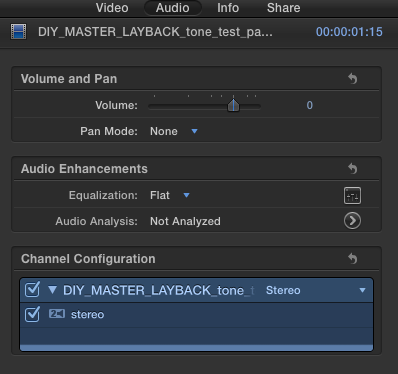
Here's my bug report and screen grabs:
Summary:
I had to supply a broadcast file of a show which required stereo audio but on unlinked tracks. When the file was exported and checked the audio levels were lower.
Steps to Reproduce:
I imported the stereo mix and separated the audio to dual mono.
I expanded the audio components and assigned a role to each separate channel.
Exported a QT selecting multichannel export and chose only the roles I assigned and set them to mono.
Expected Results:
If I import the file back into FCPX and set the audio configuration to stereo I should see the same audio levels as before.
Actual Results:
The levels are lower as per the attached screen grabs.
See 'Master Bars and Tone' screen grab to see the levels prior to export and then the 'Levels after Export' screen grab to see the reduction.
Version:
FCPX 10.2.2 OSX 10.10.5
Notes:
Configuration:
Occurs in all configurations.
Attachments:
'master bars and tone levels.png', 'Levels after export - channels set to stereo.png' and 'Export audio set to stereo.png' were successfully uploaded.
Here's my bug report and screen grabs:
Summary:
I had to supply a broadcast file of a show which required stereo audio but on unlinked tracks. When the file was exported and checked the audio levels were lower.
Steps to Reproduce:
I imported the stereo mix and separated the audio to dual mono.
I expanded the audio components and assigned a role to each separate channel.
Exported a QT selecting multichannel export and chose only the roles I assigned and set them to mono.
Expected Results:
If I import the file back into FCPX and set the audio configuration to stereo I should see the same audio levels as before.
Actual Results:
The levels are lower as per the attached screen grabs.
See 'Master Bars and Tone' screen grab to see the levels prior to export and then the 'Levels after Export' screen grab to see the reduction.
Version:
FCPX 10.2.2 OSX 10.10.5
Notes:
Configuration:
Occurs in all configurations.
Attachments:
'master bars and tone levels.png', 'Levels after export - channels set to stereo.png' and 'Export audio set to stereo.png' were successfully uploaded.


Please Log in to join the conversation.

12 Oct 2015 12:20 #69439
by joenca
Replied by joenca on topic Major bug: Audio Levels incorrect on export
Apparently, this is not a bug, Apple designed it this way. Here's their support page outlining a similar workflow:
support.apple.com/en-us/HT204261
I believe 9 addresses your issue.
I'd send feedback to Apple if I were you, asking them to change/improve this behavior. It seems very unintuitive and error prone.
I believe 9 addresses your issue.
I'd send feedback to Apple if I were you, asking them to change/improve this behavior. It seems very unintuitive and error prone.
Please Log in to join the conversation.
- James Branch
-
- Offline
- Junior Member
-
Less
More
- Posts: 29
- Thank you received: 1
12 Oct 2015 12:34 #69440
by James Branch
Replied by James Branch on topic Major bug: Audio Levels incorrect on export
That's fantastic! Thanks so much. It's been driving me crazy.
Please Log in to join the conversation.
