


- Posts: 2
- Thank you received: 0
3 Post Moderation Rule for New Boarders (25 Jan 2021)
New boarders will have their posts moderated - Don't worry if you cannot see your post immediately.
nOOb question with an error message
- Growingpack
-
 Topic Author
- Offline
- New Member
-

Less
More
06 Dec 2012 18:34 - 06 Dec 2012 18:34 #18284
by Growingpack
nOOb question with an error message was created by Growingpack
I'm fairly new to Final Cut. I have Final Cut Pro X. I just do basic stuff with the videos I shoot of my dogs - cutting clips and putting them together with basic transitions, etc. But I want to learn a little more of the professional-style things and this forum seems to be what I'm looking for.
I have a MacBook Pro (mid 2010).
Lion.
Processor is 2.4 GHz Intel Core 2 Duo
Memory is 4 GB
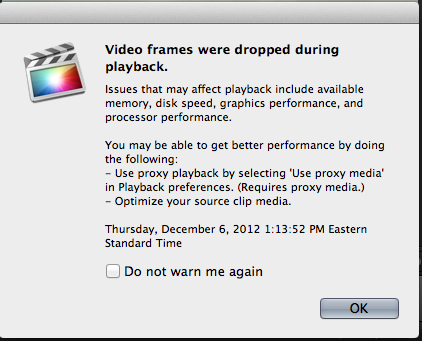
My question is regarding an error message I get when I try to view clips I imported recently after shooting with my DSLR and GoPro camcorder. I'm playing around with 100 fps. I get an error message when it tries to playback saying video frames were dropped and it gives a list of possible reasons why (see attachment). It happens when I shoot on anything greater than 30 fps.
How do I solve this issue? Do I need to get a graphics card? If so which one?
Thank you all for this forum. It looks to have a lot of great info!
I have a MacBook Pro (mid 2010).
Lion.
Processor is 2.4 GHz Intel Core 2 Duo
Memory is 4 GB
My question is regarding an error message I get when I try to view clips I imported recently after shooting with my DSLR and GoPro camcorder. I'm playing around with 100 fps. I get an error message when it tries to playback saying video frames were dropped and it gives a list of possible reasons why (see attachment). It happens when I shoot on anything greater than 30 fps.
How do I solve this issue? Do I need to get a graphics card? If so which one?
Thank you all for this forum. It looks to have a lot of great info!
Last edit: 06 Dec 2012 18:34 by Growingpack.
Please Log in to join the conversation.

06 Dec 2012 21:02 #18303
by NocoDave
Replied by NocoDave on topic nOOb question with an error message
If you hit ⌘, to bring up the preferences you can change some settings:
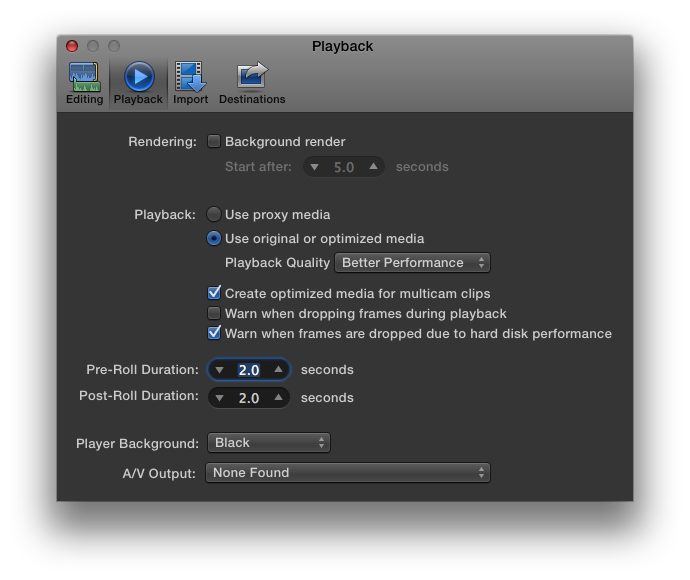
Changing the "Playback Quality" to "Better Performance" could hep. If not deselecting the frame drop warnings will let you edit without the warning popping up, but it will still be dropping frames. This is only on playback, final export will be fine.
Also, if it still drops frames with "Better Performance" selected you can turn off the frame dropping warning but keep on the warning due to disk performance.
Then if it's till dropping you at least know a faster hard drive set up will help.
Changing the "Playback Quality" to "Better Performance" could hep. If not deselecting the frame drop warnings will let you edit without the warning popping up, but it will still be dropping frames. This is only on playback, final export will be fine.
Also, if it still drops frames with "Better Performance" selected you can turn off the frame dropping warning but keep on the warning due to disk performance.
Then if it's till dropping you at least know a faster hard drive set up will help.
Please Log in to join the conversation.
06 Dec 2012 21:11 - 06 Dec 2012 21:11 #18304
by NocoDave
Replied by NocoDave on topic nOOb question with an error message
I just read your system specs. Sorry, I should have read them first. My best guess is that your dropping frames due to your macbook specs and hard disc performance. That is assuming your editing off the internal MacBook drive.
An external drive, preferably raid, of at least firewire 800 speeds would help if that is the case.
Working with proxy media would also make a big difference, if hard disc setup additions aren't enough alone.
An external drive, preferably raid, of at least firewire 800 speeds would help if that is the case.
Working with proxy media would also make a big difference, if hard disc setup additions aren't enough alone.
Last edit: 06 Dec 2012 21:11 by NocoDave. Reason: Grammar/typos
Please Log in to join the conversation.
- Growingpack
-
Topic Author
- Offline
- New Member
-
Less
More
- Posts: 2
- Thank you received: 0
06 Dec 2012 22:12 #18310
by Growingpack
Replied by Growingpack on topic nOOb question with an error message
Thank you, NocoDave.
Forgive me, I am not too knowledgeable when it comes to computers. I realize I'm in a room way above my skill level...
So a graphics card is not necessary?
I'm not sure if it's appropriate to ask how to work with proxy media or firewire 800 speeds here, so I'll punch it into Google (unless someone is willing to help me with that).
Thanks again.
Forgive me, I am not too knowledgeable when it comes to computers. I realize I'm in a room way above my skill level...
So a graphics card is not necessary?
I'm not sure if it's appropriate to ask how to work with proxy media or firewire 800 speeds here, so I'll punch it into Google (unless someone is willing to help me with that).
Thanks again.
Please Log in to join the conversation.
06 Dec 2012 22:42 #18311
by NocoDave
Replied by NocoDave on topic nOOb question with an error message
When you edit with video that is stored on your internal drive your MacBook is reading that info at the same time as it is reading what it needs to run OSX and FCPX, but the rate at all that information can be transferred is limited.
If you put your projects and events on an external drive you free up lines, one is dedicated to the running of you Mac the other to reading the information necessary for editing. Firewire 800 is the bare minimum recommend for editing standard HD video with. Personally I recommend a raid setup over firewire 800. It boosts it to being a very noticeable bit faster again.
if you have esata capabilities on your MacBook that would be even better.
If your editing 100fps it's around 3 to 4 times as much info needing read per second for playback over standard frame rates. So while it will help over the internal drive option I don't know how much. I've edited, at the highest, 60fps but at 720p over a firewire 800 raid 0 with out problems, but with a higher spec iMac than your MacBook.
So while a firewire 800, or esata, raid might not being perfect it will help a lot. As to how your MacBook specs related to CPU/RAM/GPU will effect your 100fps I'm not sure.
To work with proxy you can either tell FCPX to create proxy footage on import or create proxy from what you have already imported in the event.
Then in the preference window screen shot I posted earlier select "Use Proxy Media" while you edit, but remember to deselect it ready for export to get a full quality final output.
The proxy media is a lower quality version of the full quality media, but it will still be the same frame rate you are working with. I have no doubt that you should be fine working with a firewire 800 raid and proxy media on your current setup, though extra ram would help a lot with general FCPX running. Maybe not the raid, optimised media, and with better performance selected, but perhaps with the dropped frame warnings disabled you might get by.
Maybe someone running similar specs, with similar frame rates, but with a dedicated media drive can help?
If you put your projects and events on an external drive you free up lines, one is dedicated to the running of you Mac the other to reading the information necessary for editing. Firewire 800 is the bare minimum recommend for editing standard HD video with. Personally I recommend a raid setup over firewire 800. It boosts it to being a very noticeable bit faster again.
if you have esata capabilities on your MacBook that would be even better.
If your editing 100fps it's around 3 to 4 times as much info needing read per second for playback over standard frame rates. So while it will help over the internal drive option I don't know how much. I've edited, at the highest, 60fps but at 720p over a firewire 800 raid 0 with out problems, but with a higher spec iMac than your MacBook.
So while a firewire 800, or esata, raid might not being perfect it will help a lot. As to how your MacBook specs related to CPU/RAM/GPU will effect your 100fps I'm not sure.
To work with proxy you can either tell FCPX to create proxy footage on import or create proxy from what you have already imported in the event.
Then in the preference window screen shot I posted earlier select "Use Proxy Media" while you edit, but remember to deselect it ready for export to get a full quality final output.
The proxy media is a lower quality version of the full quality media, but it will still be the same frame rate you are working with. I have no doubt that you should be fine working with a firewire 800 raid and proxy media on your current setup, though extra ram would help a lot with general FCPX running. Maybe not the raid, optimised media, and with better performance selected, but perhaps with the dropped frame warnings disabled you might get by.
Maybe someone running similar specs, with similar frame rates, but with a dedicated media drive can help?
Please Log in to join the conversation.
