


3 Post Moderation Rule for New Boarders (25 Jan 2021)
New boarders will have their posts moderated - Don't worry if you cannot see your post immediately.
THE RED BAND IS BACK


28 Nov 2012 01:08 #17886
by dgwvideo
Creating history....one edit at a time !
THE RED BAND IS BACK was created by dgwvideo
I have been submitting data to Apple on this since version 10.0.3 and since v 10.0.5 I hadn't seen it and assumed it was fixed. I just completed an ending sequence to a project and rendered out the master file (both prores 422 HQ and uncompressed 10 bit 422) and the result was perfect. When I fired FCPX back up to make a small change in the project, I had an orange render bar across the 5 main clips which began to render with a big red band in the timeline. The inspector tells me I am missing 5 SuperGlam effects, however each clip in the inspector shows the Super Glam effect is applied and has the settings I left it with.
Hmmm...the effect is not the problem, I don't believe, as I have used it numerous times with FCPX 10.0.6. Here is a screen shot.
By the way, my correspondence with Apple during 10.0.3 was discussing this issue when retiming clips and using optical flow. It just so happens the 5 clips in this ending sequence are retimed to 50% slow (using already over-cranked footage at 60fps in a 29.97 timeline for super slow mo) and they all but 1 are using optical flow.
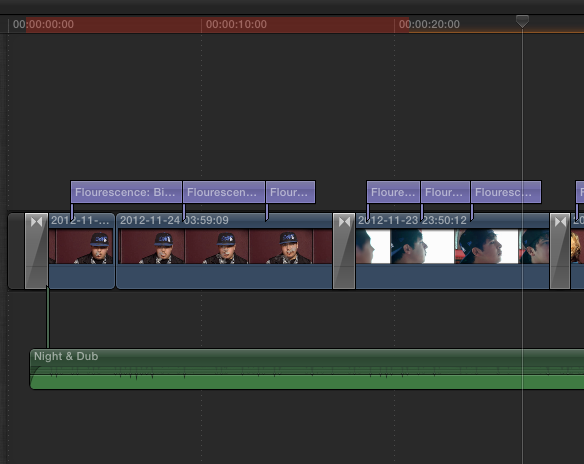
Hmmm...the effect is not the problem, I don't believe, as I have used it numerous times with FCPX 10.0.6. Here is a screen shot.
By the way, my correspondence with Apple during 10.0.3 was discussing this issue when retiming clips and using optical flow. It just so happens the 5 clips in this ending sequence are retimed to 50% slow (using already over-cranked footage at 60fps in a 29.97 timeline for super slow mo) and they all but 1 are using optical flow.
Creating history....one edit at a time !
Please Log in to join the conversation.
