




- Posts: 57
- Thank you received: 0
3 Post Moderation Rule for New Boarders (25 Jan 2021)
New boarders will have their posts moderated - Don't worry if you cannot see your post immediately.
10.0.6 export bug ?
27 Nov 2012 20:21 #17871
by ulisses
10.0.6 export bug ? was created by ulisses
Hi,
Could you confirm if exporting master file, Format: VIDEO ONLY, does it export the audio inside the mov file ?
Here I can't export video only.
Thanks,
Ulisses
Could you confirm if exporting master file, Format: VIDEO ONLY, does it export the audio inside the mov file ?
Here I can't export video only.
Thanks,
Ulisses
Please Log in to join the conversation.
- Tom Wolsky
-

- Offline
- Moderator
-

28 Nov 2012 00:18 #17881
by Tom Wolsky
Replied by Tom Wolsky on topic 10.0.6 export bug ?
Can't confirm that. I exported a shirt section of HDV to H.264. It was video only as selected in the export window.
Please Log in to join the conversation.


28 Nov 2012 00:59 #17885
by dgwvideo
Creating history....one edit at a time !
Replied by dgwvideo on topic 10.0.6 export bug ?
I just tested this and my share of video only is just that. No audio with the resulting master prores 422 .mov file. Works for me like it should.
Creating history....one edit at a time !
Please Log in to join the conversation.
28 Nov 2012 01:13 #17887
by ulisses
Replied by ulisses on topic 10.0.6 export bug ?
Thank you guys, maybe it is happening here because my audio is inside video file, not in another track.
Please Log in to join the conversation.
28 Nov 2012 01:31 #17889
by dgwvideo
Creating history....one edit at a time !
Replied by dgwvideo on topic 10.0.6 export bug ?
OK, just tested again by collapsing the audio in my project into a compound clip and re-exporting a master file. Indeed, Video only includes the audio, playing nice and clearly. This is a bug. I also tried it with an imported movie file with self contained audio. Same issue.
It appears the audio must be on a separate track in order for the video only selection to work properly. Filling out the feedback form.
It appears the audio must be on a separate track in order for the video only selection to work properly. Filling out the feedback form.
Creating history....one edit at a time !
Please Log in to join the conversation.

28 Nov 2012 03:27 #17896
by dgwvideo
Creating history....one edit at a time !
Replied by dgwvideo on topic 10.0.6 export bug ?
OK...UPDATE
I'm guessing this is not actually a bug but my misunderstanding of exactly how to use the function of master file.
After further testing, if you select VIDEO ONLY but leave the role as "Quicktime Movie", then the audio gets included if it is NOT in a separate track.
If you select Video only, but set the role as "Video as separate files", then you will get video only and no audio even if your audio is not in a separate track and is collapsed with the video. But you will get that for each clip (or video role in the timeline), so if you have 5 quicktime movies, for example, you will get one movie that contains 5 segments of video (no audio) separated by a black space.
Still researching this, but for now that may help, and it may not necessarily be a bug.
I'm guessing this is not actually a bug but my misunderstanding of exactly how to use the function of master file.
After further testing, if you select VIDEO ONLY but leave the role as "Quicktime Movie", then the audio gets included if it is NOT in a separate track.
If you select Video only, but set the role as "Video as separate files", then you will get video only and no audio even if your audio is not in a separate track and is collapsed with the video. But you will get that for each clip (or video role in the timeline), so if you have 5 quicktime movies, for example, you will get one movie that contains 5 segments of video (no audio) separated by a black space.
Still researching this, but for now that may help, and it may not necessarily be a bug.
Creating history....one edit at a time !
Please Log in to join the conversation.
- Tom Wolsky
-
- Offline
- Moderator
-
28 Nov 2012 03:44 #17897
by Tom Wolsky
Replied by Tom Wolsky on topic 10.0.6 export bug ?
Not correct. My audio is embedded in video and the export file is video only. Really need to start specifying what clip formats are and what output formats are. I can't reproduce it with different formats MXF, DV, HDV, H.264, going to ProRes or H.264.
Please Log in to join the conversation.
28 Nov 2012 03:49 #17899
by dgwvideo
Creating history....one edit at a time !
Replied by dgwvideo on topic 10.0.6 export bug ?
Tom are you saying if you export a timeline of prores 422 clips that have embedded audio as a master file prores 422 with roles as quicktime movie and select video only, then you get video only?
Creating history....one edit at a time !
Please Log in to join the conversation.
- ronny courtens
-

- Offline
- Moderator
-
Less
More
- Posts: 4455
- Thank you received: 962
28 Nov 2012 13:27 - 28 Nov 2012 13:30 #17904
by ronny courtens
Replied by ronny courtens on topic 10.0.6 export bug ?
I can confirm what Tom said. I have exported a ProRes422 clip with embedded audio from the timeline as a Master ProRes 422 file with Roles set to QT movie and Video Only selected. The result is a ProRes 422 QT file without any audio. This is the screenshot from the Movie Properties of the exported file in QT7:
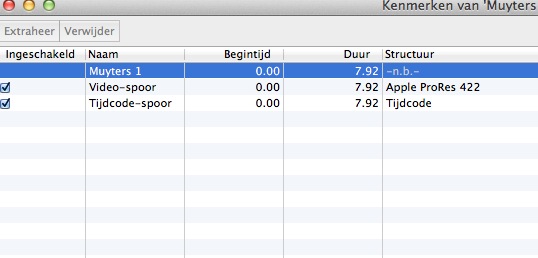
As you can see there are no audio tracks in the QT movie.
As you can see there are no audio tracks in the QT movie.
Last edit: 28 Nov 2012 13:30 by ronny courtens.
Please Log in to join the conversation.
28 Nov 2012 22:37 - 28 Nov 2012 22:38 #17945
by dgwvideo
Creating history....one edit at a time !
Replied by dgwvideo on topic 10.0.6 export bug ?
Hi, Ronny...thanks for your confirmation. I have tried twice more using your exact process (which was my original testing process) and sure enough audio comes out with the video each time. If I detach audio in the timeline and repeat the test, then video only is obtained.
So...I once again trashed all FCPX preferences and tried again. Now it works and delivers video only.
I can only say that with 10.0.6 I have had to trash preferences more times than with any other previous version (except maybe for early 10.0.2 and .3 versions) to restore normal operation. I really enjoy the new features in .6 but there is no question is has its' share of bugs. Praying daily for more stability in .7.
So...I once again trashed all FCPX preferences and tried again. Now it works and delivers video only.
I can only say that with 10.0.6 I have had to trash preferences more times than with any other previous version (except maybe for early 10.0.2 and .3 versions) to restore normal operation. I really enjoy the new features in .6 but there is no question is has its' share of bugs. Praying daily for more stability in .7.
Creating history....one edit at a time !
Last edit: 28 Nov 2012 22:38 by dgwvideo.
Please Log in to join the conversation.
- Tom Wolsky
-
- Offline
- Moderator
-
29 Nov 2012 01:44 #17953
by Tom Wolsky
Replied by Tom Wolsky on topic 10.0.6 export bug ?
Yes, exactly so, as Ronnie shows.
Please Log in to join the conversation.
