


- Posts: 5
- Thank you received: 0
3 Post Moderation Rule for New Boarders (25 Jan 2021)
New boarders will have their posts moderated - Don't worry if you cannot see your post immediately.
sound not so good
25 Nov 2012 21:07 #17786
by spin3
sound not so good was created by spin3
hello i am new to final cut but i love the program, i am a dj/vdj tha make his own video for mp3 music and i am having a problem with the sound when i importing and at the end. when i import the quality of sound drops and it sound like a bad mp3 download and when i finish my work the left side is louder then the right side..
Please Log in to join the conversation.


25 Nov 2012 23:07 #17797
by dgwvideo
Creating history....one edit at a time !
Replied by dgwvideo on topic sound not so good
MP3 is a pretty lossy codec to begin with, so any manipulation and further processing and then re-compression again will be measurably lousy quality.
Having said that, in order to help, we'll need to know a bit more about what you're doing, how you're importing and what you are doing with the audio while in FCPX. Also, describe in a bit more detail what format you are exporting (video and audio) out of FCPX.
Having said that, in order to help, we'll need to know a bit more about what you're doing, how you're importing and what you are doing with the audio while in FCPX. Also, describe in a bit more detail what format you are exporting (video and audio) out of FCPX.
Creating history....one edit at a time !
Please Log in to join the conversation.
25 Nov 2012 23:58 #17798
by spin3
Replied by spin3 on topic sound not so good
thks...ok well i make my remix music first, like let say QUEEN/ WE WILL ROCK YOU..then i look for a 720p mp4 i open up fcp then i open a new project and import the video files first then audio and i start chopping video to fit the music and sync as much as i can..i use some video effx if i can just to give it my touch..i turn every thing off my mac to use the fcp just to make sure nothing gets in the way of the cpu to make the program run smooth..
Please Log in to join the conversation.
26 Nov 2012 02:53 - 26 Nov 2012 02:56 #17800
by dgwvideo
Creating history....one edit at a time !
Replied by dgwvideo on topic sound not so good
If you can begin with your audio as AIFF or WAV file to import that will yield best results. If not, and you must use mp3 format, then it will be best to ensure the audio settings of your mp4 AV export do not drastically reduce the audio quality any further.
When you are creating your mp4 what are the audio settings? If you sharing direct from FCPX with the 720p option for apple devices you do not have the option of altering the audio compression.
Sharing from FCPX to a master file should help to preserve the video and audio quality with minimal compression. If an mp4 then needs to be made from the master file export there are many ways to do that.
You can try to export using Compressor, third party programs or Quicktime 7 and your H264 video will allow you to set basic audio properties for export. Using 128 bit, 48KHZ and best render settings will help to preserve the quality. The file extension can be changed to .mp4 if you do not want .mov.
See the attached pic of the QT7 menus.
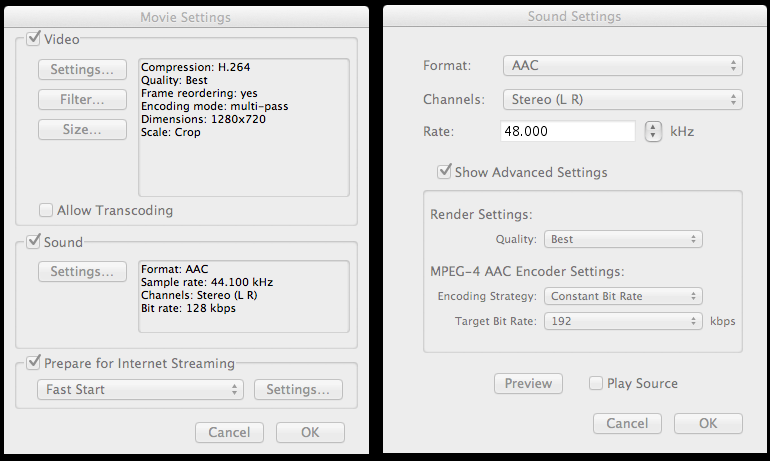
When you are creating your mp4 what are the audio settings? If you sharing direct from FCPX with the 720p option for apple devices you do not have the option of altering the audio compression.
Sharing from FCPX to a master file should help to preserve the video and audio quality with minimal compression. If an mp4 then needs to be made from the master file export there are many ways to do that.
You can try to export using Compressor, third party programs or Quicktime 7 and your H264 video will allow you to set basic audio properties for export. Using 128 bit, 48KHZ and best render settings will help to preserve the quality. The file extension can be changed to .mp4 if you do not want .mov.
See the attached pic of the QT7 menus.
Creating history....one edit at a time !
Last edit: 26 Nov 2012 02:56 by dgwvideo.
Please Log in to join the conversation.
26 Nov 2012 04:07 #17806
by spin3
 thks so your telling me to change the music file to WAV or AIFF and it will help, am not sure wat a AIFF is but i will look for it..and i dont get audio screen option when i export my midia this is wat i get..
Replied by spin3 on topic sound not so good
thks so your telling me to change the music file to WAV or AIFF and it will help, am not sure wat a AIFF is but i will look for it..and i dont get audio screen option when i export my midia this is wat i get.. 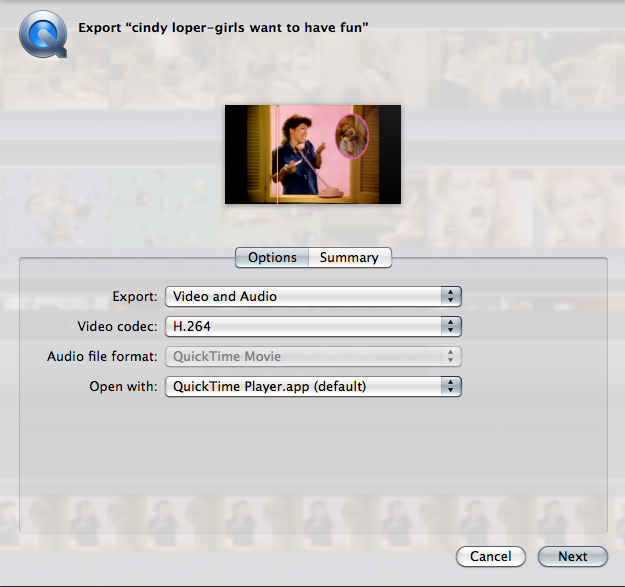
Please Log in to join the conversation.
26 Nov 2012 06:40 #17807
by cgbier
Replied by cgbier on topic sound not so good
Change the Export field to Audio only and use aiff or wav 48.000 Hz as codec.
Please Log in to join the conversation.
26 Nov 2012 06:46 #17808
by spin3
 thks cgbier..how about my out put my left is louder then my right way louder
Replied by spin3 on topic sound not so good
thks cgbier..how about my out put my left is louder then my right way louder Please Log in to join the conversation.
26 Nov 2012 06:56 #17809
by spin3
Replied by spin3 on topic sound not so good
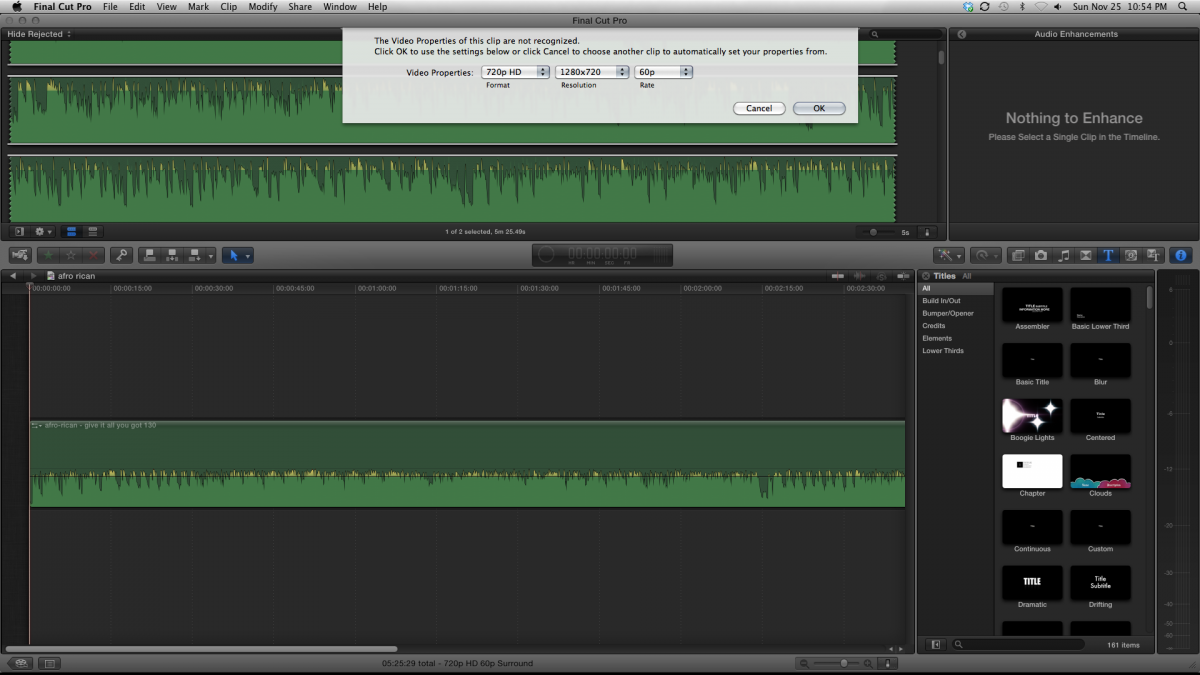
this is wat i get wen i put the audio in the time line..is this ok and i did change my mp3 to AIFF 4800
Please Log in to join the conversation.
26 Nov 2012 08:23 - 26 Nov 2012 08:24 #17812
by cgbier
Replied by cgbier on topic sound not so good
48,000 you meant to say. You could take the volume down the one or the other dB to get rid of the yellow spikes, then it looks fine. But how does it sound for you?
Last edit: 26 Nov 2012 08:24 by cgbier.
Please Log in to join the conversation.
- PaulMarcel
-

- Offline
- New Member
-

Less
More
- Posts: 18
- Thank you received: 2
26 Nov 2012 08:35 #17813
by PaulMarcel
Replied by PaulMarcel on topic sound not so good
I'd use a flac file before mp3, definitely. Or any other lossless/near-lossless format. As to why the stereo bias shifted, that I don't know. ID3v2 tags support storing a shifted balance value, but few players use that. Yours might. Doubt FCPx supports it so you are getting what the original ripper produced.
As a Dj, you likely have access to the original white label vinyl of any special mix. If it is a studio release, you should be able to find it in flac format if you are unable to rip it from original media.
Once you go to mp3, you've already lost a lot; turning it back into a full-fidelity format like WAV or flac won't regain what you lost.
As a Dj, you likely have access to the original white label vinyl of any special mix. If it is a studio release, you should be able to find it in flac format if you are unable to rip it from original media.
Once you go to mp3, you've already lost a lot; turning it back into a full-fidelity format like WAV or flac won't regain what you lost.
Please Log in to join the conversation.
26 Nov 2012 10:24 #17815
by Seanus
Sean Lander - Editing since 1982 - AVID 1991 - FCP 1999 - FCPX 2011
Replied by Seanus on topic sound not so good
Or just right click on the audio files and create optimised media.
Sean Lander - Editing since 1982 - AVID 1991 - FCP 1999 - FCPX 2011
Please Log in to join the conversation.
28 Nov 2012 01:24 #17888
by dgwvideo
That is because you are using the latest Quicktime 10.2 and not the infamous Quicktime 7 version which offers much more flexibility and from which that screenshot originated. Download QT7 from Apples site and install it. It can live peacefully with QT10 on the same machine. You'll then have the option of opening your videos and audio files with QT7 if you want to make some adjustments that QT10 doesn't offer. Just select your file and choose "open with"...
Some people use different methods, but I encode all of my H.264 web videos using QT7.
Creating history....one edit at a time !
Replied by dgwvideo on topic sound not so good
spin3 wrote: .and i dont get audio screen option when i export my midia this is wat i get..
That is because you are using the latest Quicktime 10.2 and not the infamous Quicktime 7 version which offers much more flexibility and from which that screenshot originated. Download QT7 from Apples site and install it. It can live peacefully with QT10 on the same machine. You'll then have the option of opening your videos and audio files with QT7 if you want to make some adjustments that QT10 doesn't offer. Just select your file and choose "open with"...
Some people use different methods, but I encode all of my H.264 web videos using QT7.
Creating history....one edit at a time !
Please Log in to join the conversation.
