




- Posts: 55
- Thank you received: 29
3 Post Moderation Rule for New Boarders (25 Jan 2021)
New boarders will have their posts moderated - Don't worry if you cannot see your post immediately.
How do I sync video and audio?
26 Nov 2012 19:24 #17830
by fordeetv
Replied by fordeetv on topic How do I sync video and audio?
I use Screenflow to record my tutorials.
Fordee
FordeeTV.com
Fordee
FordeeTV.com
Please Log in to join the conversation.


27 Nov 2012 04:33 #17848
by marchyman
Replied by marchyman on topic How do I sync video and audio?
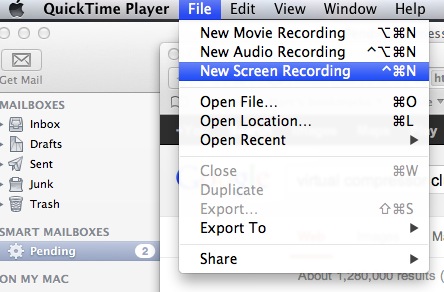
Screen capture. You can do it using Quicktime Player (File -> New Screen Recording) or use one of any number of commercial applications that give you more features to play with.
Please Log in to join the conversation.
30 Nov 2012 17:55 #18038
by Neguah
Replied by Neguah on topic How do I sync video and audio?
I´m watching "The Amazing Race", and often they start with a couple being interviewed, they then show some clips clip still hearing the couple, and finally showing couples again.
How do they do that?
Are they using separate video and audio, and sync it like we´re talking about here?
How do they do that?
Are they using separate video and audio, and sync it like we´re talking about here?
Please Log in to join the conversation.

30 Nov 2012 21:51 #18046
by BenB
Replied by BenB on topic How do I sync video and audio?
Nothing beats ScreenFlow, especially the latest version. It both captures and edits our tutorials at macProVideo really, really well and quickly.
As for Neguah's question, it is very easy. You place that interview clip in the Primary Storyline. Then take the "cut away" clip, edit it into the timeline as a Connected Clip above the interview clip. Turn down or kill it's sound. Trim it to where you want to see it. Done.
As for Neguah's question, it is very easy. You place that interview clip in the Primary Storyline. Then take the "cut away" clip, edit it into the timeline as a Connected Clip above the interview clip. Turn down or kill it's sound. Trim it to where you want to see it. Done.
Please Log in to join the conversation.
02 Dec 2012 19:24 #18080
by Neguah
Replied by Neguah on topic How do I sync video and audio?
Thank you!
I have now recorded the play(just practice, not primary play), and I don´t know what bit it is. It says it´s a mp3, and the only number I can see is 128000. Is that anywhere near 16 og 24-bit?
It´s a simple recorder!
I will try ScreenFlow!
I have now recorded the play(just practice, not primary play), and I don´t know what bit it is. It says it´s a mp3, and the only number I can see is 128000. Is that anywhere near 16 og 24-bit?
It´s a simple recorder!
I will try ScreenFlow!
Please Log in to join the conversation.
02 Dec 2012 21:25 #18086
by fordeetv
Replied by fordeetv on topic How do I sync video and audio?
Check the recorder settings... mp3 is a compressed format. You're looking for .Wav or .Aiff recording options which will let you set bit rate from 16-24bit. 128k is the bit rate set for the mp3 on your recorder which gives you significantly less headroom than an uncompressed Wav or Aiff and roughly an 11:1 compression ratio.
Fordee,
FordeeTV.com
Fordee,
FordeeTV.com
Please Log in to join the conversation.
02 Dec 2012 21:32 #18087
by Neguah
I can choose between 192kbps(SHQ),128kbps(HQ), 48kbps(SP) and 8kbps(LP).
What will be the best options?
Replied by Neguah on topic How do I sync video and audio?
fordeetv wrote: Check the recorder settings... mp3 is a compressed format. You're looking for .Wav or .Aiff recording options which will let you set bit rate from 16-24bit. 128k is the bit rate set for the mp3 on your recorder which gives you significantly less headroom than an uncompressed Wav or Aiff and roughly an 11:1 compression ratio.
Fordee,
FordeeTV.com
I can choose between 192kbps(SHQ),128kbps(HQ), 48kbps(SP) and 8kbps(LP).
What will be the best options?
Please Log in to join the conversation.
02 Dec 2012 21:36 #18088
by fordeetv
Replied by fordeetv on topic How do I sync video and audio?
192k, however it will still be an mp3.
Fordee
FordeeTV.com
Fordee
FordeeTV.com
Please Log in to join the conversation.
02 Dec 2012 21:44 #18089
by Neguah
I see. So 16-bit is 1 600 000 kbps?
Replied by Neguah on topic How do I sync video and audio?
fordeetv wrote: 192k, however it will still be an mp3.
Fordee
FordeeTV.com
I see. So 16-bit is 1 600 000 kbps?
Please Log in to join the conversation.
02 Dec 2012 22:34 #18090
by fordeetv
Replied by fordeetv on topic How do I sync video and audio?
No, 16-bit and 192k are two different measurements for two different formats. 16-bit refers to bit depth, and 192k refers to bit rate. The take away you should be noting is that MP3's are compressed and WAV's are uncompressed.
Fordee
FordeeTV.com
Fordee
FordeeTV.com
Please Log in to join the conversation.
03 Dec 2012 05:56 #18105
by Neguah
A lot i didn´t know here...
Thanks again!
Replied by Neguah on topic How do I sync video and audio?
fordeetv wrote: No, 16-bit and 192k are two different measurements for two different formats. 16-bit refers to bit depth, and 192k refers to bit rate. The take away you should be noting is that MP3's are compressed and WAV's are uncompressed.
Fordee
FordeeTV.com
A lot i didn´t know here...
Thanks again!
Please Log in to join the conversation.
- Scrubelicious
-

- Offline
- Platinum Member
-

Less
More
- Posts: 1228
- Thank you received: 114
03 Dec 2012 10:06 #18110
by Scrubelicious
Replied by Scrubelicious on topic How do I sync video and audio?
Professional audio recording devices "better" support 24-bit audio, which has become the industry standard. Anything under will limit your bit depth.
For example AJA Ki Pro wont even do 16-bit audio.
Cheers
For example AJA Ki Pro wont even do 16-bit audio.
Cheers
Please Log in to join the conversation.
