


- Posts: 4
- Thank you received: 0
3 Post Moderation Rule for New Boarders (25 Jan 2021)
New boarders will have their posts moderated - Don't worry if you cannot see your post immediately.
FCPX Angle Viewer Showing Half Thumbnail
14 Nov 2012 18:21 - 14 Nov 2012 18:24 #17255
by swiftmed
FCPX Angle Viewer Showing Half Thumbnail was created by swiftmed
Hey Guys,
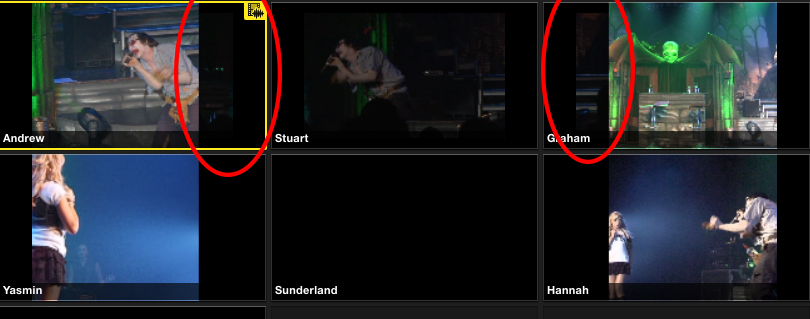
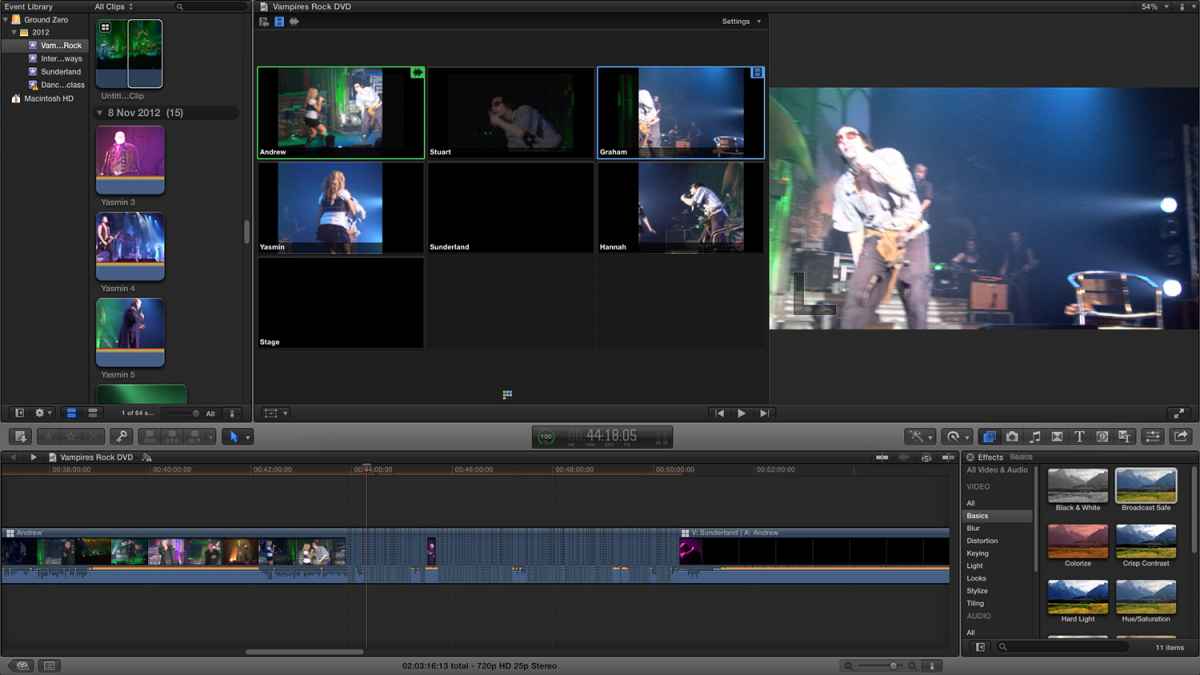
Having problems with the angle viewer in FCPX. Please have a look at the attached screenshot, basically each of the angles is only showing half of the clip, as if the clip is an aspect ratio of 1:1, when infact they're 16:9.
If you look carefully (close up in 1.jpg attachment to this post), you can also see that the Right of Angle 1 (Andrew) and the Left of Angle 3 (Graham) contain the edges of footage from Angle 2 (Stuart). As if they have spilled over. Very odd.
This happens when using both Proxy and Original media.
Any advice?
Running FCP X 10.0.6 on a 2.5GHz Intel Core i5 iMac running 4GB Ram.
Thanks in advance.
Andrew
Having problems with the angle viewer in FCPX. Please have a look at the attached screenshot, basically each of the angles is only showing half of the clip, as if the clip is an aspect ratio of 1:1, when infact they're 16:9.
If you look carefully (close up in 1.jpg attachment to this post), you can also see that the Right of Angle 1 (Andrew) and the Left of Angle 3 (Graham) contain the edges of footage from Angle 2 (Stuart). As if they have spilled over. Very odd.
This happens when using both Proxy and Original media.
Any advice?
Running FCP X 10.0.6 on a 2.5GHz Intel Core i5 iMac running 4GB Ram.
Thanks in advance.
Andrew
Last edit: 14 Nov 2012 18:24 by swiftmed.
Please Log in to join the conversation.
- Tom Wolsky
-

- Offline
- Moderator
-

14 Nov 2012 19:43 #17260
by Tom Wolsky
Replied by Tom Wolsky on topic FCPX Angle Viewer Showing Half Thumbnail
Do you have any effects applied to these clips?
Please Log in to join the conversation.
14 Nov 2012 23:45 #17268
by swiftmed
Replied by swiftmed on topic FCPX Angle Viewer Showing Half Thumbnail
Hey,
Thanks for the reply. I don't have any effects on the clips, however I might have found an answer to my own question. For some reason my Multicam clip was showing a res of 600x468 for all the video in the multicam clip, even though the vast majority of it was 1080p 16:9 footage.
Seems I selected completely the wrong resolution when creating the multicam clip, and it was showing the clips in the 600x468 ratio... although Im not sure if that explains why the clips were spilling over onto each other?
Either way, I've fixed it by creating a new Multicam clip with the correct settings. I was unable to find a way of changing the settings on the clip I'd already created. Can this be done?
Thanks again
Andrew
Thanks for the reply. I don't have any effects on the clips, however I might have found an answer to my own question. For some reason my Multicam clip was showing a res of 600x468 for all the video in the multicam clip, even though the vast majority of it was 1080p 16:9 footage.
Seems I selected completely the wrong resolution when creating the multicam clip, and it was showing the clips in the 600x468 ratio... although Im not sure if that explains why the clips were spilling over onto each other?
Either way, I've fixed it by creating a new Multicam clip with the correct settings. I was unable to find a way of changing the settings on the clip I'd already created. Can this be done?
Thanks again
Andrew
Please Log in to join the conversation.

15 Nov 2012 20:48 #17316
by BenB
Replied by BenB on topic FCPX Angle Viewer Showing Half Thumbnail
1- Select Multicam Clip in Event Browser.
2- Open the Inspector.
3- Go to the Info tab.
4- Bottom right is an Action Menu (gear icon).
5- From it select "Edit Multicam Clip Settings".
2- Open the Inspector.
3- Go to the Info tab.
4- Bottom right is an Action Menu (gear icon).
5- From it select "Edit Multicam Clip Settings".
Please Log in to join the conversation.
