


- Posts: 1
- Thank you received: 0
3 Post Moderation Rule for New Boarders (25 Jan 2021)
New boarders will have their posts moderated - Don't worry if you cannot see your post immediately.
Masking Text in FCP X (Blending Text with Video)
14 Nov 2012 02:58 #17176
by schradoc
Masking Text in FCP X (Blending Text with Video) was created by schradoc
Hi there - I am looking for a way to partially mask text in FCP X so that lets say I have a clip of a mountain, the text in the video appears 'behind' the mountain?
Any help would be greatly appreciated. This is for my latest project about three teenagers attempting to cycle across Canada!
Any help would be greatly appreciated. This is for my latest project about three teenagers attempting to cycle across Canada!
Please Log in to join the conversation.

14 Nov 2012 15:52 #17225
by BenB
Replied by BenB on topic Masking Text in FCP X (Blending Text with Video)
I'd recommend highly one of two things.
First, get "Slice X" from CoreMelt. You'll put the text above the video. Apply Slice X to the text clip. Create a shape mask that hides the text as if it were behind the mountains.
Second, take the shot into Motion and mask it there. The advantage is more flexibility and power to keyframe individual control points of the shape mask, as well as other shape mask controls.
Depends on how complex the shape mask has to be.
First, get "Slice X" from CoreMelt. You'll put the text above the video. Apply Slice X to the text clip. Create a shape mask that hides the text as if it were behind the mountains.
Second, take the shot into Motion and mask it there. The advantage is more flexibility and power to keyframe individual control points of the shape mask, as well as other shape mask controls.
Depends on how complex the shape mask has to be.
Please Log in to join the conversation.
- Simon Ubsdell
-

- Offline
- Platinum Member
-

Less
More
- Posts: 350
- Thank you received: 337
14 Nov 2012 17:31 - 14 Nov 2012 17:31 #17245
by Simon Ubsdell
Replied by Simon Ubsdell on topic Masking Text in FCP X (Blending Text with Video)
What Ben said, but I would add that since you may well be wanting to put your text in the sky behind the foreground, you could always look at using the FCP X Luma Keyer to add a keyed version of the foreground back over the text as in this example:
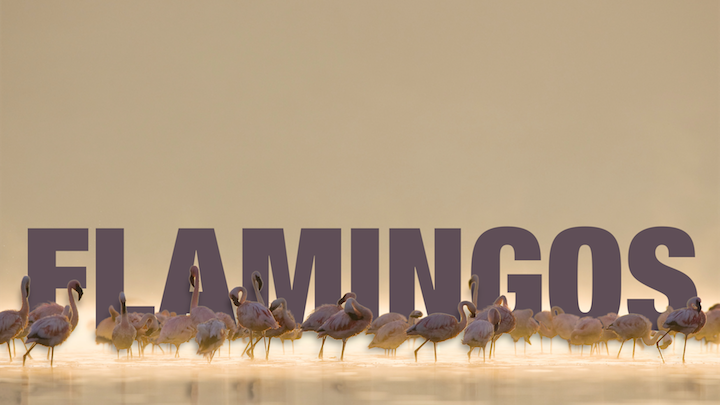
It's always a lot easier and quicker to use procedural methods rather than rotoscoping if you can get away with it.
It's always a lot easier and quicker to use procedural methods rather than rotoscoping if you can get away with it.
Last edit: 14 Nov 2012 17:31 by Simon Ubsdell.
Please Log in to join the conversation.
14 Nov 2012 17:36 #17247
by BenB
Replied by BenB on topic Masking Text in FCP X (Blending Text with Video)
I assumed mountains would have a color and luminance variations so varied that it would not work with a keyer. But if you can get a keyer to work, that'd be great. Must faster and easier. But really depends on the chorma/luma content of your background (video) clip.
Please Log in to join the conversation.
- Simon Ubsdell
-
- Offline
- Platinum Member
-
Less
More
- Posts: 350
- Thank you received: 337
14 Nov 2012 17:40 #17250
by Simon Ubsdell
The old compositor's trick in that case would still be to key as much as possible and just roto the bits that get lost. By and large you'll always get a more convincing looking edge with a key than with roto, especially where the subject or camera is/are moving.
Apologies for telling you stuff you know, Ben, but it might help the original poster
Replied by Simon Ubsdell on topic Masking Text in FCP X (Blending Text with Video)
BenB wrote: I assumed mountains would have a color and luminance variations so varied that it would not work with a keyer. But if you can get a keyer to work, that'd be great. Must faster and easier. But really depends on the chorma/luma content of your background (video) clip.
The old compositor's trick in that case would still be to key as much as possible and just roto the bits that get lost. By and large you'll always get a more convincing looking edge with a key than with roto, especially where the subject or camera is/are moving.
Apologies for telling you stuff you know, Ben, but it might help the original poster
Please Log in to join the conversation.
14 Nov 2012 18:15 - 14 Nov 2012 18:16 #17254
by BenB
Replied by BenB on topic Masking Text in FCP X (Blending Text with Video)
Animated masks can actually give amazing results. Keying by itself won't work in some situations at all, like a charm in others. Just depends on the content you have to work with. I'd never say one was better than the other, though.
Great catch throwing in the keying option.
Great catch throwing in the keying option.
Last edit: 14 Nov 2012 18:16 by BenB.
Please Log in to join the conversation.
