


3 Post Moderation Rule for New Boarders (25 Jan 2021)
New boarders will have their posts moderated - Don't worry if you cannot see your post immediately.
Faster access to Fade Handles

11 Nov 2012 21:27 #17072
by Seanus
Sean Lander - Editing since 1982 - AVID 1991 - FCP 1999 - FCPX 2011
Replied by Seanus on topic Faster access to Fade Handles
Not a fan of this idea as I think it would be too confusing to have to look at the inspector to see what the handles in the Timeline are actually going to do.
Regardless of whether you like the viewer behaviour or not one thing was that it had everything in one place. Setting the viewer to "Open" meant that scrolling through the timeline showed you the parameters for each clip without any clicking.
While I don't mind the parameter settings in the timeline I do find it very clunky. The timeline is already squeezed for real estate and this just makes it even more awkward.
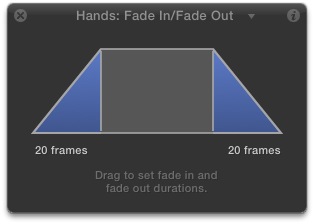
What I'd love to see is an implementation similar to that used in Motion. Where you have a contextual HUD. So click on a transition and select SHOW HUD.
Regardless of whether you like the viewer behaviour or not one thing was that it had everything in one place. Setting the viewer to "Open" meant that scrolling through the timeline showed you the parameters for each clip without any clicking.
While I don't mind the parameter settings in the timeline I do find it very clunky. The timeline is already squeezed for real estate and this just makes it even more awkward.
What I'd love to see is an implementation similar to that used in Motion. Where you have a contextual HUD. So click on a transition and select SHOW HUD.
Sean Lander - Editing since 1982 - AVID 1991 - FCP 1999 - FCPX 2011
Please Log in to join the conversation.
11 Nov 2012 21:33 #17073
by NocoDave
Replied by NocoDave on topic Faster access to Fade Handles
There's a thought, with Apples recent Motion HUD patent maybe it is something we'll see in FCPX.
Please Log in to join the conversation.

12 Nov 2012 00:12 - 12 Nov 2012 00:14 #17077
by BenB
Replied by BenB on topic Faster access to Fade Handles
I've been requesting HUDs in FCP since Motion first came out.
But they don't handle keyframing.
What I'd like to see is the ability to have a keyframe editor below the Timeline just like in Motion. That'd be the best. It'd really rock with a dual monitor setup, too.
But they don't handle keyframing.
What I'd like to see is the ability to have a keyframe editor below the Timeline just like in Motion. That'd be the best. It'd really rock with a dual monitor setup, too.
Last edit: 12 Nov 2012 00:14 by BenB.
Please Log in to join the conversation.
12 Nov 2012 01:12 #17081
by Seanus
Sean Lander - Editing since 1982 - AVID 1991 - FCP 1999 - FCPX 2011
Replied by Seanus on topic Faster access to Fade Handles
Yes that would be awesome.
Sean Lander - Editing since 1982 - AVID 1991 - FCP 1999 - FCPX 2011
Please Log in to join the conversation.
- Disproportionate Pictures
-

- Offline
- Platinum Member
-

Less
More
- Posts: 1433
- Thank you received: 64
12 Nov 2012 17:24 - 12 Nov 2012 17:25 #17100
by Disproportionate Pictures
Replied by Disproportionate Pictures on topic Faster access to Fade Handles
Yeah, I could see a very efficient setup with the timeline pushed to the second display (giving you lots of height for expanded functionality), with the Event Library and dual viewers (with the amazing horizontal scopes arrangement) stacked on the main viewer.
There are a lot of orientations that would make sense for different purposes- but I don't think more flexibility in either single or dual monitor layouts are something any of us would argue against.
There are a lot of orientations that would make sense for different purposes- but I don't think more flexibility in either single or dual monitor layouts are something any of us would argue against.
Last edit: 12 Nov 2012 17:25 by Disproportionate Pictures.
Please Log in to join the conversation.

13 Nov 2012 17:56 #17134
by jwoodjfa
Replied by jwoodjfa on topic Faster access to Fade Handles
This is what I'd love to see in FCP X 10.0.7: Fade Handels on the video track!

Easy access to Fade handels, opacity control (as we had in FCP 7). And when you look at an edited timeline you can SEE where your fades are (and match them) without having to dig.
And Apple already has this functionality developed, they'd just move it to the clip.

Jon
Easy access to Fade handels, opacity control (as we had in FCP 7). And when you look at an edited timeline you can SEE where your fades are (and match them) without having to dig.
And Apple already has this functionality developed, they'd just move it to the clip.
Jon
Please Log in to join the conversation.
- Scrubelicious
-

- Offline
- Platinum Member
-
Less
More
- Posts: 1228
- Thank you received: 114
14 Nov 2012 10:28 #17192
by Scrubelicious
Replied by Scrubelicious on topic Faster access to Fade Handles
Hitting ctrl v is pretty fast for me. But again I am a keyboard fan so it is almost natural for me hit the key combinations.
Please Log in to join the conversation.
14 Nov 2012 11:56 #17199
by jwoodjfa
Replied by jwoodjfa on topic Faster access to Fade Handles
Hit ctrl-V, then click the arrow on the right side of the clip, then scroll down to see the controls, then do your adjustments, then click the X button to close the window. Repeat 100 times. Gets old. And if you have multiple clips stacked on top of each other you end up with a lot of scrolling.
Please Log in to join the conversation.
- Scrubelicious
-
- Offline
- Platinum Member
-
Less
More
- Posts: 1228
- Thank you received: 114
14 Nov 2012 13:54 #17206
by Scrubelicious
Replied by Scrubelicious on topic Faster access to Fade Handles
Or select all Clips at once and hit your key commands.
Having them visible would be faster this correct but then there would need to be some polishing with the interactivity with the clips in the timeline.
Noticed how the Show Animation triangle disappeared from the clips in the timeline.
Having them visible would be faster this correct but then there would need to be some polishing with the interactivity with the clips in the timeline.
Noticed how the Show Animation triangle disappeared from the clips in the timeline.
Please Log in to join the conversation.
14 Nov 2012 14:35 #17209
by jwoodjfa
Replied by jwoodjfa on topic Faster access to Fade Handles
hitting ctrl-v on a clip only shows me a hint that there is a fade applied to the clip but doesn't tell me accurate fade length:

but to access the fade controls I still have to click on the little up-arrow on the right side of the clip. And then the controls are often thrown outside the timeline and I have to scroll to get access to the fade handles.
The worst situation is when I have created stacking clips, say, a title bar with 2 lines of text and 2 custom shapes stacked on top of each other and all faded in and out.

When I select all 4 elements and hit ctrl-V -

where did all the elements go? They're up above and I spend quite a bit of time to scroll up an down looking for the appropriate arrows to click, handles to move, close this window close the other.

All this scrolling and clicking could be avoided if the video fade handles were in the clip face just like they are in the audio track.
I'm amazed how good FCP X is getting and I admit, this is just some details but when you're doin it a lot it does make a difference and I'd like to see it get as competitive as possible. Seems like FCP's main edge is pure editing speed and this would make it even faster. IMHO.
Jon
but to access the fade controls I still have to click on the little up-arrow on the right side of the clip. And then the controls are often thrown outside the timeline and I have to scroll to get access to the fade handles.
The worst situation is when I have created stacking clips, say, a title bar with 2 lines of text and 2 custom shapes stacked on top of each other and all faded in and out.
When I select all 4 elements and hit ctrl-V -
where did all the elements go? They're up above and I spend quite a bit of time to scroll up an down looking for the appropriate arrows to click, handles to move, close this window close the other.
All this scrolling and clicking could be avoided if the video fade handles were in the clip face just like they are in the audio track.
I'm amazed how good FCP X is getting and I admit, this is just some details but when you're doin it a lot it does make a difference and I'd like to see it get as competitive as possible. Seems like FCP's main edge is pure editing speed and this would make it even faster. IMHO.
Jon
Please Log in to join the conversation.
14 Nov 2012 15:41 #17221
by BenB
Replied by BenB on topic Faster access to Fade Handles
If you're doing this much tweaking of fades manually, change your clips to the bars, not the large filmstrips as you have them. Save you a ton of timeline real estate.
Please Log in to join the conversation.
14 Nov 2012 16:20 #17235
by jwoodjfa
Replied by jwoodjfa on topic Faster access to Fade Handles
ok, thanks. I know there are ways to speed it up with shortcuts etc. and obviously the tools are there and they work great. I was checking to see if others wanted to see it streamlined this way also.
Please Log in to join the conversation.
