


- Posts: 11
- Thank you received: 0
3 Post Moderation Rule for New Boarders (25 Jan 2021)
New boarders will have their posts moderated - Don't worry if you cannot see your post immediately.
Playhead behavior change
08 Nov 2012 13:47 #16846
by jwoodjfa
Playhead behavior change was created by jwoodjfa
I love 10.0.6 and all the new features. But in previous X versions I had developed a workflow of editing in the timeline where I would skim in a clip in the timeline to the exact frame I wanted an edit and click there. The playhead would snap to that position, temporarily marking that frame. I could then drag an edit, either a cut or a title, to the playhead and be done.
Now, when I click in a clip in the timeline the playhead doesn't stick there, it just stays where it was. If I want the playhead to move that that spot I have to click outside the clip. If I click in the timeline area around the clip it will move the playhead there but deselect the clip, which is a pain because often I want to comm-B (blade) the clip at that point and if it's not in the main storyline I then have to reselect the clip. I can click in the Timecode Strip at the top of the timeline and the playhead will move there and the clip will remain selected but that is an extra click and a bit of a guess because then there's no fixed point to snap to. And when you're doing this a thousand times a day it becomes a pain.
I miss being able to point at a spot in a clip in the timeline, click and the playhead snaps to and stays at that frame as a temporary marker to edit to. I wish this was an optional behavior you could set (back).
Anyone else out there with the same preference or am I missing something?
Jon
Now, when I click in a clip in the timeline the playhead doesn't stick there, it just stays where it was. If I want the playhead to move that that spot I have to click outside the clip. If I click in the timeline area around the clip it will move the playhead there but deselect the clip, which is a pain because often I want to comm-B (blade) the clip at that point and if it's not in the main storyline I then have to reselect the clip. I can click in the Timecode Strip at the top of the timeline and the playhead will move there and the clip will remain selected but that is an extra click and a bit of a guess because then there's no fixed point to snap to. And when you're doing this a thousand times a day it becomes a pain.
I miss being able to point at a spot in a clip in the timeline, click and the playhead snaps to and stays at that frame as a temporary marker to edit to. I wish this was an optional behavior you could set (back).
Anyone else out there with the same preference or am I missing something?
Jon
Please Log in to join the conversation.
- Tom Wolsky
-

- Offline
- Moderator
-

08 Nov 2012 14:01 #16847
by Tom Wolsky
Replied by Tom Wolsky on topic Playhead behavior change
Couldn't agree more.
To move the playhead when you click a clip you have to hold the Option key. This is the reverse of previous behavior and a regression to legacy FCP behavior. Who wants that? It is an absolute pain when doing color correction. I click on a clip, I want to see the frakin clip. The times I don't are so few I don't see the point of this change. I loved when this changed from the legacy FCP behavior.
For me this is a significant retrograde step and a very poor decision by the FCP team.
To move the playhead when you click a clip you have to hold the Option key. This is the reverse of previous behavior and a regression to legacy FCP behavior. Who wants that? It is an absolute pain when doing color correction. I click on a clip, I want to see the frakin clip. The times I don't are so few I don't see the point of this change. I loved when this changed from the legacy FCP behavior.
For me this is a significant retrograde step and a very poor decision by the FCP team.
Please Log in to join the conversation.
- Scrubelicious
-

- Offline
- Platinum Member
-

Less
More
- Posts: 1228
- Thank you received: 114
08 Nov 2012 14:05 #16848
by Scrubelicious
Replied by Scrubelicious on topic Playhead behavior change
This might have been a requested feature... sometimes that Feedback button isn't all that great. :woohoo:
Please Log in to join the conversation.
08 Nov 2012 14:36 #16849
by jwoodjfa
Replied by jwoodjfa on topic Playhead behavior change
OK thanks, good to know I'm not alone on this. And thanks also for the option-key tip, that will help. Seems like this should be a toggle switch with a button that would act more like the snapping tool - on or off in a persistent state.
I remember in the last version of FCP 7 when they switched the snapping tool to toggle only when you held down the "n" key! That was a challenge! Glad they switched it back in X.
Jon
I remember in the last version of FCP 7 when they switched the snapping tool to toggle only when you held down the "n" key! That was a challenge! Glad they switched it back in X.
Jon
Please Log in to join the conversation.
08 Nov 2012 16:05 #16853
by tpayton
Replied by tpayton on topic Playhead behavior change
One thing to note, if you deselect all clips on the timeline the top most clip under the playhead will be psuedo-selected and it will be available in the inspector for color correction, etc. Therefore you can move the playhead from clip to clip with the keyboard instead of the mouse and perform color correction. Something that wasn't possible before.
I too was concerned about the behavior and agree that a option should be in place so that the inspector always matches the clip in the viewer.
On the other hand, I just corrected a 500 clip project, and although the option-clicking took a moment to get used to, I quickly retrained my brain. Plus it now allows you to easily copy a previous clips settings and paste it into the clip under the playhead/visible in the viewer without moving the playhead.
I too was concerned about the behavior and agree that a option should be in place so that the inspector always matches the clip in the viewer.
On the other hand, I just corrected a 500 clip project, and although the option-clicking took a moment to get used to, I quickly retrained my brain. Plus it now allows you to easily copy a previous clips settings and paste it into the clip under the playhead/visible in the viewer without moving the playhead.
Please Log in to join the conversation.
- Tom Wolsky
-
- Offline
- Moderator
-
08 Nov 2012 16:33 #16854
by Tom Wolsky
Replied by Tom Wolsky on topic Playhead behavior change
Therefore you can move the playhead from clip to clip with the keyboard instead of the mouse and perform color correction. Something that wasn't possible before.
Why couldn't you do this before?
Plus it now allows you to easily copy a previous clips settings and paste it into the clip under the playhead/visible in the viewer without moving the playhead.
Different strokes. I almost never do that. I find I almost always copy forward. Do a clip, know I'm reusing it, copy it, and use timeline index to load up the clips I want to paste it to. So nice to gets to clips later in the project and find they're already done.
Why couldn't you do this before?
Plus it now allows you to easily copy a previous clips settings and paste it into the clip under the playhead/visible in the viewer without moving the playhead.
Different strokes. I almost never do that. I find I almost always copy forward. Do a clip, know I'm reusing it, copy it, and use timeline index to load up the clips I want to paste it to. So nice to gets to clips later in the project and find they're already done.
Please Log in to join the conversation.
08 Nov 2012 16:44 #16856
by tpayton
Replied by tpayton on topic Playhead behavior change
Hi Tom,
Prior to 10.0.6 the only way to show something in the inspector was to specifically select it, and there was no keyboard command to select the next or previous clip.
In 10.0.6 deselect everything and now the top most clip under the playhead will show in the inspector. So you can correct one clip to the next without having to take a trip down to the timeline. See here:
Here is Clip A:
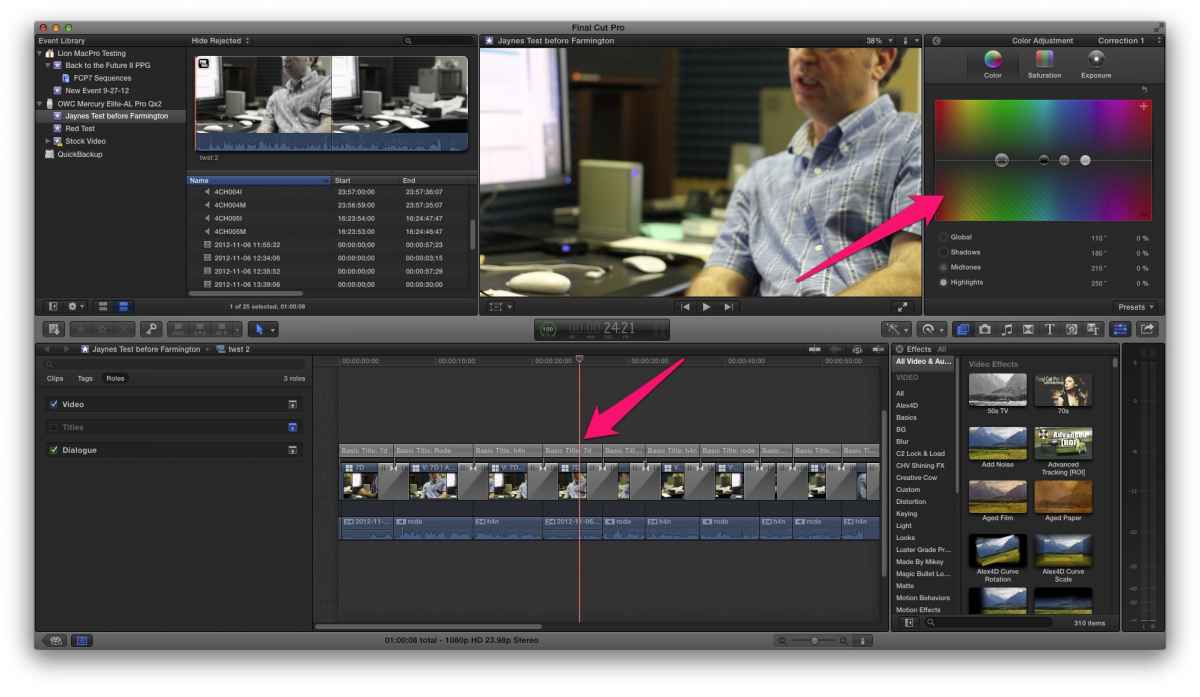
Now Clip B:
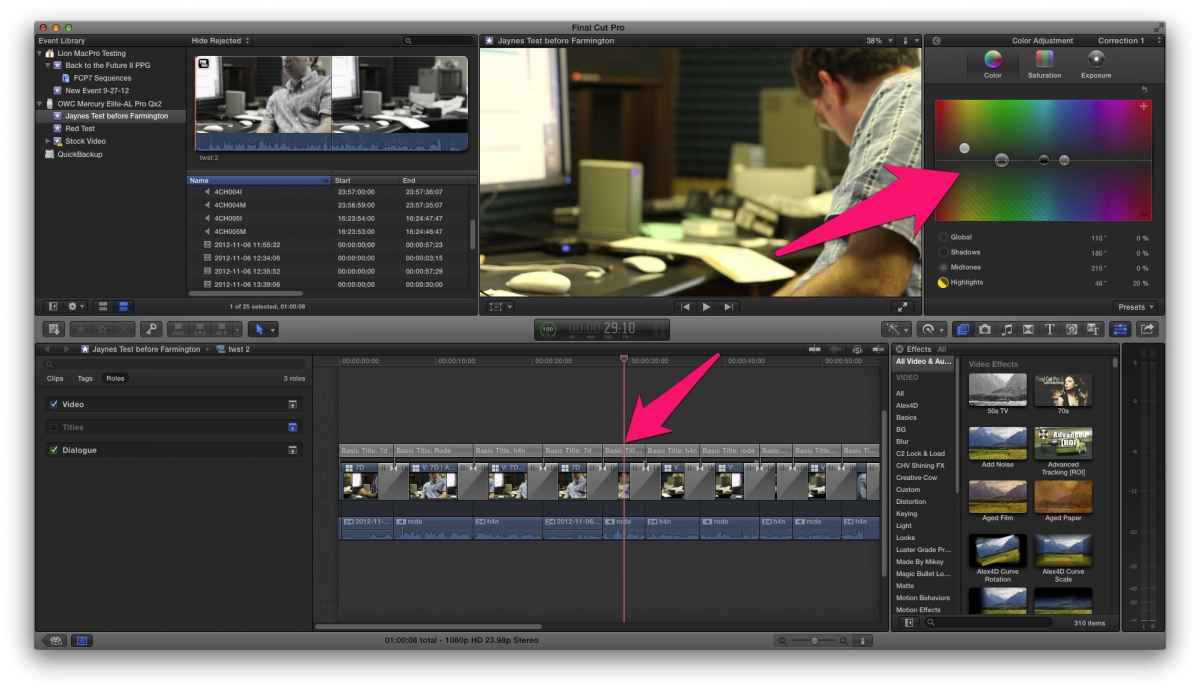
Oh notice too that I disable the Title role so the video clip would be the top most clip.
Prior to 10.0.6 the only way to show something in the inspector was to specifically select it, and there was no keyboard command to select the next or previous clip.
In 10.0.6 deselect everything and now the top most clip under the playhead will show in the inspector. So you can correct one clip to the next without having to take a trip down to the timeline. See here:
Here is Clip A:
Now Clip B:
Oh notice too that I disable the Title role so the video clip would be the top most clip.
Please Log in to join the conversation.

08 Nov 2012 16:55 #16858
by pollux
Replied by pollux on topic Playhead behavior change
I just noticed that inspector change too. I am still getting used to it
Please Log in to join the conversation.
- Tom Wolsky
-
- Offline
- Moderator
-
08 Nov 2012 22:52 - 08 Nov 2012 22:59 #16899
by Tom Wolsky
Replied by Tom Wolsky on topic Playhead behavior change
This is great, but it doesn't explain the need for the changing the playhead selection behavior. You have to move the playhead to work in the inspector, so why not move the playhead when you click on a clip?
Oh and we absolutely, positively have to have the name of the clip in the color board. I hate switching around and never having confirmation that the board is looking at the clip I want it to.
Oh and we absolutely, positively have to have the name of the clip in the color board. I hate switching around and never having confirmation that the board is looking at the clip I want it to.
Last edit: 08 Nov 2012 22:59 by Tom Wolsky.
Please Log in to join the conversation.

08 Nov 2012 23:31 #16909
by dgwvideo
I agree with this for sure. I have graded more than one clip only to find I began making changes to the wrong clip and then had to go back and fix that.
Creating history....one edit at a time !
Replied by dgwvideo on topic Playhead behavior change
Tom Wolsky wrote: Oh and we absolutely, positively have to have the name of the clip in the color board. I hate switching around and never having confirmation that the board is looking at the clip I want it to.
I agree with this for sure. I have graded more than one clip only to find I began making changes to the wrong clip and then had to go back and fix that.
Creating history....one edit at a time !
Please Log in to join the conversation.
09 Nov 2012 08:37 #16916
by Seanus
Sean Lander - Editing since 1982 - AVID 1991 - FCP 1999 - FCPX 2011
Replied by Seanus on topic Playhead behavior change
For me I love the way it works now. I hated the way it was before. I want to click on a clip and not have the play head move there. Just like its alway been in FCP Clasic. especially useful for grabbing attributes from somewhere else and not leaving your current position.
What would be good is for a preference to toggle this for people who liked the old way. How hard could it be?
What would be good is for a preference to toggle this for people who liked the old way. How hard could it be?
Sean Lander - Editing since 1982 - AVID 1991 - FCP 1999 - FCPX 2011
Please Log in to join the conversation.
- Tom Wolsky
-
- Offline
- Moderator
-
09 Nov 2012 09:10 #16918
by Tom Wolsky
Replied by Tom Wolsky on topic Playhead behavior change
The number of times I'm grabbing attributes from somewhere else is negligible to the number of times I want to select a clip and work on it. I have always had the ability to hold the Option key when I selected a clip to not move the playhead (the opposed of the current behavior). In the past year the number of times I've used that ability has been absolutely minimal. The number of times in the last day that I've wanted to move the playhead to the current location of the selected clip far exceeded the number of times I ever wanted to do the opposite.
If we can't have the original behavior back at least, at an absolute minimum, make it a preference, and make the original FCPX behavior the default.
It was always a problem in teaching when you had to constantly remind students to make sure the playhead was over the clip you selected. Make sure the clip you're working on is the one you're seeing. It was a constant refrain of I'm changing the text, the color, the size, and nothing's happening. This constant refrain is a direct indication of the counter-intuitive nature of selecting something and not seeing it.
If we can't have the original behavior back at least, at an absolute minimum, make it a preference, and make the original FCPX behavior the default.
It was always a problem in teaching when you had to constantly remind students to make sure the playhead was over the clip you selected. Make sure the clip you're working on is the one you're seeing. It was a constant refrain of I'm changing the text, the color, the size, and nothing's happening. This constant refrain is a direct indication of the counter-intuitive nature of selecting something and not seeing it.
Please Log in to join the conversation.
- ronny courtens
-

- Offline
- Moderator
-
Less
More
- Posts: 4455
- Thank you received: 962
09 Nov 2012 10:17 #16919
by ronny courtens
Replied by ronny courtens on topic Playhead behavior change
I'm with Tom on this. But opinions and workflows differ, so I think it's a great idea of letting the user decide what the default behavior for his workflow should be. I have submitted a feature request for a user preference setting to decide on the default Playhead behavior.
Please Log in to join the conversation.
09 Nov 2012 11:27 #16921
by Seanus
Sean Lander - Editing since 1982 - AVID 1991 - FCP 1999 - FCPX 2011
Replied by Seanus on topic Playhead behavior change
Agree with everything said but here is another example of why I hated this so much.
I park my play head in the timeline where I want to move a shot already in the timeline to.
I click on the shot I want to move and BOOM! The play head is now NOT where I want it. I have to try and guess where it was I wanted to move this shot to. Drove me absolutely crazy.
So expect to have me bitching if Apple switches it back. :woohoo:
A preference is the way to go. There really needs to be a LOT more preferences come to think of it.
I park my play head in the timeline where I want to move a shot already in the timeline to.
I click on the shot I want to move and BOOM! The play head is now NOT where I want it. I have to try and guess where it was I wanted to move this shot to. Drove me absolutely crazy.
So expect to have me bitching if Apple switches it back. :woohoo:
A preference is the way to go. There really needs to be a LOT more preferences come to think of it.
Sean Lander - Editing since 1982 - AVID 1991 - FCP 1999 - FCPX 2011
Please Log in to join the conversation.
- ronny courtens
-
- Offline
- Moderator
-
Less
More
- Posts: 4455
- Thank you received: 962
09 Nov 2012 11:43 - 09 Nov 2012 11:44 #16922
by ronny courtens
Replied by ronny courtens on topic Playhead behavior change
Sean: There really needs to be a LOT more preferences come to think of it.
Agreed. More and more people are working with FCP10 now and everyone has his/hers preferred workflow, so it is becoming very difficult to set default behaviors that every editor is happy with.
The other day I had a discussion with someone on another forum about the Import Preferences window. He doesn't like it showing up every time he wants to import something because he says he always uses the same settings for importing footage and it bothers him he has to confirm over and over again that he will be using the same settings he has already selected in his User Preferences. Personally, I do like to have the choice to change my import Prefs every time I want to import something. So we agreed that a "Always show Import Preferences before importing" checkbox would be a nice option to have in User Preferences.
Just to show you that everyone has his personal preferences, and opinions may differ without anyone being "right" or "wrong".
Agreed. More and more people are working with FCP10 now and everyone has his/hers preferred workflow, so it is becoming very difficult to set default behaviors that every editor is happy with.
The other day I had a discussion with someone on another forum about the Import Preferences window. He doesn't like it showing up every time he wants to import something because he says he always uses the same settings for importing footage and it bothers him he has to confirm over and over again that he will be using the same settings he has already selected in his User Preferences. Personally, I do like to have the choice to change my import Prefs every time I want to import something. So we agreed that a "Always show Import Preferences before importing" checkbox would be a nice option to have in User Preferences.
Just to show you that everyone has his personal preferences, and opinions may differ without anyone being "right" or "wrong".
Last edit: 09 Nov 2012 11:44 by ronny courtens.
Please Log in to join the conversation.
- Tom Wolsky
-
- Offline
- Moderator
-
09 Nov 2012 13:05 #16926
by Tom Wolsky
Replied by Tom Wolsky on topic Playhead behavior change
Agreed about the prefs. Remember how many panels of prefs we had in 7? It seemed every time there was a major release there was a new panel. We're only up to four and with plenty of room for more
Please Log in to join the conversation.
- Tom Wolsky
-
- Offline
- Moderator
-
09 Nov 2012 13:08 #16927
by Tom Wolsky
Replied by Tom Wolsky on topic Playhead behavior change
I bet he's a clicker. Clickers would have a problem with that. I just tap the enter key twice and I hardly notice the sheet dropping down.
Please Log in to join the conversation.

09 Nov 2012 13:13 #16928
by BenB
Replied by BenB on topic Playhead behavior change
How many times did I have clients and students contact me because media was ingesting incorrectly? Thousands. How many times did I ask if they confirmed ingest settings and they did not in these cases? 100%. Leave it alone, because the first time someone screws up in import, they'll bitch that there's no warning.
Personally, I'm working much faster with the new playhead behavior. My FCPUG members overwhelmingly love it.
A pref would be nice, I'd like that. But then just as a philosophical debate, at what point are we starting to nit-pick trivial options? I'm no saying anyone is, don't flame me. I'm simply wondering out loud what y'all think the line between necessary and nit-pick is?
Personally, I'm working much faster with the new playhead behavior. My FCPUG members overwhelmingly love it.
A pref would be nice, I'd like that. But then just as a philosophical debate, at what point are we starting to nit-pick trivial options? I'm no saying anyone is, don't flame me. I'm simply wondering out loud what y'all think the line between necessary and nit-pick is?
Please Log in to join the conversation.
09 Nov 2012 13:43 #16942
by jwoodjfa
Replied by jwoodjfa on topic Playhead behavior change
I think this is more than trivial, judging both from the discussion here and the fact that the change is loved by some and frustrates others. For me the change kills one of my basic editing workflows in the timeline. Yet another one of my basic workflow is enhanced.
Seems like one mode would work better for one workflow application and the other for the other application. Maybe it should work like the snapping toggle works - hit the "n" key and it switches modes easily. Usually you're doing repetitive tasks, like cc'ing a bunch of clips, or trimming a bunch of clips, repetitiously so it's a pain to have to hit the option key every time you need it to move.
Here's some valid reasons why it should be either way, easily switchable between:
Times when it's good to have the playhead move when you click inside a clip:
-when you use the mouse to select the exact frame you want, then use it to trim the mark in to that point.
-when you want to edit the properties of a clip by clicking on it
When it's good to have the playhead stay where it is when you click inside a clip
-when you want to bring another clip to that point the playhead is located
Any other ways this effects editing?
jon
Seems like one mode would work better for one workflow application and the other for the other application. Maybe it should work like the snapping toggle works - hit the "n" key and it switches modes easily. Usually you're doing repetitive tasks, like cc'ing a bunch of clips, or trimming a bunch of clips, repetitiously so it's a pain to have to hit the option key every time you need it to move.
Here's some valid reasons why it should be either way, easily switchable between:
Times when it's good to have the playhead move when you click inside a clip:
-when you use the mouse to select the exact frame you want, then use it to trim the mark in to that point.
-when you want to edit the properties of a clip by clicking on it
When it's good to have the playhead stay where it is when you click inside a clip
-when you want to bring another clip to that point the playhead is located
Any other ways this effects editing?
jon
Please Log in to join the conversation.
