


- Posts: 122
- Thank you received: 2
3 Post Moderation Rule for New Boarders (25 Jan 2021)
New boarders will have their posts moderated - Don't worry if you cannot see your post immediately.
Import from Camera/SDcard issues
07 Nov 2012 19:25 #16786
by mester
Import from Camera/SDcard issues was created by mester
on my Macpro I can not import far camera or SDcard
when I launch the import menu, the cards icons shows under Cameras, but keeps spinning and never mounts
I tried on my MacBookPro, and it got no problems on the same cards
I have trashed my FCPX prefs, but still the same :huh:
anyone?
when I launch the import menu, the cards icons shows under Cameras, but keeps spinning and never mounts
I tried on my MacBookPro, and it got no problems on the same cards
I have trashed my FCPX prefs, but still the same :huh:
anyone?
Please Log in to join the conversation.
- Tom Wolsky
-

- Offline
- Moderator
-

07 Nov 2012 19:31 #16788
by Tom Wolsky
Replied by Tom Wolsky on topic Import from Camera/SDcard issues
What camera? What media? What format? How's everything connected?
Please Log in to join the conversation.

07 Nov 2012 23:20 #16811
by BenB
Replied by BenB on topic Import from Camera/SDcard issues
Quit FCP X. Re-connect the camera card. Does it mount on the Desktop as it should?
Please Log in to join the conversation.
07 Nov 2012 23:23 #16812
by mester
Replied by mester on topic Import from Camera/SDcard issues
Canon 7D on a CFCard, and GoPro on SDCard, via both Camera and card reader, connected via USB
the same files works on my MacBookPro on the same connections
both macs is running 10.7.5 and FCPX is 10.06
thanks
the same files works on my MacBookPro on the same connections
both macs is running 10.7.5 and FCPX is 10.06
thanks
Please Log in to join the conversation.
07 Nov 2012 23:41 #16813
by mester
Replied by mester on topic Import from Camera/SDcard issues
have been reconnecting, rebooted the Mac, and still the same thing
and the same card reader, cables and cards works on my macbookpro
and the same card reader, cables and cards works on my macbookpro
Please Log in to join the conversation.
09 Nov 2012 19:24 #16971
by mester
Replied by mester on topic Import from Camera/SDcard issues
think I found the problem
I got a 3TB drive installed, possessing some files who disturbs the import menu…
If I unmount this hard drive everything is cool and works like it should
one strange thing is, I got all in all 7 volumes, my system drive (which is SSD), an older system drive, the 3TB backup/stuff drive and 4 media drives video storage
In FCPX, I can see the 4 media drives and the system drive, not the 3TB and the old system
in the import menu, 3Tb figures as a Camera in the first row, next row is Devices and here I see the 4 media drives, the system drive and the old system drive
so if I open the import menu with 3TB mounted, the SDcard shows under Cameras together with 3TB, but the SDcard keeps trying to load bot never do
if I eject the SDcard and wait some time, it mounts 3TB one more time, but with another icon, a XDcam disk icon, and here it stops (see attached file)
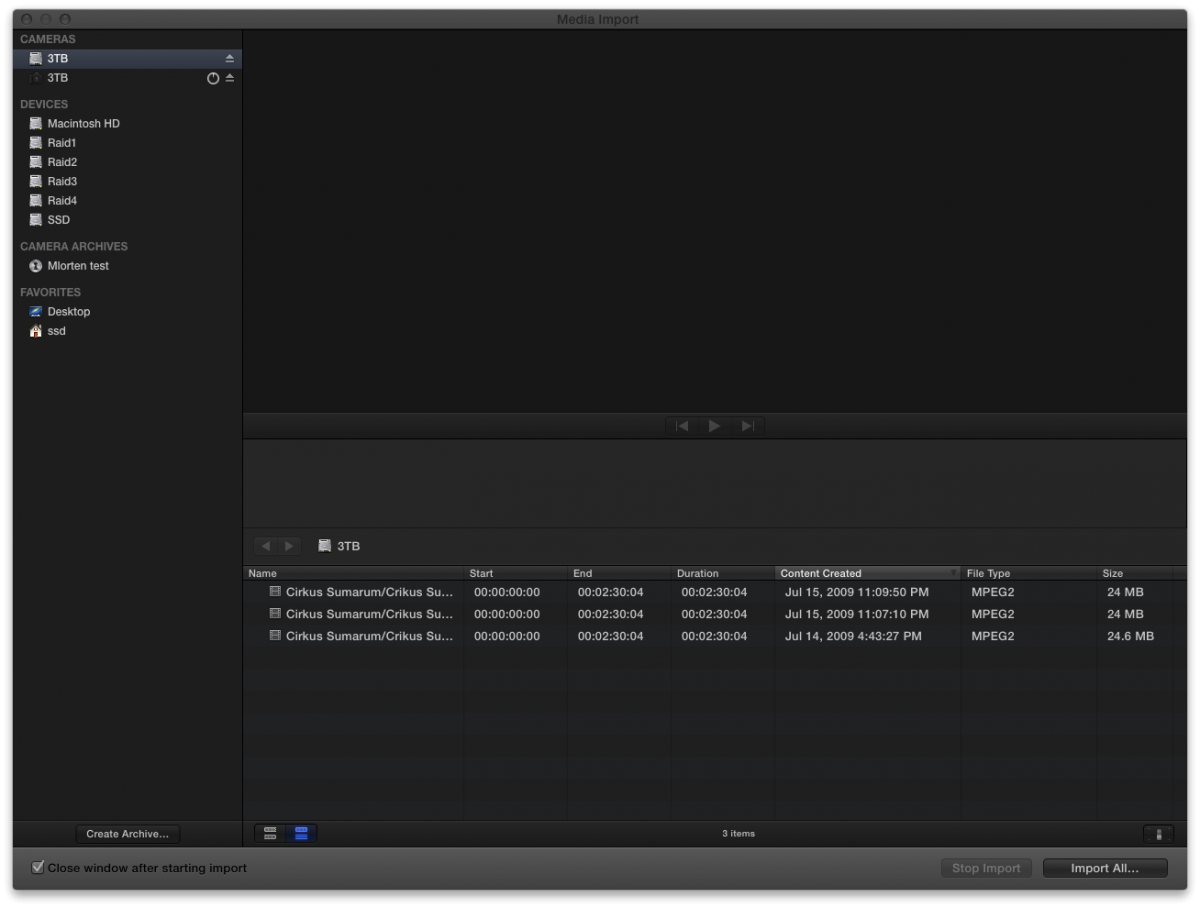
so somewhere on this drive there is a file who makes FCPX think that it got a XDCam disk on it
I am now trying to trace the file, but its a messy disk, lot and lots of files, anyone got a way to do this?
thanks
I got a 3TB drive installed, possessing some files who disturbs the import menu…
If I unmount this hard drive everything is cool and works like it should
one strange thing is, I got all in all 7 volumes, my system drive (which is SSD), an older system drive, the 3TB backup/stuff drive and 4 media drives video storage
In FCPX, I can see the 4 media drives and the system drive, not the 3TB and the old system
in the import menu, 3Tb figures as a Camera in the first row, next row is Devices and here I see the 4 media drives, the system drive and the old system drive
so if I open the import menu with 3TB mounted, the SDcard shows under Cameras together with 3TB, but the SDcard keeps trying to load bot never do
if I eject the SDcard and wait some time, it mounts 3TB one more time, but with another icon, a XDcam disk icon, and here it stops (see attached file)
so somewhere on this drive there is a file who makes FCPX think that it got a XDCam disk on it
I am now trying to trace the file, but its a messy disk, lot and lots of files, anyone got a way to do this?
thanks
Please Log in to join the conversation.
09 Nov 2012 19:27 #16974
by BenB
Replied by BenB on topic Import from Camera/SDcard issues
What format is that 3TB drive? Select it in the Finder and Command-i. What is listed as "Format"?
Is there anything on that drive besides camera cards?
Is there anything on that drive besides camera cards?
Please Log in to join the conversation.
09 Nov 2012 19:57 - 09 Nov 2012 20:06 #16979
by mester
Replied by mester on topic Import from Camera/SDcard issues
Mac OS Extended (Journaled)
there is loads of files on it, but no Camera cards, its my messing around drive
its my backup drive as well, for 3 other macs
there is loads of files on it, but no Camera cards, its my messing around drive
its my backup drive as well, for 3 other macs
Last edit: 09 Nov 2012 20:06 by mester.
Please Log in to join the conversation.
09 Nov 2012 20:07 #16980
by BenB
Replied by BenB on topic Import from Camera/SDcard issues
Wow, that's wild.
Please Log in to join the conversation.
09 Nov 2012 20:10 #16981
by mester
Replied by mester on topic Import from Camera/SDcard issues
haha, whats wild, the problem or my hard drive culture? 
Please Log in to join the conversation.
10 Nov 2012 19:47 #17003
by mester
Replied by mester on topic Import from Camera/SDcard issues
still struggling to trace the problem, now FCPX detected around 150.000 files, mostly tiff, jpg and psd files
can't figure out why FCPX see the drive as a XDCam disk
I tried to repair and verify disk permissions, thrashed about 85GB, but still the same..
would be happy to hear any ideas
thanks
can't figure out why FCPX see the drive as a XDCam disk
I tried to repair and verify disk permissions, thrashed about 85GB, but still the same..
would be happy to hear any ideas
thanks
Please Log in to join the conversation.
- ronny courtens
-

- Offline
- Moderator
-
Less
More
- Posts: 4455
- Thank you received: 962
10 Nov 2012 21:10 #17005
by ronny courtens
Replied by ronny courtens on topic Import from Camera/SDcard issues
How is this problematic drive formatted?
Please Log in to join the conversation.
10 Nov 2012 21:40 #17006
by mester
Replied by mester on topic Import from Camera/SDcard issues
Mac OS Extended (Journaled)
Please Log in to join the conversation.
- ronny courtens
-
- Offline
- Moderator
-
Less
More
- Posts: 4455
- Thank you received: 962
10 Nov 2012 21:45 #17007
by ronny courtens
Replied by ronny courtens on topic Import from Camera/SDcard issues
Just some ideas: do you have any BPAV folders on that drive?
Please Log in to join the conversation.
10 Nov 2012 22:18 #17008
by mester
Replied by mester on topic Import from Camera/SDcard issues
if I do I can't find it..
as told, its around 150.000 files it detects, and there is no folder keeping that amount, its a collection of files presented as a XDCam disk icon :sick:
as told, its around 150.000 files it detects, and there is no folder keeping that amount, its a collection of files presented as a XDCam disk icon :sick:
Please Log in to join the conversation.
- ronny courtens
-
- Offline
- Moderator
-
Less
More
- Posts: 4455
- Thank you received: 962
10 Nov 2012 22:34 #17010
by ronny courtens
Replied by ronny courtens on topic Import from Camera/SDcard issues
Okay, R-click one of these files and select "Show Info". The info window will open.
In the info window click on the selection bar under "Open with:" and select "Preview" from the list. Then click the "Change all" button under the bar. Does this change the icon of all the files (or at least some of them)?
In the info window click on the selection bar under "Open with:" and select "Preview" from the list. Then click the "Change all" button under the bar. Does this change the icon of all the files (or at least some of them)?
Please Log in to join the conversation.
11 Nov 2012 13:25 #17036
by mester
Replied by mester on topic Import from Camera/SDcard issues
thanks, but its not that simple I think
I'm moving files now,want to reformat the drive
I'm moving files now,want to reformat the drive
Please Log in to join the conversation.
11 Nov 2012 14:54 #17039
by BenB
Replied by BenB on topic Import from Camera/SDcard issues
I'd not reformat, but run Disk Warrior to repair the directory, to verify it is not about to crash for good.
Please Log in to join the conversation.
11 Nov 2012 15:03 #17042
by mester
Replied by mester on topic Import from Camera/SDcard issues
will do that as well, but its a quite new disk, 3 TB WD Caviar Green WD30EZRX, my tech guy found it, and I can see now its a 5.400 rpm, not good for video, but should run for backup and stuff
Please Log in to join the conversation.
11 Nov 2012 15:13 #17047
by BenB
Replied by BenB on topic Import from Camera/SDcard issues
The age of a drive has nothing to do with it going bad. Reformat and be sure it is "Mac OS Extended (Journaled)", and if it gives you trouble after that, I'd verify its integrity with Disk Warrior. If Disk Warrior can't repair a directory, there's something very wrong with that drive.
Please Log in to join the conversation.
