


- Posts: 17
- Thank you received: 0
3 Post Moderation Rule for New Boarders (25 Jan 2021)
New boarders will have their posts moderated - Don't worry if you cannot see your post immediately.
Wind noise and Duplicate Project
06 Nov 2012 11:51 #16677
by akelic
Wind noise and Duplicate Project was created by akelic
Hi
I had 2 questions, what is the best way to remove wind noise from a clip?
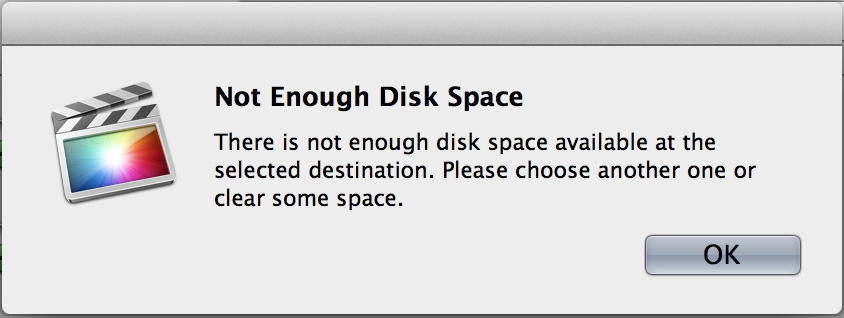
how do i duplicate a project without duplicating any media - all i want to do essentially is a 2nd edit but keep a copy of the first edit. when i tried to create a duplicate with referenced events it said ' there is not enough disk space'. i have 30GB left on my HD?
Thanks
Ante
I had 2 questions, what is the best way to remove wind noise from a clip?
how do i duplicate a project without duplicating any media - all i want to do essentially is a 2nd edit but keep a copy of the first edit. when i tried to create a duplicate with referenced events it said ' there is not enough disk space'. i have 30GB left on my HD?
Thanks
Ante
Please Log in to join the conversation.
- Tom Wolsky
-

- Offline
- Moderator
-

06 Nov 2012 12:01 #16678
by Tom Wolsky
Replied by Tom Wolsky on topic Wind noise and Duplicate Project
Wind noise is almost impossible to remove. The best you can hope for is to improve the quality of the primary audio.
Use the Duplicate Project function and duplicate the project only. The first of the three options in the dialog that appears.
Use the Duplicate Project function and duplicate the project only. The first of the three options in the dialog that appears.
Please Log in to join the conversation.
- kyletron2000
-

- Offline
- Senior Member
-

Less
More
- Posts: 79
- Thank you received: 15
06 Nov 2012 18:32 #16699
by kyletron2000
Replied by kyletron2000 on topic Wind noise and Duplicate Project
The only solution I have found is iZotope RX. The magic wand and spectral repair are a very powerful combination and have been very helpful when removing wind noise. Now, if you have a lot of wind noise that affects most of the frequency spectrum, it's not going to do a lot of good.
A low cut / high pass filter may also help to mitigate low rumble wind noise, but it won't get the harmonics.
A low cut / high pass filter may also help to mitigate low rumble wind noise, but it won't get the harmonics.
Please Log in to join the conversation.
- Tom Wolsky
-
- Offline
- Moderator
-
07 Nov 2012 02:43 #16724
by Tom Wolsky
Replied by Tom Wolsky on topic Wind noise and Duplicate Project
Apparently you don't have enough drive space in the location you're copying to.
Please Log in to join the conversation.
07 Nov 2012 03:10 #16725
by akelic
Replied by akelic on topic Wind noise and Duplicate Project
i have 12GB left, i assume that is enough considering i am not copying media? what size would you think the actual project files would be? thanks for your prompt response
Please Log in to join the conversation.
07 Nov 2012 03:14 #16726
by akelic
Replied by akelic on topic Wind noise and Duplicate Project
Tom
what would be the best way to make more space on my drive. i have all the raw footage on the system, is there a way you can tell FCP to delete unused clips?
Thanks
Ante
what would be the best way to make more space on my drive. i have all the raw footage on the system, is there a way you can tell FCP to delete unused clips?
Thanks
Ante
Please Log in to join the conversation.
- Tom Wolsky
-
- Offline
- Moderator
-
07 Nov 2012 03:33 #16727
by Tom Wolsky
Replied by Tom Wolsky on topic Wind noise and Duplicate Project
How big is the project folder without the render files? Is this your internal drive? 12G is nothing. Much too small available free space for a system drive, where you really should keep something like 10% free.
Please Log in to join the conversation.
- Tom Wolsky
-
- Offline
- Moderator
-
07 Nov 2012 03:37 #16728
by Tom Wolsky
Replied by Tom Wolsky on topic Wind noise and Duplicate Project
You need a to get another drive.
Please Log in to join the conversation.
07 Nov 2012 03:38 #16729
by akelic
Replied by akelic on topic Wind noise and Duplicate Project
render files are 100GB, project is 100MB.
I went through some other projects, can i delete the render files from them now that the projects are completed. I have the projects on another drive but like to keep the data files on the HD as a spare copy?
I went through some other projects, can i delete the render files from them now that the projects are completed. I have the projects on another drive but like to keep the data files on the HD as a spare copy?
Please Log in to join the conversation.

07 Nov 2012 08:04 #16731
by cgbier
Replied by cgbier on topic Wind noise and Duplicate Project
You can delete your render files when a project is finished. Be aware, though, that you'll have to re-render everything if you want to retouch an older project.
Do you have Background Render on? You only need that if your system is too slow. Otherwise, it is a waste of time and space.
Can you get your hands on a FCS 3 machine? You can try to cut out the wind rumble with the surgical noise removal tool. It is not perfect, but has helped me in the one or the other situation before.
<cough> Adobe Audition can also help with the wind, but it is pretty arkward to use. Until you have figured out its workings, the trial period is over (seems to be an Adobe feature).
Do you have Background Render on? You only need that if your system is too slow. Otherwise, it is a waste of time and space.
Can you get your hands on a FCS 3 machine? You can try to cut out the wind rumble with the surgical noise removal tool. It is not perfect, but has helped me in the one or the other situation before.
<cough> Adobe Audition can also help with the wind, but it is pretty arkward to use. Until you have figured out its workings, the trial period is over (seems to be an Adobe feature).
Please Log in to join the conversation.
