


- Posts: 239
- Thank you received: 20
3 Post Moderation Rule for New Boarders (25 Jan 2021)
New boarders will have their posts moderated - Don't worry if you cannot see your post immediately.
Damaged frames
- Lee Patterson
-
 Topic Author
- Offline
- Elite Member
-

Less
More
06 Nov 2012 09:26 - 06 Nov 2012 18:33 #16676
by Lee Patterson
Hi Folks
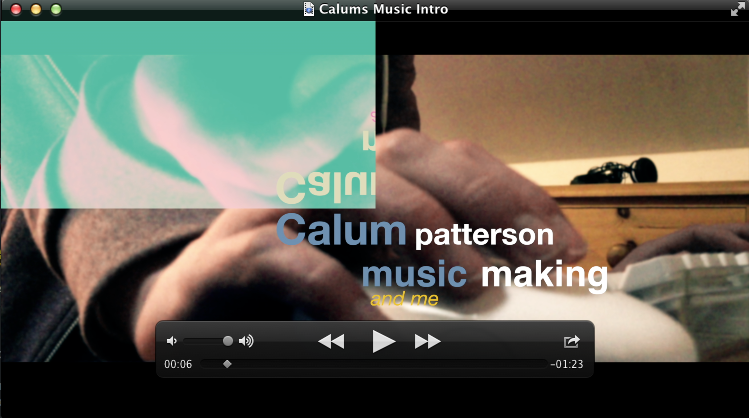
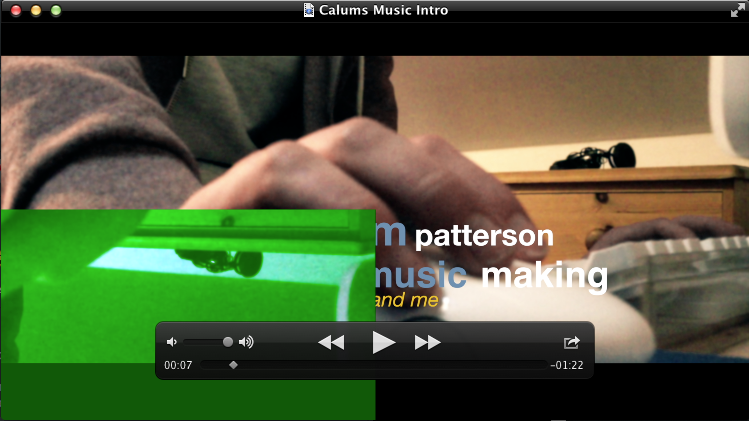
I did a short last night and when reviewing it this morning found that the file had some arbitrary damaged frames. The damage was restricted to sections with titles where a quarter of the screen inverted and mirrored the lower half or did the same to its diagonal opposite and in both cases performed a 'difference' style colour inversion. Anybody else experienced this sort of behavior?
It's a bit confidence shaking, this is just a 90second spot imagine the havoc on a long form project:(
I'll upload some screen grabs when I'm back in the studio later today.
Damaged frames was created by Lee Patterson
Hi Folks
I did a short last night and when reviewing it this morning found that the file had some arbitrary damaged frames. The damage was restricted to sections with titles where a quarter of the screen inverted and mirrored the lower half or did the same to its diagonal opposite and in both cases performed a 'difference' style colour inversion. Anybody else experienced this sort of behavior?
It's a bit confidence shaking, this is just a 90second spot imagine the havoc on a long form project:(
I'll upload some screen grabs when I'm back in the studio later today.
Last edit: 06 Nov 2012 18:33 by Lee Patterson.
Please Log in to join the conversation.
- Lee Patterson
-
Topic Author
- Offline
- Elite Member
-
Less
More
- Posts: 239
- Thank you received: 20
06 Nov 2012 18:34 #16700
by Lee Patterson
Replied by Lee Patterson on topic Damaged frames
Updates with images
Please Log in to join the conversation.
- ronny courtens
-

- Offline
- Moderator
-

Less
More
- Posts: 4455
- Thank you received: 962
06 Nov 2012 18:55 #16702
by ronny courtens
Replied by ronny courtens on topic Damaged frames
Hey Lee,
Wow this is freaky! I see you are showing the issues in QT player. Does this mean the distortions only appear after sharing, or do you also see them on your timeline?
Wow this is freaky! I see you are showing the issues in QT player. Does this mean the distortions only appear after sharing, or do you also see them on your timeline?
Please Log in to join the conversation.
- Lee Patterson
-
Topic Author
- Offline
- Elite Member
-
Less
More
- Posts: 239
- Thank you received: 20
06 Nov 2012 19:28 #16704
by Lee Patterson
Replied by Lee Patterson on topic Damaged frames
Nothing in the timeline, only the shared file, the basic Hq output
Please Log in to join the conversation.
- ronny courtens
-
- Offline
- Moderator
-
Less
More
- Posts: 4455
- Thank you received: 962
06 Nov 2012 19:49 #16705
by ronny courtens
Replied by ronny courtens on topic Damaged frames
Okay, in this case there are a few things you can do.
1. Open your project in the Project Library and select File > Delete Project Render Files. Then re-export your project. This helps in most cases.
2. Do you have Compressor installed? If so your Qmaster files may be causing these issues. If the problem does not go away by deleting your render files post back and I will explain how to get rid of corrupt Qmaster files. This does involve working in the Terminal, but it's pretty straightforward.
1. Open your project in the Project Library and select File > Delete Project Render Files. Then re-export your project. This helps in most cases.
2. Do you have Compressor installed? If so your Qmaster files may be causing these issues. If the problem does not go away by deleting your render files post back and I will explain how to get rid of corrupt Qmaster files. This does involve working in the Terminal, but it's pretty straightforward.
Please Log in to join the conversation.
- Lee Patterson
-
Topic Author
- Offline
- Elite Member
-
Less
More
- Posts: 239
- Thank you received: 20
06 Nov 2012 20:57 #16707
by Lee Patterson
Replied by Lee Patterson on topic Damaged frames
Cheers ronny, i parted company with the buggy, slow and frustrating compressor happily a few years ago. Ill give suggestion 1 a go:) ta
Please Log in to join the conversation.


07 Nov 2012 15:34 #16756
by dgwvideo
Creating history....one edit at a time !
Replied by dgwvideo on topic Damaged frames
@ Ronny
I would be interested to know the proper way to delete corrupted Qmaster files if you would be willing to share.
Also, can you advise if there should be any adjustments made to Qmaster other than the default settings when simply working with FCPX on a single Mac Pro 12 core (not sharing to any other computers)? Thanks in advance.
I would be interested to know the proper way to delete corrupted Qmaster files if you would be willing to share.
Also, can you advise if there should be any adjustments made to Qmaster other than the default settings when simply working with FCPX on a single Mac Pro 12 core (not sharing to any other computers)? Thanks in advance.
Creating history....one edit at a time !
Please Log in to join the conversation.
- ronny courtens
-
- Offline
- Moderator
-
Less
More
- Posts: 4455
- Thank you received: 962
07 Nov 2012 16:51 #16765
by ronny courtens
Replied by ronny courtens on topic Damaged frames
Hi Dan,
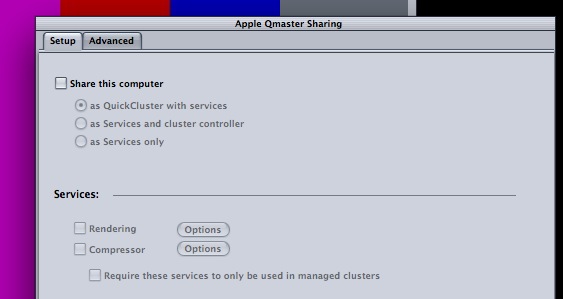
You don't need to set up Qmaster anymore if you are not distributing your rendering over multiple computers. In screenshot 1 you can see Compressor Qmaster Sharing is disabled on an 8-core MacPro.
In screenshot 2 you can see that when you share an FCP10 project using a Compressor preset on this computer all 8 cores are used.

When you experience green (or other) flashes when exporting from FCP10 with Compressor installed, and you are sure it's not a render file issue, this may indicate that you have one or more corrupt Qmaster cache files in /var/spool/qmaster/
To clear the Qmaster cache:
In the Finder choose Go > Go to Folder.
In the dialog that appears, type the following path: /var/spool/qmaster/
Click Go.
Drag the contents of /var/spool/qmaster/ to the trash.
Restart your computer.
If the problem persists after clearing the Qmaster cache you may want to remove any Qmaster traces from your computer. This is a Terminal command, but it's a very simple one.
To delete all Qmaster files from your computer:
1. Open a terminal window and type exactly as follows, including the spaces:
cd /Users/username/Library/"Application Support"
rm -r "Apple Qmaster"
Substitute username with your user name if it has no spaces, e.g.: Dan_Wierling
If it's two words, e.g. Dan Wierling, enclose it in quotes: "Dan Wierling"
2. Go to Applications/Utilities and open Disk Utility. Repair permissions.
You don't need to set up Qmaster anymore if you are not distributing your rendering over multiple computers. In screenshot 1 you can see Compressor Qmaster Sharing is disabled on an 8-core MacPro.
In screenshot 2 you can see that when you share an FCP10 project using a Compressor preset on this computer all 8 cores are used.
When you experience green (or other) flashes when exporting from FCP10 with Compressor installed, and you are sure it's not a render file issue, this may indicate that you have one or more corrupt Qmaster cache files in /var/spool/qmaster/
To clear the Qmaster cache:
In the Finder choose Go > Go to Folder.
In the dialog that appears, type the following path: /var/spool/qmaster/
Click Go.
Drag the contents of /var/spool/qmaster/ to the trash.
Restart your computer.
If the problem persists after clearing the Qmaster cache you may want to remove any Qmaster traces from your computer. This is a Terminal command, but it's a very simple one.
To delete all Qmaster files from your computer:
1. Open a terminal window and type exactly as follows, including the spaces:
cd /Users/username/Library/"Application Support"
rm -r "Apple Qmaster"
Substitute username with your user name if it has no spaces, e.g.: Dan_Wierling
If it's two words, e.g. Dan Wierling, enclose it in quotes: "Dan Wierling"
2. Go to Applications/Utilities and open Disk Utility. Repair permissions.
Please Log in to join the conversation.
07 Nov 2012 17:09 #16768
by dgwvideo
Creating history....one edit at a time !
Replied by dgwvideo on topic Damaged frames
Thanks so much for the excellent detailed information, Ronny !
Creating history....one edit at a time !
Please Log in to join the conversation.
- ronny courtens
-
- Offline
- Moderator
-
Less
More
- Posts: 4455
- Thank you received: 962
07 Nov 2012 17:12 #16769
by ronny courtens
Replied by ronny courtens on topic Damaged frames
No sweat, Dan. My pleasure.
Please Log in to join the conversation.
- PaulMarcel
-
- Offline
- New Member
-

Less
More
- Posts: 18
- Thank you received: 2
07 Nov 2012 18:27 #16776
by PaulMarcel
Replied by PaulMarcel on topic Damaged frames
I'm having similar render problems with 10.0.6.
I use the Share menu to pull up one of my presets. It generates a file. I watch the video in QuickTime Player and in the middle of a clip, I get black frames for about 1-2 seconds, sometimes much longer. Switch back to FCPx (that I never exited even) and share again.
Last video I did, the second render was fine (note that there was no edit or anything between renders; on the project list view not timeline). Today, I've rendered a new video twice. Both times, I got black frames in different places and different durations.
Love the speed of 10.0.6, but I don't trust it to render files for me with this problem. This is for a project entirely done in 10.0.6: import through rendering.
Any ideas?
I use the Share menu to pull up one of my presets. It generates a file. I watch the video in QuickTime Player and in the middle of a clip, I get black frames for about 1-2 seconds, sometimes much longer. Switch back to FCPx (that I never exited even) and share again.
Last video I did, the second render was fine (note that there was no edit or anything between renders; on the project list view not timeline). Today, I've rendered a new video twice. Both times, I got black frames in different places and different durations.
Love the speed of 10.0.6, but I don't trust it to render files for me with this problem. This is for a project entirely done in 10.0.6: import through rendering.
Any ideas?
Please Log in to join the conversation.
- ronny courtens
-
- Offline
- Moderator
-
Less
More
- Posts: 4455
- Thank you received: 962
07 Nov 2012 18:52 #16780
by ronny courtens
Replied by ronny courtens on topic Damaged frames
Hi Paul,
The first thing you want to do is to delete any render files before exporting. Seems to help in most of the cases. And if this doesn't help, flushing any old Compressor caches can solve the issue.
Just don't forget to report this to Apple. The more people post bug reports the sooner the bugs will get fixed.
The first thing you want to do is to delete any render files before exporting. Seems to help in most of the cases. And if this doesn't help, flushing any old Compressor caches can solve the issue.
Just don't forget to report this to Apple. The more people post bug reports the sooner the bugs will get fixed.
Please Log in to join the conversation.
- PaulMarcel
-
- Offline
- New Member
-
Less
More
- Posts: 18
- Thank you received: 2
07 Nov 2012 20:02 #16793
by PaulMarcel
Replied by PaulMarcel on topic Damaged frames
Thanks for the quick reply, Ronny
After posting, I went for a reboot instead then rendered before starting up much of anything. That version came out fine (frankly tired of watching the render attempts!) Active memory on my box was over 16Gb when I did the previous renders (on a 32Gb machine). Bulk of that was allocated to FCPx so I'm thinking that some caching bug caused it to lose track of the proper chunk of rendered media. If that's the case, clearing the rendered media like you propose would fix it as well.
I guess I could have tried simply restarting FCPx instead of a machine restart, but FCPx took forever plus a day to close so I thought something might be amuck with the windowstation.
Apple listens to bug reports? :evil: As an iOS developer by day, we're all pretty jaded with Apple's disregard for developer-reported bugs. iOS 5.0 and 6.0 being excellent examples Maybe that's why 3 execs got axed last week. hmm. </soapbox> :whistle:
After posting, I went for a reboot instead then rendered before starting up much of anything. That version came out fine (frankly tired of watching the render attempts!) Active memory on my box was over 16Gb when I did the previous renders (on a 32Gb machine). Bulk of that was allocated to FCPx so I'm thinking that some caching bug caused it to lose track of the proper chunk of rendered media. If that's the case, clearing the rendered media like you propose would fix it as well.
I guess I could have tried simply restarting FCPx instead of a machine restart, but FCPx took forever plus a day to close so I thought something might be amuck with the windowstation.
Apple listens to bug reports? :evil: As an iOS developer by day, we're all pretty jaded with Apple's disregard for developer-reported bugs. iOS 5.0 and 6.0 being excellent examples
Maybe that's why 3 execs got axed last week. hmm. </soapbox> :whistle: Please Log in to join the conversation.
- ronny courtens
-
- Offline
- Moderator
-
Less
More
- Posts: 4455
- Thank you received: 962
07 Nov 2012 22:08 #16801
by ronny courtens
Replied by ronny courtens on topic Damaged frames
Hey Paul-Marcel,
Don't know about how Apple treats developers, but if you are correct I think it's a good thing they have fired execs who don't listen to the people in the field. One thing I'm sure of is that Apple takes any bug reports and feature requests regarding FCP10 very seriously. We have been using FCP10 since day 1 and now we are running multiple FCP10 systems in our post house, mainly for television work. I must say we haven't had any trouble with this app so far, quite the opposite. I have been in contact with Apple quite frequently and I can only notice that they are really listening to customer feedback. We don't have the render issue on any of our machines, so I have no idea what might be causing this. But fill in those bug reports and feedback pages and I'm sure there will be a bug fix update soon enough.
Don't know about how Apple treats developers, but if you are correct I think it's a good thing they have fired execs who don't listen to the people in the field. One thing I'm sure of is that Apple takes any bug reports and feature requests regarding FCP10 very seriously. We have been using FCP10 since day 1 and now we are running multiple FCP10 systems in our post house, mainly for television work. I must say we haven't had any trouble with this app so far, quite the opposite. I have been in contact with Apple quite frequently and I can only notice that they are really listening to customer feedback. We don't have the render issue on any of our machines, so I have no idea what might be causing this. But fill in those bug reports and feedback pages and I'm sure there will be a bug fix update soon enough.
Please Log in to join the conversation.
- Lee Patterson
-
Topic Author
- Offline
- Elite Member
-
Less
More
- Posts: 239
- Thank you received: 20
07 Nov 2012 22:33 #16803
by Lee Patterson
Replied by Lee Patterson on topic Damaged frames
output from share menu again without deleting the render files and all was fine, which is worse:( I'll just have to cast an eye over every output, this is very troubling
Please Log in to join the conversation.
- ronny courtens
-
- Offline
- Moderator
-
Less
More
- Posts: 4455
- Thank you received: 962
07 Nov 2012 22:39 #16804
by ronny courtens
Replied by ronny courtens on topic Damaged frames
Hi Lee,
From all the posts I have read about this, if you delete the render files prior to sharing you won't have to worry at all. We rarely have to render anything on our systems, maybe that's why I haven't heard of any sharing issues yet in our shop. But I do agree this must be fixed.
From all the posts I have read about this, if you delete the render files prior to sharing you won't have to worry at all. We rarely have to render anything on our systems, maybe that's why I haven't heard of any sharing issues yet in our shop. But I do agree this must be fixed.
Please Log in to join the conversation.
- PaulMarcel
-
- Offline
- New Member
-
Less
More
- Posts: 18
- Thank you received: 2
07 Nov 2012 22:50 #16806
by PaulMarcel
That's why I pointed out the large active memory allocation. The render data generated while you work keeps getting stuffed and updated in the cache. It seems FCPx fumbles part of that data so when the renderer asks for it, it gets black frames. But completely agree: I did nothing but render it again and got different black frames; the second run, the duration of the black frames was 45 seconds! Neither time were the frames aligned with an edit point.
That said, I believe restarting FCPx before the render will let it get its act together on render data but for me I had a spinning beachball for a long time before it reluctantly quit so the OSX equivalent to a three-finger salute was merited
This may also explain why I've had projects that completely rendered in the background... return to the project menu... reopen same project and it has a number of regions marked as needing rendering. I only have noticed this with 10.0.6.
By the way, I've read this forum for awhile. I was surprised when I went to post that I hadn't yet registered. Lot of great tutorials on Motion and FCPx besides a wealth of good editing tips. When video editing is your occasional hobby, it helps to have access to you pros.
I'll look for a place to log the bug with all this babble.
Replied by PaulMarcel on topic Damaged frames
Lee Patterson wrote: output from share menu again without deleting the render files and all was fine, which is worse:( I'll just have to cast an eye over every output, this is very troubling
That's why I pointed out the large active memory allocation. The render data generated while you work keeps getting stuffed and updated in the cache. It seems FCPx fumbles part of that data so when the renderer asks for it, it gets black frames. But completely agree: I did nothing but render it again and got different black frames; the second run, the duration of the black frames was 45 seconds! Neither time were the frames aligned with an edit point.
That said, I believe restarting FCPx before the render will let it get its act together on render data but for me I had a spinning beachball for a long time before it reluctantly quit so the OSX equivalent to a three-finger salute was merited
This may also explain why I've had projects that completely rendered in the background... return to the project menu... reopen same project and it has a number of regions marked as needing rendering. I only have noticed this with 10.0.6.
By the way, I've read this forum for awhile. I was surprised when I went to post that I hadn't yet registered. Lot of great tutorials on Motion and FCPx besides a wealth of good editing tips. When video editing is your occasional hobby, it helps to have access to you pros.
I'll look for a place to log the bug with all this babble.
Please Log in to join the conversation.
22 Nov 2012 04:58 #17631
by kencana
Replied by kencana on topic Damaged frames
Hi all, I'm new here. I've been reading and learning a lot through this forum and have decided to join
I'm also currently having similar problem.. The difference is that the random glitch frames I'm getting are not partial frames, they are bright red and fills the entire frame. I've been getting only a few of them before upgrading to 10.0.6 but the recent upgrade to 10.0.6 made it worse and I'm now getting a lot more of these glitch frames which is very very frustrating.
I've tried everything suggested here..
I've deleted all render files prior to exporting, restarted FCPx, even restarted my macbook pro.. I'm still getting these glitch frames!
The video project is a feature-length film for my church. We had finished editing and had exported it for the screening day before the upgrade to 10.0.6, and only had 2 glitch frames through the entire length of the movie (1h 47mins).
I'm now re-editing some parts that need fixing for the DVD version of the film, but am now stuck as I'm getting at least 5 glitch frames for every chapter that I export (roughly 10 minutes per chapter).
All the footage were shot mostly on Canon 5D mkII with Cinestyle, converted to ProRes 422 before importing into FCPx.
I'm using Pomfort's DLSR2Log plugin: pomfort.com/plugins/dslrlog2video.html for LUT
and I've also used these FCPEffects plugins ( www.fcpeffects.com/ ) in the video:
- White Balance plugin
- cinema film grain
- widescreen
Does anyone have any other suggestions what I could do to resolve this? Could it be caused by the plugins?
I'm also currently having similar problem.. The difference is that the random glitch frames I'm getting are not partial frames, they are bright red and fills the entire frame. I've been getting only a few of them before upgrading to 10.0.6 but the recent upgrade to 10.0.6 made it worse and I'm now getting a lot more of these glitch frames which is very very frustrating.
I've tried everything suggested here..
I've deleted all render files prior to exporting, restarted FCPx, even restarted my macbook pro.. I'm still getting these glitch frames!
The video project is a feature-length film for my church. We had finished editing and had exported it for the screening day before the upgrade to 10.0.6, and only had 2 glitch frames through the entire length of the movie (1h 47mins).
I'm now re-editing some parts that need fixing for the DVD version of the film, but am now stuck as I'm getting at least 5 glitch frames for every chapter that I export (roughly 10 minutes per chapter).
All the footage were shot mostly on Canon 5D mkII with Cinestyle, converted to ProRes 422 before importing into FCPx.
I'm using Pomfort's DLSR2Log plugin: pomfort.com/plugins/dslrlog2video.html for LUT
and I've also used these FCPEffects plugins ( www.fcpeffects.com/ ) in the video:
- White Balance plugin
- cinema film grain
- widescreen
Does anyone have any other suggestions what I could do to resolve this? Could it be caused by the plugins?
Please Log in to join the conversation.
- sirdavidabraham
-
- Offline
- Senior Member
-

- Musician, Geek and Spinach lover.
Less
More
- Posts: 79
- Thank you received: 3
22 Nov 2012 05:27 #17633
by sirdavidabraham
Replied by sirdavidabraham on topic Damaged frames
I'm getting these glitch frames as well. I believe it plug-in related...in my case mojo in particular.
I've seen many reports of this so I'm assuming/hoping that Apple is aware of this.
I've seen many reports of this so I'm assuming/hoping that Apple is aware of this.
Please Log in to join the conversation.

23 Nov 2012 19:51 #17702
by BenB
Replied by BenB on topic Damaged frames
I can not stress how important it is to fill out the feedback page with these sort of issues. Apple really, really does read and track that feedback!
I know someone locally who's reported to me some users having export frames glitch even when only using the built-in effects. I think it is a genera FCP X bug we'll see fix soon.
I know someone locally who's reported to me some users having export frames glitch even when only using the built-in effects. I think it is a genera FCP X bug we'll see fix soon.
Please Log in to join the conversation.
