


- Posts: 38
- Thank you received: 0
3 Post Moderation Rule for New Boarders (25 Jan 2021)
New boarders will have their posts moderated - Don't worry if you cannot see your post immediately.
Transition Purgatory
04 Nov 2012 17:28 - 04 Nov 2012 17:29 #16584
by riversurf
Transition Purgatory was created by riversurf
The work I do with FCPX is relatively simple - mostly interviews or speakers that I intersperse with still images to break up the "talking head."
I use transitions a lot to go from the speaker to the still shot, or when I edit out some uninteresting parts of the talk and transition back to the speaker. Usually I just use a simple cross dissolve.
And that's where my FCPX hell usually begins.
I can't count the number of different unwanted results I've gotten when trying to put in a transition. For example:
1. When transitioning between two sections of the same clip (eg, the first 3 minutes, then I edit out a minute and return to the video) I'll often get the message that there's not enough extra video to work with and would it like me to still create a transition. This doesn't make sense, since there is clearly plenty of extra video the program can use as handles, since the portions I've selected are from the middle of the same clip with lots of unused stuff in between. If I click "Create Transition," much of the time it still does absolutely nothing and I end up creating a workaround (see #4)
2. Sometimes I'll return to the project an hour later and the the transition is accepted under the very same circumstances it was earlier rejected.
3. Sometimes the audio during the transition gets a weird echo-ey quality & I can hear the speaker repeating the same words two or three times.
4. Many times I have to devise some sort of workaround to add what would otherwise be a simple transition and that should take literally a few seconds. Instead I spend many minutes inserting gaps, messing around with transition insertions on either side of the gap, tweaking the overlap, devising my own fades using keyframes...
I've estimated that on a project that requires 20 transitions, I spend two-three hours fiddling around with transition workarounds. Seems like almost everything requires a workaround.
I'm at a loss.
Any suggestions would be much appreciated and contribute greatly to the preservation of my sanity, which is gradually cross dissolving into a dark place.
Thank you.
I use transitions a lot to go from the speaker to the still shot, or when I edit out some uninteresting parts of the talk and transition back to the speaker. Usually I just use a simple cross dissolve.
And that's where my FCPX hell usually begins.
I can't count the number of different unwanted results I've gotten when trying to put in a transition. For example:
1. When transitioning between two sections of the same clip (eg, the first 3 minutes, then I edit out a minute and return to the video) I'll often get the message that there's not enough extra video to work with and would it like me to still create a transition. This doesn't make sense, since there is clearly plenty of extra video the program can use as handles, since the portions I've selected are from the middle of the same clip with lots of unused stuff in between. If I click "Create Transition," much of the time it still does absolutely nothing and I end up creating a workaround (see #4)
2. Sometimes I'll return to the project an hour later and the the transition is accepted under the very same circumstances it was earlier rejected.
3. Sometimes the audio during the transition gets a weird echo-ey quality & I can hear the speaker repeating the same words two or three times.
4. Many times I have to devise some sort of workaround to add what would otherwise be a simple transition and that should take literally a few seconds. Instead I spend many minutes inserting gaps, messing around with transition insertions on either side of the gap, tweaking the overlap, devising my own fades using keyframes...
I've estimated that on a project that requires 20 transitions, I spend two-three hours fiddling around with transition workarounds. Seems like almost everything requires a workaround.
I'm at a loss.
Any suggestions would be much appreciated and contribute greatly to the preservation of my sanity, which is gradually cross dissolving into a dark place.
Thank you.
Last edit: 04 Nov 2012 17:29 by riversurf.
Please Log in to join the conversation.
- Tom Wolsky
-

- Offline
- Moderator
-

04 Nov 2012 18:06 #16587
by Tom Wolsky
Replied by Tom Wolsky on topic Transition Purgatory
Can you show a screen shot of your timeline where you get the problem?
Can you tell us the specs of your media?
Are these synced clips, or clips with embedded audio?
Audio transitioning can be a problem when going between bits of speech. If you expand the clips and apply the transition to the video only, the audio might be cleaner.
Can you tell us the specs of your media?
Are these synced clips, or clips with embedded audio?
Audio transitioning can be a problem when going between bits of speech. If you expand the clips and apply the transition to the video only, the audio might be cleaner.
Please Log in to join the conversation.
04 Nov 2012 18:37 #16590
by riversurf
Replied by riversurf on topic Transition Purgatory
The inspector says it's 1920x1080 (is there more info you'd need?). The clips are synchronized with the audio.
I took a screen shot and added it as an attachment here, but I don't know if it worked.
(To fix the sound issue when it occurred, I separated out the audio and created a soundless gap during the transition.)
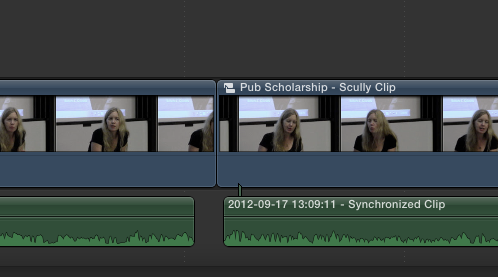
I took a screen shot and added it as an attachment here, but I don't know if it worked.
(To fix the sound issue when it occurred, I separated out the audio and created a soundless gap during the transition.)
Please Log in to join the conversation.
04 Nov 2012 18:38 #16591
by riversurf
Replied by riversurf on topic Transition Purgatory
Screen shot obviously did work. And obviously this example is without a transition inserted.
Please Log in to join the conversation.

04 Nov 2012 18:51 #16593
by Wildgiles
Replied by Wildgiles on topic Transition Purgatory
I had problems with transitions on day 1, It stems from transitioning, compound clips(sync clips). I found it best to break apart sound from the clips and add to a secondary storyline for the audio transitions. Unless somehow things have improved in 10.0.6 but I haven't heard otherwise.
Please Log in to join the conversation.
- Tom Wolsky
-
- Offline
- Moderator
-
04 Nov 2012 19:18 #16594
by Tom Wolsky
Replied by Tom Wolsky on topic Transition Purgatory
Working with compound clips (like synced audio) is very different from working between clips with audio.
I'm a little puzzled with what the screen shot shows. The video clips is a compound clip, but the audio is attached. Normally if you break apart a synchronized clip you just get video and audio as two separate pieces. Don't understand why there is a compound clip on the primary.
I'm a little puzzled with what the screen shot shows. The video clips is a compound clip, but the audio is attached. Normally if you break apart a synchronized clip you just get video and audio as two separate pieces. Don't understand why there is a compound clip on the primary.
Please Log in to join the conversation.
04 Nov 2012 19:53 #16597
by riversurf
Replied by riversurf on topic Transition Purgatory
Don't know if this will clarify anything, but: I synced the video with audio that was recorded separately on a digital recorder, then went into Inspector and de-activated the audio track that was recorded by the videocam. Then I just detached the audio and this is what I got. In fact, it's always what I get when I detach audio from a synced clip, so I didn't know it was abnormal.
This is the type of thing (not to mention the transitions problem, regular crashes lockups and complete shutdowns, unpredictability, etc) that has led me to dislike FCPX so much, even at the very basic level for which I need it. Honestly, it's been one of the most frustrating computer-related experiences I've ever had and I'm finding out more and more that my problems don't stem entirely from my limited abilities. I probably shouldn't get started down that track. It'd just turn into a rant.
This is the type of thing (not to mention the transitions problem, regular crashes lockups and complete shutdowns, unpredictability, etc) that has led me to dislike FCPX so much, even at the very basic level for which I need it. Honestly, it's been one of the most frustrating computer-related experiences I've ever had and I'm finding out more and more that my problems don't stem entirely from my limited abilities. I probably shouldn't get started down that track. It'd just turn into a rant.
Please Log in to join the conversation.
- Tom Wolsky
-
- Offline
- Moderator
-
04 Nov 2012 20:06 #16598
by Tom Wolsky
Replied by Tom Wolsky on topic Transition Purgatory
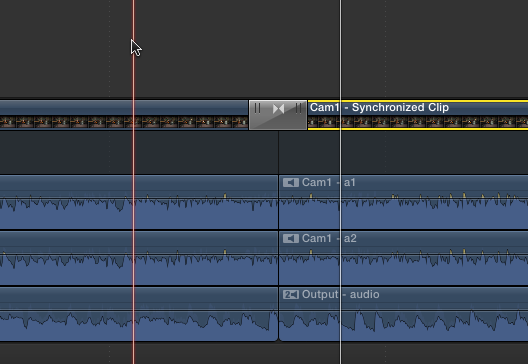
I see, you're detaching, not breaking apart I think. The behavior in 10.0.6 has changed a lot. You can expand the audio components of synchronized clips and put a transition between the video portions and then collapse the components.
Please Log in to join the conversation.

04 Nov 2012 20:49 #16599
by stitch
Replied by stitch on topic Transition Purgatory
I had several issues with transitions some I still haven't managed to solve but the main one seemed to stem from very small gaps between my media. When I enlarged/magnified the timeline it became obvious where the errors lay.
I still have some annoying issues but I'm sure I will get to the bottom of them with more experience.
I still have some annoying issues but I'm sure I will get to the bottom of them with more experience.
Please Log in to join the conversation.
04 Nov 2012 21:47 #16600
by riversurf
Replied by riversurf on topic Transition Purgatory
I'll keep an eye on that and see if I notice that happening.
Please Log in to join the conversation.
04 Nov 2012 21:49 #16601
by riversurf
Replied by riversurf on topic Transition Purgatory
I'm only using one audio track, so I haven't had to learn about breaking multiple tracks apart.
Please Log in to join the conversation.


04 Nov 2012 22:41 #16603
by dgwvideo
Tom addressed most of your audio transition issues, but these small pieces of clips you are seeing when enlarging your timeline is because you do not have sufficient handles on the video clips you are applying the transition to. As such, the transition is getting applied as much as it can and then creating the small pieces (which usually appear at each end of the affected clip). If your video clip is very near its end (designated by the red bracket as you stretch it out to each end) then your transition won't work as expected. If this is the case, try moving the ends in a bit from the end (5 or 10 frames) on each side of where you want to place the transition.
Creating history....one edit at a time !
Replied by dgwvideo on topic Transition Purgatory
stitch wrote: I had several issues with transitions some I still haven't managed to solve but the main one seemed to stem from very small gaps between my media. When I enlarged/magnified the timeline it became obvious where the errors lay.
Tom addressed most of your audio transition issues, but these small pieces of clips you are seeing when enlarging your timeline is because you do not have sufficient handles on the video clips you are applying the transition to. As such, the transition is getting applied as much as it can and then creating the small pieces (which usually appear at each end of the affected clip). If your video clip is very near its end (designated by the red bracket as you stretch it out to each end) then your transition won't work as expected. If this is the case, try moving the ends in a bit from the end (5 or 10 frames) on each side of where you want to place the transition.
Creating history....one edit at a time !
Please Log in to join the conversation.
05 Nov 2012 02:18 #16618
by stitch
Replied by stitch on topic Transition Purgatory
Hi Tom,
Not sure if that was meant for the thread starter? I was fortunate enough in my most recent project that the media in my case always had 10 to 15 seconds available at the start and end.
However even to me it does sound like this is more a case of I'm not 100% sure what I'm doing, rather than an issue with the program so I'm happy to persevere.
Not sure if that was meant for the thread starter? I was fortunate enough in my most recent project that the media in my case always had 10 to 15 seconds available at the start and end.
However even to me it does sound like this is more a case of I'm not 100% sure what I'm doing, rather than an issue with the program so I'm happy to persevere.
Please Log in to join the conversation.
05 Nov 2012 02:33 #16619
by riversurf
Replied by riversurf on topic Transition Purgatory
But the thing is I did have sufficient handles, at least the way I understand it. Usually, the sections of video between which I want to put a transition are nowhere near the start or the end of the original clip in the event library. That's why it's been so frustrating.
Please Log in to join the conversation.
05 Nov 2012 02:53 #16620
by dgwvideo
Creating history....one edit at a time !
Replied by dgwvideo on topic Transition Purgatory
The handles have nothing to do with the start or end of the original clip in the event library. They refer to the in and out points that you mark from that event library clip to place into the timeline. There needs to be enough extra media on the timeline clip to accommodate the transition and that timeline clip may be simply a 5 second piece of your 4 minute event library clip (for example).
Creating history....one edit at a time !
Please Log in to join the conversation.
05 Nov 2012 15:08 #16640
by riversurf
Replied by riversurf on topic Transition Purgatory
I'm just not getting this (and I've watched and read countless "official" and independent tutorial videos). If I, for example, take a one-minute segment of a clip in the event library and move it to the Timeline, then I skip the next minute of that clip and insert the following couple minutes into the Timeline right after the first one I inserted, than I add a transition, shouldn't FCPX add whatever handles it needs from the unused section of the clip to create that transition?
Please Log in to join the conversation.
- Tom Wolsky
-
- Offline
- Moderator
-
05 Nov 2012 15:16 #16643
by Tom Wolsky
Replied by Tom Wolsky on topic Transition Purgatory
Are you editing a clip or a compound clip?
Please Log in to join the conversation.
05 Nov 2012 15:37 #16645
by riversurf
Replied by riversurf on topic Transition Purgatory
Looks like compound clip. Usually I have to sync the audio to create a Synchronized Clip. This doesn't show up as a compound clip when I drop it into the timeline. But then if I detach audio and then re-attach it, the result is a compound clip, even if I didn't make any changes to anything at all.
Short answer though: compound clips.
Short answer though: compound clips.
Please Log in to join the conversation.

05 Nov 2012 15:41 #16647
by BenB
Replied by BenB on topic Transition Purgatory
To verify you have "handles", double-click the edit point to open it into the Precision Editor. There you will see plainly if you have handles or not, and if so, how much.
Please Log in to join the conversation.
