


- Posts: 8
- Thank you received: 0
3 Post Moderation Rule for New Boarders (25 Jan 2021)
New boarders will have their posts moderated - Don't worry if you cannot see your post immediately.
Slowing down title animations in FCPX
03 Nov 2012 22:21 #16531
by scottyd
Slowing down title animations in FCPX was created by scottyd
I'm trying to slow down the "Assembler" build in/out title. Can't seem to find an easy way to do this. The re-time function is greyed out. I would like the text to fly in at a slower rate.
The topic has been locked.

03 Nov 2012 22:39 #16534
by dgwvideo
Creating history....one edit at a time !
Replied by dgwvideo on topic Slowing down title animations in FCPX
In the timeline, stretch your title to make it longer (slower) or shorter (faster).
Creating history....one edit at a time !
The topic has been locked.
03 Nov 2012 22:43 #16537
by scottyd
Replied by scottyd on topic Slowing down title animations in FCPX
I tried this, but it didn't seem to slow down the animation of the titles flying it. Everything still appeared at the same rate. For example, 2 seconds into the title everything has already appeared. I want to stretch that time out.
The topic has been locked.
03 Nov 2012 23:19 #16543
by dgwvideo
Creating history....one edit at a time !
Replied by dgwvideo on topic Slowing down title animations in FCPX
Yeah, this won't work for all titles, depending on how they were built. If you are handy with Motion, it shouldn't be a big deal to open the title in Motion and make your speed changes there, then just re-publish to FCPX.
Creating history....one edit at a time !
The topic has been locked.
03 Nov 2012 23:21 #16544
by scottyd
Replied by scottyd on topic Slowing down title animations in FCPX
Any tips for doing this in Motion? I'm not very familiar with it. I opened it in Motion, but I couldn't seem to find out how to adjust speed.
The topic has been locked.
03 Nov 2012 23:31 #16545
by dgwvideo
Creating history....one edit at a time !
Replied by dgwvideo on topic Slowing down title animations in FCPX
Not sure I can walk you thru that in a short time. Depends also on what title you're dealing with, but if you look at the timeline area where your elements are placed, you should be able to drag them out slowing the speed. If you move the whole bar that represents the element in question you will be affecting how soon or late it appears on screen.
Maybe experiment a bit with moving things around and see how that is impacting your playback.
Otherwise, let me know what title you're using and I see if I can have a look at it tonight or tomorrow.
Maybe experiment a bit with moving things around and see how that is impacting your playback.
Otherwise, let me know what title you're using and I see if I can have a look at it tonight or tomorrow.
Creating history....one edit at a time !
The topic has been locked.
- Scrubelicious
-

- Offline
- Platinum Member
-

Less
More
- Posts: 1228
- Thank you received: 114
03 Nov 2012 23:35 #16546
by Scrubelicious
Replied by Scrubelicious on topic Slowing down title animations in FCPX
I will Take a Look at the Project later on wie. I get some Time but try to adjustier the keyframes of the Animation in the keyframe viewer (command 7).
The topic has been locked.
03 Nov 2012 23:38 #16548
by dgwvideo
Creating history....one edit at a time !
Replied by dgwvideo on topic Slowing down title animations in FCPX
Scrubs to the rescue :woohoo:
Creating history....one edit at a time !
The topic has been locked.

04 Nov 2012 00:47 - 04 Nov 2012 00:49 #16550
by FCPGuy
Replied by FCPGuy on topic Slowing down title animations in FCPX
The Assembler project is bild with Behaviors and co. I can create a rigged project but it would be faster if you can let me know how long the build in/out should take.
dgwvideo, I guess so... or not!
dgwvideo, I guess so... or not!
Last edit: 04 Nov 2012 00:49 by FCPGuy.
The topic has been locked.
04 Nov 2012 00:55 #16552
by scottyd
Replied by scottyd on topic Slowing down title animations in FCPX
Hmm I don't really have a specific time. I was hoping I could mess around with it and see what looked best. Appreciate the offer though. I really want to learn this stuff, so I don't want it to be done for me. Pointed in the right direction (as far as what to modify in Motion) would be most helpful.
The topic has been locked.
- Scrubelicious
-
- Offline
- Platinum Member
-
Less
More
- Posts: 1228
- Thank you received: 114
04 Nov 2012 02:17 #16554
by Scrubelicious
Unless I missed something since the release, you can not Rig keyframes over time.
yup always here to help.
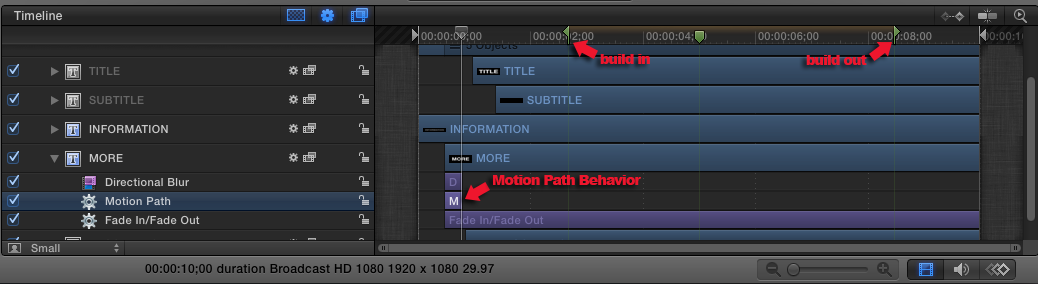
Yes the project uses Behaviors which is easy to modify. Right click the Title in the Titles Browser and Open in Motion.
Just adjust the length the behavior in the corresponding track to slow down the speed of the animation. Or move them down the timeline but you will also have to adjust the in and outs of the individual "clips or objects".
Keep in mind when publishing it back into FCPX you might want to adjust your build in and out markers.
Here is a screenshot, if you have any other question post them here!
Replied by Scrubelicious on topic Slowing down title animations in FCPX
FCPGuy wrote: The Assembler project is bild with Behaviors and co. I can create a rigged project but it would be faster if you can let me know how long the build in/out should take.
dgwvideo, I guess so... or not!
Unless I missed something since the release, you can not Rig keyframes over time.
yup always here to help.
scottyd wrote: Hmm I don't really have a specific time. I was hoping I could mess around with it and see what looked best. Appreciate the offer though. I really want to learn this stuff, so I don't want it to be done for me. Pointed in the right direction (as far as what to modify in Motion) would be most helpful.
Yes the project uses Behaviors which is easy to modify. Right click the Title in the Titles Browser and Open in Motion.
Just adjust the length the behavior in the corresponding track to slow down the speed of the animation. Or move them down the timeline but you will also have to adjust the in and outs of the individual "clips or objects".
Keep in mind when publishing it back into FCPX you might want to adjust your build in and out markers.
Here is a screenshot, if you have any other question post them here!
The topic has been locked.
04 Nov 2012 03:26 #16557
by scottyd
Replied by scottyd on topic Slowing down title animations in FCPX
Thank you Scrubelicious. I got it to slow down quite a bit by dragging out the motion path and moving each element down the timeline causing each to come in one after another instead of all at once. My question is how does the build in and out time work? What does it do and what is the middle marker (poster frame?) for?
The topic has been locked.
28 Mar 2021 07:42 #113719
by Adamesq
Replied by Adamesq on topic Slowing down title animations in FCPX
Scotty, have you tried just putting Assembler in a Compound Clip, then slowing down the Compound Clip playback? It work, I'm just not sure if it's exactly what you want.
The topic has been locked.
- Carsten Orlt
-

- Offline
- Platinum Member
-
Less
More
- Posts: 422
- Thank you received: 82
28 Mar 2021 21:36 #113731
by Carsten Orlt
Replied by Carsten Orlt on topic Slowing down title animations in FCPX
Great advice in this thread. I was just wondering if maybe the easiest solution is to make a copy of the title template in Motion and only remove the marker(s). Because the first marker sets that the timing of any behaviour or keyframes to the left (beginning) doesn’t change regardless of length of the title in your FCP project. If you remove that marker and publish the title under its own name the time of all behaviours and/or keyframes will be adjusted in relation to the overall length of the title in the FCP project. This will then result in what you’re trying to do: lengthen the build in time by lengthening the total title duration.
The idea behind these markers is that they make it possible to protect the timing of behaviours and keyframes regardless of length of the title so if you remove them the protection disappears.
The idea behind these markers is that they make it possible to protect the timing of behaviours and keyframes regardless of length of the title so if you remove them the protection disappears.
The topic has been locked.
30 Mar 2021 06:40 #113752
by Adamesq
Tested & confirmed! Thanks, Carsten. If the markers are wanted, you could go in and make each behavior longer, but, as mentioned above, timing still wouldn't be adjustable from within FCPx as it is with Carsten's suggestion.
Replied by Adamesq on topic Slowing down title animations in FCPX
Carsten Orlt wrote: ...If you remove that marker and publish the title under its own name the time of all behaviours and/or keyframes will be adjusted in relation to the overall length of the title in the FCP project....
Tested & confirmed! Thanks, Carsten. If the markers are wanted, you could go in and make each behavior longer, but, as mentioned above, timing still wouldn't be adjustable from within FCPx as it is with Carsten's suggestion.
The topic has been locked.
30 Mar 2021 20:28 - 30 Mar 2021 20:29 #113766
by scottyd
Replied by scottyd on topic Slowing down title animations in FCPX
This is a 9 year old thread that I hardly even remember making. Forgot I subscribed to new replies. Not even sure what I ended up doing.
Last edit: 30 Mar 2021 20:29 by scottyd.
The topic has been locked.
