


- Posts: 9
- Thank you received: 0
3 Post Moderation Rule for New Boarders (25 Jan 2021)
New boarders will have their posts moderated - Don't worry if you cannot see your post immediately.
Share Audio Settings in 10.0.6
02 Nov 2012 11:42 #16445
by sg335man
Share Audio Settings in 10.0.6 was created by sg335man
Hello All, I am new to FCPX and 10.0.6. In the Share or Export option, can you set the audio kHz and bit rate amount of audio compression etc. like in Compressor and QT7 Pro, possibly create a destination. I don't have Compressor but have QT 7.6.6 Pro. Having checked out the different audio settings they all seem to be preset. I presume the Destinations are set and cannot be customised? I guess I will have to get Compressor Thanks SG335man
Please Log in to join the conversation.
- Tom Wolsky
-

- Offline
- Moderator
-

02 Nov 2012 11:56 #16446
by Tom Wolsky
Replied by Tom Wolsky on topic Share Audio Settings in 10.0.6
The export presets have limited customizability. You need Compressor or MPEG Streamclip if you want better control and batch processing.
Please Log in to join the conversation.
- ronny courtens
-

- Offline
- Moderator
-
Less
More
- Posts: 4455
- Thank you received: 962
02 Nov 2012 12:11 #16448
by ronny courtens
Replied by ronny courtens on topic Share Audio Settings in 10.0.6
Tom is correct. I just wanted to chime in to say It gives me pleasure to see so many posts lately starting with "I am new to FCPX". Welcome to the family.
Please Log in to join the conversation.
02 Nov 2012 14:19 #16450
by sg335man
Replied by sg335man on topic Share Audio Settings in 10.0.6
Thanks again for all your Help . How would you get MPEG Stream Clip to show up in Export presets? Thank you SG335Man
Please Log in to join the conversation.
- Tom Wolsky
-
- Offline
- Moderator
-
02 Nov 2012 14:30 #16451
by Tom Wolsky
Replied by Tom Wolsky on topic Share Audio Settings in 10.0.6
You can't. You export a master file and take that to Streamclip.
Please Log in to join the conversation.

02 Nov 2012 16:17 #16457
by BenB
Replied by BenB on topic Share Audio Settings in 10.0.6
As Tom said, and I'll just elaborate, in the Settings tab of the Share window, there is a place to set the resulting exported file to open into another app right away. Look for the "When Done" menu in the Share window. It will change to "Open With" if an app is already set. I did a short, free tutorial about this, but I'm not supposed to post links.
Please Log in to join the conversation.
02 Nov 2012 16:48 #16463
by sg335man
Replied by sg335man on topic Share Audio Settings in 10.0.6
Thank you again for your help: It seems opening in another application to compress again rather long winded. Why Apple can't add QT Pro 7 settings where audio is concerned or at least include Compressor with FCPX? Oh well I guess they will get there one day. Again thank you all SG335Man
Please Log in to join the conversation.
02 Nov 2012 16:50 - 02 Nov 2012 16:51 #16464
by BenB
Replied by BenB on topic Share Audio Settings in 10.0.6
Bear in mind that FCP, Motion, and Compressor were WAY, WAY more expensive at one time. The price you pay for Compressor now, with all of its power, is dirt cheap.
The GUI hasn't been updated yet, some of the functions are built in to OS X 10.0.8, who knows, it may be dropped all together soon. Just like Shake, Color, Final Cut Server, etc. I'm not holding my breath for a Logic Pro X, either.
The GUI hasn't been updated yet, some of the functions are built in to OS X 10.0.8, who knows, it may be dropped all together soon. Just like Shake, Color, Final Cut Server, etc. I'm not holding my breath for a Logic Pro X, either.
Last edit: 02 Nov 2012 16:51 by BenB.
Please Log in to join the conversation.
- ronny courtens
-
- Offline
- Moderator
-
Less
More
- Posts: 4455
- Thank you received: 962
02 Nov 2012 18:35 - 02 Nov 2012 18:45 #16467
by ronny courtens
Replied by ronny courtens on topic Share Audio Settings in 10.0.6
When you have Compressor alongside with FCP10 you don't have to open your edit in any other application to convert it using customized settings.
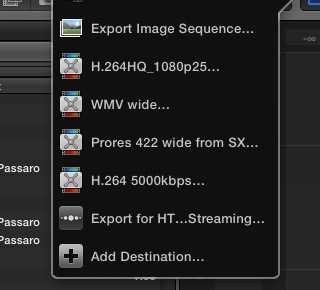
You can easily create your custom settings in Compressor and add these settings to the Destinations pane of your FCP10 Share window. When you select any of these Compressor settings for Sharing in FCP10 your edit will be converted to the appropriate setting as a background process. Compressor won't even open, it will just perform your conversion in the background while you can continue using FCP10. You can see the progress of the conversion in the new Share field in the Background Tasks window.
In the screenshot you see the Share window of one of our FCP10systems, where we have added custom Compressor settings for regular conversion tasks. This is a perfect workflow for us.
Like Ben said Compressor is really cheap at this moment. Only a small price tag for the many extra benefits you get when you want highly customizable conversion settings.
You can easily create your custom settings in Compressor and add these settings to the Destinations pane of your FCP10 Share window. When you select any of these Compressor settings for Sharing in FCP10 your edit will be converted to the appropriate setting as a background process. Compressor won't even open, it will just perform your conversion in the background while you can continue using FCP10. You can see the progress of the conversion in the new Share field in the Background Tasks window.
In the screenshot you see the Share window of one of our FCP10systems, where we have added custom Compressor settings for regular conversion tasks. This is a perfect workflow for us.
Like Ben said Compressor is really cheap at this moment. Only a small price tag for the many extra benefits you get when you want highly customizable conversion settings.
Last edit: 02 Nov 2012 18:45 by ronny courtens.
Please Log in to join the conversation.
02 Nov 2012 19:32 #16477
by BenB
Replied by BenB on topic Share Audio Settings in 10.0.6
To add, I have a specific tweaked still PNG Destination, a specific tweaked image sequence Destination, and specific tweaked REDCODE RAW Destination, a web video Destination, and several for various clients who are really picky about what they need in a deliverable. Very cool to have Compressor around to tweak it all.
Please Log in to join the conversation.

02 Nov 2012 23:29 #16487
by sidderke
Replied by sidderke on topic Share Audio Settings in 10.0.6
Hi Ben,
Just curious: what do you mean with REDCODE RAW destination?
Because to my knowledge, you can't write to REDCODE.
Are you talking about a 4K Prores 4444 preset or something?
Regards,
Just curious: what do you mean with REDCODE RAW destination?
Because to my knowledge, you can't write to REDCODE.
Are you talking about a 4K Prores 4444 preset or something?
Regards,
Please Log in to join the conversation.
03 Nov 2012 15:08 - 03 Nov 2012 15:09 #16510
by BenB
Replied by BenB on topic Share Audio Settings in 10.0.6
It is set to export ProRes 4444, open in RedCine-X Pro, also create an H.264 web ready preview copy.
I have a second one to simply make a ProRes HQcopy for screening.
I have a second one to simply make a ProRes HQcopy for screening.
Last edit: 03 Nov 2012 15:09 by BenB.
Please Log in to join the conversation.
