


- Posts: 3
- Thank you received: 0
3 Post Moderation Rule for New Boarders (25 Jan 2021)
New boarders will have their posts moderated - Don't worry if you cannot see your post immediately.
audio and video synchronization
02 Nov 2012 10:05 #16442
by gabih
audio and video synchronization was created by gabih
Hello,
I’m a beginner in FCPX and also in video editing, so please, help me!
I have to make a little video for an ensemble. I made the clip, and “under” it I have to put the music from a CD. But they do not match.... How can I make it, not to have a “sleep” between the audio and the video?
How can I synchronize?
Sorry for my silly question and my bad English. :blush:
I’m a beginner in FCPX and also in video editing, so please, help me!
I have to make a little video for an ensemble. I made the clip, and “under” it I have to put the music from a CD. But they do not match.... How can I make it, not to have a “sleep” between the audio and the video?
How can I synchronize?
Sorry for my silly question and my bad English. :blush:
Please Log in to join the conversation.
- ronny courtens
-

- Offline
- Moderator
-

Less
More
- Posts: 4455
- Thank you received: 962
02 Nov 2012 11:22 #16443
by ronny courtens
Replied by ronny courtens on topic audio and video synchronization
Welcome to the forum. There are no silly questions, only silly answers 
You say the video and your music clip do not "match". Do you mean the music is too short? If so, how much is it too short?
You say the video and your music clip do not "match". Do you mean the music is too short? If so, how much is it too short?
Please Log in to join the conversation.
02 Nov 2012 11:30 #16444
by gabih
Replied by gabih on topic audio and video synchronization
Hi,
my video is about 01.06.20, the audio (from the CD) ia 01.04.02.
When we made the video-shooting, the ensamble made a "play-back" for the original music, but the sound was not good, so that's why I must use the original audio for the clip. But I CAN NOT DO...
my video is about 01.06.20, the audio (from the CD) ia 01.04.02.
When we made the video-shooting, the ensamble made a "play-back" for the original music, but the sound was not good, so that's why I must use the original audio for the clip. But I CAN NOT DO...
Please Log in to join the conversation.
- ronny courtens
-
- Offline
- Moderator
-
Less
More
- Posts: 4455
- Thank you received: 962
02 Nov 2012 12:00 #16447
by ronny courtens
Replied by ronny courtens on topic audio and video synchronization
Ouch, now I see what you mean. There is always a way to "fix it", but you say the ensemble did a playback performance on the original music. If you mean they have played the original music from a CD or audio player and they performed on this music track, wouldn't it be better to ask them to send you the exact music track they have used during the shoot?
Of course, if the difference is only 2 seconds over 1 minute of video, you can always try to "stretch" the music track to make it as long as the video. This is how you do this:
Select the music clip and press CMD+R. A retiming bar will appear on top of the music clip.

Now drag the the two vertical strips on the right side of your the Retiming bar to the right to make your music clip as long as your video.
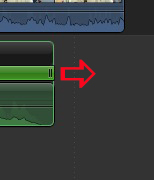
The green retiming bar will turn orange indicating you are slowing down your music clip.
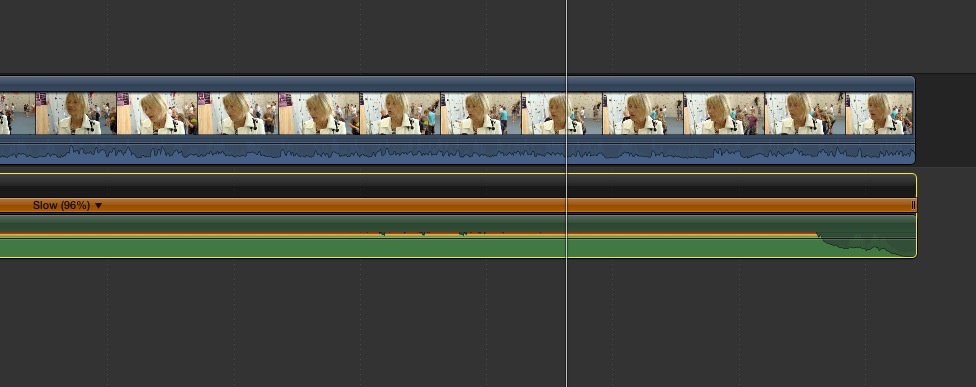
Now play your edit to see if the video is still in sync with the music. This may work or it may not work at all. It's the fastest solution I can think of without having to go through all your video clips and speed clips up to make your video match the length of your music.
As the difference is only about 4% stretching the music clip will not affect the quality of your music. Try this first and if it does not work come back for further advice.
Of course, if the difference is only 2 seconds over 1 minute of video, you can always try to "stretch" the music track to make it as long as the video. This is how you do this:
Select the music clip and press CMD+R. A retiming bar will appear on top of the music clip.
Now drag the the two vertical strips on the right side of your the Retiming bar to the right to make your music clip as long as your video.
The green retiming bar will turn orange indicating you are slowing down your music clip.
Now play your edit to see if the video is still in sync with the music. This may work or it may not work at all. It's the fastest solution I can think of without having to go through all your video clips and speed clips up to make your video match the length of your music.
As the difference is only about 4% stretching the music clip will not affect the quality of your music. Try this first and if it does not work come back for further advice.
Please Log in to join the conversation.
02 Nov 2012 12:48 #16449
by gabih
Replied by gabih on topic audio and video synchronization
THANK YOU!
I made it, and it works!!!!!!!!! Thanks again!
I made it, and it works!!!!!!!!! Thanks again!
Please Log in to join the conversation.
- ronny courtens
-
- Offline
- Moderator
-
Less
More
- Posts: 4455
- Thank you received: 962
02 Nov 2012 17:40 #16466
by ronny courtens
Replied by ronny courtens on topic audio and video synchronization
I am happy you have been able to solve the problem. Enjoy editing in FCP10!
Please Log in to join the conversation.

02 Nov 2012 18:47 #16468
by DaveG
Replied by DaveG on topic audio and video synchronization
Ronny,
You're a good man. I'm continually impressed by the quality of posts and posters here.
Dave
You're a good man. I'm continually impressed by the quality of posts and posters here.
Dave
Please Log in to join the conversation.
- ronny courtens
-
- Offline
- Moderator
-
Less
More
- Posts: 4455
- Thank you received: 962
02 Nov 2012 18:56 - 02 Nov 2012 18:58 #16469
by ronny courtens
Replied by ronny courtens on topic audio and video synchronization
Hi Dave,
Thanks for the kudos. I agree on the quality of the posts here. That's why this is the number one final cut resource on the net. Have a great weekend!
Thanks for the kudos. I agree on the quality of the posts here. That's why this is the number one final cut resource on the net. Have a great weekend!
Last edit: 02 Nov 2012 18:58 by ronny courtens.
Please Log in to join the conversation.
02 Nov 2012 19:24 #16474
by DaveG
Replied by DaveG on topic audio and video synchronization
Ronny,
I seem to remember your name from years ago back in the FCP 4.5 days. Was it possibly at Ken Stone or elsewhere?
Dave
I seem to remember your name from years ago back in the FCP 4.5 days. Was it possibly at Ken Stone or elsewhere?
Dave
Please Log in to join the conversation.
- ronny courtens
-
- Offline
- Moderator
-
Less
More
- Posts: 4455
- Thank you received: 962
02 Nov 2012 19:27 #16475
by ronny courtens
Replied by ronny courtens on topic audio and video synchronization
Yep I still am a regular contributor to Ken's site. Since many, many years now. Good to meet you here, Dave.
Please Log in to join the conversation.
- Cableaddict
-

- Offline
- Junior Member
-

Less
More
- Posts: 23
- Thank you received: 0
04 Nov 2012 18:33 #16589
by Cableaddict
Replied by Cableaddict on topic audio and video synchronization
Thanks, Ronnie, this just helped me as well.
I thought I would have to import my work into Protools, but this works (and sounds) fine.
I thought I would have to import my work into Protools, but this works (and sounds) fine.
Please Log in to join the conversation.


04 Nov 2012 23:09 #16606
by dgwvideo
Creating history....one edit at a time !
Replied by dgwvideo on topic audio and video synchronization
As usual, Ronny's solutions are the best. I will add, FWIW, that in certain situations where timing of clip changes or transitions are critical to match the beat of the music, longer time stretches may affect this timing but still sound OK. Visually, there could be a small mismatch.
In these cases, I have found a section of the audio clip (a chorus or such) and used the blade tool to cut and copy a piece of the original audio. With a little adjustment it is not too difficult to paste it onto the end of the song (or even somewhere in the middle) and blend it in to make it an unnoticeable extension. I just had to do this earlier in the week to add another 16 seconds to a song.
In these cases, I have found a section of the audio clip (a chorus or such) and used the blade tool to cut and copy a piece of the original audio. With a little adjustment it is not too difficult to paste it onto the end of the song (or even somewhere in the middle) and blend it in to make it an unnoticeable extension. I just had to do this earlier in the week to add another 16 seconds to a song.
Creating history....one edit at a time !
Please Log in to join the conversation.
