


- Posts: 49
- Thank you received: 2
3 Post Moderation Rule for New Boarders (25 Jan 2021)
New boarders will have their posts moderated - Don't worry if you cannot see your post immediately.
Anamorphic HD and Multicam
- Patrice Freymond
-
 Topic Author
- Offline
- Senior Member
-

Less
More
01 Nov 2012 10:44 #16362
by Patrice Freymond
Anamorphic HD and Multicam was created by Patrice Freymond
Hi,
Imported DVCProHD files for multicam show. Thumbnails are 4x3 and so is canvas picture, but individual clips play 16x9 in broadcast monitor fed through iOXT.
Multicam clip thumbnail is 16x9 but plays 4x3 in canvas and broadcast monitor.
This is using original files optimized in Prores 422. Now generating proxies to see if it is the same, but I am not holding my breath...
So the nice implementation of Multicam is not quite complete yet
or...
am I missing something ?
Imported DVCProHD files for multicam show. Thumbnails are 4x3 and so is canvas picture, but individual clips play 16x9 in broadcast monitor fed through iOXT.
Multicam clip thumbnail is 16x9 but plays 4x3 in canvas and broadcast monitor.
This is using original files optimized in Prores 422. Now generating proxies to see if it is the same, but I am not holding my breath...
So the nice implementation of Multicam is not quite complete yet
or...
am I missing something ?
Please Log in to join the conversation.
- Lee Patterson
-

- Offline
- Elite Member
-

Less
More
- Posts: 239
- Thank you received: 20
01 Nov 2012 11:45 #16364
by Lee Patterson
Replied by Lee Patterson on topic Anamorphic HD and Multicam
Am i missing something, is the footage true anamorphic from the lens?
Please Log in to join the conversation.
- Patrice Freymond
-
Topic Author
- Offline
- Senior Member
-
Less
More
- Posts: 49
- Thank you received: 2
01 Nov 2012 11:54 #16365
by Patrice Freymond
Replied by Patrice Freymond on topic Anamorphic HD and Multicam
Err... Dvcprohd 1440x1080 = anamorphic format (not full raster @1920x1080)
Please Log in to join the conversation.
- ronny courtens
-

- Offline
- Moderator
-

Less
More
- Posts: 4455
- Thank you received: 962
01 Nov 2012 13:22 #16371
by ronny courtens
Replied by ronny courtens on topic Anamorphic HD and Multicam
FCP10.0.6 has an Anamorphic Override option. To activate it you will have to make a small adjustment to your Settings View:
Go to your Events Browser and select one of the original anamorphic files you have imported (not the multicam clip).
In the Inspector click the Info tab. At the bottom of the Info window change "Basic View" to "Settings View". Click "Settings View" again and select "Edit Metadata View". In the Metadata View list put a checkmark next to "Anamorphic Override" and press OK. Now the Anamorphic Override option will always show up whenever you select Settings View.
With the original anamorphic clip selected in your Events Browser change the Anamorphic Override option in the Inspector > Info window to "widescreen". The thumbnail of the clip in the Events Browser should now change from "4:3" to widescreen and it should display as widescreen in your Viewer. Does this work?
If it works change all the original anamorphic clips to "widescreen" using the Anamorphic Override option, then recreate your multicam clip. It should play fine now in your Viewer and your monitor.
Go to your Events Browser and select one of the original anamorphic files you have imported (not the multicam clip).
In the Inspector click the Info tab. At the bottom of the Info window change "Basic View" to "Settings View". Click "Settings View" again and select "Edit Metadata View". In the Metadata View list put a checkmark next to "Anamorphic Override" and press OK. Now the Anamorphic Override option will always show up whenever you select Settings View.
With the original anamorphic clip selected in your Events Browser change the Anamorphic Override option in the Inspector > Info window to "widescreen". The thumbnail of the clip in the Events Browser should now change from "4:3" to widescreen and it should display as widescreen in your Viewer. Does this work?
If it works change all the original anamorphic clips to "widescreen" using the Anamorphic Override option, then recreate your multicam clip. It should play fine now in your Viewer and your monitor.
Please Log in to join the conversation.

01 Nov 2012 13:31 #16373
by BenB
Replied by BenB on topic Anamorphic HD and Multicam
I shoot DVCPR0-HD from an HVX-200 and an HPX-170, I don't have any issues as being described. You shouldn't need to convert to ProRes as DVCPRO-HD is already optimized.
Are these clips from tape or P2?
How did you ingest them?
Are these clips from tape or P2?
How did you ingest them?
Please Log in to join the conversation.
- Patrice Freymond
-
Topic Author
- Offline
- Senior Member
-
Less
More
- Posts: 49
- Thank you received: 2
01 Nov 2012 14:27 #16390
by Patrice Freymond
Replied by Patrice Freymond on topic Anamorphic HD and Multicam
Thanks for your answers.
However:
- as per Apple FCPX manual, the Override option is only present for SD formats. I am using DVCProHD
- I prefer to convert to ProRes (and should be able to). This gives me better performance, specially once I start to add corrections and effects. Render times will be shorter with full raster frames and my end product spec is full raster.
However:
- as per Apple FCPX manual, the Override option is only present for SD formats. I am using DVCProHD
- I prefer to convert to ProRes (and should be able to). This gives me better performance, specially once I start to add corrections and effects. Render times will be shorter with full raster frames and my end product spec is full raster.
Please Log in to join the conversation.
- Patrice Freymond
-
Topic Author
- Offline
- Senior Member
-
Less
More
- Posts: 49
- Thank you received: 2
01 Nov 2012 14:28 #16391
by Patrice Freymond
Replied by Patrice Freymond on topic Anamorphic HD and Multicam
Clips are pushed from EVS XT2 in our Studio to our SAN.
Please Log in to join the conversation.
01 Nov 2012 14:41 - 01 Nov 2012 14:42 #16396
by BenB
Replied by BenB on topic Anamorphic HD and Multicam
DVCOPRO-HD, yes, what I've been using for years. There is not one single reason to transcode it to ProRes. There is no better performance, holds up just as well as ProRes to compositing and color work, full raster frames in your end product. They are both All I-Frame codecs. I've run some tests over the years, never found a single reason to transcode DVDPRO-HD to ProRes. Just saying, it's all I-Frame, that's all you need, that's all ProRes is.
No reason to mess with the anamorphic flag for HD footage, that is correct.
Are these DVCPRO-HD clips coming from P2 or tape originally?
No reason to mess with the anamorphic flag for HD footage, that is correct.
Are these DVCPRO-HD clips coming from P2 or tape originally?
Last edit: 01 Nov 2012 14:42 by BenB.
Please Log in to join the conversation.
- peteramwiggins
-

- Offline
- Administrator
-

- The Administrator :)
Less
More
- Posts: 1049
- Thank you received: 404
01 Nov 2012 14:55 #16397
by peteramwiggins
Administrator
Replied by peteramwiggins on topic Anamorphic HD and Multicam
Patrice,
EVS will also write out HD ProRes 422. I know that you might be set up for DVCPRO HD but that would solve a lot of problems and optimise your system.
Could you export to an EVS watched bin from FCPX? I don't know
Peter
EVS will also write out HD ProRes 422. I know that you might be set up for DVCPRO HD but that would solve a lot of problems and optimise your system.
Could you export to an EVS watched bin from FCPX? I don't know
Peter
Administrator
Please Log in to join the conversation.
01 Nov 2012 15:15 #16401
by BenB
What problems will it solve, and how will it "optimize" anything? I'm just trying to understand what transcoding from DVCPRO-HD to ProRes buys you.
Replied by BenB on topic Anamorphic HD and Multicam
peteramwiggins wrote: EVS will also write out HD ProRes 422. I know that you might be set up for DVCPRO HD but that would solve a lot of problems and optimise your system.
What problems will it solve, and how will it "optimize" anything? I'm just trying to understand what transcoding from DVCPRO-HD to ProRes buys you.
Please Log in to join the conversation.
- peteramwiggins
-
- Offline
- Administrator
-
- The Administrator :)
Less
More
- Posts: 1049
- Thank you received: 404
01 Nov 2012 15:18 #16404
by peteramwiggins
Administrator
Replied by peteramwiggins on topic Anamorphic HD and Multicam
Not transcoding anything
EVS writes out ProRes, Edit in ProREs, write back to EVS in Prores.
Optimised - graphics in ProRes 422 or Prores4444
Render times shorter, better performance
EVS writes out ProRes, Edit in ProREs, write back to EVS in Prores.
Optimised - graphics in ProRes 422 or Prores4444
Render times shorter, better performance
Administrator
Please Log in to join the conversation.
01 Nov 2012 16:04 #16410
by BenB
Replied by BenB on topic Anamorphic HD and Multicam
Actually, in our tests, DVCPRO-HD and ProRes 422 (both Intra-frame codecs) give the same performance and render/export times. Optimized in FCP X means anything that is all I-Frame. Aside from simply crating a homogenous workflow, I don't see ProRes giving any advantage over DVCPRO-HD.
But ProRes can give you a homogenous environment if you're working with a variety of camera types mixing Inter-Frame and Intra-Frame formats.
But ProRes can give you a homogenous environment if you're working with a variety of camera types mixing Inter-Frame and Intra-Frame formats.
Please Log in to join the conversation.
- Patrice Freymond
-
Topic Author
- Offline
- Senior Member
-
Less
More
- Posts: 49
- Thank you received: 2
01 Nov 2012 16:12 #16411
by Patrice Freymond
Replied by Patrice Freymond on topic Anamorphic HD and Multicam
Hi Peter,
thank you for adding to this thread.
I know we could be doing a full ProRes workflow straight off the XT2's. Historically the choice for DVCProHD was because we are split between Avid(PC) and FCP7 and DVCProHD was until recently the only Codec working on EVS that would play nicely on both platforms.
I am testing FCPX to see how it would fit into current established workflows and what, if needed, we would need to change to accommodate it.
Graphics is one reason for staying PR full raster since we have a ton of legacy stuff originating in Motion. Incidentally I am also playing with the idea of keeping Automotion to generate titles from templates we already have, even though, since there is no compatibility with FCPX, it means a trip through Motion 5 to transform them so we can use them. Surely this can be scripted (Automator?)
Lots of fun but because we got all sorts of situations it will take some time to figure things out.
I even got an SD MXF (IMX50) file that refuses to play nice with respect to anamorphic issue. Was cut in Avid and exported with MXF wrapper. Some flag too many or lost...
thank you for adding to this thread.
I know we could be doing a full ProRes workflow straight off the XT2's. Historically the choice for DVCProHD was because we are split between Avid(PC) and FCP7 and DVCProHD was until recently the only Codec working on EVS that would play nicely on both platforms.
I am testing FCPX to see how it would fit into current established workflows and what, if needed, we would need to change to accommodate it.
Graphics is one reason for staying PR full raster since we have a ton of legacy stuff originating in Motion. Incidentally I am also playing with the idea of keeping Automotion to generate titles from templates we already have, even though, since there is no compatibility with FCPX, it means a trip through Motion 5 to transform them so we can use them. Surely this can be scripted (Automator?)
Lots of fun but because we got all sorts of situations it will take some time to figure things out.
I even got an SD MXF (IMX50) file that refuses to play nice with respect to anamorphic issue. Was cut in Avid and exported with MXF wrapper. Some flag too many or lost...
Please Log in to join the conversation.
- peteramwiggins
-
- Offline
- Administrator
-
- The Administrator :)
Less
More
- Posts: 1049
- Thank you received: 404
01 Nov 2012 16:27 #16414
by peteramwiggins
Administrator
Replied by peteramwiggins on topic Anamorphic HD and Multicam
You cannot optimise XDCAM and that isn't I Frame
I was told that optimise means that there is little gain to be had in performance from transcoding the footage
I was told that optimise means that there is little gain to be had in performance from transcoding the footage
Administrator
Please Log in to join the conversation.
- peteramwiggins
-
- Offline
- Administrator
-
- The Administrator :)
Less
More
- Posts: 1049
- Thank you received: 404
01 Nov 2012 16:30 #16415
by peteramwiggins
Administrator
Replied by peteramwiggins on topic Anamorphic HD and Multicam
Don't know if it will help, but I believe there is a lot of media sharing now via EVS with AVC Intra
I worked on a large sporting event recently that EVSs served that to FCP7 & Avid suites. Had to use MXF for Mac.
I worked on a large sporting event recently that EVSs served that to FCP7 & Avid suites. Had to use MXF for Mac.
Administrator
Please Log in to join the conversation.
- ronny courtens
-
- Offline
- Moderator
-
Less
More
- Posts: 4455
- Thank you received: 962
01 Nov 2012 16:47 #16416
by ronny courtens
Replied by ronny courtens on topic Anamorphic HD and Multicam
Hi Patrice,
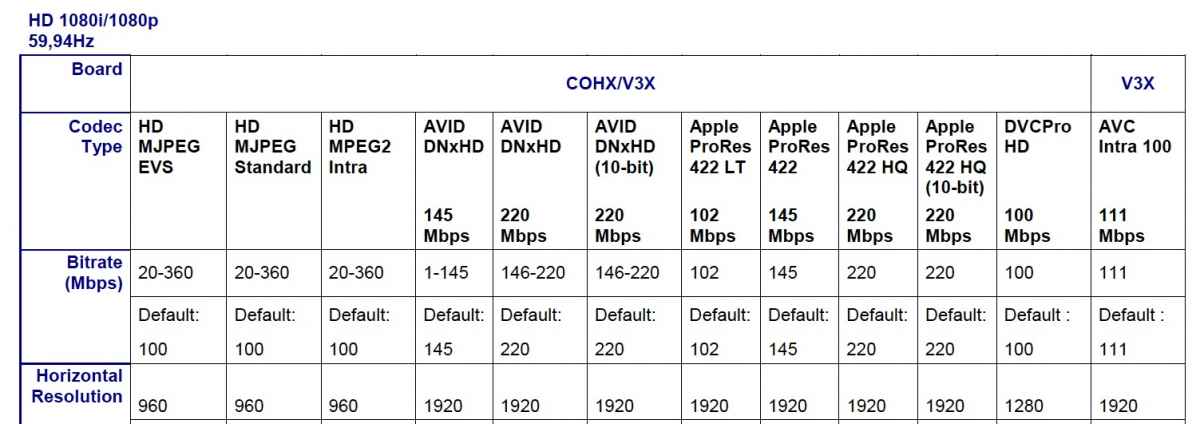
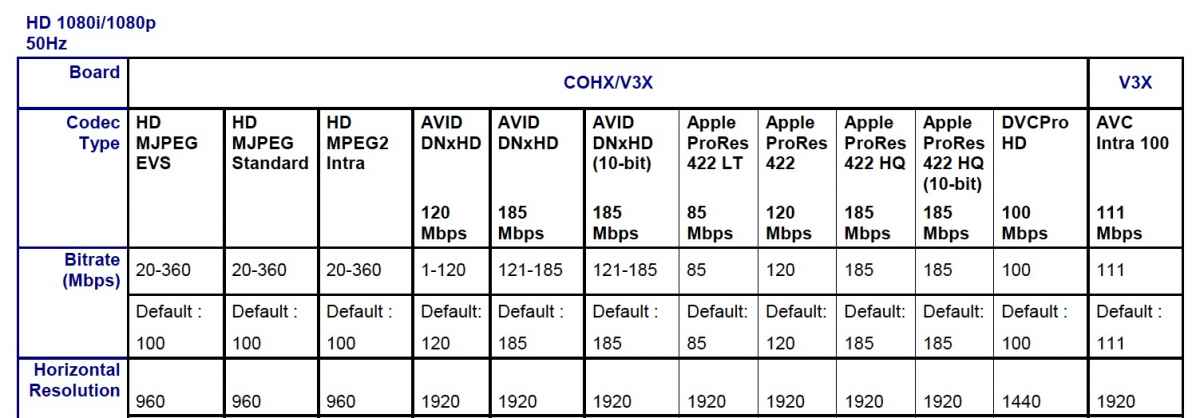
I have taken this up with our technical guy. Are you by any chance in PAL world? He says the EVS XT3 we have is set by default to a pixel width of 1440 for DVCPRO HD at 50 Hz (PAL) and to a 1280 pixel width for DVCPRO HD at 60 Hz. (see screenshots 1 and 2). This could explain why your DVCPRO HD video comes out squished without an anamorphic flag.
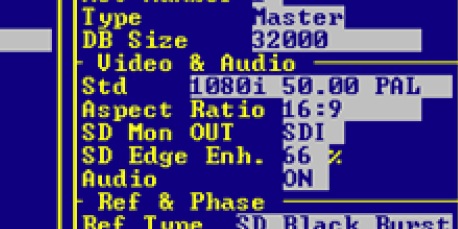
Apparently you can change the aspect ratio setting in the EVS Configuration menu (F9) to force widescreen aspect ratio on the output module (see screenshot 3).
I cannot vow for this, we hardly ever use DVCPRO HD in our post workflow. But maybe this can help.
You are correct that the Anamorphic Override option is not available for HD, my mistake. But reading all the posts of people who are having trouble with DVCPRO HD not displaying correctly in FCP10 I really wish there was such an option.
I have taken this up with our technical guy. Are you by any chance in PAL world? He says the EVS XT3 we have is set by default to a pixel width of 1440 for DVCPRO HD at 50 Hz (PAL) and to a 1280 pixel width for DVCPRO HD at 60 Hz. (see screenshots 1 and 2). This could explain why your DVCPRO HD video comes out squished without an anamorphic flag.
Apparently you can change the aspect ratio setting in the EVS Configuration menu (F9) to force widescreen aspect ratio on the output module (see screenshot 3).
I cannot vow for this, we hardly ever use DVCPRO HD in our post workflow. But maybe this can help.
You are correct that the Anamorphic Override option is not available for HD, my mistake. But reading all the posts of people who are having trouble with DVCPRO HD not displaying correctly in FCP10 I really wish there was such an option.
Please Log in to join the conversation.
- Patrice Freymond
-
Topic Author
- Offline
- Senior Member
-
Less
More
- Posts: 49
- Thank you received: 2
01 Nov 2012 17:12 #16419
by Patrice Freymond
Replied by Patrice Freymond on topic Anamorphic HD and Multicam
Thank you for these. Yes I am in PAL land.
It is reassuring to know that others share the issues :huh:
Most of our stuff travels in MXF wrapper and I am testing MXF4Mac suite with FCPX as we speak. Works very well with XDCAM HD material, no rendering and very stable in FCPX.
I still have to feed this back into the network and see if the transmission guys are happy with the resulting files.
MXF is coming together but as you know there have been many issues with "so called" MXF ready/compatible hardware...
Will keep digging ... always open to suggestions...
It is reassuring to know that others share the issues :huh:
Most of our stuff travels in MXF wrapper and I am testing MXF4Mac suite with FCPX as we speak. Works very well with XDCAM HD material, no rendering and very stable in FCPX.
I still have to feed this back into the network and see if the transmission guys are happy with the resulting files.
MXF is coming together but as you know there have been many issues with "so called" MXF ready/compatible hardware...
Will keep digging ... always open to suggestions...
Please Log in to join the conversation.
- ronny courtens
-
- Offline
- Moderator
-
Less
More
- Posts: 4455
- Thank you received: 962
01 Nov 2012 17:32 #16420
by ronny courtens
Replied by ronny courtens on topic Anamorphic HD and Multicam
We are quite happy with MXF4Mac. Most of our broadcast clients require file delivery as MXF for audio and video with an XML for the metadata. It's slowly developing into a standard. And we love standards.
I see you're in Switzerland, I am in Belgium. Happy to hear that more and more professionals are looking into changing an existing workflow to accomodate for FP10. Times really are changing
I hope you will find all the answers to your questions. This forum is absolutely the best for FCP10 related questions. And if you want to discuss any technical or other broadcast workflows in person here's my number: ++32 470 53 18 97. I speak fluent French and German, but no Romansh
I see you're in Switzerland, I am in Belgium. Happy to hear that more and more professionals are looking into changing an existing workflow to accomodate for FP10. Times really are changing
I hope you will find all the answers to your questions. This forum is absolutely the best for FCP10 related questions. And if you want to discuss any technical or other broadcast workflows in person here's my number: ++32 470 53 18 97. I speak fluent French and German, but no Romansh
Please Log in to join the conversation.
- Patrice Freymond
-
Topic Author
- Offline
- Senior Member
-
Less
More
- Posts: 49
- Thank you received: 2
01 Nov 2012 17:42 #16421
by Patrice Freymond
Replied by Patrice Freymond on topic Anamorphic HD and Multicam
We've been using MXF4Mac on FCP7 for a few years with good results. Issues were more of the unwrapping re-wrapping in the video/audio post workflows, but those are ironed out nowadays.
we have a lot of different formats to deal with, from HDCAM tapes to FCP exports of different flavors to EVS generated material to Avid pieces in either IMX or DNXHD. Oh, and the occasional DV document or Beta SP archive....
At this point I am quite happy with the way FCPX deals with HD but it is the legacy material that seems the most problematic if one wants to avoid systematically transcoding everything...
Thanks for the help and no, I don't speak romantsch either. Guess we'll keep this exchange in english here otherwise I fear we'll lose our audience (although Peter has done enough TDF and RG to speak decent french by now
we have a lot of different formats to deal with, from HDCAM tapes to FCP exports of different flavors to EVS generated material to Avid pieces in either IMX or DNXHD. Oh, and the occasional DV document or Beta SP archive....
At this point I am quite happy with the way FCPX deals with HD but it is the legacy material that seems the most problematic if one wants to avoid systematically transcoding everything...
Thanks for the help and no, I don't speak romantsch either. Guess we'll keep this exchange in english here otherwise I fear we'll lose our audience
(although Peter has done enough TDF and RG to speak decent french by now Please Log in to join the conversation.
