


- Posts: 379
- Thank you received: 6
3 Post Moderation Rule for New Boarders (25 Jan 2021)
New boarders will have their posts moderated - Don't worry if you cannot see your post immediately.
Multicam & Audio
- Marc Lucas
-
 Topic Author
- Offline
- Platinum Member
-

Less
More
31 Oct 2012 02:22 #16268
by Marc Lucas
Multicam & Audio was created by Marc Lucas
Having a couple of strange things going on with a MC which was created 10.0.5 and I'm now on 10.0.6
First of all the waveforms seem to be taking a really long time to cache, I have 10 tracks and am using Proxy media for the multi cam.
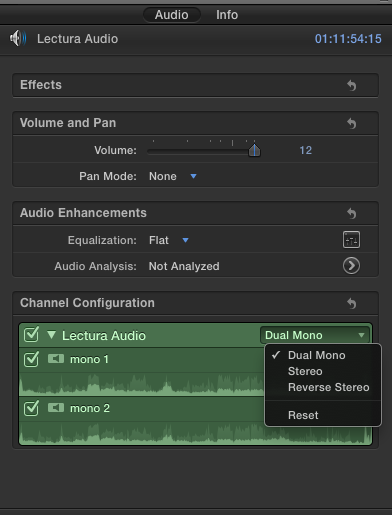
If I'm in the Angle viewer and select an audio track I can clearly see that I have made it dual mono and I can also make put it back to stereo because the option isn't greyed out (PIC1)
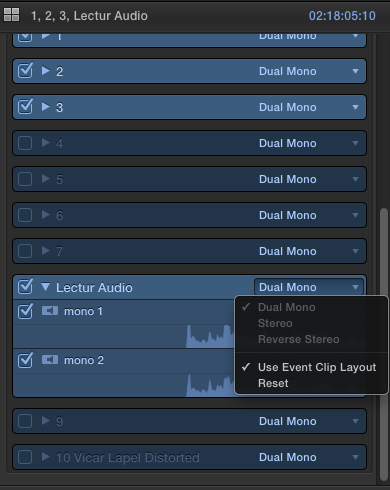
If I am in the Timeline after editing in the MC clip and I select the same audio track (PIC2) the options are greyed out.
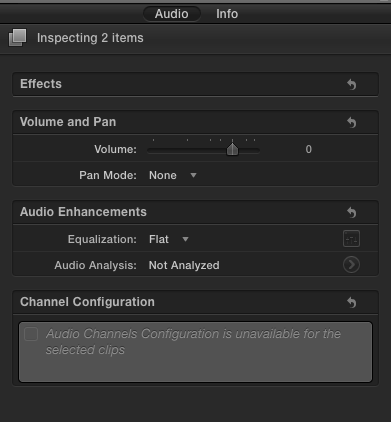
And if I select the same audio track in the actual Timeline and I look in the Inspector I get this (PIC3)
Really not sure what is going on here??
First of all the waveforms seem to be taking a really long time to cache, I have 10 tracks and am using Proxy media for the multi cam.
If I'm in the Angle viewer and select an audio track I can clearly see that I have made it dual mono and I can also make put it back to stereo because the option isn't greyed out (PIC1)
If I am in the Timeline after editing in the MC clip and I select the same audio track (PIC2) the options are greyed out.
And if I select the same audio track in the actual Timeline and I look in the Inspector I get this (PIC3)
Really not sure what is going on here??
Please Log in to join the conversation.


31 Oct 2012 11:18 - 31 Oct 2012 11:23 #16288
by BenB
Replied by BenB on topic Multicam & Audio
It is very simple. In pic 2 you can click the check boxes to enable and disable "channels".
In pic 3 you have audio "channels" expanded out. Thus when you select an "individual channel, there's nothing to configure, it is a single channel. It is NOT the same as expanding the audio "component" of the clip as we have always had. We can now expand out individual channels in order to access each individually.
Check this article out.
www.macprovideo.com/hub/final-cut/final-...channel-editing-1006
In pic 3 you have audio "channels" expanded out. Thus when you select an "individual channel, there's nothing to configure, it is a single channel. It is NOT the same as expanding the audio "component" of the clip as we have always had. We can now expand out individual channels in order to access each individually.
Check this article out.
www.macprovideo.com/hub/final-cut/final-...channel-editing-1006
Last edit: 31 Oct 2012 11:23 by BenB.
Please Log in to join the conversation.
- Marc Lucas
-
Topic Author
- Offline
- Platinum Member
-
Less
More
- Posts: 379
- Thank you received: 6
31 Oct 2012 11:42 #16295
by Marc Lucas
Replied by Marc Lucas on topic Multicam & Audio
Thanks Ben I will revisit later on
Please Log in to join the conversation.
