


- Posts: 76
- Thank you received: 1
3 Post Moderation Rule for New Boarders (25 Jan 2021)
New boarders will have their posts moderated - Don't worry if you cannot see your post immediately.
FCPX squashing aspect ratio of iPhone footage
- coffee_king
-
 Topic Author
- Offline
- Senior Member
-

Less
More
29 Oct 2012 16:43 - 29 Oct 2012 16:44 #16120
by coffee_king
FCPX squashing aspect ratio of iPhone footage was created by coffee_king
Hi there
Ive created a project of 1280x720p 50 fps
Ive imported into event
1280x720p 50fps .mov
640x480p 30fps .avi
1920x1080p 25fps .mov
footage which all looks fine.
Ive also imported a
960x720p 9.93fps .mov
piece of video footage into my event (Taken on an iPhone 3GS) but the aspect ratio when viewed in the event or added to the project has squashed the aspect ratio of this footage. To be honest I didnt think the iPhone 3GS could record in 720p as it doesnt have hidef video capabilities.
The aspect ratio looks fine when viewed in Quick Time Player but not in FCPX.
Here is the footage displaying properly in QuickTime Player
[img]http://http://www.thiscarbonfootprint.co.uk/FCPX/quick-time-ok.png[/img]
Here it is not displaying properly in FCPX

It must be something to do with setting in FCPX as it displays properly in every other video playback program I use.
Any help?
Thanks
Ive created a project of 1280x720p 50 fps
Ive imported into event
1280x720p 50fps .mov
640x480p 30fps .avi
1920x1080p 25fps .mov
footage which all looks fine.
Ive also imported a
960x720p 9.93fps .mov
piece of video footage into my event (Taken on an iPhone 3GS) but the aspect ratio when viewed in the event or added to the project has squashed the aspect ratio of this footage. To be honest I didnt think the iPhone 3GS could record in 720p as it doesnt have hidef video capabilities.
The aspect ratio looks fine when viewed in Quick Time Player but not in FCPX.
Here is the footage displaying properly in QuickTime Player
[img]http://http://www.thiscarbonfootprint.co.uk/FCPX/quick-time-ok.png[/img]
Here it is not displaying properly in FCPX
It must be something to do with setting in FCPX as it displays properly in every other video playback program I use.
Any help?
Thanks
Last edit: 29 Oct 2012 16:44 by coffee_king.
Please Log in to join the conversation.
- coffee_king
-
Topic Author
- Offline
- Senior Member
-
Less
More
- Posts: 76
- Thank you received: 1
29 Oct 2012 16:46 #16121
by coffee_king
Replied by coffee_king on topic FCPX squashing aspect ratio of iPhone footage
I'll try that again.
Displayed properly in QuickTime

Displayed properly in QuickTime
Please Log in to join the conversation.

29 Oct 2012 17:45 #16129
by BenB
Replied by BenB on topic FCPX squashing aspect ratio of iPhone footage
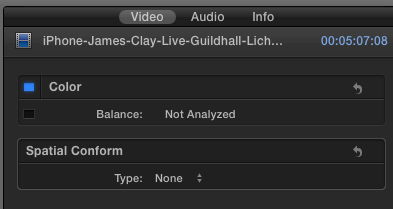
Command-4 to open the Inspector.
Video tab.
At the bottom, the Spacial Conform setting.
Make sure it is set to None.
Video tab.
At the bottom, the Spacial Conform setting.
Make sure it is set to None.
Please Log in to join the conversation.
- coffee_king
-
Topic Author
- Offline
- Senior Member
-
Less
More
- Posts: 76
- Thank you received: 1
30 Oct 2012 07:55 #16200
by coffee_king
Replied by coffee_king on topic FCPX squashing aspect ratio of iPhone footage
Its makes no difference what I set Spacial Conform to, it doesnt make any difference on any option.
Please Log in to join the conversation.
30 Oct 2012 13:37 #16211
by BenB
Replied by BenB on topic FCPX squashing aspect ratio of iPhone footage
I don't see any aspect ratios squashed in your screen shots. I'm confused.
Please Log in to join the conversation.
- Snapdragon
-
- Offline
- Senior Member
-
Less
More
- Posts: 63
- Thank you received: 1
30 Oct 2012 14:11 - 30 Oct 2012 14:13 #16215
by Snapdragon
Replied by Snapdragon on topic FCPX squashing aspect ratio of iPhone footage
You need your eyes tested Ben. The aspect ratio is definitely squashed in those pictures.
I think the iPhone 3GS has a 4:3 aspect ratio (thats what it looks like in your quicktime screen grab anyway).
It would seem like FCPX isn't recognising that aspect ration (it has done that to me before), so just manually squish it (WITH THE TRANSFORM TOOLS) on one shot to about the right aspect - and then copy and paste to the other 3GS clips.
I think the iPhone 3GS has a 4:3 aspect ratio (thats what it looks like in your quicktime screen grab anyway).
It would seem like FCPX isn't recognising that aspect ration (it has done that to me before), so just manually squish it (WITH THE TRANSFORM TOOLS) on one shot to about the right aspect - and then copy and paste to the other 3GS clips.
Last edit: 30 Oct 2012 14:13 by Snapdragon.
Please Log in to join the conversation.
30 Oct 2012 14:43 #16220
by BenB
Replied by BenB on topic FCPX squashing aspect ratio of iPhone footage
Yeah, I've never seen the images on this site very clearly, and clicking them often gives me smaller images than what are in the actual post. It is the one on going issue I have with this site.
But yes, I see now, it is stretched a tad. Is that in 10.0.6, cause it's supposed to improve this type of thing, from what I understand.
What frame size is a 3GS video?
But yes, I see now, it is stretched a tad. Is that in 10.0.6, cause it's supposed to improve this type of thing, from what I understand.
What frame size is a 3GS video?
Please Log in to join the conversation.
- Snapdragon
-
- Offline
- Senior Member
-
Less
More
- Posts: 63
- Thank you received: 1
30 Oct 2012 17:33 - 30 Oct 2012 17:36 #16227
by Snapdragon
Replied by Snapdragon on topic FCPX squashing aspect ratio of iPhone footage
640x480p 30fps .avi
I have had a few problems with Spacial Conform on older footage. Easily rectified by transforming it yourself.
I have had a few problems with Spacial Conform on older footage. Easily rectified by transforming it yourself.
Last edit: 30 Oct 2012 17:36 by Snapdragon.
Please Log in to join the conversation.

30 Oct 2012 17:55 #16229
by Soundwise
Replied by Soundwise on topic FCPX squashing aspect ratio of iPhone footage
There is also a new "Anamorphic Override" setting in the Info tab. Not sure if that helps in this case, though.
Please Log in to join the conversation.
- coffee_king
-
Topic Author
- Offline
- Senior Member
-
Less
More
- Posts: 76
- Thank you received: 1
31 Oct 2012 09:28 #16282
by coffee_king
Replied by coffee_king on topic FCPX squashing aspect ratio of iPhone footage
Hi there
I have managed to solve this issue by doing the following steps.
Open in a free program called MPEG Streamclip
Set Video PID to 4:3
Export to Quick Time
Compression H.264
Quality 100%
Frame Size 640x480
Frame rate 25
(the rest of the settings I left alone)
Thanks for everyones help
I have managed to solve this issue by doing the following steps.
Open in a free program called MPEG Streamclip
Set Video PID to 4:3
Export to Quick Time
Compression H.264
Quality 100%
Frame Size 640x480
Frame rate 25
(the rest of the settings I left alone)
Thanks for everyones help
Please Log in to join the conversation.
31 Oct 2012 11:28 #16290
by BenB
Replied by BenB on topic FCPX squashing aspect ratio of iPhone footage
Only thing I'd have done different, is transcode it to ProRes and kept all my image quality.
Please Log in to join the conversation.
