


- Posts: 377
- Thank you received: 32
3 Post Moderation Rule for New Boarders (25 Jan 2021)
New boarders will have their posts moderated - Don't worry if you cannot see your post immediately.
10.0.6 destroyed my libraries.
28 Oct 2012 10:54 #15983
by Julian
10.0.6 destroyed my libraries. was created by Julian
I'm not upset, I was done with everything and most of it was school projects. I just want to know what I did wrong.
I have all my events and projects on an external thunderbolt drive.
Upgraded to 10.0.6
Everything is now red and needs to be relinked. I click on an event and then "relink event files". It either says no events are missing, or that they are all missing. I tried relinking to the original media and it does nothing, I tried linking to the transcoded media and it dumped all of those files into the trash.
I haven't been able to do anything to relink the files. I've had some media management problems before, but this is the worst. If anything keeps FCPX from being highly adopted by pros, I think media management is going to have to become a lot more reliable.
So any ideas on why this happened or what I could have done differently during the update? After I opened FCPX the first time I also clicked the update events button, so all my events were updated.
I have all my events and projects on an external thunderbolt drive.
Upgraded to 10.0.6
Everything is now red and needs to be relinked. I click on an event and then "relink event files". It either says no events are missing, or that they are all missing. I tried relinking to the original media and it does nothing, I tried linking to the transcoded media and it dumped all of those files into the trash.
I haven't been able to do anything to relink the files. I've had some media management problems before, but this is the worst. If anything keeps FCPX from being highly adopted by pros, I think media management is going to have to become a lot more reliable.
So any ideas on why this happened or what I could have done differently during the update? After I opened FCPX the first time I also clicked the update events button, so all my events were updated.
Please Log in to join the conversation.
28 Oct 2012 20:10 #16047
by Julian
Replied by Julian on topic 10.0.6 destroyed my libraries.
Such a simple fix. I forgot I turned this on when I was trying something new with another project.
Thanks!
Thanks!
Please Log in to join the conversation.

28 Oct 2012 23:01 #16060
by RonPriest
Replied by RonPriest on topic 10.0.6 destroyed my libraries.
Wow, you nailed that one Seanus! Good work.
Please Log in to join the conversation.
- kyletron2000
-

- Offline
- Senior Member
-

Less
More
- Posts: 79
- Thank you received: 15
29 Oct 2012 02:12 #16074
by kyletron2000
Replied by kyletron2000 on topic 10.0.6 destroyed my libraries.
I really wish Apple would make the proxy/original/optimized media project-specific rather than global. Maybe allow you to set up a default, but also allow you to set it on a project-by-project basis.
Please Log in to join the conversation.
29 Oct 2012 07:29 #16078
by Seanus
Sean Lander - Editing since 1982 - AVID 1991 - FCP 1999 - FCPX 2011
Replied by Seanus on topic 10.0.6 destroyed my libraries.
I just wish there was a big RED sign saying "PROXY MODE ON".
Sean Lander - Editing since 1982 - AVID 1991 - FCP 1999 - FCPX 2011
Please Log in to join the conversation.
29 Oct 2012 07:38 #16079
by Julian
Replied by Julian on topic 10.0.6 destroyed my libraries.
Yeah, it would have been nice for it to just say proxy media was on. I've been playing around with garage band tonight a lot and it got me wondering why FCPX doesn't manage projects the same way. Each project in garageband is it's own version and you don't have to look at all the other garage band projects you are working on. I can move those projects from disk to disk and it will still open any time I want.
Having every project in the program every time you open it doesn't make as much sense as just having a individual version of FCPX for each event. I know it would start to suck when you're trying to work on a project with multiple events and so on, but I'm sure there could be a solution for that.
Having every project in the program every time you open it doesn't make as much sense as just having a individual version of FCPX for each event. I know it would start to suck when you're trying to work on a project with multiple events and so on, but I'm sure there could be a solution for that.
Please Log in to join the conversation.
- ronny courtens
-

- Offline
- Moderator
-

Less
More
- Posts: 4455
- Thank you received: 962
29 Oct 2012 10:58 - 29 Oct 2012 11:00 #16089
by ronny courtens
Replied by ronny courtens on topic 10.0.6 destroyed my libraries.
With all due respect: let's remain serious here.
1. Proxy Mode warning
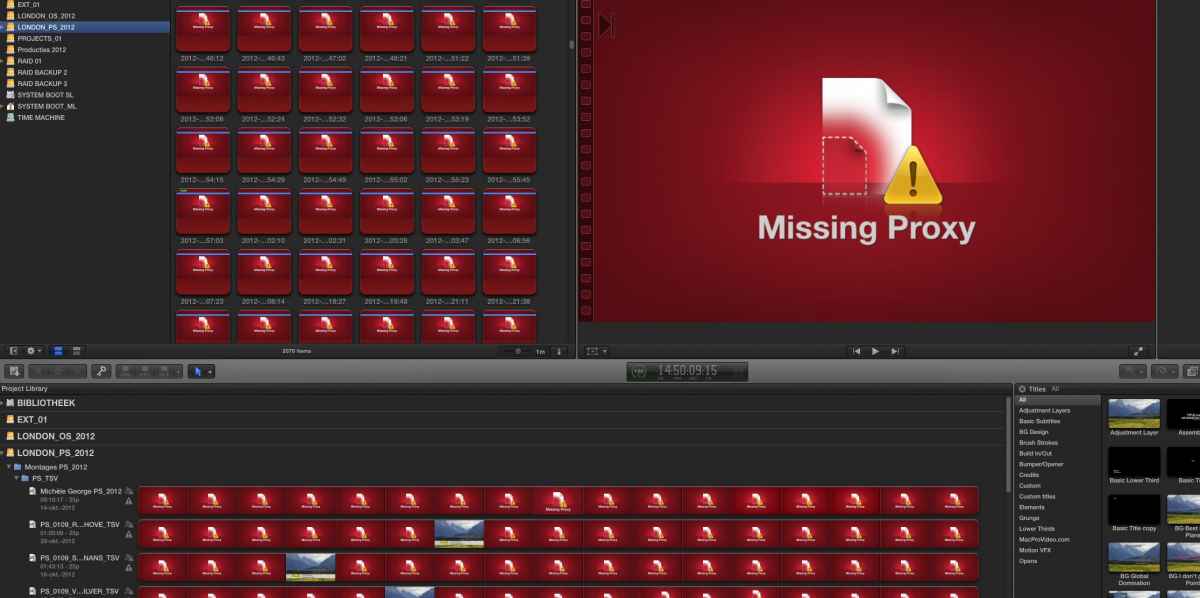
When you open FCP10 and you have your Proxy Mode switched on while there are no Proxies available you get big red warnings with the title "Missing Proxy" everywhere in your Project and in your Events. If you have ever read the manual or you have followed a decent training you will know that this warning means exactly what it says: that you have Proxy mode switched on while there are no Proxies available (see attached screenshot). Whenever I see this I immediately check my Proxy Mode. I really don't know what could be more clear than that. I do agree Proxy mode should be on a Project to Project basis and not in general preferences.
2. Media management
I don't know how much experience you have with other popular NLEs. I have worked professionally with most of them and if there is one thing I find where FCP10 really excels it is exactly media management. The key to successful media management is to first fully understand how your media are stored and managed by your application, and how the different media management options deal with this, before performing any media management task. And this goes for any existing NLE.
There are some things that still can be improved in FCP10 media management (consolidating with handles is one of these things), but its basic media management structure is one of the most solid I have even seen (classic FCP and PPro CS6 being the worst I have ever seen).
Please don't interpret my reply as patronizing, that's not my intention. If we are honest I think most of us at a certain time have cursed our software for something that went wrong, while the mistake was entirely operator-related. I certainly have. That's human nature. As long as we learn from it there's no harm done.
1. Proxy Mode warning
When you open FCP10 and you have your Proxy Mode switched on while there are no Proxies available you get big red warnings with the title "Missing Proxy" everywhere in your Project and in your Events. If you have ever read the manual or you have followed a decent training you will know that this warning means exactly what it says: that you have Proxy mode switched on while there are no Proxies available (see attached screenshot). Whenever I see this I immediately check my Proxy Mode. I really don't know what could be more clear than that. I do agree Proxy mode should be on a Project to Project basis and not in general preferences.
2. Media management
I don't know how much experience you have with other popular NLEs. I have worked professionally with most of them and if there is one thing I find where FCP10 really excels it is exactly media management. The key to successful media management is to first fully understand how your media are stored and managed by your application, and how the different media management options deal with this, before performing any media management task. And this goes for any existing NLE.
There are some things that still can be improved in FCP10 media management (consolidating with handles is one of these things), but its basic media management structure is one of the most solid I have even seen (classic FCP and PPro CS6 being the worst I have ever seen).
Please don't interpret my reply as patronizing, that's not my intention. If we are honest I think most of us at a certain time have cursed our software for something that went wrong, while the mistake was entirely operator-related. I certainly have. That's human nature. As long as we learn from it there's no harm done.
Last edit: 29 Oct 2012 11:00 by ronny courtens.
Please Log in to join the conversation.
29 Oct 2012 11:22 #16090
by Seanus
Sean Lander - Editing since 1982 - AVID 1991 - FCP 1999 - FCPX 2011
Replied by Seanus on topic 10.0.6 destroyed my libraries.
Only problems really come when you do have Proxy and full media. A Proxy mode indicator would be handy. Save you forgetting and having to re-output again at high res.
I like FCPs management for Events. Not for Projects. A better structure I believe would be to have two media directories on your media drives. "Event Media" and "Project Media" this way Project files could be stored anywhere and backed up and shared easily.
Working like Garage band wouldn't work as often you will need to source footage from other Events.
I like FCPs management for Events. Not for Projects. A better structure I believe would be to have two media directories on your media drives. "Event Media" and "Project Media" this way Project files could be stored anywhere and backed up and shared easily.
Working like Garage band wouldn't work as often you will need to source footage from other Events.
Sean Lander - Editing since 1982 - AVID 1991 - FCP 1999 - FCPX 2011
Please Log in to join the conversation.
- ronny courtens
-
- Offline
- Moderator
-
Less
More
- Posts: 4455
- Thank you received: 962
29 Oct 2012 11:55 #16092
by ronny courtens
Replied by ronny courtens on topic 10.0.6 destroyed my libraries.
A Proxy mode indicator would be handy. Save you forgetting and having to re-output again at high res.
I entirely agree on this one.
I entirely agree on this one.
Please Log in to join the conversation.
