


- Posts: 172
- Thank you received: 2
3 Post Moderation Rule for New Boarders (25 Jan 2021)
New boarders will have their posts moderated - Don't worry if you cannot see your post immediately.
Experiencing Green Up-side down glitches in MBL 2.0 with FCPX 10.0.6 on iMac but not MacBook
28 Oct 2012 01:43 #15973
by RonPriest
Experiencing Green Up-side down glitches in MBL 2.0 with FCPX 10.0.6 on iMac but not MacBook was created by RonPriest
After much contemplation over the last week or two, I decided to purchase MBL 2 today. So after registering the software, I was anxious to get started with some color grading on a project Im working on. Then I started to notice I was getting glitches after rendering. I would get strange up-side down green frames that would flash across the screen. I'm not seeing the problem when I render the same effects on the same Thunderbolt drive using my 17" 2011 MacBook Pro. So I would assume it has something to do with the graphics card in my 2011 iMac. I have never had any problems with this computer, I just bought it in February to use only for editing in FCPX. Since I had only use it a small amount of time in the trial mode in FCPX 10.0.5, I'm not sure if this is a FCPX 10.0.6 bug with MBL 2 or what. So, I was hoping that someone else with a 2011 iMac would check it out on their system.
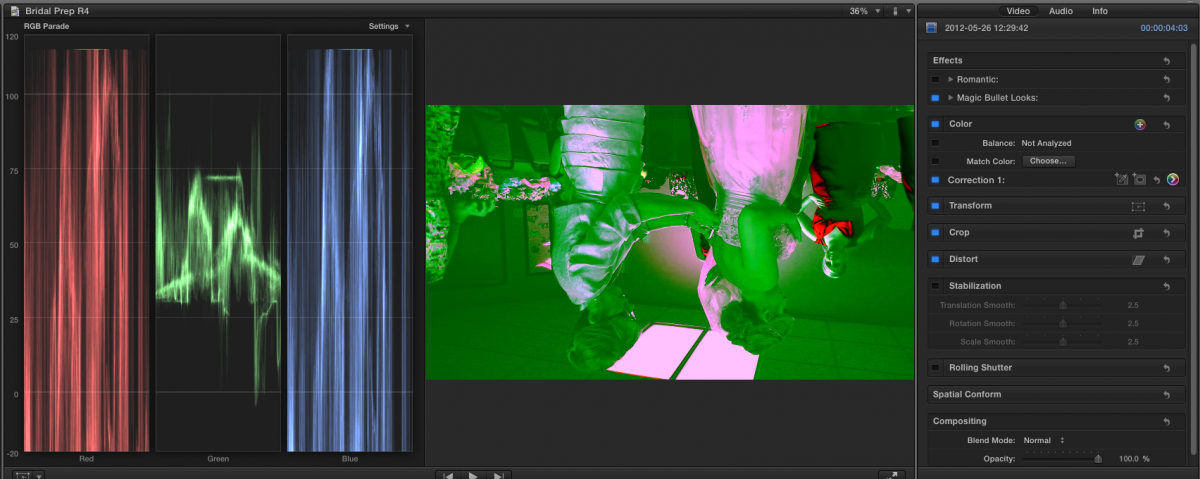
I've attached a screen shot of my problem.
I've attached a screen shot of my problem.
Please Log in to join the conversation.
28 Oct 2012 02:09 #15975
by RonPriest
Replied by RonPriest on topic Experiencing Green Up-side down glitches in MBL 2.0 with FCPX 10.0.6 on iMac but not MacBook
BTW, I meant to mention that In an attempt to fix this, I removed MBL and reinstalled it from scratch using my Serial Number, not as a trial version (which shouldn't make any difference) but it DID't make any difference.
I'm sure someone is going to tell me to trash my preferences. I've never had a reason to do that before in X so I guess I'll see if I can figure out how to do that.
I'm sure someone is going to tell me to trash my preferences. I've never had a reason to do that before in X so I guess I'll see if I can figure out how to do that.
Please Log in to join the conversation.

28 Oct 2012 13:32 #15992
by BenB
Replied by BenB on topic Experiencing Green Up-side down glitches in MBL 2.0 with FCPX 10.0.6 on iMac but not MacBook
MBL and some other plugins are having problems in 10.0.6. You may have to wait until they are updated.
Please Log in to join the conversation.
28 Oct 2012 14:06 #15997
by RonPriest
Replied by RonPriest on topic Experiencing Green Up-side down glitches in MBL 2.0 with FCPX 10.0.6 on iMac but not MacBook
Okay, thanks Ben. I was hoping someone could verify that fact. I can't find anything on Red Giants website admitting to the problem. Have you found any official news release. I was also having problems with some idustrial revolution transitions and after sending them an email, they replied letting me know they were working on the problem.
With this MBL problem, it's strange I don't have the same problem on the MacBook. So I assume it's related to different video cards?
With this MBL problem, it's strange I don't have the same problem on the MacBook. So I assume it's related to different video cards?
Please Log in to join the conversation.
28 Oct 2012 14:15 #16000
by BenB
Replied by BenB on topic Experiencing Green Up-side down glitches in MBL 2.0 with FCPX 10.0.6 on iMac but not MacBook
It could be related to a hundred different variations in folks hardware and software configurations. OS versions and configurations. It could be some changed code inside FCP X. Who knows, only Apple and 3rd party developers know what is going on for sure.
But yes, there are other threads here about MBL, NI, and others not working properly in FCP X.0.6. Give it a week or so and it'll all get worked out.
But yes, there are other threads here about MBL, NI, and others not working properly in FCP X.0.6. Give it a week or so and it'll all get worked out.
Please Log in to join the conversation.

28 Oct 2012 15:07 #16006
by dgwvideo
Creating history....one edit at a time !
Replied by dgwvideo on topic Experiencing Green Up-side down glitches in MBL 2.0 with FCPX 10.0.6 on iMac but not MacBook
For sure MBL2 has some issues with 10.0.6. It works for me occasionally but is very flaky and sometimes FCPX will need to be restarted and an effect from MBL2 applied again for it to take. Red Giant will fix this soon, as they have with all other FCPX updates.
Creating history....one edit at a time !
Please Log in to join the conversation.
28 Oct 2012 17:25 #16029
by RonPriest
Replied by RonPriest on topic Experiencing Green Up-side down glitches in MBL 2.0 with FCPX 10.0.6 on iMac but not MacBook
Thanks for your input Dan, Im so glad you're having trouble too! Well, you know what I mean. 
It was just a little discouraging for me since I had been laboring so hard over the last 2 weeks trying to make a decision whether or not to go with the purchase of MBL. I suppose I wasn't really doing any rendering of effects until 3 days after the FCPX upgrade as there was no reason to render with the large red X across the image, so I was just messing around with the different looks, more or less in a static mode if you will. Then once I purchased it and started rendering (after the X update) is when I discovered the problems, and evidently when MBL started having problems.
That was my point in another thread concerning my initial apprehension of purchasing MBL and allowing it to take my NLE hostage every time Apple came out with a new update to X. I had "Googled it" and read how MBL had problems the last time FCPX was updated and Red Giant was warning their users to not upgrade FCPX to the new version until they found a fix for their software. I just hope their quick about it.
It was just a little discouraging for me since I had been laboring so hard over the last 2 weeks trying to make a decision whether or not to go with the purchase of MBL. I suppose I wasn't really doing any rendering of effects until 3 days after the FCPX upgrade as there was no reason to render with the large red X across the image, so I was just messing around with the different looks, more or less in a static mode if you will. Then once I purchased it and started rendering (after the X update) is when I discovered the problems, and evidently when MBL started having problems.
That was my point in another thread concerning my initial apprehension of purchasing MBL and allowing it to take my NLE hostage every time Apple came out with a new update to X. I had "Googled it" and read how MBL had problems the last time FCPX was updated and Red Giant was warning their users to not upgrade FCPX to the new version until they found a fix for their software. I just hope their quick about it.
Please Log in to join the conversation.
28 Oct 2012 17:44 #16033
by dgwvideo
Creating history....one edit at a time !
Replied by dgwvideo on topic Experiencing Green Up-side down glitches in MBL 2.0 with FCPX 10.0.6 on iMac but not MacBook
Ron, I wouldn't get too discouraged. MBL2 is an amazing program and I think you'll find it very useful in your everyday workflow. Every decent application I have as a plugin for FCPX for the most part requires an update when FCPX is updated. The better vendors get on this pretty quickly so I don't think you'll have to wait long. It seems to be the nature of the beast and most likely how FCPX is written that requires updating of most plugins.
Creating history....one edit at a time !
Please Log in to join the conversation.
04 Nov 2012 19:50 #16596
by gregtoope
Replied by gregtoope on topic Experiencing Green Up-side down glitches in MBL 2.0 with FCPX 10.0.6 on iMac but not MacBook
Yeah im having the same issue. Have a 27" iMac 3.4ghz and a 15" Retina MBPro and they are both having the same issues. Talked with Red Giant support and they are aware. Just hoping that they get a fix out soon!!
Please Log in to join the conversation.
- simonpwood
-

- Offline
- Platinum Member
-

Less
More
- Posts: 654
- Thank you received: 42
05 Nov 2012 06:48 #16625
by simonpwood
Replied by simonpwood on topic Experiencing Green Up-side down glitches in MBL 2.0 with FCPX 10.0.6 on iMac but not MacBook
"...Buying MBL and allowing it to take my NLE hostage every time Apple came out with a new update to X..."
That is true to a degree with MBL, and Neat Video. I never update FCPX until I confirm that these have not been affected, or until a fix has been found. I would say that this is true of any plug-in that you use for paid work though; and I rely on these a lot.
However, I think it is also prudent to wait a week or two irrespective of plug-ins or not, as sometimes there are kinks in the update itself that need to be ironed out. Its not a major hassle though, as 10.0.5 works well enough, though I am looking forward to the improvements in 10.0.6.
Luckily, there are enough hobby editors out there, or pros who just cant wait who update straight away who can be the guinea pigs and test it out and let us know!
That is true to a degree with MBL, and Neat Video. I never update FCPX until I confirm that these have not been affected, or until a fix has been found. I would say that this is true of any plug-in that you use for paid work though; and I rely on these a lot.
However, I think it is also prudent to wait a week or two irrespective of plug-ins or not, as sometimes there are kinks in the update itself that need to be ironed out. Its not a major hassle though, as 10.0.5 works well enough, though I am looking forward to the improvements in 10.0.6.
Luckily, there are enough hobby editors out there, or pros who just cant wait who update straight away who can be the guinea pigs and test it out and let us know!
Please Log in to join the conversation.
05 Nov 2012 19:34 #16656
by oweng69
Replied by oweng69 on topic Experiencing Green Up-side down glitches in MBL 2.0 with FCPX 10.0.6 on iMac but not MacBook
I am having exactly the same problem too.
I only updated to .06 as Red Giant said their plugins all worked.
Silly me.
I only updated to .06 as Red Giant said their plugins all worked.
Silly me.
Please Log in to join the conversation.
- geoffdills
-
- Offline
- New Member
-

Less
More
- Posts: 4
- Thank you received: 0
09 Nov 2012 15:35 #16953
by geoffdills
Replied by geoffdills on topic Experiencing Green Up-side down glitches in MBL 2.0 with FCPX 10.0.6 on iMac but not MacBook
I was getting the same green frames, and was using Neat denoiser plugin. But I also saw it on clips,with NO plugin applied. Then I thought it might be the fact it was a 30p timeline and the footage was 1080i. Put the clip in a 1080i timeline, no green frames. And the latest version of the Neat plugin (not released but being tested) works fine.
Please Log in to join the conversation.
- sirdavidabraham
-
- Offline
- Senior Member
-

- Musician, Geek and Spinach lover.
Less
More
- Posts: 79
- Thank you received: 3
14 Nov 2012 00:58 #17167
by sirdavidabraham
Replied by sirdavidabraham on topic Experiencing Green Up-side down glitches in MBL 2.0 with FCPX 10.0.6 on iMac but not MacBook
After a few years I stopped using most 3rd party audio plugins and switched to Logic Pro to get away from this plug-in hell that I'm now being reintroduced to in video land 
Can't wait until most of what I want plugin-wise is just part of the FCPX install.
Can't wait until most of what I want plugin-wise is just part of the FCPX install.
Please Log in to join the conversation.
14 Nov 2012 02:17 #17170
by dgwvideo
Unless you don't want very much, that will likely never happen. FCPX will probably evolve as a competent NLE but I wouldn't expect to see much in the way of its' ability to do compositing, graphics, 3D, rotoscoping, full fledged color grading, etc. The need for 3rd party plugs will surely continue to exist in my opinion.
I do have a friend editor who uses legacy FCP with all its basic supplied transitions and effects. He's been using it for 4 years now and never purchased any 3rd party plugins. But, he's doing basic corporate work, talking head shots (no keying), simple titling.
Creating history....one edit at a time !
Replied by dgwvideo on topic Experiencing Green Up-side down glitches in MBL 2.0 with FCPX 10.0.6 on iMac but not MacBook
sirdavidabraham wrote: Can't wait until most of what I want plugin-wise is just part of the FCPX install.
Unless you don't want very much, that will likely never happen. FCPX will probably evolve as a competent NLE but I wouldn't expect to see much in the way of its' ability to do compositing, graphics, 3D, rotoscoping, full fledged color grading, etc. The need for 3rd party plugs will surely continue to exist in my opinion.
I do have a friend editor who uses legacy FCP with all its basic supplied transitions and effects. He's been using it for 4 years now and never purchased any 3rd party plugins. But, he's doing basic corporate work, talking head shots (no keying), simple titling.
Creating history....one edit at a time !
Please Log in to join the conversation.
- sirdavidabraham
-
- Offline
- Senior Member
-
- Musician, Geek and Spinach lover.
Less
More
- Posts: 79
- Thank you received: 3
14 Nov 2012 02:30 #17172
by sirdavidabraham
I'd probably be in the "don't want much" category. A good video denoiser, a stronger look library, keyframeable bezier masks and basic tracking all seem reasonable. If they add these I'm good to go. Any projects that demand more than this I would likely be outsourcing
Replied by sirdavidabraham on topic Experiencing Green Up-side down glitches in MBL 2.0 with FCPX 10.0.6 on iMac but not MacBook
dgwvideo wrote:
sirdavidabraham wrote: Can't wait until most of what I want plugin-wise is just part of the FCPX install.
Unless you don't want very much, that will likely never happen. FCPX will probably evolve as a competent NLE but I wouldn't expect to see much in the way of its' ability to do compositing, graphics, 3D, rotoscoping, full fledged color grading, etc. The need for 3rd party plugs will surely continue to exist in my opinion.
I'd probably be in the "don't want much" category. A good video denoiser, a stronger look library, keyframeable bezier masks and basic tracking all seem reasonable. If they add these I'm good to go. Any projects that demand more than this I would likely be outsourcing
Please Log in to join the conversation.
14 Nov 2012 02:40 #17173
by dgwvideo
Creating history....one edit at a time !
Replied by dgwvideo on topic Experiencing Green Up-side down glitches in MBL 2.0 with FCPX 10.0.6 on iMac but not MacBook
Then there is hope
Creating history....one edit at a time !
Please Log in to join the conversation.
