


- Posts: 92
- Thank you received: 6
3 Post Moderation Rule for New Boarders (25 Jan 2021)
New boarders will have their posts moderated - Don't worry if you cannot see your post immediately.
How to add a Fade-In on a Clip but not create a Transition?
27 Oct 2012 23:40 - 27 Oct 2012 23:41 #15962
by bendermac
this drives me nuts...
i want to add a fade-in on a clip but no matter what, fcpx always adds a transition because there is a clip in front of it. vice versa if it was a fade-out.
so how do i apply the plugin (in this case nattress film-dissolve) to create a fade-in and not a transition?
in the screenshot below you can see where i want to add the fade-in.
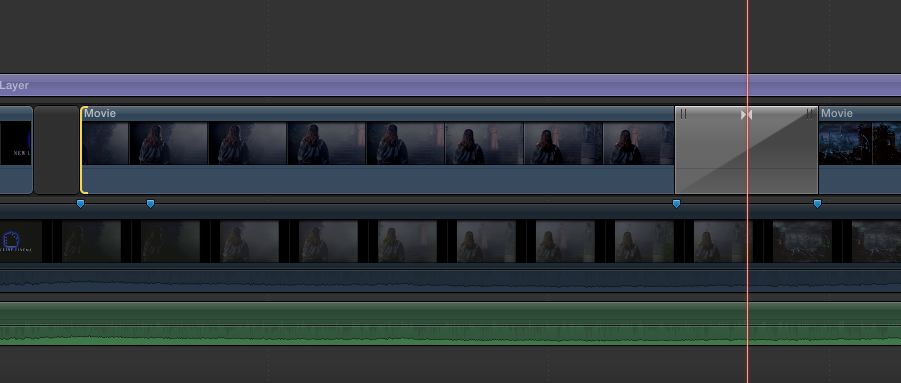
thanks in advance
i want to add a fade-in on a clip but no matter what, fcpx always adds a transition because there is a clip in front of it. vice versa if it was a fade-out.
so how do i apply the plugin (in this case nattress film-dissolve) to create a fade-in and not a transition?
in the screenshot below you can see where i want to add the fade-in.
thanks in advance
Last edit: 27 Oct 2012 23:41 by bendermac.
Please Log in to join the conversation.
- Tom Wolsky
-

- Offline
- Moderator
-

27 Oct 2012 23:54 #15963
by Tom Wolsky
Replied by Tom Wolsky on topic How to add a Fade-In on a Clip but not create a Transition?
Control-V to open video animations and double clip opacity to open it. Use the fade button to ramp up the opacity.
Please Log in to join the conversation.
27 Oct 2012 23:56 #15965
by bendermac
Replied by bendermac on topic How to add a Fade-In on a Clip but not create a Transition?
the opacity is no good because it behaves differently then a real film fade-in, which i tried before. sorry for not writing it in my post :blush:
Please Log in to join the conversation.


28 Oct 2012 00:01 #15967
by grailz
Replied by grailz on topic How to add a Fade-In on a Clip but not create a Transition?
You could either try splitting the clip and moving it to another lane and adding a transition there or put the clip in a compound clip and adding the transition there.
Please Log in to join the conversation.
- Tom Wolsky
-
- Offline
- Moderator
-
28 Oct 2012 00:02 #15968
by Tom Wolsky
Replied by Tom Wolsky on topic How to add a Fade-In on a Clip but not create a Transition?
Not sure what you're expecting. You could try a gap and cross dissolve from that. The gap needs to be no longer than the length of the transition.
Please Log in to join the conversation.
28 Oct 2012 00:06 #15970
by bendermac
Replied by bendermac on topic How to add a Fade-In on a Clip but not create a Transition?
so there is no real option to add an actual fade-in/fade-out? we always need a work-around  :dry:
:dry:
anyway, this is what i did - cause there is no better solution :whistle:
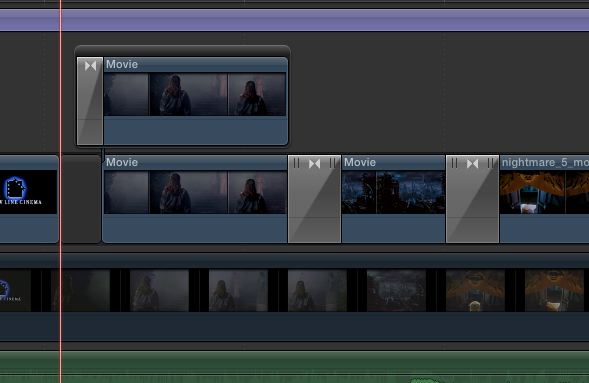
:dry:anyway, this is what i did - cause there is no better solution :whistle:
Please Log in to join the conversation.
- Tom Wolsky
-
- Offline
- Moderator
-
28 Oct 2012 04:58 #15979
by Tom Wolsky
Replied by Tom Wolsky on topic How to add a Fade-In on a Clip but not create a Transition?
A fade in is a transition from black. Not sure what you're expecting, but if you fade in from black that's what you get with a cross dissolve from a gap.
Please Log in to join the conversation.

28 Oct 2012 05:18 #15980
by sc_fox
Replied by sc_fox on topic How to add a Fade-In on a Clip but not create a Transition?
The basic fade behavior from Motion covers that. There are four parameters: Fade In Time, Fade Out Time (reflects the # of frames for the duration of the fade); Start Offset and End Offset (reflects the # of frames to "pad" before or after the fades.)
If you don't have Motion, you can download this Effect here:
ftp.sight-creations.com/free_stuff/sc_missing_fade.zip
Unzip the file and move "Fade In Fade Out" into ~/Movies/Motion Templates/Effects/<category of your choice> (Basics would be a good choice)
HTH
If you don't have Motion, you can download this Effect here:
ftp.sight-creations.com/free_stuff/sc_missing_fade.zip
Unzip the file and move "Fade In Fade Out" into ~/Movies/Motion Templates/Effects/<category of your choice> (Basics would be a good choice)
HTH
Please Log in to join the conversation.
28 Oct 2012 11:22 #15985
by toxotis70
Replied by toxotis70 on topic How to add a Fade-In on a Clip but not create a Transition?
link is dead....
Please Log in to join the conversation.

28 Oct 2012 13:36 #15993
by BenB
Replied by BenB on topic How to add a Fade-In on a Clip but not create a Transition?
From the screen shot of your solution, you could put the transition crossing between the gap clip and the Storyline clip. No reason to duplicate it as a Connected Clip.
Please Log in to join the conversation.


28 Oct 2012 15:39 #16015
by dgwvideo
Creating history....one edit at a time !
Replied by dgwvideo on topic How to add a Fade-In on a Clip but not create a Transition?
Creating history....one edit at a time !
Please Log in to join the conversation.
28 Oct 2012 15:55 #16017
by screendor
Replied by screendor on topic How to add a Fade-In on a Clip but not create a Transition?
I think what you want can be found in the effects browser: >transitions>dissolves>fade to color.
The default fade "from" color is black. This works like a standard "kiss black" transition. Hope that helps.
The default fade "from" color is black. This works like a standard "kiss black" transition. Hope that helps.
Please Log in to join the conversation.
28 Oct 2012 16:51 - 28 Oct 2012 16:52 #16019
by bendermac
Replied by bendermac on topic How to add a Fade-In on a Clip but not create a Transition?
first off: thanks guys for all your replies 
you are right. in this case it works. but it wouldn't work if there was no gab clip.
thanks for this. i tried a similar plugin from alex4d
i did try this before and it behaves like a transition if there are two clips together. it would only work as a fade-in with no clip before it.
BenB wrote: From the screen shot of your solution, you could put the transition crossing between the gap clip and the Storyline clip. No reason to duplicate it as a Connected Clip.
you are right. in this case it works. but it wouldn't work if there was no gab clip.
sc_fox wrote: The basic fade behavior from Motion covers that. There are four parameters: Fade In Time, Fade Out Time (reflects the # of frames for the duration of the fade); Start Offset and End Offset (reflects the # of frames to "pad" before or after the fades.)
If you don't have Motion, you can download this Effect here:
sight-creations.com/free_stuff/sc_missing_fade.zip
Unzip the file and move "Fade In Fade Out" into ~/Movies/Motion Templates/Effects/<category of your choice> (Basics would be a good choice)
HTH
thanks for this. i tried a similar plugin from alex4d
screendor wrote: I think what you want can be found in the effects browser: >transitions>dissolves>fade to color.
The default fade "from" color is black. This works like a standard "kiss black" transition. Hope that helps.
i did try this before and it behaves like a transition if there are two clips together. it would only work as a fade-in with no clip before it.
Last edit: 28 Oct 2012 16:52 by bendermac.
Please Log in to join the conversation.
28 Oct 2012 16:57 #16021
by BenB
Replied by BenB on topic How to add a Fade-In on a Clip but not create a Transition?
"you are right. in this case it works. but it wouldn't work if there was no gab clip."
Yes, and you can easily insert a Gap Clip at that point, change it's duration to what you need, exactly as you've done, but with less work.
Yes, and you can easily insert a Gap Clip at that point, change it's duration to what you need, exactly as you've done, but with less work.
Please Log in to join the conversation.
28 Oct 2012 17:07 #16023
by bendermac
how would you apply a fade-in in this example (see screenshot below) without a dedicated fade-in filter like the one from alex4d or from motion provided by dgwvideo? afaik you have make a connected clip to get it to work.
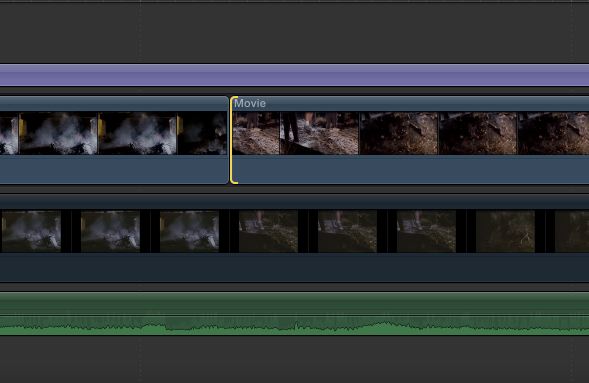
Replied by bendermac on topic How to add a Fade-In on a Clip but not create a Transition?
BenB wrote: "you are right. in this case it works. but it wouldn't work if there was no gab clip."
Yes, and you can easily insert a Gap Clip at that point, change it's duration to what you need, exactly as you've done, but with less work.
how would you apply a fade-in in this example (see screenshot below) without a dedicated fade-in filter like the one from alex4d or from motion provided by dgwvideo? afaik you have make a connected clip to get it to work.
Please Log in to join the conversation.
28 Oct 2012 17:21 #16027
by BenB
Replied by BenB on topic How to add a Fade-In on a Clip but not create a Transition?
Insert a Gap clip, set its duration, apply the transition.
Please Log in to join the conversation.
28 Oct 2012 17:43 #16032
by bendermac
i tried something with your suggestion...
if i want a fade-in with a duration 6 frame i trim the clip by 3 frames using the position tool and then apply the filter.
is that what you suggested?
at least, this seams to work
Replied by bendermac on topic How to add a Fade-In on a Clip but not create a Transition?
BenB wrote: Insert a Gap clip, set its duration, apply the transition.
i tried something with your suggestion...
if i want a fade-in with a duration 6 frame i trim the clip by 3 frames using the position tool and then apply the filter.
is that what you suggested?
at least, this seams to work
Please Log in to join the conversation.
28 Oct 2012 17:57 #16034
by dgwvideo
Creating history....one edit at a time !
Replied by dgwvideo on topic How to add a Fade-In on a Clip but not create a Transition?
The position tool will move the clip on the timeline, not trim it. Trimming can be done with the Select (A) tool or the Trim (T) tool.
Creating history....one edit at a time !
Please Log in to join the conversation.
28 Oct 2012 18:00 #16036
by bendermac
Replied by bendermac on topic How to add a Fade-In on a Clip but not create a Transition?
i know. the clips need to stay in place and that works only with the position tool. the select/trim tool would would change the position and there for the duration. they are looked for this project.
Please Log in to join the conversation.

28 Oct 2012 19:00 #16040
by Mals82
Replied by Mals82 on topic How to add a Fade-In on a Clip but not create a Transition?
I don't understand why some here don't seem to get bendermac's problem: he just wants transitions that you can set to either start from or end on cut, as we always have had on all NLE's (at least FCP7 and AVID, I haven't looked too much into Premiere but I'm sure it's there too). Solutions with inserting gap clips or trimming under the centered transitions seem clunky. I find that not having this is a big PITA and seems like a surprising oversight from the development team. I hope they get this feature back in the next update.
Please Log in to join the conversation.
