


- Posts: 3
- Thank you received: 0
3 Post Moderation Rule for New Boarders (25 Jan 2021)
New boarders will have their posts moderated - Don't worry if you cannot see your post immediately.
Time & date appear on footage
23 Oct 2012 03:55 #15400
by lechrist
Time & date appear on footage was created by lechrist
Hi everyone
I have a question for you, hoping someone got an answer for me!
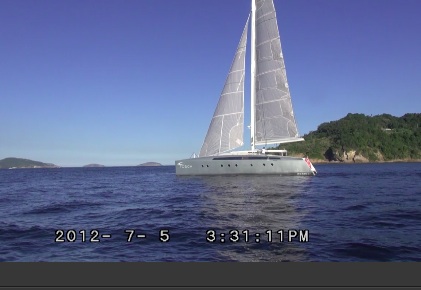
I am working on an edit on FCPX. I got a bunch of footage from the person who filmed but it's the kind of footage (MTS files that I had to convert) where the time and the date appear on the images. It's the way it was shot. But I don't want to have the time & date on the images for my edit.
How can I remove it?
I looked through FCP, I've been on forums but couldn't get an answer yet.
Here's a pic attached so you know what I mean.
Thank you in advance!
I have a question for you, hoping someone got an answer for me!
I am working on an edit on FCPX. I got a bunch of footage from the person who filmed but it's the kind of footage (MTS files that I had to convert) where the time and the date appear on the images. It's the way it was shot. But I don't want to have the time & date on the images for my edit.
How can I remove it?
I looked through FCP, I've been on forums but couldn't get an answer yet.
Here's a pic attached so you know what I mean.
Thank you in advance!
Please Log in to join the conversation.

23 Oct 2012 06:24 #15401
by Seanus
Sean Lander - Editing since 1982 - AVID 1991 - FCP 1999 - FCPX 2011
Replied by Seanus on topic Time & date appear on footage
Sorry bud but its there for good. Your only solution is blow it up, crop it out, or add a blur over it.
Questions like this are cropping up more and more.
Makes me think its time that we have a FCP X for Pros and a FCP X for amatures.
Questions like this are cropping up more and more.
Makes me think its time that we have a FCP X for Pros and a FCP X for amatures.
Sean Lander - Editing since 1982 - AVID 1991 - FCP 1999 - FCPX 2011
Please Log in to join the conversation.
23 Oct 2012 07:02 #15402
by lechrist
Replied by lechrist on topic Time & date appear on footage
Thanks Seanus for your quick answer. Even though I wish you had a magic remedy for me ! I did crop some of the images already but I was hoping for a more convenient solution. I thought something might exist out there that I wasn't aware of..
Anyways.
Many thanks.
B.
Anyways.
Many thanks.
B.
Please Log in to join the conversation.
23 Oct 2012 08:58 #15405
by cgbier
Replied by cgbier on topic Time & date appear on footage
Tell your cinematographer to turn off date and time in his/her camera (it's in the manual somewhere).
Please Log in to join the conversation.
23 Oct 2012 17:47 #15443
by lechrist
Replied by lechrist on topic Time & date appear on footage
I know! But too late. I have just been asked to edit the thing, I haven't been involved in the shooting part at all...live & learn!
Thanks
Thanks
Please Log in to join the conversation.
