


- Posts: 3
- Thank you received: 0
3 Post Moderation Rule for New Boarders (25 Jan 2021)
New boarders will have their posts moderated - Don't worry if you cannot see your post immediately.
FCPX deleting files from Original Media folder upon relink
16 Oct 2012 22:09 #15190
by bonzox
FCPX deleting files from Original Media folder upon relink was created by bonzox
Whew where do I start on this one? I'll do my best to be succinct, but this is unlink anything I've run across:
I'm editing a multi-cam wedding (edit about 20 of these a year). For some reason when I opened the project the next day, 12 of my CCAM clips were gone from my original media, just gone somehow (I copied all media into FCPX folder when asked to do so upon import). As I needed to get working and the raw files were at my partners, I relinked the files to the proxy media that I had created. Wasn't ideal, but I just had to scale them 200% to fit with the others.
Fast forward to a week later, I get the original media from my partner and copy the CCAM files onto my hard drive. I choose the files I replaced with the lower res versions, then when I select the files that I needed to relink to their proper full res versions, and hit relink files. It goes through the normal relinking process, but when it's done, the clips have the yellow caution warning beside them. I check, it didn't get relinked. However when I go to relink it again, the files are gone. Just...gone. Not in the original media folder, not in the trash, not where they started, they were just gone.
I then pulled the files back from the external drive back onto my hard drive, went to relink them again (this time I chose "copy clips to FCPX folder" as I didn't choose it last time) and then I opened the finder window with my target media. Hit relink, and I can watch the files get deleted one by one as FCPX "relinks" them. They're gone, not in the trash, just gone.
Has anyone run into this before? I've tried every bit of troubleshooting I can think of, but no matter how I do it, as soon as I go to relink the clips, they delete out of whatever folder you have them in; on your hard drive, original media folder, transcoded media folder, no matter what.
Please help! I've been using FCPX since day one, I didn't make some sort of newb error when managing my data originally. If the project has simple got corrupted somehow, what can I do at this point aside from starting over?
Thanks!!
I'm editing a multi-cam wedding (edit about 20 of these a year). For some reason when I opened the project the next day, 12 of my CCAM clips were gone from my original media, just gone somehow (I copied all media into FCPX folder when asked to do so upon import). As I needed to get working and the raw files were at my partners, I relinked the files to the proxy media that I had created. Wasn't ideal, but I just had to scale them 200% to fit with the others.
Fast forward to a week later, I get the original media from my partner and copy the CCAM files onto my hard drive. I choose the files I replaced with the lower res versions, then when I select the files that I needed to relink to their proper full res versions, and hit relink files. It goes through the normal relinking process, but when it's done, the clips have the yellow caution warning beside them. I check, it didn't get relinked. However when I go to relink it again, the files are gone. Just...gone. Not in the original media folder, not in the trash, not where they started, they were just gone.
I then pulled the files back from the external drive back onto my hard drive, went to relink them again (this time I chose "copy clips to FCPX folder" as I didn't choose it last time) and then I opened the finder window with my target media. Hit relink, and I can watch the files get deleted one by one as FCPX "relinks" them. They're gone, not in the trash, just gone.
Has anyone run into this before? I've tried every bit of troubleshooting I can think of, but no matter how I do it, as soon as I go to relink the clips, they delete out of whatever folder you have them in; on your hard drive, original media folder, transcoded media folder, no matter what.
Please help! I've been using FCPX since day one, I didn't make some sort of newb error when managing my data originally. If the project has simple got corrupted somehow, what can I do at this point aside from starting over?
Thanks!!
Please Log in to join the conversation.

17 Oct 2012 00:35 #15194
by BenB
Replied by BenB on topic Re: FCPX deleting files from Original Media folder upon relink
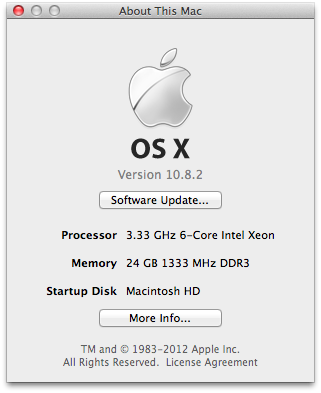
System specs?
Please Log in to join the conversation.
17 Oct 2012 03:53 #15203
by bonzox
Replied by bonzox on topic Re: FCPX deleting files from Original Media folder upon relink
I've attached my specs. I just also read comment #67 below, that could explain a lot

Please Log in to join the conversation.
17 Oct 2012 04:02 #15204
by BenB
Replied by BenB on topic Re: FCPX deleting files from Original Media folder upon relink
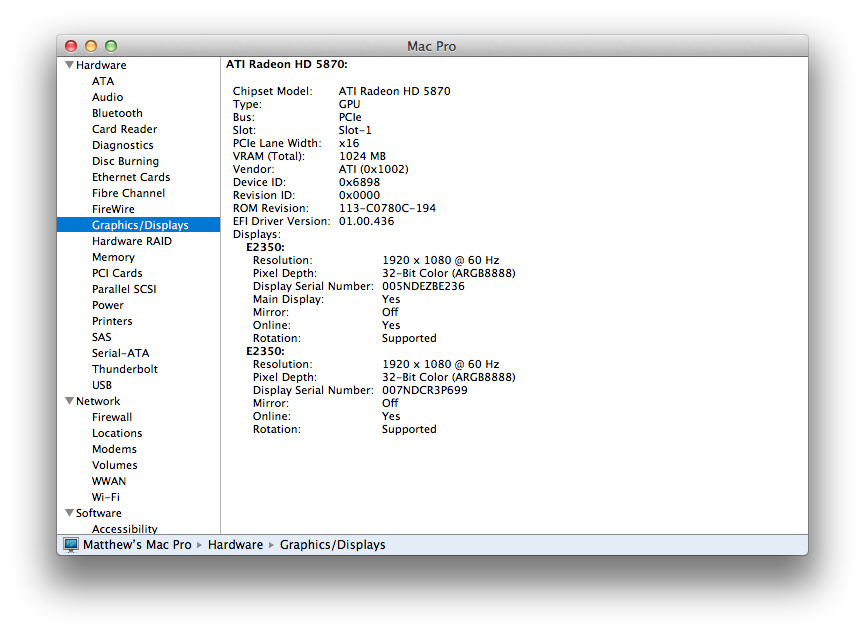
GPU, drive config, software versions?
Please Log in to join the conversation.
17 Oct 2012 04:05 #15205
by bonzox
Replied by bonzox on topic Re: FCPX deleting files from Original Media folder upon relink
GPU attached, project is running off of a hard drive that contains only FCPX events and projects, on hard drive bay 2 (I believe that's what you're asking?), FCPX 10.0.5
Please Log in to join the conversation.
17 Oct 2012 12:34 #15218
by BenB
Replied by BenB on topic Re: FCPX deleting files from Original Media folder upon relink
That is odd, I've not seen this before on up to date systems. Disk Warrior.
Please Log in to join the conversation.
- Patchwork Films
-

- Offline
- New Member
-

Less
More
- Posts: 3
- Thank you received: 0
26 Feb 2013 14:53 #21749
by Patchwork Films
Replied by Patchwork Films on topic FCPX deleting files from Original Media folder upon relink
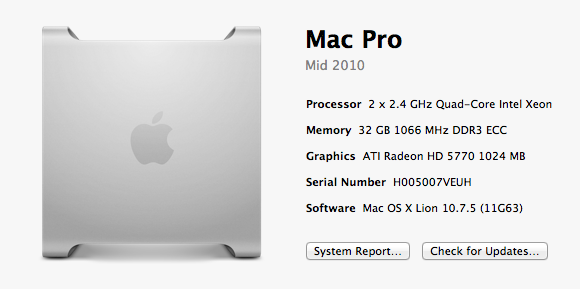
The same thing just happened to me. Can't find the transcoded media anywhere. It's just gone.....Like nothing I've ever seen. Did you have any luck solving this issue?
Thanks in advance,
Ben
FCPX 10.0.6
Thanks in advance,
Ben
FCPX 10.0.6
Please Log in to join the conversation.
