


- Posts: 220
- Thank you received: 17
3 Post Moderation Rule for New Boarders (25 Jan 2021)
New boarders will have their posts moderated - Don't worry if you cannot see your post immediately.
Music in FCPX
- Don Rumsey
-
 Topic Author
- Offline
- Elite Member
-

Less
More
15 Oct 2012 04:27 #15072
by Don Rumsey
Music in FCPX was created by Don Rumsey
I'm doing some wedding highlights and looking all over for Royalty Free Music that fits the mood of a piece I'm working on. I find myself keep coming bak to one of the pieces of music in the loops library. I think it's from the old Soundtrack Pro actually. I just can't seem to bring myself to using it. Why is that?
Please Log in to join the conversation.
- Don Rumsey
-
Topic Author
- Offline
- Elite Member
-
Less
More
- Posts: 220
- Thank you received: 17
15 Oct 2012 04:43 #15073
by Don Rumsey
Replied by Don Rumsey on topic Re: Music in FCPX
By the way. I find rummaging through the small music window in FCPX to be tedious. I need more space. Sooo.... I keep iTunes open in the other monitor. Did you know that you can drag a song from iTunes into the timeline of FCPX????
Please Log in to join the conversation.

15 Oct 2012 10:53 - 15 Oct 2012 10:54 #15075
by BenB
Replied by BenB on topic Re: Music in FCPX
If the music works, use it. But your question is one of a personal nature, no one can answer it but you.
You can drag media from just about anywhere into an FCP X timeline or event, yes. Just be aware it is making a full copy in your event, too.
You can drag media from just about anywhere into an FCP X timeline or event, yes. Just be aware it is making a full copy in your event, too.
Last edit: 15 Oct 2012 10:54 by BenB.
Please Log in to join the conversation.


15 Oct 2012 22:49 #15103
by dgwvideo
Creating history....one edit at a time !
Replied by dgwvideo on topic Re: Music in FCPX
I copy a lot of my third party royalty free music CD's into the directory listed below so it shows up in the FCPX browser under what I labeled LICENSED MUSIC.
Your system drive/library/audio/apple loops/apple/apple loops for soundtrack pro/
My browser in FCPX then displays all the appropriate sub genres. You can use this method if you don't want to use iTunes or don't want your production music as part of your iTunes library.
Your system drive/library/audio/apple loops/apple/apple loops for soundtrack pro/
My browser in FCPX then displays all the appropriate sub genres. You can use this method if you don't want to use iTunes or don't want your production music as part of your iTunes library.
Creating history....one edit at a time !
Please Log in to join the conversation.
- Don Rumsey
-
Topic Author
- Offline
- Elite Member
-
Less
More
- Posts: 220
- Thank you received: 17
16 Oct 2012 02:04 #15112
by Don Rumsey
Replied by Don Rumsey on topic Re: Music in FCPX
Ahhhh. Very nice. I think I shall do that tonight. Thank you.
Please Log in to join the conversation.
16 Oct 2012 06:09 #15116
by fcpguru
Replied by fcpguru on topic Re: Music in FCPX
You can also store that music in any folder and just drag the folder into the music browser. It will reference it. Really helpful if you have a huge soundFX library because you can simply type in what you are looking for in the search field.
Please Log in to join the conversation.
16 Oct 2012 13:09 #15128
by dgwvideo
Creating history....one edit at a time !
Replied by dgwvideo on topic Re: Music in FCPX
@fcpguru Your method is correct with some limitation. By dragging from the finder, you are placing folders only into a "FOLDER" directory within the browser. You lose the ability to label that directory and to place it wherever you want within the browser. You also are unable to drag a single song into the browser.
By copying to the path I have posted, you have complete control over your directory, what you want to call it and where you want to place it. See the attached image of my browser. I place all of my purchased RF music into the LICENSED folder.
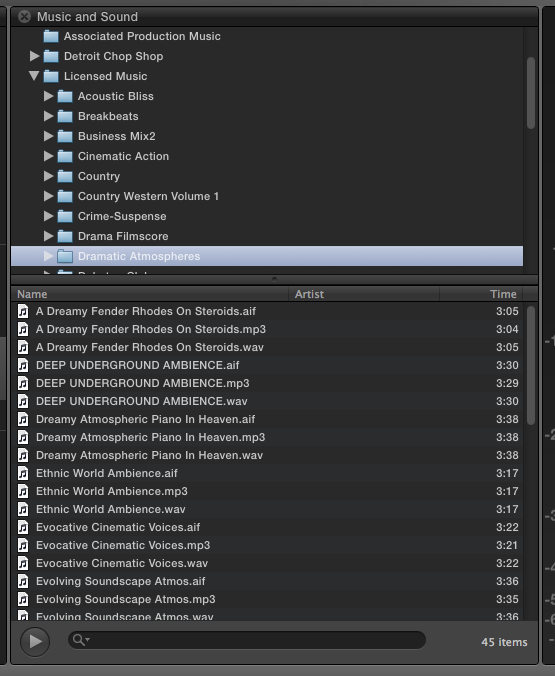
By copying to the path I have posted, you have complete control over your directory, what you want to call it and where you want to place it. See the attached image of my browser. I place all of my purchased RF music into the LICENSED folder.
Creating history....one edit at a time !
Please Log in to join the conversation.
16 Oct 2012 14:14 #15140
by BenB
Replied by BenB on topic Re: Music in FCPX
I created Events called Stock Video, Stock Photo, Stock Audio. I put all of my stock stuff in there.
Advantages are better, faster, easier searching, and no duplication of files on my hard drives, much easier, faster to add new material to the libraries.
Dragging things from any source that is not an Event creates a duplicate file on your drive.
Food for thought.
Advantages are better, faster, easier searching, and no duplication of files on my hard drives, much easier, faster to add new material to the libraries.
Dragging things from any source that is not an Event creates a duplicate file on your drive.
Food for thought.
Please Log in to join the conversation.
16 Oct 2012 14:21 #15141
by dgwvideo
Creating history....one edit at a time !
Replied by dgwvideo on topic Re: Music in FCPX
Not in my example above, Ben. I insert the audio CD. Open that in Finder and drag those audio files to the path I listed at the top of this thread. One audio file only on the computer and it's in the FCPX browser where you want it.
Creating history....one edit at a time !
Please Log in to join the conversation.
16 Oct 2012 14:48 #15145
by BenB
Replied by BenB on topic Re: Music in FCPX
Keywords?
Please Log in to join the conversation.
16 Oct 2012 14:59 - 16 Oct 2012 15:00 #15146
by dgwvideo
Creating history....one edit at a time !
Replied by dgwvideo on topic Re: Music in FCPX
Yes...you got me there. You cannot apply keywords unless you have an event. But I never had the need to search my music on keywords...maybe others do.
And, now that I think of it, I probably am duplicating the audio file when it's used in a project as it is in the directory and then subsequently gets copied to the event associated with the project. No big deal for me, but maybe doing it as you do in an event allows you to reference the audio file rather than copying to the events folder. Is that correct?
And, now that I think of it, I probably am duplicating the audio file when it's used in a project as it is in the directory and then subsequently gets copied to the event associated with the project. No big deal for me, but maybe doing it as you do in an event allows you to reference the audio file rather than copying to the events folder. Is that correct?
Creating history....one edit at a time !
Last edit: 16 Oct 2012 15:00 by dgwvideo.
Please Log in to join the conversation.
16 Oct 2012 15:09 #15148
by BenB
Replied by BenB on topic Re: Music in FCPX
You still have to dig through folders in the Finder, then copy. We have a HUGE collection of stock media. We keyword them by genre, publisher, artist, etc. Also, it's one step import in FCPX.
And yes, your way is making duplicated files in the Events. When you drag anything from a Findeer window, app window, or FCPX's media browsers into a Timeline, it creates a physical duplicate in the Event.
Not that either way is better or worse, use what works best for you. But for us, we have libraries that have been building for a decade now, and they are very sizable. We started putting them in iTunes using the genre and playlists there to organize and search in FCP X. But then found we had way too much and the media browser in FCP X was super limited for doing searches. That was just our unique needs.
There are several ways to do all of this, use which ever one you like best. I'm just offering our solution as food for thought.
And yes, your way is making duplicated files in the Events. When you drag anything from a Findeer window, app window, or FCPX's media browsers into a Timeline, it creates a physical duplicate in the Event.
Not that either way is better or worse, use what works best for you. But for us, we have libraries that have been building for a decade now, and they are very sizable. We started putting them in iTunes using the genre and playlists there to organize and search in FCP X. But then found we had way too much and the media browser in FCP X was super limited for doing searches. That was just our unique needs.
There are several ways to do all of this, use which ever one you like best. I'm just offering our solution as food for thought.
Please Log in to join the conversation.
16 Oct 2012 15:53 #15155
by dgwvideo
Creating history....one edit at a time !
Replied by dgwvideo on topic Re: Music in FCPX
I'll have to take a look at moving those audio files to events. On the other hand, I kind of like having the music copied into the respective project event. The files are relatively small and always there within the job folder for me. But I guess using events, one could organize the files within FCPX to achieve the same result.
Creating history....one edit at a time !
Please Log in to join the conversation.
16 Oct 2012 17:48 #15171
by fcpguru
Replied by fcpguru on topic Re: Music in FCPX
I've put a lot of my stock video and effects libraries in events, but found that having a lot of events open also creates a drag on resources. Not a huge deal, but when you are stretching it to the max...
I like having the file copied into the event as this just makes it easier to wrap it for me, although one could also just consolidate the media at any point as well...
As with legacy FCP, many ways to skin the cat.
I like having the file copied into the event as this just makes it easier to wrap it for me, although one could also just consolidate the media at any point as well...
As with legacy FCP, many ways to skin the cat.
Please Log in to join the conversation.
