


- Posts: 2
- Thank you received: 0
3 Post Moderation Rule for New Boarders (25 Jan 2021)
New boarders will have their posts moderated - Don't worry if you cannot see your post immediately.
Problems with project "a selected item contains no media for export"
- homestar_kevin
-
 Topic Author
- Offline
- New Member
-

Less
More
05 Oct 2012 00:06 - 05 Oct 2012 00:08 #14783
by homestar_kevin
Hey guys, long time lurker!
Never had to post, because, well, I've never really had any problems!
Been loving the app since day one.
I'm in the process now of cutting a demo reel together for some of the more recent projects I've done.
This involved clips from several different events going into one project and timeline.
I made a new project inside one of these events and started the edit.
Everything was fine, until today when I was trying to finish up. I brought in new clips today, and was not having any issues.
I then noticed that I wasn't hearing any audio.
I thought I had muted it, and stopped to figure out what was happening when I realized I wasn't.
I tried exporting the event and got a dialogue box saying
"a selected item contains no media for export" although I had all the clips on the timeline and was seeing them.(screeen shot below)
I went out into my project library, and it's showing my demo reel as just a blank gray bar among my other projects.(scrrenshot below)
This weirded me out, so I duplicated the project and went into that timeline.
All the clips are still in the places I edited them to be, but I'm not getting any sound still.
I then select all and copy everything and final cut crashes.
I've retried this method and every time the app will crash.
I filled out my error report diligently, but still am unable to export the reel I just spent a few hours on.
Will I have to redo everything?
Has anyone experienced anything like this?
The project opened fine before today, but when I went into my 'final cut projects' folder today, there isn't one for it, even though I see it in my project library and can click and see all my clips once the project is selected.
I am running version 10.0.4 on OSX 10.6.8 a 2.8 i7 Imac11,1
I've attached screen shots!
Thanks for any insight, and thanks for posting on this board.
Love it here, excited to finally get active and start talking with you all!
Kevin
Never had to post, because, well, I've never really had any problems!
Been loving the app since day one.
I'm in the process now of cutting a demo reel together for some of the more recent projects I've done.
This involved clips from several different events going into one project and timeline.
I made a new project inside one of these events and started the edit.
Everything was fine, until today when I was trying to finish up. I brought in new clips today, and was not having any issues.
I then noticed that I wasn't hearing any audio.
I thought I had muted it, and stopped to figure out what was happening when I realized I wasn't.
I tried exporting the event and got a dialogue box saying
"a selected item contains no media for export" although I had all the clips on the timeline and was seeing them.(screeen shot below)
I went out into my project library, and it's showing my demo reel as just a blank gray bar among my other projects.(scrrenshot below)
This weirded me out, so I duplicated the project and went into that timeline.
All the clips are still in the places I edited them to be, but I'm not getting any sound still.
I then select all and copy everything and final cut crashes.
I've retried this method and every time the app will crash.
I filled out my error report diligently, but still am unable to export the reel I just spent a few hours on.
Will I have to redo everything?
Has anyone experienced anything like this?
The project opened fine before today, but when I went into my 'final cut projects' folder today, there isn't one for it, even though I see it in my project library and can click and see all my clips once the project is selected.
I am running version 10.0.4 on OSX 10.6.8 a 2.8 i7 Imac11,1
I've attached screen shots!
Thanks for any insight, and thanks for posting on this board.
Love it here, excited to finally get active and start talking with you all!
Kevin
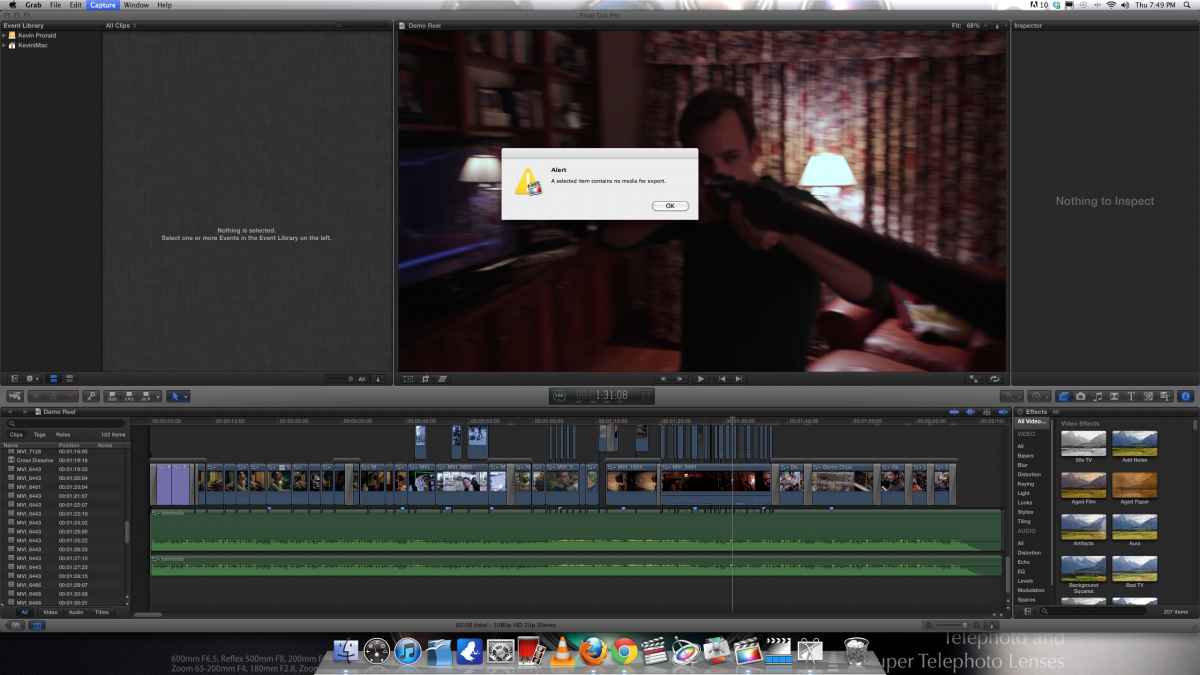
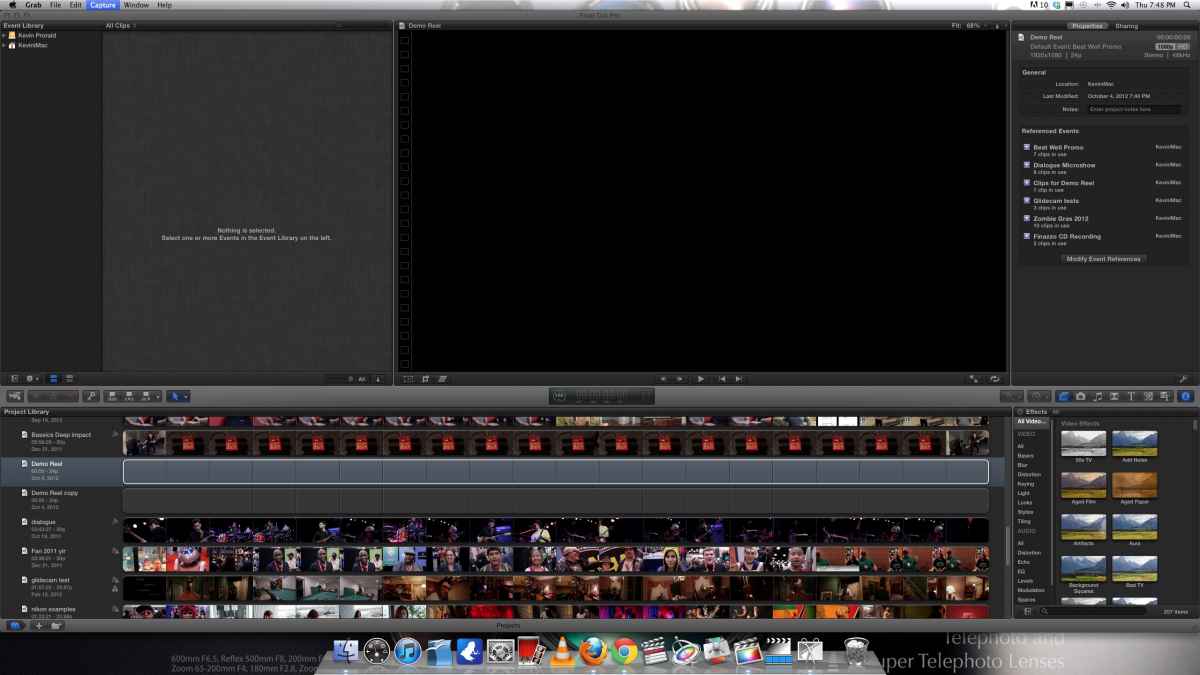
Last edit: 05 Oct 2012 00:08 by homestar_kevin. Reason: Pictures didn't attach!
Please Log in to join the conversation.
- homestar_kevin
-
Topic Author
- Offline
- New Member
-
Less
More
- Posts: 2
- Thank you received: 0
17 Oct 2012 19:20 #15240
by homestar_kevin
Replied by homestar_kevin on topic Re: Problems with project "a selected item contains no media for export"
Is there any information that I haven't provided that would be helpful?
Or is this something no one has run into?
I haven't messed around with this too much more, but it's pretty frustrating that it happened later in the edit.
Just re do the demo reel?
Or is this something no one has run into?
I haven't messed around with this too much more, but it's pretty frustrating that it happened later in the edit.
Just re do the demo reel?
Please Log in to join the conversation.

17 Oct 2012 23:01 #15250
by BenB
Replied by BenB on topic Re: Problems with project "a selected item contains no media for export"
Update to at least OS X 10.7. Preferably to OS X 10.8.2 and FCP X 10.0.5. I've never seen this problem. What is the original source of the clips, what are you system specs?
Please Log in to join the conversation.
- ronny courtens
-

- Offline
- Moderator
-

Less
More
- Posts: 4455
- Thank you received: 962
17 Oct 2012 23:03 #15251
by ronny courtens
Replied by ronny courtens on topic Re: Problems with project "a selected item contains no media for export"
This has happened before and I agree it's a dreadful experience. Most of the posts I have read about this problem were from people using 10.0.4.
I would suggest updating to 10.0.5 because this has solved the issue for some people, but as you say your Project folder has disappeared I doubt if this will be of any help. On the other hand: if your project is screwed anyway there's no harm in trying this.
Are you really sure your Project folder is not somewhere else (on your boot drive or another location)? Can you do a Search for the project folder (Spotlight > Name of your Project) to see if you can find it?
I would suggest updating to 10.0.5 because this has solved the issue for some people, but as you say your Project folder has disappeared I doubt if this will be of any help. On the other hand: if your project is screwed anyway there's no harm in trying this.
Are you really sure your Project folder is not somewhere else (on your boot drive or another location)? Can you do a Search for the project folder (Spotlight > Name of your Project) to see if you can find it?
Please Log in to join the conversation.
