


3 Post Moderation Rule for New Boarders (25 Jan 2021)
New boarders will have their posts moderated - Don't worry if you cannot see your post immediately.
J-Cut bug
29 Sep 2012 05:52 - 29 Sep 2012 05:54 #14596
by canelson
--
Matias Canelson
www.canelson.us
Hi guys! I was testing some things on FCPx 10.0.5 last night and I found this weird bug.
I have 2 clips, I double click the audio to detach it and trim one audio over the other creating a J-CUT (the L-CUT in this example image is not important)
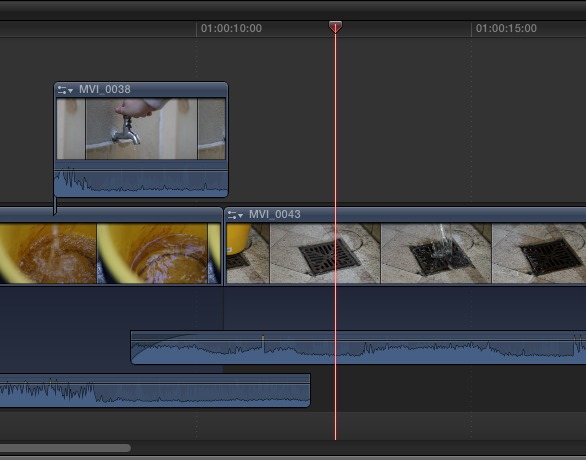
I keep on editing and now I want to do a jump-cut on the J-Cut clip, so I select the range I want to delete...
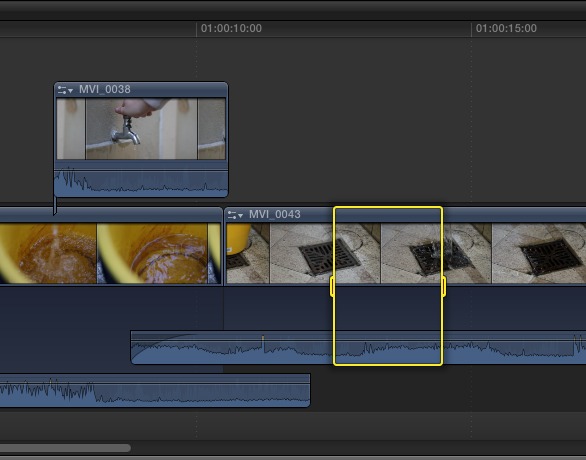
Press the BACKSPACE key (same as Menu bar > EDIT > DELETE) and the selected range disappears, BUT...
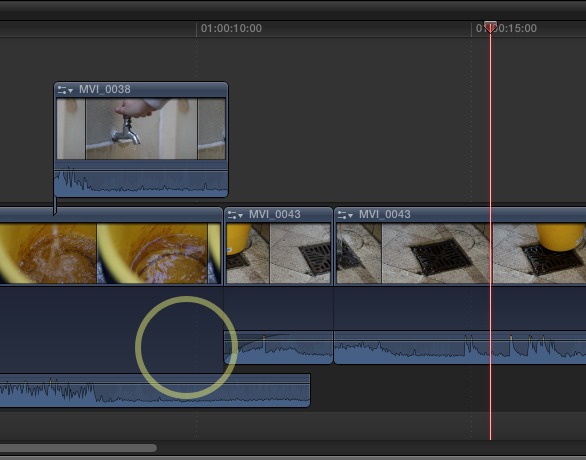
The J-CUT extended audio disappears too. WEIRD! It happens with J-Cuts, not with L-Cuts.
Any of you have the same problem!?
I have 2 clips, I double click the audio to detach it and trim one audio over the other creating a J-CUT (the L-CUT in this example image is not important)
I keep on editing and now I want to do a jump-cut on the J-Cut clip, so I select the range I want to delete...
Press the BACKSPACE key (same as Menu bar > EDIT > DELETE) and the selected range disappears, BUT...
The J-CUT extended audio disappears too. WEIRD! It happens with J-Cuts, not with L-Cuts.
Any of you have the same problem!?
--
Matias Canelson
www.canelson.us
Last edit: 29 Sep 2012 05:54 by canelson.
Please Log in to join the conversation.
- Tom Wolsky
-

- Offline
- Moderator
-

29 Sep 2012 11:51 #14600
by Tom Wolsky
Replied by Tom Wolsky on topic Re: J-Cut bug
I get a different behavior that's also not correct. But I only get it if I use the range selection tool. I do not get this problem if I blade the clip. I get this before the edit:
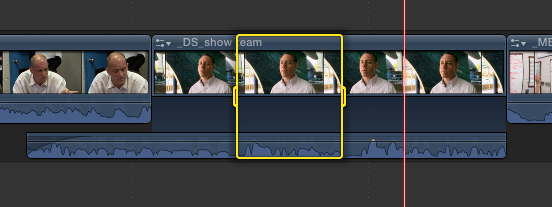
And this after the edit
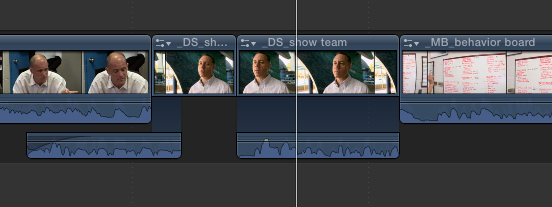
which is clearly not right.
However, if I do the same edit blading. I get this
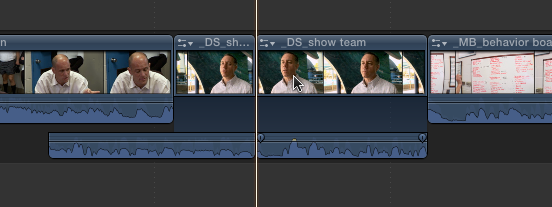
And this after the edit
which is clearly not right.
However, if I do the same edit blading. I get this
Please Log in to join the conversation.

29 Sep 2012 12:35 #14601
by Mals82
Replied by Mals82 on topic Re: J-Cut bug
Wow guys, this is a pretty bad one...FCPX definitely needs some adjustments. But thanks for the tip, now i won't try this using the range tool!
Please Log in to join the conversation.
29 Sep 2012 13:43 #14605
by canelson
--
Matias Canelson
www.canelson.us
Replied by canelson on topic Re: J-Cut bug
Hi Tom!
I have the same problem as you do, but when I was doing the screenshots I didn’t know how to perform the second bug. This should be reported ASAP, don’t you think?
It could be a problem with OS X 10.8.2 or FCPx 10.0.5, because I can’t remember it happened to me before (but I don’t use FCPx everyday) and I updated OS X and FCPx last week.
I have the same problem as you do, but when I was doing the screenshots I didn’t know how to perform the second bug. This should be reported ASAP, don’t you think?
It could be a problem with OS X 10.8.2 or FCPx 10.0.5, because I can’t remember it happened to me before (but I don’t use FCPx everyday) and I updated OS X and FCPx last week.
--
Matias Canelson
www.canelson.us
Please Log in to join the conversation.
- jjsanderson
-

- Offline
- Elite Member
-

30 Sep 2012 10:38 #14615
by jjsanderson
Replied by jjsanderson on topic Re: J-Cut bug
Daft question: you folks have reported this using the Final Cut Pro X feedback form, right? (perhaps with a link to this thread, for clarity).
Please Log in to join the conversation.
- Tom Wolsky
-
- Offline
- Moderator
-
30 Sep 2012 11:13 #14616
by Tom Wolsky
Replied by Tom Wolsky on topic Re: J-Cut bug
Yes.
Please Log in to join the conversation.
