


- Posts: 10
- Thank you received: 0
3 Post Moderation Rule for New Boarders (25 Jan 2021)
New boarders will have their posts moderated - Don't worry if you cannot see your post immediately.
Missing Event File to work on... and more!
27 Sep 2012 01:31 - 27 Sep 2012 02:27 #14505
by NovaP
Missing Event File to work on... and more! was created by NovaP
I don't know what happened.... I was working on a project called "TEST" for a couple of weeks. A few days ago, I started working on a new project called "Sneaker" on FCPX. All I did was upload the media files so I could begin working on it later. Today, I opened the "TEST" project within the events folder but FCP opens with everything mixed up. The first project "TEST" shows on the timeline but the event window shows the media footage from the second project "Sneaker".
After messing around with it, I end up losing the timeline. Instead of seeing the timeline, it says project library showing the home icon (where the sneaker event file is located) and the external drive (it's empty). The only media that shows up in the events window is the "Sneaker" project located in the home icon where the timeline should be. What's going on? I really dug a deep hole for myself! Can anyone give me a hand?
FYI: I fiddled with it some more and every time I update something with the file, it changes. Now I'm in the "Sneaker" project and I made a slight change. Now every file ("TEST" and "SNEAKER") has the changes. The older files seem to be updating every time I do something!! What?!?! HELP!
After messing around with it, I end up losing the timeline. Instead of seeing the timeline, it says project library showing the home icon (where the sneaker event file is located) and the external drive (it's empty). The only media that shows up in the events window is the "Sneaker" project located in the home icon where the timeline should be. What's going on? I really dug a deep hole for myself! Can anyone give me a hand?
FYI: I fiddled with it some more and every time I update something with the file, it changes. Now I'm in the "Sneaker" project and I made a slight change. Now every file ("TEST" and "SNEAKER") has the changes. The older files seem to be updating every time I do something!! What?!?! HELP!
Last edit: 27 Sep 2012 02:27 by NovaP.
Please Log in to join the conversation.


27 Sep 2012 03:53 #14517
by dgwvideo
Creating history....one edit at a time !
Replied by dgwvideo on topic Re: Missing Event File to work on... and more!
Not sure I can help all the way through, but you should know that in FCPX, events can be tied to multiple projects. You can have project "TEST" open, for example, but in the event library, have any event on your drive active. To be sure the correct event is associated with the correct project, in the project library, click on the information button to the right to see the referenced events for that project. I don't believe FCPX is mixing that up. You may have had that event selected.
Creating history....one edit at a time !
Please Log in to join the conversation.
27 Sep 2012 04:09 #14518
by NovaP
Replied by NovaP on topic Re: Missing Event File to work on... and more!
Thanks for responding. I'll check that out. The only event that pops up in the project library is the "Sneaker" event. The icon has an arrow that I click on, the description drops down to show the "Sneaker" event. The funny thing is.... Now, the media doesn't show in the event browser in the upper-right hand corner. This is crazy. I'll try again tomorrow. My brain is drained at this point! I want to believe it's somewhere hidden but I don't know. I would hate to think that I lost everything.
Please Log in to join the conversation.

27 Sep 2012 15:42 #14536
by BenB
Replied by BenB on topic Re: Missing Event File to work on... and more!
Screen shots?
Please Log in to join the conversation.
27 Sep 2012 15:44 - 27 Sep 2012 15:45 #14537
by dgwvideo
Creating history....one edit at a time !
Replied by dgwvideo on topic Re: Missing Event File to work on... and more!
Maybe you're just mixing up terminology, but the project library cannot contain an event. They are strictly projects (the edit points, timeline, etc.). The events (footage, media, graphics, etc.) are only in the Event Library and you can assign which event is connected to which project by using the wrench icon once you have opened a project. Here you can also assign the video and audio format for the project.
Sorry if I am telling you things you already know.
Sorry if I am telling you things you already know.
Creating history....one edit at a time !
Last edit: 27 Sep 2012 15:45 by dgwvideo.
Please Log in to join the conversation.
27 Sep 2012 17:30 - 27 Sep 2012 17:31 #14540
by NovaP
Replied by NovaP on topic Re: Missing Event File to work on... and more!
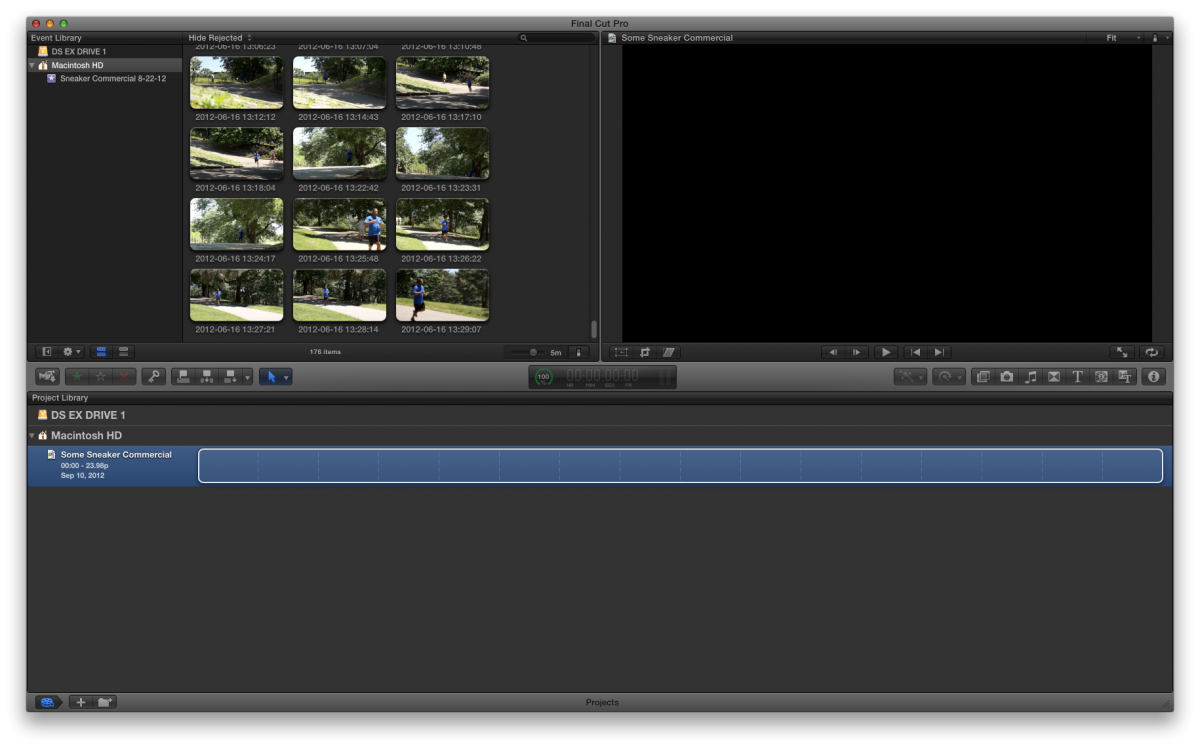
Here is what I see when I click on the "TEST" event file in finder. This is the "Sneaker" project I created. I'm just trying to find my "TEST" project... Where could it be?
Last edit: 27 Sep 2012 17:31 by NovaP.
Please Log in to join the conversation.
27 Sep 2012 17:34 - 27 Sep 2012 18:03 #14541
by NovaP
Replied by NovaP on topic Re: Missing Event File to work on... and more!
The event file shows up in my external drive in finder but it doesn't pop up in FCP. I must have done something wrong....
Last edit: 27 Sep 2012 18:03 by NovaP.
Please Log in to join the conversation.
27 Sep 2012 17:45 #14542
by NovaP
Replied by NovaP on topic Re: Missing Event File to work on... and more!
DG, I may be mixing up terminology. Please check out the screenshot so you can be clear on what Im saying...
Please Log in to join the conversation.
27 Sep 2012 18:07 #14544
by dgwvideo
Creating history....one edit at a time !
Replied by dgwvideo on topic Re: Missing Event File to work on... and more!
What event is supposed to be associated with your TEST project? Is the event also called "TEST"? Whatever it's called, be sure in the finder that it is placed within the "FINAL CUT EVENTS" folder, otherwise it will not be seen by FCPX. Maybe it got misplaced outside of that folder. This is the only reason I can think of that would allow you to see it in finder but not fcpx.
Your screenshot shows a project with no thumbnails. Click on the project and then click the info button to the bottom right of the viewer. This will show the associated event. If it is not correct, click the wrench icon that you will see and select the default event for that project.
Your screenshot shows a project with no thumbnails. Click on the project and then click the info button to the bottom right of the viewer. This will show the associated event. If it is not correct, click the wrench icon that you will see and select the default event for that project.
Creating history....one edit at a time !
Please Log in to join the conversation.
27 Sep 2012 18:39 #14547
by NovaP
Replied by NovaP on topic Re: Missing Event File to work on... and more!
In finder, I click on the FCP event folder. The event folder has Camera Render Files, Effect Browser Thumbnails and New Event Folder 3-19-12. After clicking the new event folder, 7 folders pop up along with CurrentVersion.fcpevent. I click on that file and the "Sneaker" project opens in FCP.
I tried this in the project folder as well out of frustration. There are 3 folders and a file named "CurrentVersionfcpproject". I click on that file and the same "Sneaker" project opens in FCP.
I never officially named the event folder for "TEST". I left it as "New Event Folder 3-19-12". As the project developed, I decided to leave it unnamed because I knew where the files were anyway.
I tried this in the project folder as well out of frustration. There are 3 folders and a file named "CurrentVersionfcpproject". I click on that file and the same "Sneaker" project opens in FCP.
I never officially named the event folder for "TEST". I left it as "New Event Folder 3-19-12". As the project developed, I decided to leave it unnamed because I knew where the files were anyway.
Please Log in to join the conversation.
27 Sep 2012 19:34 #14550
by dgwvideo
Creating history....one edit at a time !
Replied by dgwvideo on topic Re: Missing Event File to work on... and more!
OK, so the complete path would be users/movies/final cut events...
If that is what you have then the directory structure is correct.
However, that tells me that you are keeping your events (and probably also projects) on your system OS drive. This is not a great idea since the OS needs to use that drive to run your computer, and if it is also being asked to stream data from your events, poor performance and other issues may arise.
I would move the Final Cut Events and Final Cut Projects folder to another (preferably external FW 800 7200 RPM drive or faster.
Additionally, if you hadn't tried to trash preferences and restart FCPX, now would be a good time to see if you can get the project back intact. You can use the free program "Preference Manager" from Digital Rebellion.
Another thing to try after that would be to delete the CurrentVersion.fcpproject file that is located in the Final Cut Projects folder and force FCPX to look for the backup file on startup (in case the current one is corrupted).
If that is what you have then the directory structure is correct.
However, that tells me that you are keeping your events (and probably also projects) on your system OS drive. This is not a great idea since the OS needs to use that drive to run your computer, and if it is also being asked to stream data from your events, poor performance and other issues may arise.
I would move the Final Cut Events and Final Cut Projects folder to another (preferably external FW 800 7200 RPM drive or faster.
Additionally, if you hadn't tried to trash preferences and restart FCPX, now would be a good time to see if you can get the project back intact. You can use the free program "Preference Manager" from Digital Rebellion.
Another thing to try after that would be to delete the CurrentVersion.fcpproject file that is located in the Final Cut Projects folder and force FCPX to look for the backup file on startup (in case the current one is corrupted).
Creating history....one edit at a time !
Please Log in to join the conversation.
27 Sep 2012 19:53 #14553
by NovaP
Replied by NovaP on topic Re: Missing Event File to work on... and more!
Dg,
The files were moved to an external drive. It's 3 folders in.... That's how I arrange the file order. I didn't trash the preferences but I'll look into that. Do you think the "TEST" file was written over? Would erasing the CurrentVersion.fcpproject corrupt my project? I tried all the files in finder under the "TEST" and they still come up as the "Sneaker" setup in FCP. Why is that happening though?
The files were moved to an external drive. It's 3 folders in.... That's how I arrange the file order. I didn't trash the preferences but I'll look into that. Do you think the "TEST" file was written over? Would erasing the CurrentVersion.fcpproject corrupt my project? I tried all the files in finder under the "TEST" and they still come up as the "Sneaker" setup in FCP. Why is that happening though?
Please Log in to join the conversation.

27 Sep 2012 21:13 #14562
by marchyman
How did you move them? Did you use the Finder or FCPX?
Replied by marchyman on topic Re: Missing Event File to work on... and more!
NovaP wrote: The files were moved to an external drive.
How did you move them? Did you use the Finder or FCPX?
Please Log in to join the conversation.
27 Sep 2012 23:25 #14568
by NovaP
Replied by NovaP on topic Re: Missing Event File to work on... and more!
Marchyman,
I moved the files through the finder...
I moved the files through the finder...
Please Log in to join the conversation.
27 Sep 2012 23:29 #14569
by dgwvideo
Creating history....one edit at a time !
Replied by dgwvideo on topic Re: Missing Event File to work on... and more!
Sounds like your current project is corrupt now, so it shouldn't hurt to try to delete the current project. If you're worried about it, just move it thru the finder to a storage place that you can get back to it, but the purpose of the backup project it to give you a chance to salvage the project.
As for moving any other files, those should always be done through FCPX so the database stays intact. If you use Digital Rebellions software to trash FCPX preferences, there is also an option to rebuild the database.
As for moving any other files, those should always be done through FCPX so the database stays intact. If you use Digital Rebellions software to trash FCPX preferences, there is also an option to rebuild the database.
Creating history....one edit at a time !
Please Log in to join the conversation.
28 Sep 2012 00:59 #14573
by NovaP
Replied by NovaP on topic Re: Missing Event File to work on... and more!
This is my first major issue with FCPX I'm just so disappointed! Arrghh! It took some time to get that first project together! I'll try that preferences suggestion. Thanks a lot, DG! Does moving files in Finder corrupt the project?
Please Log in to join the conversation.
28 Sep 2012 03:22 #14579
by NovaP
Replied by NovaP on topic Re: Missing Event File to work on... and more!
DG,
I just wanted to say thanks for the help. I figured it out. I just needed to take a tutorial on media management. I was totally in old FCP mode.... I got to remember even though it's apple, it's a whole new animal! Thanks again!
I just wanted to say thanks for the help. I figured it out. I just needed to take a tutorial on media management. I was totally in old FCP mode.... I got to remember even though it's apple, it's a whole new animal! Thanks again!
Please Log in to join the conversation.
29 Sep 2012 01:38 #14590
by dgwvideo
Creating history....one edit at a time !
Replied by dgwvideo on topic Re: Missing Event File to work on... and more!
Glad you got it sorted out.
Creating history....one edit at a time !
Please Log in to join the conversation.
29 Sep 2012 04:25 #14592
by marchyman
Glad you got it sorted out. I believe that moving via the finder can cause issues with duplicate identities... but I'm mostly parroting what I've read and don't have a real understanding of what is going on. To be safe I always move/duplicate inside of FCPX so it has a chance to do whatever database magic it has to do to keep things straight.
Replied by marchyman on topic Re: Missing Event File to work on... and more!
NovaP wrote: Does moving files in Finder corrupt the project?
Glad you got it sorted out. I believe that moving via the finder can cause issues with duplicate identities... but I'm mostly parroting what I've read and don't have a real understanding of what is going on. To be safe I always move/duplicate inside of FCPX so it has a chance to do whatever database magic it has to do to keep things straight.
Please Log in to join the conversation.
29 Sep 2012 04:50 #14594
by BenB
Replied by BenB on topic Re: Missing Event File to work on... and more!
Every Event and Project is a mini-database. A scaled down version of the former Final Cut Server. Each is a assigned it's own database ID. FCPX can only open and track one database with that unique ID number. If you duplicate in the Finder, you end up with two copies of an Event or Project that both have the same ID. FCPX will use the first one it finds, and give a warning (not mount) the second. When duplicating inside FCP X, it assigns a new ID to the duplicates.
Please Log in to join the conversation.
