


- Posts: 1
- Thank you received: 0
3 Post Moderation Rule for New Boarders (25 Jan 2021)
New boarders will have their posts moderated - Don't worry if you cannot see your post immediately.
how i install plugins fcp x
- 246822
-
 Topic Author
- Offline
- New Member
-

- words may hurt, but silence is a killer... I don't like any complex. But simple thing is not simple! So........ It's funny how people take advantage of you're kindness... but when you stop being kind to them... they say your a bad person or something
Less
More
25 Sep 2012 06:29 #14406
by 246822
how i install plugins fcp x was created by 246822
how can i install plugins fcp x
Please Log in to join the conversation.
- Andreas Kiel
-
- Offline
- Platinum Member
-

Less
More
- Posts: 1077
- Thank you received: 189
25 Sep 2012 08:28 #14407
by Andreas Kiel
Replied by Andreas Kiel on topic Re: how i install plugins fcp x
You can use my MTT app. Read the manual first.
www.spherico.com/filmtools/MotionTemplat.../MTT%20Installer.dmg
-Andreas
www.spherico.com/filmtools/MotionTemplat.../MTT%20Installer.dmg
-Andreas
Please Log in to join the conversation.

26 Sep 2012 15:28 - 26 Sep 2012 15:30 #14481
by dgwvideo
Creating history....one edit at a time !
Replied by dgwvideo on topic Re: how i install plugins fcp x
Hello, Andreas...
I have never been able to get the Motion Template Tool to work. I know other users have no problem with it, so it must be just me or my configuration. Using Mac Pro 12 Core mid 2010 dual 2.93 GHZ 64GB Ram ATI HD5870 12 TB eSata 6GBS Internal Sata 6GBS and two 512 Solid State system and scratch drives.
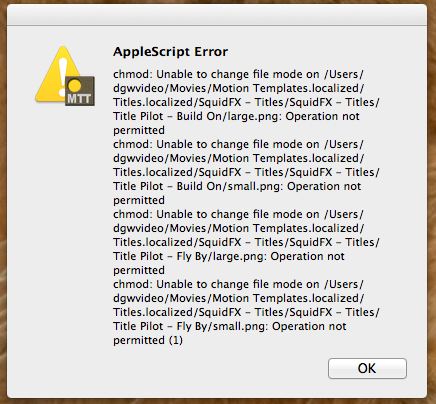
Here is the error message I keep getting. Reinstalled MTT twice now.
Any help is appreciated.
EDIT: I should add that it seems as if the SquidFX Title Pilot plugin may be interfering.
I have never been able to get the Motion Template Tool to work. I know other users have no problem with it, so it must be just me or my configuration. Using Mac Pro 12 Core mid 2010 dual 2.93 GHZ 64GB Ram ATI HD5870 12 TB eSata 6GBS Internal Sata 6GBS and two 512 Solid State system and scratch drives.
Here is the error message I keep getting. Reinstalled MTT twice now.
Any help is appreciated.
EDIT: I should add that it seems as if the SquidFX Title Pilot plugin may be interfering.
Creating history....one edit at a time !
Last edit: 26 Sep 2012 15:30 by dgwvideo.
Please Log in to join the conversation.
- Andreas Kiel
-
- Offline
- Platinum Member
-
Less
More
- Posts: 1077
- Thank you received: 189
26 Sep 2012 16:35 #14487
by Andreas Kiel
Replied by Andreas Kiel on topic Re: how i install plugins fcp x
Hi,
Try to change the permissions of the "Squid-FX" manually on Finder base using the info window.
-Andreas
Try to change the permissions of the "Squid-FX" manually on Finder base using the info window.
-Andreas
Please Log in to join the conversation.
26 Sep 2012 22:32 #14499
by dgwvideo
Creating history....one edit at a time !
Replied by dgwvideo on topic Re: how i install plugins fcp x
Hi, Andreas...
I changed the permissions of the enclosed folders for Squid-FX and that did in fact solve the problem. I tested the program with a few MTT dmg files and all is well.
Best regards,
Dan
I changed the permissions of the enclosed folders for Squid-FX and that did in fact solve the problem. I tested the program with a few MTT dmg files and all is well.
Best regards,
Dan
Creating history....one edit at a time !
Please Log in to join the conversation.
