


- Posts: 178
- Thank you received: 9
3 Post Moderation Rule for New Boarders (25 Jan 2021)
New boarders will have their posts moderated - Don't worry if you cannot see your post immediately.
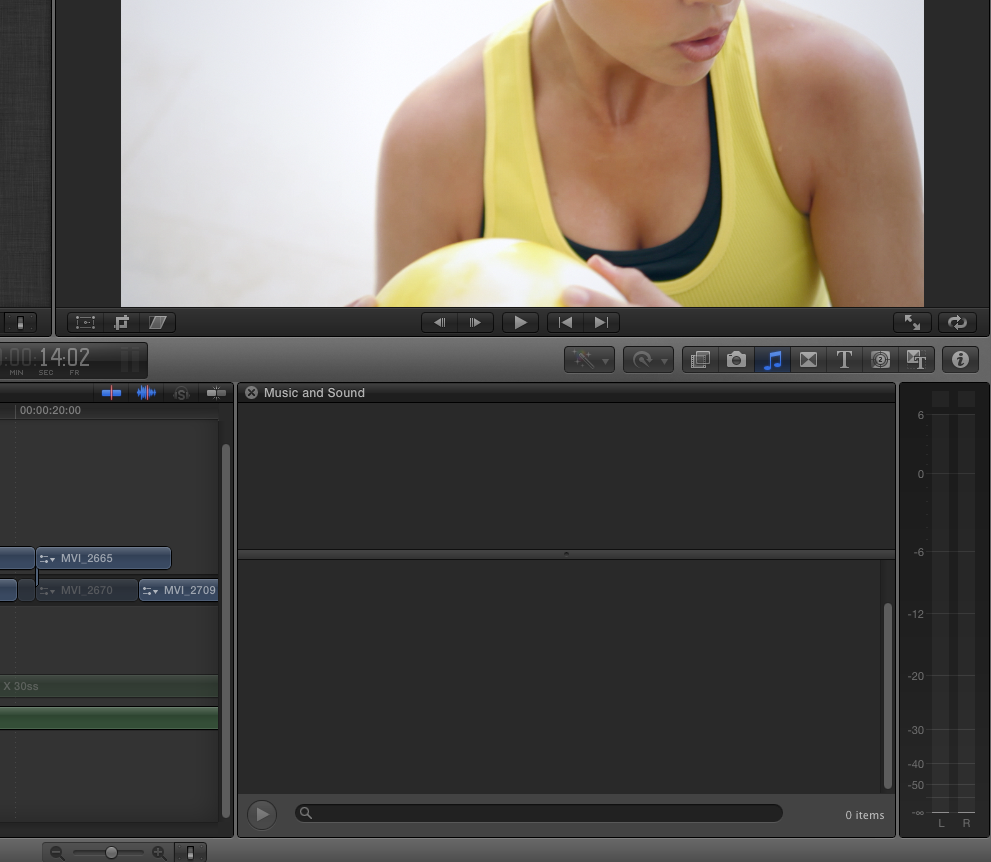
FCP X don't show audio files in the music and sound browsing.
24 Sep 2012 17:17 #14365
by rickytin
Today I open FCP X to find some Sound Fx for a TV Spot and FCP X doesn't show any audio in the music and sound browsing. I trash my preference, restart computer with no lock.
Hope that somebody can help,
Ricky Dominguez
Luna Films
Puerto Rico
Hope that somebody can help,
Ricky Dominguez
Luna Films
Puerto Rico
Please Log in to join the conversation.

24 Sep 2012 17:20 #14366
by BenB
Replied by BenB on topic Re: FCP X don't show audio files in the music and sound browsing.
Can you give us a screen shot, maybe?
Please Log in to join the conversation.
24 Sep 2012 17:53 #14373
by rickytin
Replied by rickytin on topic Re: FCP X don't show audio files in the music and sound browsing.
Thanks BenB, the screen shot.
Please Log in to join the conversation.
24 Sep 2012 18:13 #14377
by BenB
Replied by BenB on topic Re: FCP X don't show audio files in the music and sound browsing.
Holy crap! That's NOT good. Not at all!
1 - Did you see content there before?
2 - If no, did you run the "Download Additional Content" function?
3 - If yes, what did you break?
Delete prefs didn't work? Try moving FCP X from the Applications folder to the trash, launch App Store, go to Purchased tab, click Install for FCP X, see if that fixes it. That's just weird.
I gotta get back to Puerto Rico some time soon. I had so much fun there way back when.
1 - Did you see content there before?
2 - If no, did you run the "Download Additional Content" function?
3 - If yes, what did you break?
Delete prefs didn't work? Try moving FCP X from the Applications folder to the trash, launch App Store, go to Purchased tab, click Install for FCP X, see if that fixes it. That's just weird.
I gotta get back to Puerto Rico some time soon. I had so much fun there way back when.
Please Log in to join the conversation.
24 Sep 2012 18:45 #14379
by rickytin
Replied by rickytin on topic Re: FCP X don't show audio files in the music and sound browsing.
Again thanks Ben, yes I did have the content I also have many sound FX that I have purchase over the years in Itunes and I see them in FCP X. This past friday I try to start FCP X and I have the Restoring the window layout freeze problem, so I delete the Layout as Apple recommend
support.apple.com/kb/TS4169
. Then I start FCP X and everything work, I don't know if that day I have the audio because I didn't need sound fx but I did have sound FX wednesday because I edit a tv spot and I use some sound fx. I will try to install again FCP X and I hope it fix my problem. I will let you know. Thanks again..
I am glad that you have a great time en Puerto Rico and hope you can return soon.
I am glad that you have a great time en Puerto Rico and hope you can return soon.
Please Log in to join the conversation.
24 Sep 2012 20:47 #14385
by BenB
Replied by BenB on topic Re: FCP X don't show audio files in the music and sound browsing.
Is your iTunes library on the system drive, or a secondary drive?
Please Log in to join the conversation.
24 Sep 2012 21:07 #14388
by rickytin
Replied by rickytin on topic Re: FCP X don't show audio files in the music and sound browsing.
In the same system.
Please Log in to join the conversation.
24 Sep 2012 22:56 #14391
by rickytin
Replied by rickytin on topic Re: FCP X don't show audio files in the music and sound browsing.
I reinstall FCP X but still have the problem, it dosen't show my audio. I try Apple support, they told my that I don't have support so I have to pay $19.00 for 30 day support I said okay and I pay but then they don't give support to Puerto Rico so I am fu.... up sorry for the language I don't know what else to do...
Ricky Dominguez
Luna Films
Puerto Rico
Ricky Dominguez
Luna Films
Puerto Rico
Please Log in to join the conversation.
24 Sep 2012 23:45 #14392
by BenB
Replied by BenB on topic Re: FCP X don't show audio files in the music and sound browsing.
Apple legally has to refund you the money for support since they can't give it. Demand a refund, keep at it.
Anyway, that's odd. Let's go back and start over. Info needed:
Mac model
how much RAM
what GPU
hard drive configuration
what's stored where on what drives
OS and app versions
Then we'll move forward and figure this out. Any one else here know anything about this particular issue?
Anyway, that's odd. Let's go back and start over. Info needed:
Mac model
how much RAM
what GPU
hard drive configuration
what's stored where on what drives
OS and app versions
Then we'll move forward and figure this out. Any one else here know anything about this particular issue?
Please Log in to join the conversation.
25 Sep 2012 01:05 #14396
by rickytin
Replied by rickytin on topic Re: FCP X don't show audio files in the music and sound browsing.
Thanks Ben for all your support.
I did't pay for the support because it's not available in Puerto Rico.
I update my MacPro to the lattes Lion version 10.7.5 and now it's working I can see my audio files in the sound browser. I really don't know what happen but now is working.
Sorry to abuse you help, I have a question that maybe you know and if you don't that's OK I appreciated all your help, I would like to update to OS X Mountain Lion but I still use FCP 7 to digitize Beta SP, DigiBeta and also export to tape with AJA LHI. I have look in AJA technical support and other forums with no answer. Will I would be able to use FCP 7 with AJA LHI in OS X Mountain Lion.
Again thanks far all your help and next time you come to Puerto Rico let me invite you to a beer, Rum, whisky or whatever you like.
Thanks / Gracias
Ricky Dominguez
Luna Films
Puerto Rico
I did't pay for the support because it's not available in Puerto Rico.
I update my MacPro to the lattes Lion version 10.7.5 and now it's working I can see my audio files in the sound browser. I really don't know what happen but now is working.
Sorry to abuse you help, I have a question that maybe you know and if you don't that's OK I appreciated all your help, I would like to update to OS X Mountain Lion but I still use FCP 7 to digitize Beta SP, DigiBeta and also export to tape with AJA LHI. I have look in AJA technical support and other forums with no answer. Will I would be able to use FCP 7 with AJA LHI in OS X Mountain Lion.
Again thanks far all your help and next time you come to Puerto Rico let me invite you to a beer, Rum, whisky or whatever you like.
Thanks / Gracias
Ricky Dominguez
Luna Films
Puerto Rico
Please Log in to join the conversation.
25 Sep 2012 01:52 - 25 Sep 2012 01:55 #14398
by BenB
Replied by BenB on topic Re: FCP X don't show audio files in the music and sound browsing.
I'm running a 2008 Mac Pro with Mountain Lion, FCP 7, FCP X, and an AJA Kona LHi. The latest drivers from AJA run FCP X really well. Just don't use the version with the Desktop monitor support (NDD version). I do not use my AJA card with FCP 7. 7 is only on my system to help me trouble shoot and advise my students and consulting clients who still use it. I never use it for any real production work anymore.
BUT, if you want to run the Kona run with FCP 7, leave the old driver in place and run it with FCP 7.
The Kona drivers for FCP 7 and FCP X are two totally separate, mutually incompatible drivers.
AND, you be able to use AJA "VTR Xchange" to capture from your deck with the FCP X drivers, rather than using FCP 7.
BUT, if you want to run the Kona run with FCP 7, leave the old driver in place and run it with FCP 7.
The Kona drivers for FCP 7 and FCP X are two totally separate, mutually incompatible drivers.
AND, you be able to use AJA "VTR Xchange" to capture from your deck with the FCP X drivers, rather than using FCP 7.
Last edit: 25 Sep 2012 01:55 by BenB.
Please Log in to join the conversation.
