


- Posts: 49
- Thank you received: 0
3 Post Moderation Rule for New Boarders (25 Jan 2021)
New boarders will have their posts moderated - Don't worry if you cannot see your post immediately.
.MXF files with separate audio and video? How do I work with these?
19 Sep 2012 14:10 #14197
by Ferrari
I have been given some footage in .MXF format. I'm not sure what camera it originated from. I've posted here but it could be from a Sony camera.
I edit .MXF files from my C300 with no problems in CS6 and FCPX.
However the file structure I have been given for these is completely different to the C300 material.
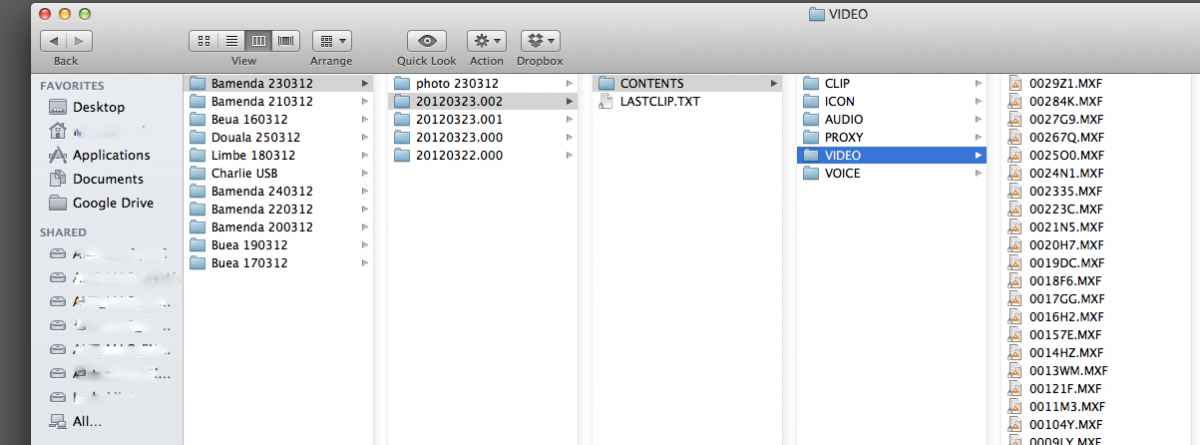
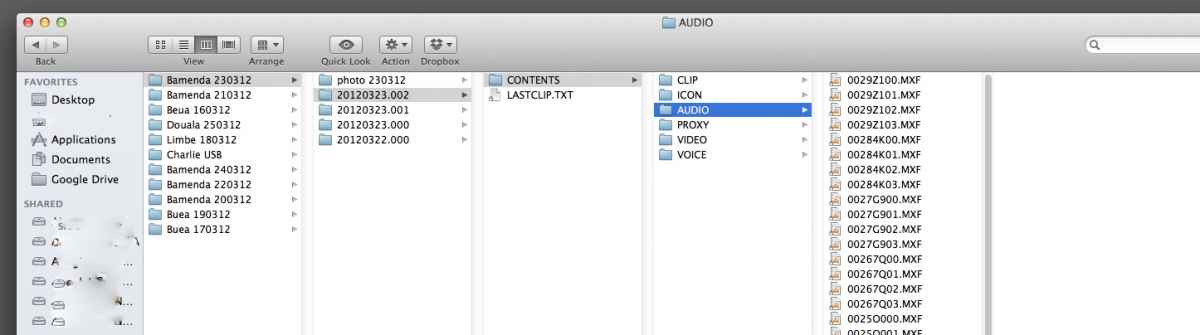
There appears to be separate AUDIO and VIDEO .MXF files. Neither will play in VLC and FCPX and CS6 do not recognise them.
I have attached screen grabs of the file structure.
Any ideas?
PS: Files were locked but I have unlocked them before trying to play/import them.
Thanks.
I edit .MXF files from my C300 with no problems in CS6 and FCPX.
However the file structure I have been given for these is completely different to the C300 material.
There appears to be separate AUDIO and VIDEO .MXF files. Neither will play in VLC and FCPX and CS6 do not recognise them.
I have attached screen grabs of the file structure.
Any ideas?
PS: Files were locked but I have unlocked them before trying to play/import them.
Thanks.
Please Log in to join the conversation.

19 Sep 2012 18:45 #14210
by Dawar
Replied by Dawar on topic Re: .MXF files with separate audio and video? How do I work with these?
It looks like a P2 Card structure.
Try "Import from camera" in FCPX, then choose "open archive" and choose a parent folder (20120323.002 for example).
You should see your clips and be able to import them.
Try "Import from camera" in FCPX, then choose "open archive" and choose a parent folder (20120323.002 for example).
You should see your clips and be able to import them.
Please Log in to join the conversation.


19 Sep 2012 23:41 #14217
by dgwvideo
Creating history....one edit at a time !
Replied by dgwvideo on topic Re: .MXF files with separate audio and video? How do I work with these?
The P2 structure is exactly what that is and following Dawars advice is correct to import them into FCPX. FCPX has an amazing import function for P2 data but not necessarily clearly understood.
Creating history....one edit at a time !
Please Log in to join the conversation.
