


- Posts: 10
- Thank you received: 0
3 Post Moderation Rule for New Boarders (25 Jan 2021)
New boarders will have their posts moderated - Don't worry if you cannot see your post immediately.
Secondary storyline vs Compounds clip
- duodiscuss
-
 Topic Author
- Offline
- New Member
-

Less
More
18 Sep 2012 18:07 #14172
by duodiscuss
Secondary storyline vs Compounds clip was created by duodiscuss
Hi,
I've just watched Steve Martin explanation of the secondary storyline.
Thanks Steve, for I found it very useful.
However, I was wondering in what case you would use secondary storyline instead of the compounds clip. I have to say that not knowing of the existence of the Secondary storyline, I was blindly using the compound clip.
I would be grateful if someone could help me understand in what case you use each one of those features.
Thanks a lot.
Steve
I've just watched Steve Martin explanation of the secondary storyline.
Thanks Steve, for I found it very useful.
However, I was wondering in what case you would use secondary storyline instead of the compounds clip. I have to say that not knowing of the existence of the Secondary storyline, I was blindly using the compound clip.
I would be grateful if someone could help me understand in what case you use each one of those features.
Thanks a lot.
Steve
Please Log in to join the conversation.

18 Sep 2012 18:29 - 18 Sep 2012 18:43 #14173
by canelson
--
Matias Canelson
www.canelson.us
Replied by canelson on topic Re: Secondary storyline vs Compounds clip
One of the benefits of compound clips is that you can save them in your Event Library and use them in other projects (for example: closing credits for a show you edit every week).
Secondary storylines are stuck to the project you are working with (unless you copy&paste them to the new project). One thing Steve forgot to say is that when you break apart the secondary storyline to back to connected clips, it will lose any transitions you have already added to it, because connected clips can´t have transitions.
An interesting difference between the two is when you create a compound clip in your project in hides the names and edit points, so you have to step in to make changes, see the names, etc.
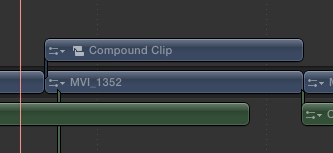
Secondary story lines keep the names and edit points in the project timeline.
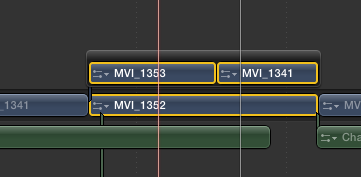
Another difference is that you can create a compound clip in your timeline by selecting the clips, right click with your mouse and select the create compound clips option. If there are any overlapping clips, they will get nested.
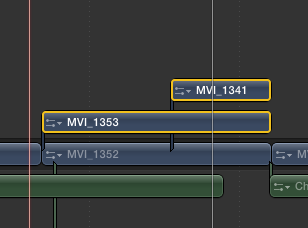
But if you want to create a secondary storyline and you select overlapping clips, you won´t be allowed, you will have to trim the clips until they won´t overlap, then you can create a secondary storyline using the right click menu with your mouse.
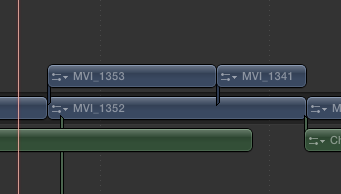
If you ask me, I would really modify how secondary storylines work, just use them to connect to some clips together (example, select all the subtitles of a movie, create a storyline so all the subtitles get arranged together in one track so they won´t mess with my editing and if you add Richard Taylor´s #12 request , all the subtitles could be enabled or disabled at once, creating one project for a movie or short film with english+spanish+french subtitles). And let the connected clips work as normal clips without generating a storyline just to add a dissolve between them (I never understood this).
Maybe there are more differences, but hope this helps you to understand!
Secondary storylines are stuck to the project you are working with (unless you copy&paste them to the new project). One thing Steve forgot to say is that when you break apart the secondary storyline to back to connected clips, it will lose any transitions you have already added to it, because connected clips can´t have transitions.
An interesting difference between the two is when you create a compound clip in your project in hides the names and edit points, so you have to step in to make changes, see the names, etc.
Secondary story lines keep the names and edit points in the project timeline.
Another difference is that you can create a compound clip in your timeline by selecting the clips, right click with your mouse and select the create compound clips option. If there are any overlapping clips, they will get nested.
But if you want to create a secondary storyline and you select overlapping clips, you won´t be allowed, you will have to trim the clips until they won´t overlap, then you can create a secondary storyline using the right click menu with your mouse.
If you ask me, I would really modify how secondary storylines work, just use them to connect to some clips together (example, select all the subtitles of a movie, create a storyline so all the subtitles get arranged together in one track so they won´t mess with my editing and if you add Richard Taylor´s #12 request , all the subtitles could be enabled or disabled at once, creating one project for a movie or short film with english+spanish+french subtitles). And let the connected clips work as normal clips without generating a storyline just to add a dissolve between them (I never understood this).
Maybe there are more differences, but hope this helps you to understand!
--
Matias Canelson
www.canelson.us
Last edit: 18 Sep 2012 18:43 by canelson. Reason: Added pictures and more examples.
Please Log in to join the conversation.
- Tom Wolsky
-

- Offline
- Moderator
-

18 Sep 2012 18:43 #14174
by Tom Wolsky
Replied by Tom Wolsky on topic Re: Secondary storyline vs Compounds clip
Just to add, many people use a secondary storyline as a B-roll track. Because it has all of the magnetic and editing properties of the primary (except for precision editor), it's a very useful way to create a separate track with clips that are connected only at a single point. Wherever you don't need the secondary, you simply insert a gap clip of whatever length you want.
Please Log in to join the conversation.

- duodiscuss
-
Topic Author
- Offline
- New Member
-
Less
More
- Posts: 10
- Thank you received: 0
19 Sep 2012 06:24 #14184
by duodiscuss
Replied by duodiscuss on topic Re: Secondary storyline vs Compounds clip
Thanks a lot to both of you. Your explanations are clear and very helpful.
Steve
Steve
Please Log in to join the conversation.
