


- Posts: 3
- Thank you received: 0
3 Post Moderation Rule for New Boarders (25 Jan 2021)
New boarders will have their posts moderated - Don't worry if you cannot see your post immediately.
Can't upgrade 10.0.1 to old Macs
- Mad James Cash
-
 Topic Author
- Offline
- New Member
-

Less
More
22 Sep 2011 13:12 #1321
by Mad James Cash
Can't upgrade 10.0.1 to old Macs was created by Mad James Cash
Hi all,
I purchased FCPX on 14 September 2011. I have a Black Macbook (2008) which it was working fine with. Went to the App Store to update to 10.0.1 and was unable to install as the update version will now not work with older Macs. I called Apple and was directed to their tech support article support.apple.com/kb/ht4664 which outlines the graphics cards that it is incompatible with.
Prior to my purchase I scoured the web reading all the good and bad articles/forums etc re the new release of FCP and researched the alternatives (Avid, Premiere) but decided to keep with Apple FCPX as I was willing to wait for updates that would better the program.
Now my choices are to upgrade my computer or switch to the alternatives or go back to Final Cut Express.
I really enjoyed FCPX for a week. Oh well.... goodbye FCPX.
Has anyone else encountered this problem?
I purchased FCPX on 14 September 2011. I have a Black Macbook (2008) which it was working fine with. Went to the App Store to update to 10.0.1 and was unable to install as the update version will now not work with older Macs. I called Apple and was directed to their tech support article support.apple.com/kb/ht4664 which outlines the graphics cards that it is incompatible with.
Prior to my purchase I scoured the web reading all the good and bad articles/forums etc re the new release of FCP and researched the alternatives (Avid, Premiere) but decided to keep with Apple FCPX as I was willing to wait for updates that would better the program.
Now my choices are to upgrade my computer or switch to the alternatives or go back to Final Cut Express.
I really enjoyed FCPX for a week. Oh well.... goodbye FCPX.
Has anyone else encountered this problem?
Please Log in to join the conversation.
22 Sep 2011 13:43 #1322
by oweng69
Replied by oweng69 on topic Re: Can't upgrade 10.0.1 to old Macs
My 2009 Mac Pro was the same so I just binned the original app from my Applications folder and then downloaded the latest version of Final Cut from my App Store purchases not updates (as its not available there) and it works fine.
Its funny but I installed FCPX on my 2010 Mac Mini and it doesn't work so well due to the memory limitations yet the update is available for that, go figure.
Its funny but I installed FCPX on my 2010 Mac Mini and it doesn't work so well due to the memory limitations yet the update is available for that, go figure.
Please Log in to join the conversation.
- Mad James Cash
-
Topic Author
- Offline
- New Member
-
Less
More
- Posts: 3
- Thank you received: 0
22 Sep 2011 13:50 #1323
by Mad James Cash
Replied by Mad James Cash on topic Re: Can't upgrade 10.0.1 to old Macs
Hi oweng69,
Yes I originally tried that but I now can't download the original FCPX app or the 10.0.1 update.
At the App Store I get the following message.... "Your computer’s video card does not meet the minimum system requirements:. Looks like I'm screwed!
Yes I originally tried that but I now can't download the original FCPX app or the 10.0.1 update.
At the App Store I get the following message.... "Your computer’s video card does not meet the minimum system requirements:. Looks like I'm screwed!
Please Log in to join the conversation.
22 Sep 2011 13:54 #1324
by oweng69
Replied by oweng69 on topic Re: Can't upgrade 10.0.1 to old Macs
You didn't delete your Trash did you? I would've hoped not until you knew the latest update would work on your computer. If it's still in your Trash then drag in back into your Apps folder.
Please Log in to join the conversation.
- Mad James Cash
-
Topic Author
- Offline
- New Member
-
Less
More
- Posts: 3
- Thank you received: 0
22 Sep 2011 13:58 #1325
by Mad James Cash
Replied by Mad James Cash on topic Re: Can't upgrade 10.0.1 to old Macs
I still have the program on my machine but it's useless if I can't upgrade.... I'm in the same boat as the FCP7 folks.
Please Log in to join the conversation.
22 Sep 2011 19:03 #1326
by TiRex
Replied by TiRex on topic Re: Can't upgrade 10.0.1 to old Macs
I got FCP X, Motion and Compressor when they first came out although I had an ATI Radeon XT1900 graphic card. They all downloaded from the App Store and work fine on my computer (2 x 2.66 GHz Dual-Core Intel Xeon/5 GB 667 MHz ECC DDR2 FB-DIMM/ATI Radeon X1900 XT 512 MB). So three months ago my computer qualified for the software but it doesn't anymore. The App Store now gives me this message "Your computer’s video card does not meet the minimum system requirements." I spoke to an Apple tech who admitted it was an Apple mistake in the first place to allow the original download but he said there is no way I can access the updates. I am now waiting to see what Apple is going to do to solve this mistake they made on allowing downloads on the original versions..
Please Log in to join the conversation.

22 Sep 2011 19:38 #1327
by tpayton
Replied by tpayton on topic Re: Can't upgrade 10.0.1 to old Macs
Just wanted to let you know my experience: Aur studio we have been testing FCP X on several macs. Including 2006 MacPro and 2007 MacBook Pro. The latest 10.0.1 works very well on all of them including the ones with unsupported video cards. To get FCP X on all the Macs downloaded 10.0.1 from a supported Mac, then copied the App to a external drive and then copied it to each one of my Macs. It appears as if only the Mac App Store does the checking, not the App itself. Frankly everything works great. I don't know why Apple is restricting it.
So here are a few options to get FCP X 10.0.1:
1. Download on another one of your Macs, just copy the App over.
2. If you can borrow a Friends mac, perhaps a MacBook Pro or a Mac Mini, startup on their machine using your Mac's hard drive using firewire target mode. Then, it will have the correct hardware and download and install under your Apple ID of course. If you don't have a friend, I would run to your local Apple store and tell them what you need and ask if you could utilize one of your machines to do the same task. You are not violating your license at all, so they should let you.
3. Login on a friends supported Mac to the Mac App Store using your apple id. Under the purchase tab, install FCP X. Then copy that fresh FCP X to a external drive and then to your Mac. Then logout of your Mac App Store account. Delete FCP X on your friends Mac and you are good to go. Again, if you don't have a friend, ask your Apple store if you can do this.
I hope this helps.
So here are a few options to get FCP X 10.0.1:
1. Download on another one of your Macs, just copy the App over.
2. If you can borrow a Friends mac, perhaps a MacBook Pro or a Mac Mini, startup on their machine using your Mac's hard drive using firewire target mode. Then, it will have the correct hardware and download and install under your Apple ID of course. If you don't have a friend, I would run to your local Apple store and tell them what you need and ask if you could utilize one of your machines to do the same task. You are not violating your license at all, so they should let you.
3. Login on a friends supported Mac to the Mac App Store using your apple id. Under the purchase tab, install FCP X. Then copy that fresh FCP X to a external drive and then to your Mac. Then logout of your Mac App Store account. Delete FCP X on your friends Mac and you are good to go. Again, if you don't have a friend, ask your Apple store if you can do this.
I hope this helps.
Please Log in to join the conversation.
22 Sep 2011 19:52 #1328
by tpayton
Replied by tpayton on topic Re: Can't upgrade 10.0.1 to old Macs
TiRex -
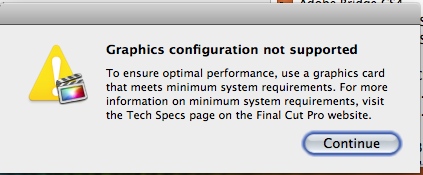
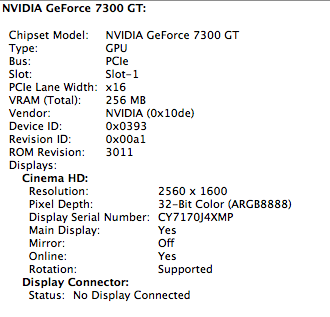
I found I have some of those 2.66 MacPros but with an even lower end graphics card that doesn't have OpenCL Support at all, Nvidia GeForce 7300 GT. I copied FCP X over to it and it works but gives the warning attatched, but it still seems to work fine.
I found I have some of those 2.66 MacPros but with an even lower end graphics card that doesn't have OpenCL Support at all, Nvidia GeForce 7300 GT. I copied FCP X over to it and it works but gives the warning attatched, but it still seems to work fine.
Please Log in to join the conversation.
23 Sep 2011 02:30 #1340
by TiRex
Replied by TiRex on topic Re: Can't upgrade 10.0.1 to old Macs
Do your older Macs with the non supported cards show a warning when you launch the application? ... or is everything normal like it must be on your more recent Macs?
Please Log in to join the conversation.
23 Sep 2011 02:34 #1341
by TiRex
Replied by TiRex on topic Re: Can't upgrade 10.0.1 to old Macs
I guess you answered my question with the above screen shots, thank you
Please Log in to join the conversation.
23 Sep 2011 02:43 #1343
by tpayton
Replied by tpayton on topic Re: Can't upgrade 10.0.1 to old Macs
Only the ones with non Open CL graphic cards. I have a MacBook with an Open CL card but not enough ram. It opens without warning.
Please Log in to join the conversation.
23 Sep 2011 11:02 #1346
by Propellor
Replied by Propellor on topic Re: Can't upgrade 10.0.1 to old Macs
FCPX runs on my MacBook 2008 but the colors in the viewer are off. It looks like the green channel is not supported. So grading is out of the question.
Unfortunately the graphic cards in the MacBooks cannot be upgraded.
Unfortunately the graphic cards in the MacBooks cannot be upgraded.
Please Log in to join the conversation.
23 Sep 2011 21:51 #1362
by tpayton
Replied by tpayton on topic Re: Can't upgrade 10.0.1 to old Macs
What is the graphic card on that MacBook 2008. Is that a MacBook Pro or regular MacBook?
Please Log in to join the conversation.
24 Sep 2011 01:36 #1365
by tpayton
Replied by tpayton on topic Re: Can't upgrade 10.0.1 to old Macs
Unfortunately I think the no pro MacBooks are truly unsupported. I wasn't even aware they ran FCP 7.
Please Log in to join the conversation.
