




- Posts: 57
- Thank you received: 0
3 Post Moderation Rule for New Boarders (25 Jan 2021)
New boarders will have their posts moderated - Don't worry if you cannot see your post immediately.
project duration
16 Aug 2012 21:54 #13155
by ulisses
project duration was created by ulisses
Hello,
I know that FCPX can't set IN/OUT in timeline, but I had to get the duration of a segment in my project to inform the client... ok, I wrote down the times at start/end points and subtract the values, but a little archaic for today NLEs, right ?
Any workaround ?
Thanks,
Ulisses
I know that FCPX can't set IN/OUT in timeline, but I had to get the duration of a segment in my project to inform the client... ok, I wrote down the times at start/end points and subtract the values, but a little archaic for today NLEs, right ?
Any workaround ?
Thanks,
Ulisses
Please Log in to join the conversation.
- Tom Wolsky
-

- Offline
- Moderator
-

16 Aug 2012 23:02 #13156
by Tom Wolsky
Replied by Tom Wolsky on topic Re: project duration
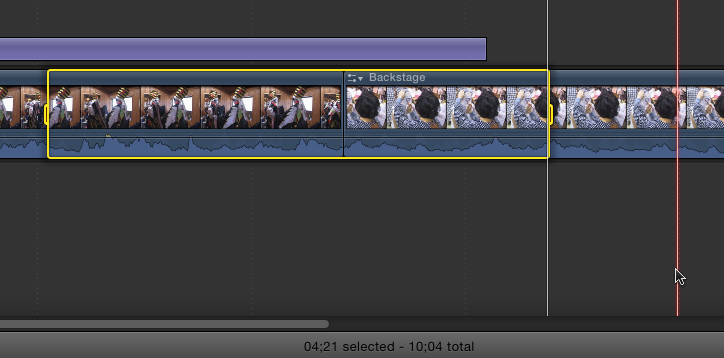
You can mark I/O on the primary storyline or on a clip or clips. The duration of the selected area will appear at the bottom of the timeline panel.
Please Log in to join the conversation.
- Tom Wolsky
-
- Offline
- Moderator
-
17 Aug 2012 00:29 #13159
by Tom Wolsky
Replied by Tom Wolsky on topic Re: project duration
You press I and you press O.
Please Log in to join the conversation.
