


- Posts: 161
- Thank you received: 31
3 Post Moderation Rule for New Boarders (25 Jan 2021)
New boarders will have their posts moderated - Don't worry if you cannot see your post immediately.
Color Correction on Camera Raw Stills
- Scott Markowitz
-
 Topic Author
- Offline
- Elite Member
-

Less
More
09 Aug 2012 19:49 #12820
by Scott Markowitz
Color Correction on Camera Raw Stills was created by Scott Markowitz
Does anybody know if you have access to all the image data when working with camera raw files inside FCP X?
I understand that you must first use the Import->File method to get the raw files int your event.
(As opposed to using the image browser interface- which will make optimized versions of the raw file.)
I'm just not sure if I'm better off using Aperture to make adjustments prior to pulling them into my event, or not.
I would obviously prefer to do the color correction in FCP X rather than Aperture while working on a video project.
Cheers,
Scott M
I understand that you must first use the Import->File method to get the raw files int your event.
(As opposed to using the image browser interface- which will make optimized versions of the raw file.)
I'm just not sure if I'm better off using Aperture to make adjustments prior to pulling them into my event, or not.
I would obviously prefer to do the color correction in FCP X rather than Aperture while working on a video project.
Cheers,
Scott M
Please Log in to join the conversation.

10 Aug 2012 12:32 - 10 Aug 2012 12:33 #12836
by BenB
Replied by BenB on topic Re: Color Correction on Camera Raw Stills
Aperture is made for photo corrections, and that's the workflow I use. I get the photo to look its best first.
It used to be before 10.0.5 (or was it 10.0.4?) that FCP X always optimized RAW to JPEG. But since 10.0.5 it will work natively with RAW, unless you have the Optimize option checked on import.
Even then it's the same frame size, which is way to large most of the time anyway.
I much prefer processing in Aperture first, simply because I can batch export as 50% or the original size PNGs, which are much more easy to deal with in video. RAW and it's native frame size are way overkill and just add to the resource overhead FCP X has to deal with.
It used to be before 10.0.5 (or was it 10.0.4?) that FCP X always optimized RAW to JPEG. But since 10.0.5 it will work natively with RAW, unless you have the Optimize option checked on import.
Even then it's the same frame size, which is way to large most of the time anyway.
I much prefer processing in Aperture first, simply because I can batch export as 50% or the original size PNGs, which are much more easy to deal with in video. RAW and it's native frame size are way overkill and just add to the resource overhead FCP X has to deal with.
Last edit: 10 Aug 2012 12:33 by BenB.
Please Log in to join the conversation.
- Scott Markowitz
-
Topic Author
- Offline
- Elite Member
-
Less
More
- Posts: 161
- Thank you received: 31
10 Aug 2012 13:33 #12839
by Scott Markowitz
Replied by Scott Markowitz on topic Re: Color Correction on Camera Raw Stills
Thanks for the response.
In general your advise is dead on.
I totally agree that 99% of the time, I'm better off using aperture to correct photos and create more video-friendly sizes before editing.
But sometimes, in documentary work, I need to do (painfully) slow ken burns moves on big photos.
I want to know if I have the color correction freedom inside FCPX to be manipulating all the color information in the camera raw file. It could save me time in my prep work knowing that I won't have to make color corrections twice.
Cheers,
Scott M
In general your advise is dead on.
I totally agree that 99% of the time, I'm better off using aperture to correct photos and create more video-friendly sizes before editing.
But sometimes, in documentary work, I need to do (painfully) slow ken burns moves on big photos.
I want to know if I have the color correction freedom inside FCPX to be manipulating all the color information in the camera raw file. It could save me time in my prep work knowing that I won't have to make color corrections twice.
Cheers,
Scott M
Please Log in to join the conversation.
10 Aug 2012 13:59 #12841
by BenB
Replied by BenB on topic Re: Color Correction on Camera Raw Stills
Even at 50% original size, the photos are still WAY large enough for Ken Burns effects. Using images that are way too large will start to bog down FCP, so be very careful.
No, FCP X does not manipulate the RAW settings. In fact, the latest Aperture update removed those controls. I've no idea why.
You will simply be doing 8-bit RGB color correction with images in FCP, no matter what the original format is.
I find I can get more detailed adjustments in Aperture than in FCP X. But then, and I'll get flamed for this, FCP X's color grading tools are extremely limited, and not very sensitive at all. Aperture and Color do infinity better jobs, if only because you can adjust to very minute degrees that are vital to real color work.
Aside from "speed" of workflow, there's no advantage to working natively with RAW in FCP X. A 50% size PNG will do the same thing, and not eat up near as many resources, while still being way large enough for Ken Burns.
No, FCP X does not manipulate the RAW settings. In fact, the latest Aperture update removed those controls. I've no idea why.
You will simply be doing 8-bit RGB color correction with images in FCP, no matter what the original format is.
I find I can get more detailed adjustments in Aperture than in FCP X. But then, and I'll get flamed for this, FCP X's color grading tools are extremely limited, and not very sensitive at all. Aperture and Color do infinity better jobs, if only because you can adjust to very minute degrees that are vital to real color work.
Aside from "speed" of workflow, there's no advantage to working natively with RAW in FCP X. A 50% size PNG will do the same thing, and not eat up near as many resources, while still being way large enough for Ken Burns.
Please Log in to join the conversation.
- Scott Markowitz
-
Topic Author
- Offline
- Elite Member
-
Less
More
- Posts: 161
- Thank you received: 31
10 Aug 2012 14:18 #12844
by Scott Markowitz
Replied by Scott Markowitz on topic Re: Color Correction on Camera Raw Stills
Excellent Information.
That's exactly what I needed to know.
Thank you, sir.
Scott M
That's exactly what I needed to know.
Thank you, sir.
Scott M
Please Log in to join the conversation.

10 Aug 2012 16:57 #12847
by tpayton
Replied by tpayton on topic Re: Color Correction on Camera Raw Stills
Ben,
Can you confirm that 10.0.5 will optimize RAW images to JPEG. I'm not seeing this happen on my system with shots from a 7D.
Can you confirm that 10.0.5 will optimize RAW images to JPEG. I'm not seeing this happen on my system with shots from a 7D.
Please Log in to join the conversation.
10 Aug 2012 17:10 - 10 Aug 2012 17:10 #12848
by BenB
Replied by BenB on topic Re: Color Correction on Camera Raw Stills
Right, let me confirm. I do remember something odd last time I brought 7D RAW images into FCP X directly...
OK, I just did some tests...
No matter what you set Import for, you get the RAW file. Even though the User Manual say different about Proxy media for stills:
"Still images are transcoded to either JPEG (if the original file doesn’t have alpha channel information) or PNG files (if the file has alpha channel information). Still-image proxy files facilitate faster processing and rendering when the original image is very large."
It used to say the same for Optimized stills, but the 10.0.5 manual seems to not mention stills anywhere concerning Optimized media. I'm not happy, cause I'd like PNG when I select "Optimized" for stills, like it used to do. But then, I often want other things Optimized that Apple won't allow us to do, even if we want. This really gives me very mixed feelings, taking away our choice when importing.
OK, I just did some tests...
No matter what you set Import for, you get the RAW file. Even though the User Manual say different about Proxy media for stills:
"Still images are transcoded to either JPEG (if the original file doesn’t have alpha channel information) or PNG files (if the file has alpha channel information). Still-image proxy files facilitate faster processing and rendering when the original image is very large."
It used to say the same for Optimized stills, but the 10.0.5 manual seems to not mention stills anywhere concerning Optimized media. I'm not happy, cause I'd like PNG when I select "Optimized" for stills, like it used to do. But then, I often want other things Optimized that Apple won't allow us to do, even if we want. This really gives me very mixed feelings, taking away our choice when importing.
Last edit: 10 Aug 2012 17:10 by BenB.
Please Log in to join the conversation.
10 Aug 2012 17:18 #12849
by tpayton
Replied by tpayton on topic Re: Color Correction on Camera Raw Stills
Hi Ben,
Thanks for the clarification. I agree that Optimize of RAW files should at least do something.
I looked back at a project I did in 10.0.4 and had RAW images and they were not optimized to JPEGs or PNGs. Perhaps it was an earlier version that did that.
Thanks for the clarification. I agree that Optimize of RAW files should at least do something.
I looked back at a project I did in 10.0.4 and had RAW images and they were not optimized to JPEGs or PNGs. Perhaps it was an earlier version that did that.
Please Log in to join the conversation.
10 Aug 2012 17:33 #12850
by BenB
Replied by BenB on topic Re: Color Correction on Camera Raw Stills
Right, 10.0.5 was just retina support. 10.0.4 changed all of this. I just checked, and another issue I have is that from the Browser, the Inspector shows an IMG fame size as 5184x3456. But when I drop it into a 1080 Timeline, it's shrunk to fit the 1080 frame size, and the Inspector > Transform shows it as 100% scale. That makes no freakin' sense to me! At 100% it should be WAY larger than the 1080 frame size, right?
Feedback page again... ugh...
Feedback page again... ugh...
Please Log in to join the conversation.
14 Aug 2012 04:32 - 14 Aug 2012 04:33 #13004
by marchyman
The controls have not been removed from Aperture, just taken out of the set of default adjustments. If you click on the Add Adjustment pull-down you'll find Raw Fine Tuning is still available for use.
Replied by marchyman on topic Re: Color Correction on Camera Raw Stills
BenB wrote: No, FCP X does not manipulate the RAW settings. In fact, the latest Aperture update removed those controls. I've no idea why.
The controls have not been removed from Aperture, just taken out of the set of default adjustments. If you click on the Add Adjustment pull-down you'll find Raw Fine Tuning is still available for use.
Last edit: 14 Aug 2012 04:33 by marchyman.
Please Log in to join the conversation.

26 Aug 2012 09:17 - 26 Aug 2012 09:22 #13474
by RobM
Replied by RobM on topic Re: Color Correction on Camera Raw Stills
It Appears FCPX optimises all stills to ProRes 422 at their original resolution. Not sure at what version this started as I skipped from 10.02 to 10.05.
Stumbled upon this when importing the BlackMagic Cinema DNGs. You can read about it here. Have tested with jpegs, tifs and Canon raw.
Render files are created within the Event folder /Render Files/High Quality Media.
Files are created on import if "create optimised media" is selected or when playing the still in the event, project timeline or project browser. Screenshot below shows the render files created when importing a RAW file from my 60D, dropping it into a ProRes 422 1080p 24 project and rendering. I can't actually view the data in the image files labelled "Frame 0 -1023" but the accompanying plist (show open in Xcode but you can see more info in TextEdit) appears to store the raster size and codec. Also the file size of the 18Mpx optimised 60D still is about what you'd expect if encoded in ProRes422. At 5.1 MB it's around 8.5 times the size of the 2Mpx 1080p render file.
Hope this info helps. As far as I'm aware it's not documented anywhere.
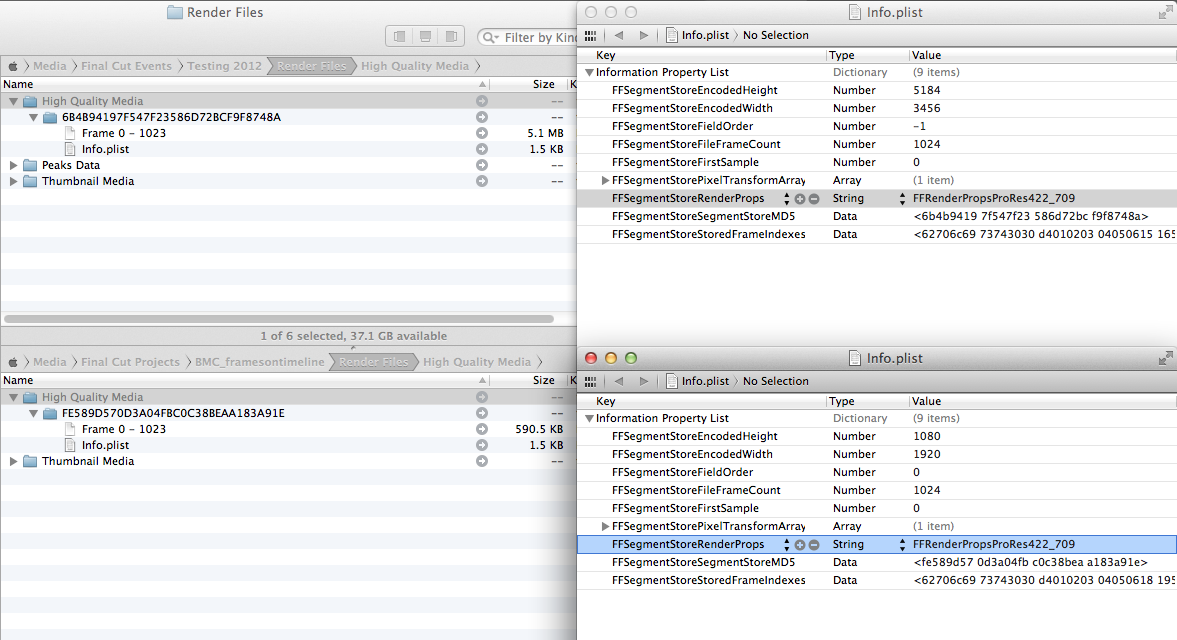
Stumbled upon this when importing the BlackMagic Cinema DNGs. You can read about it here. Have tested with jpegs, tifs and Canon raw.
Render files are created within the Event folder /Render Files/High Quality Media.
Files are created on import if "create optimised media" is selected or when playing the still in the event, project timeline or project browser. Screenshot below shows the render files created when importing a RAW file from my 60D, dropping it into a ProRes 422 1080p 24 project and rendering. I can't actually view the data in the image files labelled "Frame 0 -1023" but the accompanying plist (show open in Xcode but you can see more info in TextEdit) appears to store the raster size and codec. Also the file size of the 18Mpx optimised 60D still is about what you'd expect if encoded in ProRes422. At 5.1 MB it's around 8.5 times the size of the 2Mpx 1080p render file.
Hope this info helps. As far as I'm aware it's not documented anywhere.
Last edit: 26 Aug 2012 09:22 by RobM.
Please Log in to join the conversation.
27 Aug 2012 15:31 #13487
by BenB
Replied by BenB on topic Re: Color Correction on Camera Raw Stills
"Photos" are not transcoded to ProRes. .C2R are kept that way. JPEG is kept that way.
"Blackmagic Cinema DNGs" are handled differently than regular photos.
"Blackmagic Cinema DNGs" are handled differently than regular photos.
Please Log in to join the conversation.
