


- Posts: 38
- Thank you received: 0
3 Post Moderation Rule for New Boarders (25 Jan 2021)
New boarders will have their posts moderated - Don't worry if you cannot see your post immediately.
Counting generator error
- keithwhite
-
 Topic Author
- Offline
- Junior Member
-

Less
More
09 Aug 2012 02:40 #12783
by keithwhite
Counting generator error was created by keithwhite
I'm doing a short video for a school with 120 still images in rapid succession from 120 years of the schools history.
I've set a counting generator to count through the years from 1892 to 2012 but it insists on finishing up with 2013.
If I change the end date to 2011 it finishes on 2012 but the timing is then out of sync.
Anyone else had this problem?
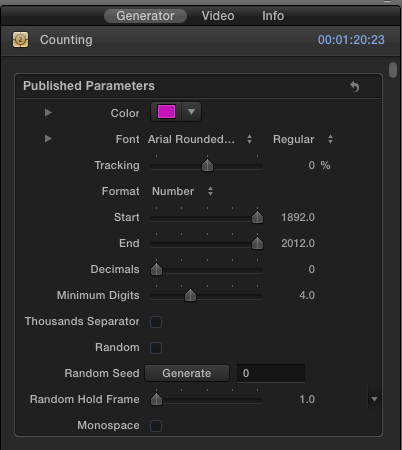
I've set a counting generator to count through the years from 1892 to 2012 but it insists on finishing up with 2013.
If I change the end date to 2011 it finishes on 2012 but the timing is then out of sync.
Anyone else had this problem?
Please Log in to join the conversation.

09 Aug 2012 04:05 #12791
by BenB
Replied by BenB on topic Re: Counting generator error
Drag it's length out longer to correct for the sync.
So that you don't see it longer after the last date than you wish, you can keyframe it's Opacity setting.
If it's finishing too late, shorten it up, and make the last frame a Hold Frame (Retiming menu) to last how ever many frames it should last.
Not sure if that'll work or not.
So that you don't see it longer after the last date than you wish, you can keyframe it's Opacity setting.
If it's finishing too late, shorten it up, and make the last frame a Hold Frame (Retiming menu) to last how ever many frames it should last.
Not sure if that'll work or not.
Please Log in to join the conversation.
- keithwhite
-
Topic Author
- Offline
- Junior Member
-
Less
More
- Posts: 38
- Thank you received: 0
09 Aug 2012 04:41 #12797
by keithwhite
Replied by keithwhite on topic Re: Counting generator error
thanks BenB
Yep I tried the Opacity solution - works OK thanks
weird about the number bug though
Yep I tried the Opacity solution - works OK thanks
weird about the number bug though
Please Log in to join the conversation.


09 Aug 2012 12:12 #12809
by alex4D
Replied by alex4D on topic Re: Counting generator error
If you have a picture of every year starting at 1892 and finishing in 2012, you need 121!
Odd that the generator didn't jump from from 1951 to 1953 in the middle of your sequence to allow for the one year difference...
Odd that the generator didn't jump from from 1951 to 1953 in the middle of your sequence to allow for the one year difference...
Please Log in to join the conversation.
- keithwhite
-
Topic Author
- Offline
- Junior Member
-
Less
More
- Posts: 38
- Thank you received: 0
10 Aug 2012 02:27 #12827
by keithwhite
Replied by keithwhite on topic Re: Counting generator error
There's no jump in the middle. It stays pretty much in sync until the last 10-15 years when it starts to lag just a little. And I've got the generator the exact length of the image sequence. And as you can see from my screenshot - I've told it to end at 2012.
I can get by as all this happens rapid fire, but it would be nice to be in perfect sync.
Thanks
I can get by as all this happens rapid fire, but it would be nice to be in perfect sync.
Thanks
Please Log in to join the conversation.
10 Aug 2012 06:06 #12830
by alex4D
Replied by alex4D on topic Re: Counting generator error
Is your image sequence 120 or 121 images?
If you were celebrating 1 year, you'd have two images: 2011 and 2012.
If you were celebrating 1 year, you'd have two images: 2011 and 2012.
Please Log in to join the conversation.
- keithwhite
-
Topic Author
- Offline
- Junior Member
-
Less
More
- Posts: 38
- Thank you received: 0
10 Aug 2012 06:44 #12832
by keithwhite
Replied by keithwhite on topic Re: Counting generator error
121 images which may be where the error comes in.
I failed maths at school
I failed maths at school
Please Log in to join the conversation.
