


- Posts: 3
- Thank you received: 0
3 Post Moderation Rule for New Boarders (25 Jan 2021)
New boarders will have their posts moderated - Don't worry if you cannot see your post immediately.
FCPX deleted footage
07 Aug 2012 19:45 #12743
by AW
FCPX deleted footage was created by AW
This is just a warning.
My warning is: Do not relink to files already in your event folder. They will be deleted.
- (1) I opened an event in Final Cut Pro X that I had been working on before. The clips had already been categorized into many keywords and everything was ready to begin editing.
- (2) I clicked on the event No clips showed up. (I suspect that there was a glitch in the search bar, because even though nothing was typed there, an "x icon" did appear as if there was something typed there.)
- (3) I opened a finder window to check if the files existed on the hard drive by opening the "original media", "High Quality Media", and "proxy media" folders. The files were secure in all three.
- (4) I went back into FCPX to relink the files. I pointed FCPX to the High quality media folder to relink the files. It had no problem recognizing the files.
- (5) I unchecked the "copy files to events folder" option because I thought it might duplicate the files, and they were already where they were supposed to be.
- (6) Then I clicked "relink."
- (7) The result was that FCPX deleted all my files–from all three folders. They were not in my trash or copied somewhere else. They were permanently deleted. Vanished.
- (8 ) I talked to Apple support about this and he basically said that FCPX is, at its heart, a database system. It likes to keep things tidy, and because it didn't initially recognize the files that were in the folders-it got rid of them.
My warning is: Do not relink to files already in your event folder. They will be deleted.
Please Log in to join the conversation.

07 Aug 2012 22:13 - 07 Aug 2012 22:17 #12748
by BenB
Replied by BenB on topic Re: FCPX deleted footage
"... an "x icon" did appear as if there was something typed there"
This is my suspicion:
That X icon means you did not clear it after the last Smart Search you did for "Rejected" rating status. If there are no rejected rated clips, you won't see anything. This field does not automatically clear ever.
Just click the gray X at the right of the field to clear it before doing anything, ever.
Otherwise your clips would have had the "Offline" warning icons.
Also verify the filter menu (top left) is set to All Clips before doing anything, also.
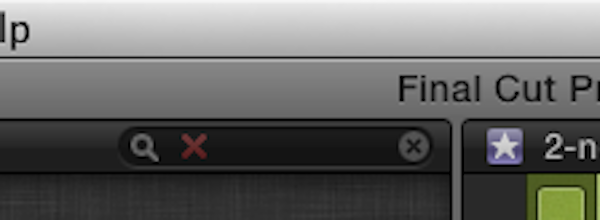
This is my suspicion:
That X icon means you did not clear it after the last Smart Search you did for "Rejected" rating status. If there are no rejected rated clips, you won't see anything. This field does not automatically clear ever.
Just click the gray X at the right of the field to clear it before doing anything, ever.
Otherwise your clips would have had the "Offline" warning icons.
Also verify the filter menu (top left) is set to All Clips before doing anything, also.
Last edit: 07 Aug 2012 22:17 by BenB.
Please Log in to join the conversation.
08 Aug 2012 14:19 #12770
by AW
Replied by AW on topic Re: FCPX deleted footage
The filter option was set to "hide rejected." and there was nothing typed next to the magnifying glass in the search bar. I checked both. In hindsight I wish I had clicked the "X" anyway. But since there was nothing typed I assumed it wasn't necessary. Still, this isn't the point. The point is that there is a perception that Final Cut can't destroy anything without first giving you a clear warning. But that fact is that it can. The words "delete" or "remove" were never on the screen. There was no indication that anything would be deleted.
Please Log in to join the conversation.
08 Aug 2012 14:31 - 08 Aug 2012 14:35 #12771
by BenB
Replied by BenB on topic Re: FCPX deleted footage
Fill out the feedback page. I've relinked media already in the Event folder before and nothing was deleted, it just worked.
But I have noticed since 10.0.5 moving some things to the Trash simply deletes them, when it should only move them to the trash. I've reported that to Apple via the Feedback Page and they are aware of it. I'd strongly suggest filling out the Feedback page and letting them know you lost files. It is not supposed to work that way at all.
Next time, clear the search field and change the filter menu to All Clips just to be safe.
I'm still confused when you say "... an "x icon" did appear as if there was something typed there", and then say nothing was there. Just confusing, no big deal.
When clips loose their links, you should see them in the Browser, but with the Offline icons. If you didn't even see that, I'd be very worried and report it all, in clear detail, to the Feedback page.
www.apple.com/feedback/finalcutpro.html
But I have noticed since 10.0.5 moving some things to the Trash simply deletes them, when it should only move them to the trash. I've reported that to Apple via the Feedback Page and they are aware of it. I'd strongly suggest filling out the Feedback page and letting them know you lost files. It is not supposed to work that way at all.
Next time, clear the search field and change the filter menu to All Clips just to be safe.
I'm still confused when you say "... an "x icon" did appear as if there was something typed there", and then say nothing was there. Just confusing, no big deal.
When clips loose their links, you should see them in the Browser, but with the Offline icons. If you didn't even see that, I'd be very worried and report it all, in clear detail, to the Feedback page.
www.apple.com/feedback/finalcutpro.html
Last edit: 08 Aug 2012 14:35 by BenB.
Please Log in to join the conversation.
