


- Posts: 57
- Thank you received: 2
3 Post Moderation Rule for New Boarders (25 Jan 2021)
New boarders will have their posts moderated - Don't worry if you cannot see your post immediately.
App to see how many cores being used for FCPX? because its going super slowwww.
- randychesbro
-
 Topic Author
- Offline
- Senior Member
-

Less
More
03 Aug 2012 02:31 #12560
by randychesbro
App to see how many cores being used for FCPX? because its going super slowwww. was created by randychesbro
I thought there was a builtin app to see how much of the processors are being used. i thought i saw one that showed all 8 cores. i see the one in activity monitor but it shows just one and it says fcpx is useing 700 some % of the cpu which i dont get how can you use more than 100%?
I have a video that 1hr20 and i have a good part of that with color brightness adjustments and its taking the entire day so far to render it out and its only at 14min in to the video. whats up with that? I remember back when i used Speededit from newtek and it was all realtime, ugh!
I have a video that 1hr20 and i have a good part of that with color brightness adjustments and its taking the entire day so far to render it out and its only at 14min in to the video. whats up with that? I remember back when i used Speededit from newtek and it was all realtime, ugh!
Please Log in to join the conversation.

03 Aug 2012 03:16 - 03 Aug 2012 11:59 #12562
by BenB
Replied by BenB on topic Re: App to see how many cores being used for FCPX? because its going super slowwww.
700% means it's using 100% of 7 cores.
In the Activity Monitor, go to the Window menu, to Floating CPU Window, and select the Vertical option. You'll see how much of each core is working.
You can even, in that same menu, set the CPU usage floating window to Stay On Top, meaning it's still visible while you work in other apps, so that you can monitor CPU activity while you work. Although it doesn't really matter. The CPU will do what it does, and there's not much you can do about it.
Each core can account for up to 100%, multiple cores can add up to over 100%. So you have 7 cores working full time when you read 700%.
In the Activity Monitor, go to the Window menu, to Floating CPU Window, and select the Vertical option. You'll see how much of each core is working.
You can even, in that same menu, set the CPU usage floating window to Stay On Top, meaning it's still visible while you work in other apps, so that you can monitor CPU activity while you work. Although it doesn't really matter. The CPU will do what it does, and there's not much you can do about it.
Each core can account for up to 100%, multiple cores can add up to over 100%. So you have 7 cores working full time when you read 700%.
Last edit: 03 Aug 2012 11:59 by BenB.
Please Log in to join the conversation.
- Scrubelicious
-

- Offline
- Platinum Member
-

Less
More
- Posts: 1228
- Thank you received: 114
03 Aug 2012 08:45 #12566
by Scrubelicious
Look into iStat Pro pretty cool App and you have some Customization.
Replied by Scrubelicious on topic Re: App to see how many cores being used for FCPX? because its going super slowwww.
randychesbro wrote: I thought there was a builtin app to see how much of the processors are being used. i thought i saw one that showed all 8 cores. i see the one in activity monitor but it shows just one and it says fcpx is useing 700 some % of the cpu which i dont get how can you use more than 100%?
I have a video that 1hr20 and i have a good part of that with color brightness adjustments and its taking the entire day so far to render it out and its only at 14min in to the video. whats up with that? I remember back when i used Speededit from newtek and it was all realtime, ugh!
Look into iStat Pro pretty cool App and you have some Customization.
Please Log in to join the conversation.
- randychesbro
-
Topic Author
- Offline
- Senior Member
-
Less
More
- Posts: 57
- Thank you received: 2
03 Aug 2012 12:56 #12578
by randychesbro
Replied by randychesbro on topic Re: App to see how many cores being used for FCPX? because its going super slowwww.
Found it .. Thanks.
Please Log in to join the conversation.

03 Aug 2012 13:37 - 03 Aug 2012 13:40 #12581
by ptrush
Replied by ptrush on topic Re: App to see how many cores being used for FCPX? because its going super slowwww.
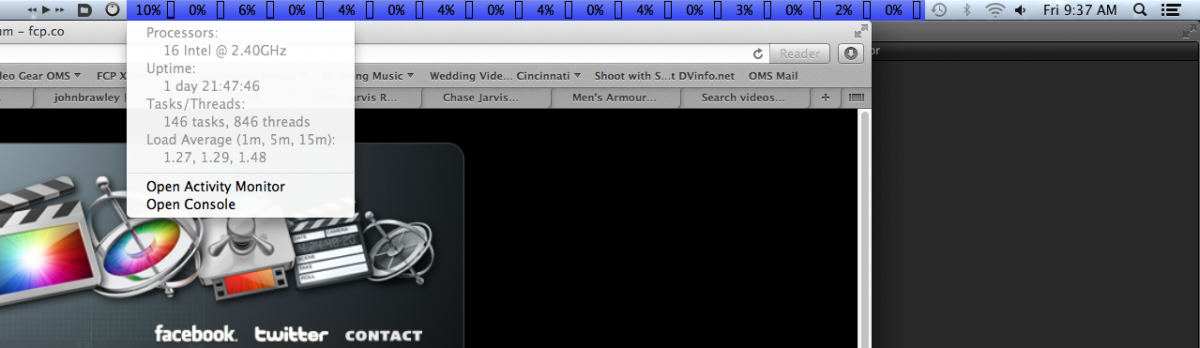
I can't live without menu meters. gives direct feedback of processors, and they're usage every second on the menu bar. it's a lite little app that uses close to no recourses. and it's free!
to the left of that, I use:
Contour Shuttle pro config
Default Folder
and Byte Controller for iTunes
Default folder is awesome too!!
to the left of that, I use:
Contour Shuttle pro config
Default Folder
and Byte Controller for iTunes
Default folder is awesome too!!
Last edit: 03 Aug 2012 13:40 by ptrush.
Please Log in to join the conversation.
03 Aug 2012 14:19 #12584
by BenB
Replied by BenB on topic Re: App to see how many cores being used for FCPX? because its going super slowwww.
Yep, Activity Monitor does that, too, just more simply. Personally I prefer uncluttered interfaces. But use what works for you. Lots of choices out there.
Please Log in to join the conversation.
03 Aug 2012 15:33 #12586
by tpayton
Replied by tpayton on topic Re: App to see how many cores being used for FCPX? because its going super slowwww.
Back to your original topic, that render time is a drag. When you say render do you mean export? or do you mean you mean rendering the timeline (with background or choosing render selection, etc.)
Reason I ask is that currently rendering in FCP doesn't use your GPU, but using Share > Export Media does use your GPU. Depending on your setup it might be 10X as fast exporting as it is waiting for something to render. On my machine and in most cases it actually takes just as long to export rendered material as it does non-rendered.
FWIW My current workflow is turn background rendering off and edit as needed. Then I will Share > Export Media in whatever format I need.
Hope this helps.
Reason I ask is that currently rendering in FCP doesn't use your GPU, but using Share > Export Media does use your GPU. Depending on your setup it might be 10X as fast exporting as it is waiting for something to render. On my machine and in most cases it actually takes just as long to export rendered material as it does non-rendered.
FWIW My current workflow is turn background rendering off and edit as needed. Then I will Share > Export Media in whatever format I need.
Hope this helps.
Please Log in to join the conversation.
- randychesbro
-
Topic Author
- Offline
- Senior Member
-
Less
More
- Posts: 57
- Thank you received: 2
03 Aug 2012 18:27 #12589
by randychesbro
Replied by randychesbro on topic Re: App to see how many cores being used for FCPX? because its going super slowwww.
I was rendering the timeline with background render on.
when i use share the activity monitor says im using all 8 core mostly at max. how can i see if its using the GPU? and does it use both?
my video card is a nvidea gt8800 512mg
thanks for your help...
when i use share the activity monitor says im using all 8 core mostly at max. how can i see if its using the GPU? and does it use both?
my video card is a nvidea gt8800 512mg
thanks for your help...
Please Log in to join the conversation.
03 Aug 2012 19:42 #12595
by BenB
Please Log in to join the conversation.
03 Aug 2012 21:02 - 03 Aug 2012 21:02 #12601
by tpayton
Replied by tpayton on topic Re: App to see how many cores being used for FCPX? because its going super slowwww.
Ben - is ATMonitor working on your system? For me one of the last Lion updates seemed to have broken it and the GPU is always at 0%, even while using Motion (which I know uses the GPU).
Randy - you are going to get the best performance from FCP X when you perform a foreground export, which will utilize the GPU for export, i.e. this:
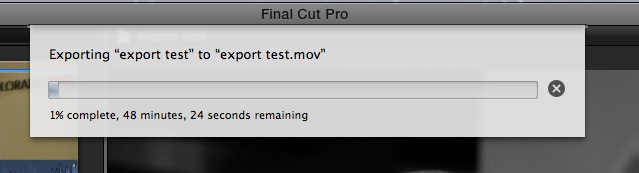
In that example I put 48 minutes of 1080p h264 footage on a timeline, applied color correction to all and was exporting as ProRes LT. As you can see it is about 1x actual time.
When you render the timeline (background or by choosing Modify > Render All) it only use the CPU and will typically be much slower. Here is some more info from me back in November:
fcp.co/forum/4-final-cut-pro-x-fcpx/2175...ally-render-in-fcp-x
Randy - you are going to get the best performance from FCP X when you perform a foreground export, which will utilize the GPU for export, i.e. this:
In that example I put 48 minutes of 1080p h264 footage on a timeline, applied color correction to all and was exporting as ProRes LT. As you can see it is about 1x actual time.
When you render the timeline (background or by choosing Modify > Render All) it only use the CPU and will typically be much slower. Here is some more info from me back in November:
fcp.co/forum/4-final-cut-pro-x-fcpx/2175...ally-render-in-fcp-x
Last edit: 03 Aug 2012 21:02 by tpayton.
Please Log in to join the conversation.
