


- Posts: 60
- Thank you received: 0
3 Post Moderation Rule for New Boarders (25 Jan 2021)
New boarders will have their posts moderated - Don't worry if you cannot see your post immediately.
FCPX eating my GB
31 Jul 2012 22:18 #12456
by AndyKamo
FCPX eating my GB was created by AndyKamo
Hello!
This isn't the first time I've had this problem. FCPX seems to be eating all of my GB when its rendering a video that is around 60 minutes long. The only way to get it back is to delete the project.
I went into Finder and checked out the Info for the project and noticed that it is 148 GB I also checked out the second part to the video which is 128 GB.
All together the video is about 1 Hour and 50 minutes and it's taking 276 GB of space... Is this normal or is there something wrong?
( I've once made a project within the same length but didn't take as much GB. )
This isn't the first time I've had this problem. FCPX seems to be eating all of my GB when its rendering a video that is around 60 minutes long. The only way to get it back is to delete the project.
I went into Finder and checked out the Info for the project and noticed that it is 148 GB I also checked out the second part to the video which is 128 GB.
All together the video is about 1 Hour and 50 minutes and it's taking 276 GB of space... Is this normal or is there something wrong?
( I've once made a project within the same length but didn't take as much GB. )
Please Log in to join the conversation.
- Tom Wolsky
-

- Offline
- Moderator
-

31 Jul 2012 23:11 #12458
by Tom Wolsky
Replied by Tom Wolsky on topic Re: FCPX eating my GB
Go into the project folder and trash the render files. In playback prefs switch off background rendering. What render settings did you pick for the project?
Please Log in to join the conversation.
01 Aug 2012 00:09 #12460
by AndyKamo
Replied by AndyKamo on topic Re: FCPX eating my GB
ok, ill delete the render files and turn off playback. In playback I have " Use Original or Optimized Media " selected and for quality I have " Better Performance " Pre & Post Roll Duration are both at 2.00 secs and the background is black.
Please Log in to join the conversation.
01 Aug 2012 00:13 #12461
by AndyKamo
Replied by AndyKamo on topic Re: FCPX eating my GB
To render with the playback prefs off. Do I go to modify > Render all? Is that the correct way to do it?
Please Log in to join the conversation.
- Tom Wolsky
-
- Offline
- Moderator
-
01 Aug 2012 00:16 #12462
by Tom Wolsky
Replied by Tom Wolsky on topic Re: FCPX eating my GB
What render option did you set when you made the project? Check the project properties. Don't render unless you have to and then render selection.
Please Log in to join the conversation.
01 Aug 2012 00:21 #12463
by AndyKamo
Replied by AndyKamo on topic Re: FCPX eating my GB
I had background render start after 5 secs. As well as " Use Original or Optimized Media " with Quality set as " Better Performance ". Pre & Post Roll Duration both at 2 secs, finally black background.
Please Log in to join the conversation.
- Scrubelicious
-

- Offline
- Platinum Member
-

Less
More
- Posts: 1228
- Thank you received: 114
01 Aug 2012 10:42 #12469
by Scrubelicious
Replied by Scrubelicious on topic Re: FCPX eating my GB
Go to Project LIbrary and select the project you are working on... in the Inspector select Modify Project Properties the little wrench on the right side.
And here you will find your Render Properties and Render Format
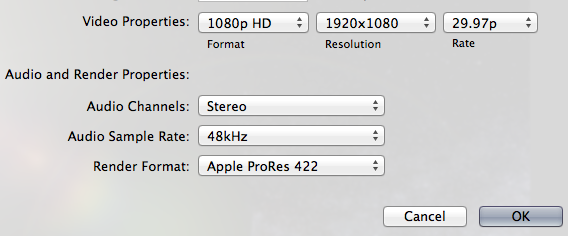
And here you will find your Render Properties and Render Format
Please Log in to join the conversation.
