


- Posts: 479
- Thank you received: 5
3 Post Moderation Rule for New Boarders (25 Jan 2021)
New boarders will have their posts moderated - Don't worry if you cannot see your post immediately.
frustration with favorites
31 Jul 2012 15:12 #12435
by parkerhqj
frustration with favorites was created by parkerhqj
I use favorites for logging interviews and I use keywords to organize my selects for each interview subject. So on any given project, I will have six or seven subjects organized into six or seven keyword collections. I also have a number of clips per subject. When I start to edit , when I open a keyword collection, all the clips are collapsed so I have to expand each of them. I can shorten this process by selecting all of them and then hitting option/ arrow right. But when I go back and forth between my subjects, I have to reexpand the clips each time which is time-consuming and annoying. In fcp7, my selects were in a bin and always there when I opened the bin. I've sent feedback to Apple about this, but I was wondering if anyone else had a readier solution. thx
Please Log in to join the conversation.
31 Jul 2012 15:51 - 31 Jul 2012 15:51 #12437
by tpayton
Replied by tpayton on topic Re: frustration with favorites
We have a similar workflow, however I haven't had the need to expand when clicking on a keyword collection because the browser shows individual clips for each keyword range I created. Does that makes sense?
Here is our main clip:
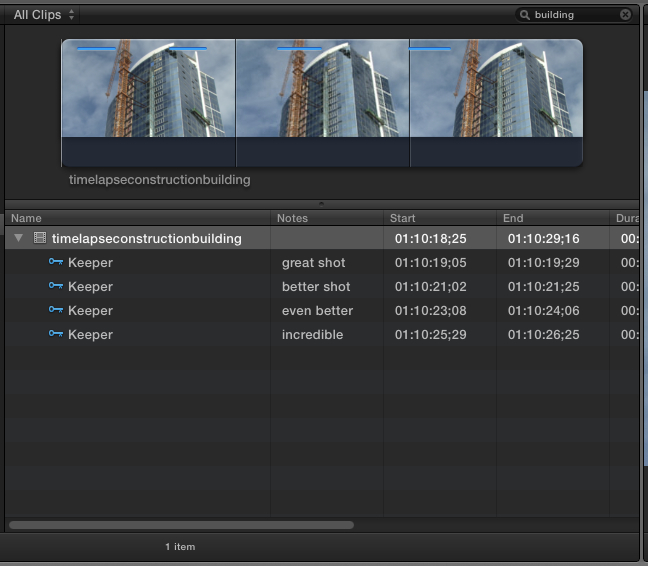
And then the ranges when showing the keyword collection.
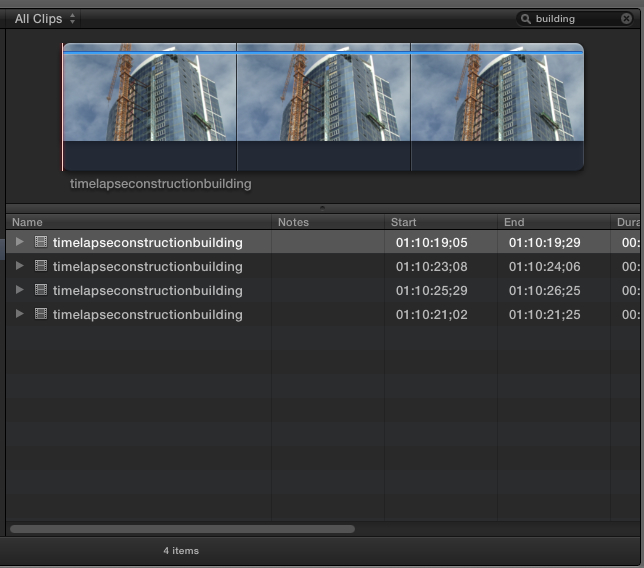
Perhaps I'm missing something in your workflow.
Here is our main clip:
And then the ranges when showing the keyword collection.
Perhaps I'm missing something in your workflow.
Last edit: 31 Jul 2012 15:51 by tpayton.
Please Log in to join the conversation.
31 Jul 2012 18:33 #12446
by parkerhqj
Replied by parkerhqj on topic Re: frustration with favorites
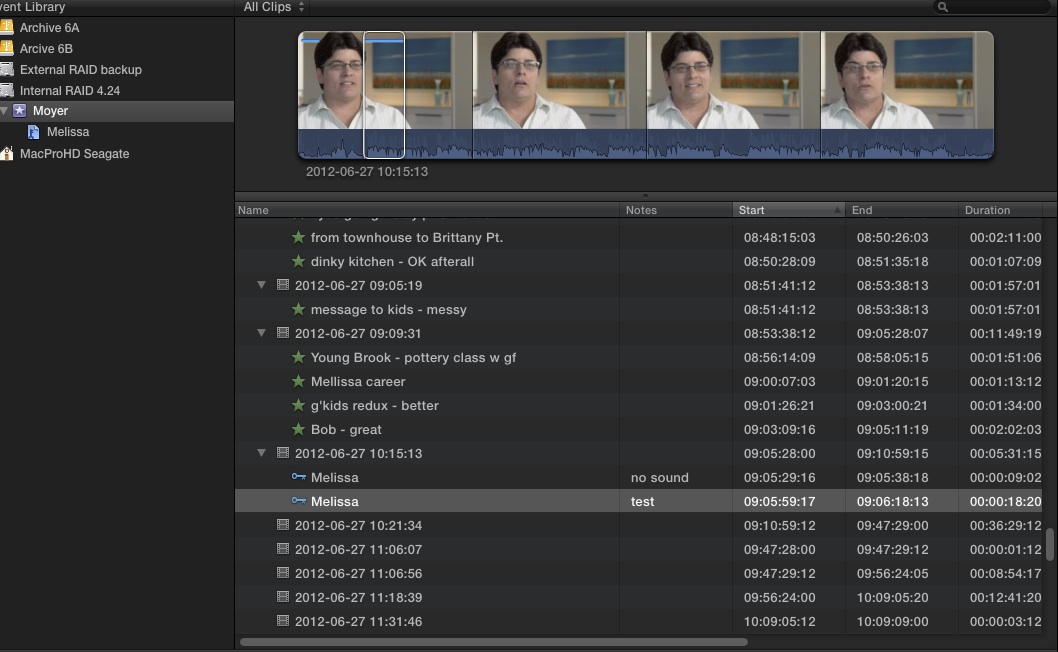
So here's my way mixed with your way. I'm not sure which works better for me. The way I've organized it, when I click on my keywords, I get a list of the various selects for each key worded subject. I don't think it would work doing it your way. This is not an area of strength for me - my brain hurts.
Please Log in to join the conversation.
31 Jul 2012 18:44 #12447
by tpayton
Replied by tpayton on topic Re: frustration with favorites
Can you grab a few more screen shots, of what you are doing. It looks like from the above shot that you have an event selected. When you say you click on a keyword, do you mean you click on the keyword collection or the keyword in your clip?
Please Log in to join the conversation.
31 Jul 2012 19:01 - 31 Jul 2012 19:01 #12448
by parkerhqj
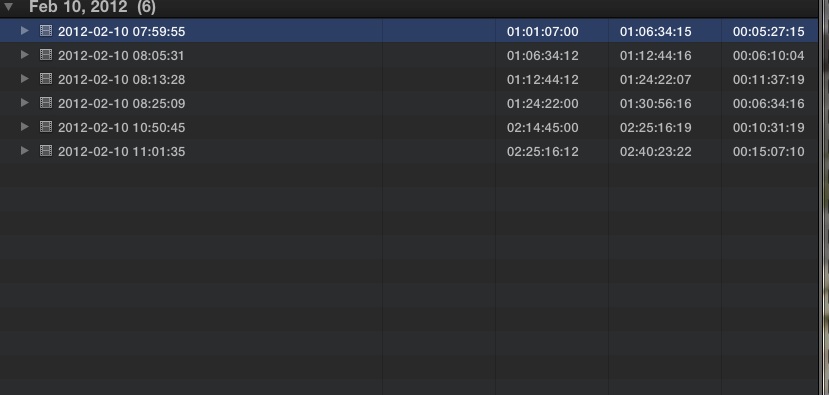
Here's a screen shot of the expanded clips and then of the collapsed clips using favorites. When I leave one keyword collection and open another keyframe collection and then go back to my original one, it has collapsed. I just want it to stay open.
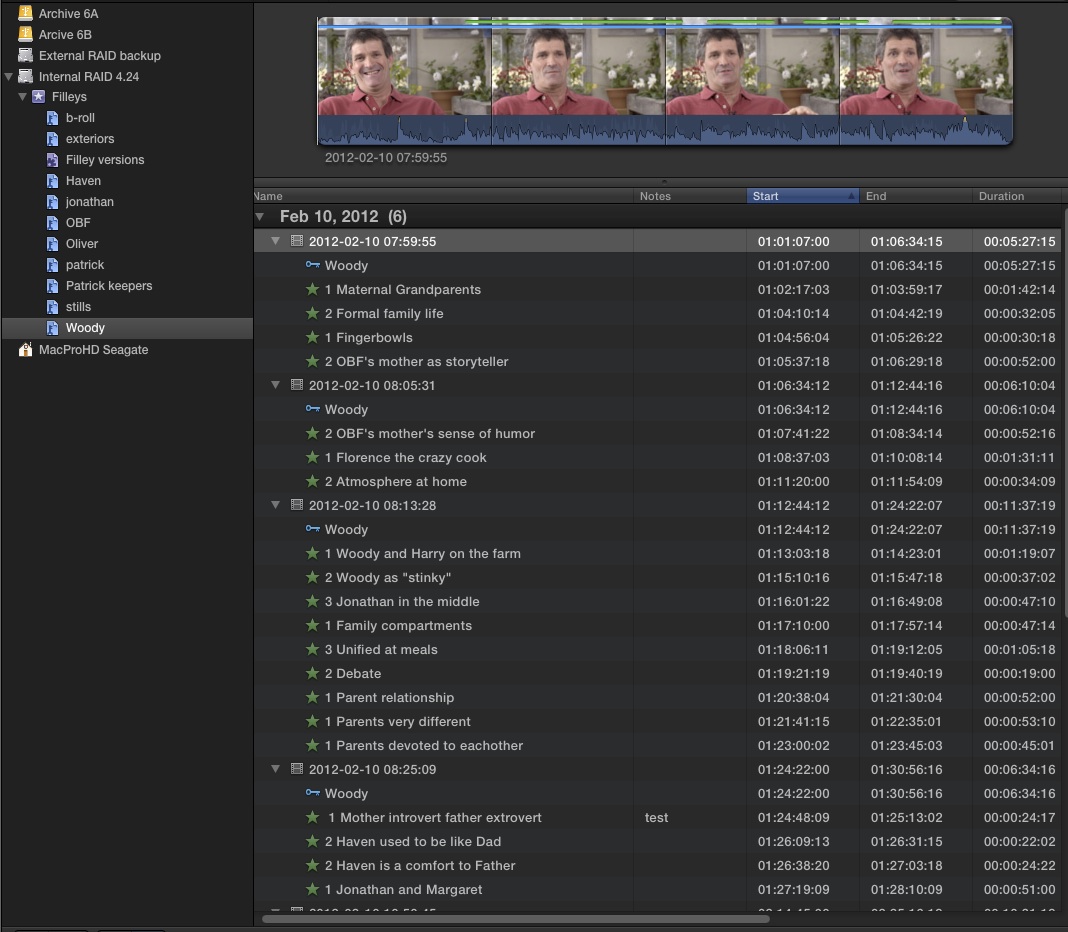
I have six clips of this subject. There are about 30 selects on him alone. There are about six other interview subjects so I go back and forth a lot as I put together my timeline - I am cutting back and forth all the time. It's just a nuisance to have to keep opening them each time.
Replied by parkerhqj on topic Re: frustration with favorites
Here's a screen shot of the expanded clips and then of the collapsed clips using favorites. When I leave one keyword collection and open another keyframe collection and then go back to my original one, it has collapsed. I just want it to stay open.
I have six clips of this subject. There are about 30 selects on him alone. There are about six other interview subjects so I go back and forth a lot as I put together my timeline - I am cutting back and forth all the time. It's just a nuisance to have to keep opening them each time.
Last edit: 31 Jul 2012 19:01 by parkerhqj.
Please Log in to join the conversation.
01 Aug 2012 16:05 - 01 Aug 2012 16:09 #12481
by tpayton
Replied by tpayton on topic Re: frustration with favorites
Ahh, I see why we were not having this issue. In a situation like this, we put a single persons interview in a large multicam clip (we shoot double system sound, so we sync first and then place in a multicam clip), so we don't have individual keywords, we just have a "interview" keyword collection with each clip is named.
One thing you might try is command clicking more than one keyword collection at a time or create a smart collection that selects all your interview keywords. Then you'll be scrolling, but at least they will stay open. Use your second monitor (which looks like you are already doing) if you have it to show events and set your browser text size to Small, that should help. Of course you would need to rename your clips to add the name of the subject so it makes sense.
Another idea would be to save a bit of keystokes by using something like Keyboard Maestro ( itunes.apple.com/us/app/keyboard-maestro/id406298247?mt=12 ) to map command-A and then option-right arrow on a single keystoke. It would at least make things go faster for you.
I totally see your point about persistent disclosure triangles and will add this as an enhancement request also.
One thing you might try is command clicking more than one keyword collection at a time or create a smart collection that selects all your interview keywords. Then you'll be scrolling, but at least they will stay open. Use your second monitor (which looks like you are already doing) if you have it to show events and set your browser text size to Small, that should help. Of course you would need to rename your clips to add the name of the subject so it makes sense.
Another idea would be to save a bit of keystokes by using something like Keyboard Maestro ( itunes.apple.com/us/app/keyboard-maestro/id406298247?mt=12 ) to map command-A and then option-right arrow on a single keystoke. It would at least make things go faster for you.
I totally see your point about persistent disclosure triangles and will add this as an enhancement request also.
Last edit: 01 Aug 2012 16:09 by tpayton.
Please Log in to join the conversation.
02 Aug 2012 01:21 #12491
by Seanus
Sean Lander - Editing since 1982 - AVID 1991 - FCP 1999 - FCPX 2011
Replied by Seanus on topic Re: frustration with favorites
This is the way I do it.
Interview clips would have their own keyword. If it's a multicam then like Payton I'll make them up first and I'll then use a smart collection that brings in any clips that are multicam or sync. Then I'll go through the interview and instead of using keywords or favourites I'll use MARKERS as they are very easy to navigate and can be renamed.
Interview clips would have their own keyword. If it's a multicam then like Payton I'll make them up first and I'll then use a smart collection that brings in any clips that are multicam or sync. Then I'll go through the interview and instead of using keywords or favourites I'll use MARKERS as they are very easy to navigate and can be renamed.
Sean Lander - Editing since 1982 - AVID 1991 - FCP 1999 - FCPX 2011
Please Log in to join the conversation.
02 Aug 2012 12:18 #12512
by parkerhqj
Replied by parkerhqj on topic Re: frustration with favorites
Interesting. So your would literally give a keyword to every select quote? So in an interview with 30 quotes, you would have 30 keywords? And then add a keyword for the speaker and then make a smart collection? I played around with that and I still run into the same problem with expanding/collapsing clips.
One solution is to make every select a compound clip and then assign keywords. I've done this and the advantage is that you can see all your selects - labeled no less - as thumbnails as well as in a list. The only disadvantage is that the compound clips are now discreet components and their position in the overall timeline is not readily apparent. I'm beginning to think I should go back to this. Here's a screen shot:
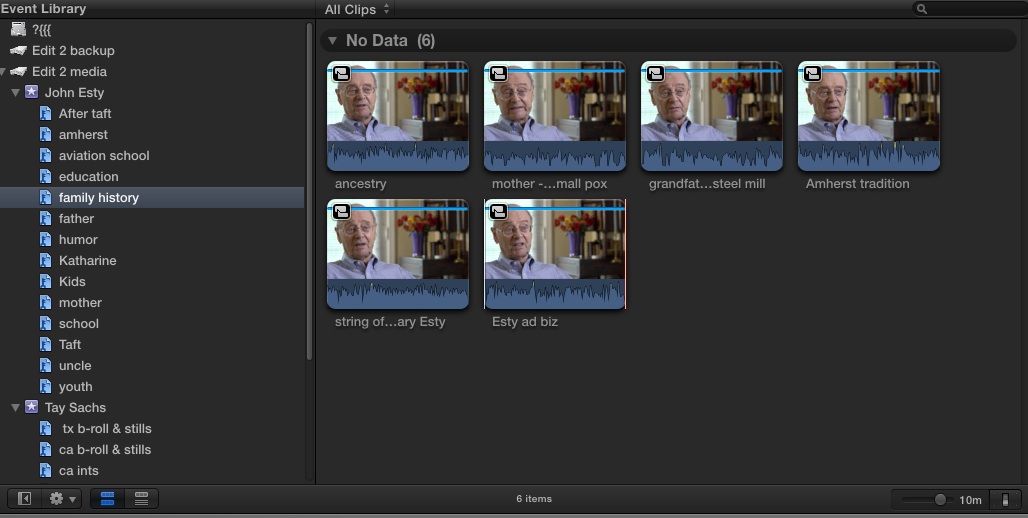
One solution is to make every select a compound clip and then assign keywords. I've done this and the advantage is that you can see all your selects - labeled no less - as thumbnails as well as in a list. The only disadvantage is that the compound clips are now discreet components and their position in the overall timeline is not readily apparent. I'm beginning to think I should go back to this. Here's a screen shot:
Please Log in to join the conversation.
02 Aug 2012 13:33 - 02 Aug 2012 13:35 #12524
by Seanus
Sean Lander - Editing since 1982 - AVID 1991 - FCP 1999 - FCPX 2011
Replied by Seanus on topic Re: frustration with favorites
No. You mis-understand. I would have a keyword selection called "Interviews" in ther would go ALL my interviews (if there weren't too many) then on each interview itself I'd be adding MARKERS.
I honestly think you are over doing it with keywords. Just watching and listening to an interview should tell you whether it's going to make it into the show or not. 1 Marker is all that's needed on my experience. But then of course we all work differently.
I honestly think you are over doing it with keywords. Just watching and listening to an interview should tell you whether it's going to make it into the show or not. 1 Marker is all that's needed on my experience. But then of course we all work differently.
Sean Lander - Editing since 1982 - AVID 1991 - FCP 1999 - FCPX 2011
Last edit: 02 Aug 2012 13:35 by Seanus.
Please Log in to join the conversation.
02 Aug 2012 13:42 #12525
by parkerhqj
Replied by parkerhqj on topic Re: frustration with favorites
Got it. I have way too many interviews for that method. And marker only gives you one point where a favorite or compound clip lets you set an in & out point.
Please Log in to join the conversation.

02 Aug 2012 14:51 #12533
by BenB
Replied by BenB on topic Re: frustration with favorites
I have to agree with Seanus. And use Folders to further organize those keyword collections, too, along with favorite ranges for specific dialog sections, perhaps.
Please Log in to join the conversation.
02 Aug 2012 15:03 #12538
by parkerhqj
Replied by parkerhqj on topic Re: frustration with favorites
I have interviews as long as 90-minutes for some subjects and I have a fairly circular pattern of editing that has me coming back to various selects multiple times. It's pretty important to me to be able to access them easily and I think the compound clip approach gives me the best chance of doing that. I appreciate your input and as time goes on and I get to know the program better - and as it improves, I'll find the right workflow. thx
Please Log in to join the conversation.
03 Aug 2012 01:03 #12556
by Seanus
Sean Lander - Editing since 1982 - AVID 1991 - FCP 1999 - FCPX 2011
Replied by Seanus on topic Re: frustration with favorites
90 minute Interviews! Wow sounds more like an interrogation. :woohoo:
Of course you could still use favourites. So group your interviews into each person with a keyword.... then favourite the subject they are talking about. Then add markers for each point.
Use Control F to narrow the view down.
Of course you could still use favourites. So group your interviews into each person with a keyword.... then favourite the subject they are talking about. Then add markers for each point.
Use Control F to narrow the view down.
Sean Lander - Editing since 1982 - AVID 1991 - FCP 1999 - FCPX 2011
Please Log in to join the conversation.
03 Aug 2012 12:05 #12571
by parkerhqj
Replied by parkerhqj on topic Re: frustration with favorites
I shoot & edit oral histories. 90 minutes if anything isn't long enough. Most of the people I interview are in their 80's and up. That's a lot of ground to cover! There's just so much I can shoot and manage to edit without making my services unaffordable. So that's why the workflow is so critical to me.
I just discovered a transcription service that charges $48 per hour of interview and delivers a hard copy transcript with time code inserted. That should speed up my process a lot and let me choose most of my selects before I even begin logging. I can easily pass that cost through to my clients as two days of logging at my rates is far more expensive. I feel guilty sending my work overseas - to India - but I couldn't afford American prices for transcripts.
I just discovered a transcription service that charges $48 per hour of interview and delivers a hard copy transcript with time code inserted. That should speed up my process a lot and let me choose most of my selects before I even begin logging. I can easily pass that cost through to my clients as two days of logging at my rates is far more expensive. I feel guilty sending my work overseas - to India - but I couldn't afford American prices for transcripts.
Please Log in to join the conversation.
03 Aug 2012 12:15 #12572
by BenB
Replied by BenB on topic Re: frustration with favorites
When doing a documentary, having interviews transcripted is the first thing normally done. Then you storyboard from the transcripts.
Also, there's an app that may also help you out. It used to be called "GET" and I used it a lot some time ago. Today it's been bought by Boris and is called "Sound Bite". It does phonetic searching and cataloging. Fantastic for documentary makers.
www.borisfx.com/Soundbite/
Since you have to review the 90 minute clip anyway, I'd do it in the Browser, mark favorites for the usable sections, and put a quote from the dialog, or keywords from the dialog of that section in the "Notes" field of that Favorite. Then with the transcript, you can do a simple text search fast and easy for any dialog you're looking for.
Also, there's an app that may also help you out. It used to be called "GET" and I used it a lot some time ago. Today it's been bought by Boris and is called "Sound Bite". It does phonetic searching and cataloging. Fantastic for documentary makers.
www.borisfx.com/Soundbite/
Since you have to review the 90 minute clip anyway, I'd do it in the Browser, mark favorites for the usable sections, and put a quote from the dialog, or keywords from the dialog of that section in the "Notes" field of that Favorite. Then with the transcript, you can do a simple text search fast and easy for any dialog you're looking for.
Please Log in to join the conversation.
03 Aug 2012 12:33 #12575
by parkerhqj
Replied by parkerhqj on topic Re: frustration with favorites
I always use transcripts with corporate clients because there are no budgetary restrictions, but with oral histories (my preferred work), I don't have as much leeway. I've worked around this by hiring someone young (cheap!) to do my logging for me, but they don't always know what I'm looking for and I wind up either missing out on good quotes or doing a lot of relogging.
I'll look into Soundbites and I'll experiment with the Notes field which I haven't done before.
Thanks.
I'll look into Soundbites and I'll experiment with the Notes field which I haven't done before.
Thanks.
Please Log in to join the conversation.
