


- Posts: 6
- Thank you received: 0
3 Post Moderation Rule for New Boarders (25 Jan 2021)
New boarders will have their posts moderated - Don't worry if you cannot see your post immediately.
the best way to convert hd to sd?
- crisisduduk
-
 Topic Author
- Offline
- New Member
-

Less
More
31 Jul 2012 09:46 - 31 Jul 2012 09:47 #12413
by crisisduduk
the best way to convert hd to sd? was created by crisisduduk
Hi,
just wondering what the best way is to convert hd to sd? 16:9 to 4:3 without losing too much quality?
thanks in advance.
just wondering what the best way is to convert hd to sd? 16:9 to 4:3 without losing too much quality?
thanks in advance.
Last edit: 31 Jul 2012 09:47 by crisisduduk.
Please Log in to join the conversation.

31 Jul 2012 12:15 #12422
by Seanus
Sean Lander - Editing since 1982 - AVID 1991 - FCP 1999 - FCPX 2011
Replied by Seanus on topic Re: the best way to convert hd to sd?
Lose quality? The only thing you'll be doing is cutting off the sides. The quality will be great as your working with a lot more image data.
I have to ask though. Why on earth do you want 4:3?
I have to ask though. Why on earth do you want 4:3?
Sean Lander - Editing since 1982 - AVID 1991 - FCP 1999 - FCPX 2011
Please Log in to join the conversation.
- crisisduduk
-
Topic Author
- Offline
- New Member
-
Less
More
- Posts: 6
- Thank you received: 0
31 Jul 2012 12:35 #12424
by crisisduduk
Replied by crisisduduk on topic Re: the best way to convert hd to sd?
losing quality part was about converting it to sd.
4:3 is for the broadcast service where i live in.
any suggestions for the best way to convert from hd to sd?
4:3 is for the broadcast service where i live in.
any suggestions for the best way to convert from hd to sd?
Please Log in to join the conversation.

31 Jul 2012 12:57 #12427
by ptrush
Replied by ptrush on topic Re: the best way to convert hd to sd?
I recently had to give my clients 4:3 but high res for their web placement.
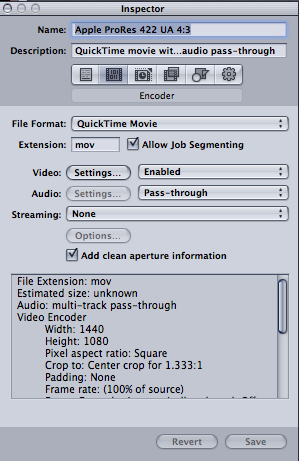
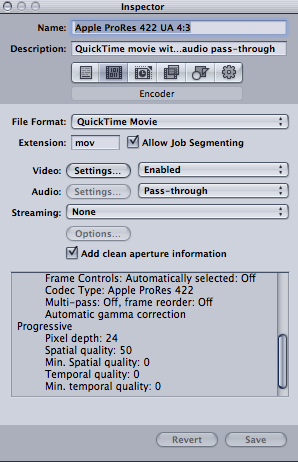
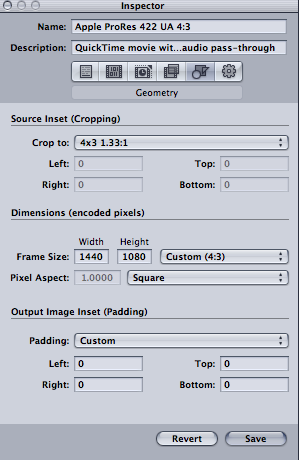
here are pic of my settings. a little tricky, but worked great!
i saved my custom setting in compressor so anytime i wanted to output a file from FCPx. i would just "share" using the pre-saved custom compressor setting, and check render in the background.
here are pic of my settings. a little tricky, but worked great!
i saved my custom setting in compressor so anytime i wanted to output a file from FCPx. i would just "share" using the pre-saved custom compressor setting, and check render in the background.
Please Log in to join the conversation.
- crisisduduk
-
Topic Author
- Offline
- New Member
-
Less
More
- Posts: 6
- Thank you received: 0
31 Jul 2012 13:07 #12428
by crisisduduk
Replied by crisisduduk on topic Re: the best way to convert hd to sd?
thank you very much ptrush.i apprecite it.
Please Log in to join the conversation.
31 Jul 2012 21:33 #12452
by Seanus
Sean Lander - Editing since 1982 - AVID 1991 - FCP 1999 - FCPX 2011
Replied by Seanus on topic Re: the best way to convert hd to sd?
Well if it was me I'd just create a SD Preoject and then edit the HD footage into it. This way you can Pan and Scan your shots to make them fit the format.
Sean Lander - Editing since 1982 - AVID 1991 - FCP 1999 - FCPX 2011
Please Log in to join the conversation.
01 Aug 2012 13:05 #12475
by ptrush
Replied by ptrush on topic Re: the best way to convert hd to sd?
you could do that but after you drop those HD clips into the storyline, you'll never get that resolution back... crisis mentioned not wanting to loose too much quality.
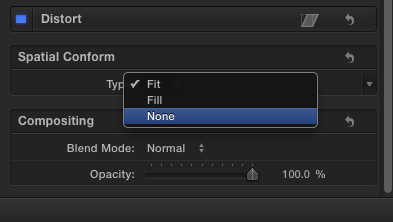
but yeah, if you find that SD is enough resolution for your client you can select all of your clips in the storyline and change spacial conform to none allowing room to move your clips around in the viewer.
but yeah, if you find that SD is enough resolution for your client you can select all of your clips in the storyline and change spacial conform to none allowing room to move your clips around in the viewer.
Please Log in to join the conversation.
01 Aug 2012 13:52 #12477
by Seanus
Sean Lander - Editing since 1982 - AVID 1991 - FCP 1999 - FCPX 2011
Replied by Seanus on topic Re: the best way to convert hd to sd?
Never get that resolution back? I'm sorry I guess I'm not understanding the process here. I thought he was editing a 4:3 project from scratch. Not converting a HD project to 4:3.
Sean Lander - Editing since 1982 - AVID 1991 - FCP 1999 - FCPX 2011
Please Log in to join the conversation.
01 Aug 2012 14:23 #12479
by ptrush
Replied by ptrush on topic Re: the best way to convert hd to sd?
yep, I'm pretty sure that if you start in an SD project, drop your clips in, then decide later to reconform to HD, I'm pretty sure the clips will still be SD.
Please Log in to join the conversation.
01 Aug 2012 17:31 - 01 Aug 2012 17:36 #12482
by NocoDave
If you have HD clips in an event and add them to SD project, then change the project settings to HD it's still referencing the same clips. Losing the original clips quality isn't a problem.
What will be a problem is if putting HD clips in an SD 4:3 project with Pan and Scan, then changing the setting to an HD version, the Pan and Scan is still going to be there with black bars showing up all over the place.
It could all be reset easy enough but I'd edit in an HD project, duplicate it, change the settings of the duplicate to create a 4:3 SD version with Pan & Scan and have both from the offset.
Replied by NocoDave on topic Re: the best way to convert hd to sd?
yep, I'm pretty sure that if you start in an SD project, drop your clips in, then decide later to reconform to HD, I'm pretty sure the clips will still be SD.
If you have HD clips in an event and add them to SD project, then change the project settings to HD it's still referencing the same clips. Losing the original clips quality isn't a problem.
What will be a problem is if putting HD clips in an SD 4:3 project with Pan and Scan, then changing the setting to an HD version, the Pan and Scan is still going to be there with black bars showing up all over the place.
It could all be reset easy enough but I'd edit in an HD project, duplicate it, change the settings of the duplicate to create a 4:3 SD version with Pan & Scan and have both from the offset.
Last edit: 01 Aug 2012 17:36 by NocoDave. Reason: Better wording
Please Log in to join the conversation.
