


- Posts: 3
- Thank you received: 0
3 Post Moderation Rule for New Boarders (25 Jan 2021)
New boarders will have their posts moderated - Don't worry if you cannot see your post immediately.
FCPX Archives direct to DVD
17 Sep 2011 20:34 #1231
by Vinnio
FCPX Archives direct to DVD was created by Vinnio
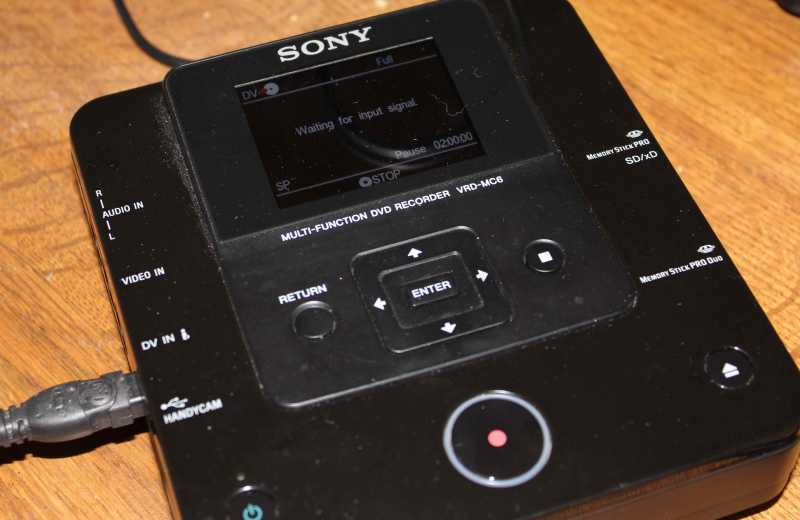
Is it possible to burn FCPX archives directly to DVD? (MBP 17") using Firewire 'print to Video' I have a sony DVD recorder with a firewire labelled 'DV in" I have a lot of FCPX archives I need to burn to DVD and really don't want to go through the process of loading them individually into FCPX and then sending them to compressor, I find compressor takes ages!
Vinnio
Vinnio
Please Log in to join the conversation.

19 Sep 2011 05:08 #1241
by BenB
Replied by BenB on topic Re: FCPX Archives direct to DVD
Um, burning them to DVD like that just makes a video DVD, and you will lose image quality. If you ever need the footage again, you'll need to jump through hoops with something like MPEGStreamClip to "rip" the video off the DVD, and you'll lose a good deal of image quality.
Yes, Compressor takes a long time, depending on your hardware, but you're transcoding (hopefully to a ProRes lossless codec) to something that will retain image and sound quality over time and over more transcodes.
That's the nature of the beast, "fast time" or "good quality", you can't have both, it's a balancing act. Which is more important to you?
Yes, Compressor takes a long time, depending on your hardware, but you're transcoding (hopefully to a ProRes lossless codec) to something that will retain image and sound quality over time and over more transcodes.
That's the nature of the beast, "fast time" or "good quality", you can't have both, it's a balancing act. Which is more important to you?
Please Log in to join the conversation.
21 Sep 2011 18:51 #1310
by Vinnio
Replied by Vinnio on topic Re: FCPX Archives direct to DVD
Hi Ben,
Many thanks for your reply, I have tried a couple of different options and have now settled for sending them to DVD from the timeline, it takes a bit of time but the quality is pretty good, I'm happy to run with quality over speed.
Vincent
Many thanks for your reply, I have tried a couple of different options and have now settled for sending them to DVD from the timeline, it takes a bit of time but the quality is pretty good, I'm happy to run with quality over speed.
Vincent
Please Log in to join the conversation.
21 Sep 2011 19:52 #1312
by BenB
Replied by BenB on topic Re: FCPX Archives direct to DVD
DVD is not giving you "quality". How will you take it from DVD back into FCP if you ever need to use it again? Video DVD is NOT quality archiving. You are losing tons of quality in the extremely high compression that happens. So your conclusion of taking quality over speed, and then saying you're going to DVD, are contradictory.
Burn a video DVD, then what happens when you need to edit that video back in FCP?
Burn a video DVD, then what happens when you need to edit that video back in FCP?
Please Log in to join the conversation.
21 Sep 2011 20:50 #1315
by holdenkim
Replied by holdenkim on topic Re: FCPX Archives direct to DVD
First, DVD is not really a good option to archive any project nowadays, simply because of its size limitation and slow transfer rate. Use an external Hard Drives with FW800 or even USB 2.0 cable.
If you MUST use DVDs to archive, you have to make a "Data DVD" not a "Video DVD" like BenB's saying. You lose quality, not just a little but ALOT. Video DVD is for TV viewing and for client reviews.
If you MUST use DVDs to archive, you have to make a "Data DVD" not a "Video DVD" like BenB's saying. You lose quality, not just a little but ALOT. Video DVD is for TV viewing and for client reviews.
Please Log in to join the conversation.
21 Sep 2011 21:42 #1316
by Vinnio
 Thanks All for your replies,
May I clarify a number of things, that perhaps I did not state clearly in my original post.
I have quite a number of Camera Archives (HD) (Football Matches) which I expect to keep. I have been asked to burn these onto DVD's so they can be viewed by a colleague. I go through the process of loading each onto the timeline and with very little editing, burn them to DVD's. I appreciate there is an obvious loss of quality when burned to DVD (But as DVD's go the quality is excellent!) I have a portable DVD burner that I can connect my camera when I'm recording the matches. I finalize the DVD and hand them to the manager after the game. When I get home I make an archive of the tapes and this is where the question evolved from: I was hoping there was a quick way of transferring the Camera Archive to this DVD burner rather than importing to the timeline and then burning to DVD. I hope this clarifies the question and thank you all for your responses. The reason I stated I would prefer Quality over Speed is that I don't ever anticipate deleting my archives, so the original HD video is there whenever I need it!
Vincent
Replied by Vinnio on topic Re: FCPX Archives direct to DVD
Thanks All for your replies,May I clarify a number of things, that perhaps I did not state clearly in my original post.
I have quite a number of Camera Archives (HD) (Football Matches) which I expect to keep. I have been asked to burn these onto DVD's so they can be viewed by a colleague. I go through the process of loading each onto the timeline and with very little editing, burn them to DVD's. I appreciate there is an obvious loss of quality when burned to DVD (But as DVD's go the quality is excellent!) I have a portable DVD burner that I can connect my camera when I'm recording the matches. I finalize the DVD and hand them to the manager after the game. When I get home I make an archive of the tapes and this is where the question evolved from: I was hoping there was a quick way of transferring the Camera Archive to this DVD burner rather than importing to the timeline and then burning to DVD. I hope this clarifies the question and thank you all for your responses. The reason I stated I would prefer Quality over Speed is that I don't ever anticipate deleting my archives, so the original HD video is there whenever I need it!
Vincent
Please Log in to join the conversation.
