


- Posts: 17
- Thank you received: 0
3 Post Moderation Rule for New Boarders (25 Jan 2021)
New boarders will have their posts moderated - Don't worry if you cannot see your post immediately.
Notes lost when adding new keyword(s) in FCPX
13 Sep 2011 22:39 #1207
by pxjenkins
Notes lost when adding new keyword(s) in FCPX was created by pxjenkins
This one is really annoying: am logging material with keywords and notes in Event Library. BUT I have noticed that when a new keyword is added, FCPX deletes the Notes field!!
Anyone else experiencing this, or can please test to see if it is a common bug.
Thanks!
Anyone else experiencing this, or can please test to see if it is a common bug.
Thanks!
Please Log in to join the conversation.
13 Sep 2011 23:42 #1209
by pxjenkins
Replied by pxjenkins on topic Re: Notes lost when adding new keyword(s) in FCPX
update:
the problem seems to be that if notes are added to the keyworded segment (ie the clip) via the Notes field in the clip Inspector then the notes remain untouched whether or not keywords are added or deleted.
However, if notes are added to a clip by clicking inside the Notes field in the Event Library, then they seem to get deleted if a keyword is added or deleted.
very odd...
at least there is a workaround (using the Inspector)
the problem seems to be that if notes are added to the keyworded segment (ie the clip) via the Notes field in the clip Inspector then the notes remain untouched whether or not keywords are added or deleted.
However, if notes are added to a clip by clicking inside the Notes field in the Event Library, then they seem to get deleted if a keyword is added or deleted.
very odd...
at least there is a workaround (using the Inspector)
Please Log in to join the conversation.
- Michael Orton
-

- Offline
- New Member
-

Less
More
- Posts: 3
- Thank you received: 0
14 Sep 2011 08:16 #1211
by Michael Orton
Replied by Michael Orton on topic Re: Notes lost when adding new keyword(s) in FCPX
Not only as you describe, but also in other fields after edit and layoff are completed, background "rendering" complete, etc. This is very annoying, and if I'm doing/not doing something critical, I'd love to know about what exactly that is.
Please Log in to join the conversation.

14 Sep 2011 18:46 #1215
by BenB
Replied by BenB on topic Re: Notes lost when adding new keyword(s) in FCPX
I'm testing what is described here, I'm not seeing it. I've had a few others try, we're not getting that to happen.
To be clear, we're adding a not to the clip Name, not to the Keyword. I'm assuming you're adding clip name notes, not clip keyword notes? Notes added to a specific keyword on a clip will disappear if you remove that keyword.
Notes applied to Keywords (not to the clip's Name) are independent from clip to clip, as are Favorites (which can be renamed and given Notes). Keyword Ranges can overlap, Favorite Ranges can not overlap.
As for background rendering deleting Notes, that simply makes no sense to me at all. Not saying it can't happen, but I've never heard of that before. Can you give a detailed blow by blow description of what's happening?
To be clear, we're adding a not to the clip Name, not to the Keyword. I'm assuming you're adding clip name notes, not clip keyword notes? Notes added to a specific keyword on a clip will disappear if you remove that keyword.
Notes applied to Keywords (not to the clip's Name) are independent from clip to clip, as are Favorites (which can be renamed and given Notes). Keyword Ranges can overlap, Favorite Ranges can not overlap.
As for background rendering deleting Notes, that simply makes no sense to me at all. Not saying it can't happen, but I've never heard of that before. Can you give a detailed blow by blow description of what's happening?
Please Log in to join the conversation.
19 Sep 2011 22:14 #1258
by pxjenkins
Replied by pxjenkins on topic Re: Notes lost when adding new keyword(s) in FCPX
Hi Ben,
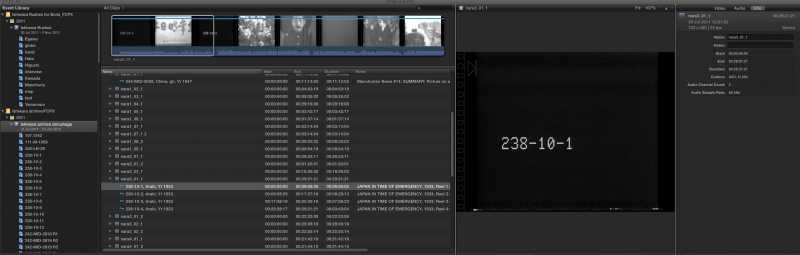
the issue for me is that I'm trying to log archive film in Final Cut X. The situation is that each file that I'm importing into Final Cut X contains several film bobbins; therefore the only way I could see to breakdown the individual bobbins was to assign each one a keyword so that they list separately under the relevant file name. Each bobbin has a shortlist, and what I wanted to do was to put this shop list in the notes alongside each bobbin in my list. What I found of course was that although I could enter the note (i.e. the shortlist) alongside the keyword collection, this note is not in fact present in the Inspector window.
In effect, it seems that the only way to do this exercise would be to create a compound clip in the event library for each bobbin, and then assign the shortlist into the notes for that compound clip.
Or am I missing something? I've attached a screen grab of part of my events library for reference.
Thanks!
the issue for me is that I'm trying to log archive film in Final Cut X. The situation is that each file that I'm importing into Final Cut X contains several film bobbins; therefore the only way I could see to breakdown the individual bobbins was to assign each one a keyword so that they list separately under the relevant file name. Each bobbin has a shortlist, and what I wanted to do was to put this shop list in the notes alongside each bobbin in my list. What I found of course was that although I could enter the note (i.e. the shortlist) alongside the keyword collection, this note is not in fact present in the Inspector window.
In effect, it seems that the only way to do this exercise would be to create a compound clip in the event library for each bobbin, and then assign the shortlist into the notes for that compound clip.
Or am I missing something? I've attached a screen grab of part of my events library for reference.
Thanks!
Please Log in to join the conversation.
20 Sep 2011 00:00 #1259
by BenB
Replied by BenB on topic Re: Notes lost when adding new keyword(s) in FCPX
OK, nope, notes for Tags and Keywords don't show up in the Inspector. My question would be, at this time (until Apple enhances the metadata as they claim), what is your purpose to see the Tag and Keyword notes in the Inspector?
Remember that a single Keyword Collection can only contain one universal keyword note. Change it in one clip, it changes in all clips for that shared keyword.
And remember that each Tag (Favorite or Rejected) can contain it's own unique note which is not shared by any other Favorite range. And that you can rename Favorite tags.
The thing is, I'm not sure that a combination of keywords (used for grouping like clips or clip ranges) and tags (used to make unique, individual clips or clip ranges) wouldn't be better than just only using keywords.
I have no idea what you mean by "bobbin" or "shortlist", if you could define what those are, please.
Remember that a single Keyword Collection can only contain one universal keyword note. Change it in one clip, it changes in all clips for that shared keyword.
And remember that each Tag (Favorite or Rejected) can contain it's own unique note which is not shared by any other Favorite range. And that you can rename Favorite tags.
The thing is, I'm not sure that a combination of keywords (used for grouping like clips or clip ranges) and tags (used to make unique, individual clips or clip ranges) wouldn't be better than just only using keywords.
I have no idea what you mean by "bobbin" or "shortlist", if you could define what those are, please.
Please Log in to join the conversation.
22 Sep 2011 20:19 #1330
by pxjenkins
Replied by pxjenkins on topic Re: Notes lost when adding new keyword(s) in FCPX
no purpose - it just seems indicative that the note is not being truly added to the keyword collection. Therefore it's confusing because one is under the impression that the note is added when it is not!
I'm thinking that creating compound clips may be the best way forward for logging..
bobbin = physical film roll; when getting archive from, for example, NARA it is ID's in the form 242-MID-6043 R 1 etc where R1 = Reel 1..
shotlist = a text summary of the contents of a clip or reel, list the various shots
I'm thinking that creating compound clips may be the best way forward for logging..
bobbin = physical film roll; when getting archive from, for example, NARA it is ID's in the form 242-MID-6043 R 1 etc where R1 = Reel 1..
shotlist = a text summary of the contents of a clip or reel, list the various shots
Please Log in to join the conversation.
22 Sep 2011 20:43 #1332
by BenB
Replied by BenB on topic Re: Notes lost when adding new keyword(s) in FCPX
So, you have several Reels on one long piece of video tape? That's very odd. Anyway, you want to mark each "Reel" (Bobbin) section into a Keyword. You want that Keyword to have a note. That can be done easily.
What you're dealing with is that the Inspector shows Clip metadata, not keyword or tagging metadata.
I think you'd be better served with Roles.
As for using Compound Clips, you still have separate Clips, and the information in the Inspector isn't changed. I can give each clip the same Keyword to group them together in a Smart Collection just like a Compound Clip. I can then give each clip either a Favorite tag or second Keyword for secondary categorization, and create a more complex Smart Search for organizing them, with more flexibility and faster accessibility then Compound Clips.
Just a thought. Seems from what I understand your goal is, Compound Clips, although it'd work, are not an efficient way to do this. Because each clip will still only have one Note field in the Inspector.
What you're dealing with is that the Inspector shows Clip metadata, not keyword or tagging metadata.
I think you'd be better served with Roles.
As for using Compound Clips, you still have separate Clips, and the information in the Inspector isn't changed. I can give each clip the same Keyword to group them together in a Smart Collection just like a Compound Clip. I can then give each clip either a Favorite tag or second Keyword for secondary categorization, and create a more complex Smart Search for organizing them, with more flexibility and faster accessibility then Compound Clips.
Just a thought. Seems from what I understand your goal is, Compound Clips, although it'd work, are not an efficient way to do this. Because each clip will still only have one Note field in the Inspector.
Please Log in to join the conversation.
27 Sep 2011 00:06 #1399
by pxjenkins
Replied by pxjenkins on topic Re: Notes lost when adding new keyword(s) in FCPX
Yes,That's how the reels were provided: several of them for each .MOV file.
When you say that a keyword can have a note, that's true and as you say the inspector won't display it. But this doesn't really get me closer to solving my problem because I still want to assign several keywords to each reel, at different stages of logging/editing. However, when I do so, any information I've put into the notes field disappears.
I've just tried playing around with the roles idea; but the problem seems to be that rolls can only be assigned to an entire clip, not to a range inside a clip.
Therefore, as far as I can see the only solution is to use compound clips as a way to create and name a range within a clip, and then assign a note to that newly created compound clip which will remain in situ as keywords are added or deleted thereafter.
Am I missing something in the workflow?
When you say that a keyword can have a note, that's true and as you say the inspector won't display it. But this doesn't really get me closer to solving my problem because I still want to assign several keywords to each reel, at different stages of logging/editing. However, when I do so, any information I've put into the notes field disappears.
I've just tried playing around with the roles idea; but the problem seems to be that rolls can only be assigned to an entire clip, not to a range inside a clip.
Therefore, as far as I can see the only solution is to use compound clips as a way to create and name a range within a clip, and then assign a note to that newly created compound clip which will remain in situ as keywords are added or deleted thereafter.
Am I missing something in the workflow?
Please Log in to join the conversation.
27 Sep 2011 00:13 - 30 Sep 2011 10:48 #1400
by BenB
Replied by BenB on topic Re: Notes lost when adding new keyword(s) in FCPX
Ah yes, when you add a second keyword, it does lose the note. Not good. It looks like the keyword function sort of does a reset when you add a second keyword. Fill out the feedback page and let Apple know to change it.
Last edit: 30 Sep 2011 10:48 by BenB.
Please Log in to join the conversation.
