


3 Post Moderation Rule for New Boarders (25 Jan 2021)
New boarders will have their posts moderated - Don't worry if you cannot see your post immediately.
SAN Location already in use?

We've tried all the usual things to fix it to no avail. Anyone here have a suggestion on how to fix this annoying problem?
System is Mac Pro 10.7.4, 8GB Ram Projects and Events on separate FW800 Drives.
Have trashed prefs, restarted, etc.
Sean Lander - Editing since 1982 - AVID 1991 - FCP 1999 - FCPX 2011
Please Log in to join the conversation.
discussions.apple.com/thread/3354778?start=15&tstart=0
Hope apple is addressing this. :-o
Can't sleep? Try this: fcpxpert.net ;-)
Please Log in to join the conversation.

Please Log in to join the conversation.
Sean Lander - Editing since 1982 - AVID 1991 - FCP 1999 - FCPX 2011
Please Log in to join the conversation.
Please Log in to join the conversation.
Saw on the apple forum Ben linked about resetting PRAM. Don't know how/why that would work but no harm in trying. Haven't done it a while anyway.
Definitely a BUG in X!
Please Log in to join the conversation.
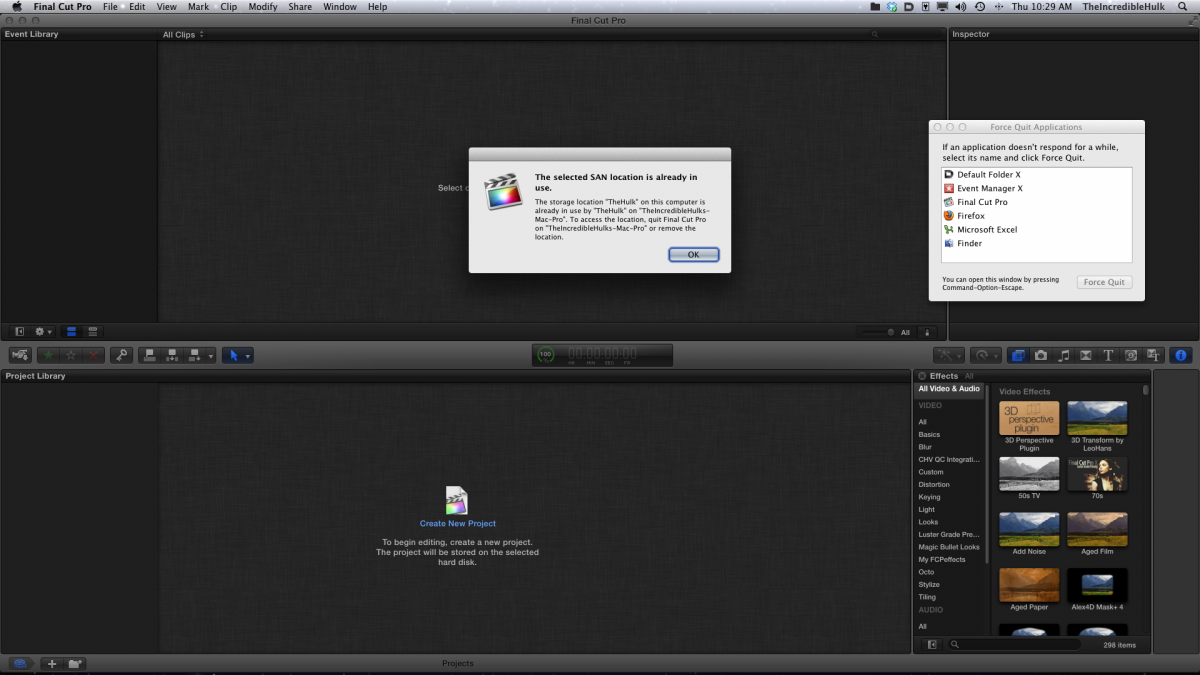
Please Log in to join the conversation.
Can you go to the File menu and disconnect that "Location"? I'm guessing now, but would be interesting to see if FCP let you.
Please Log in to join the conversation.
I mean, is it even possible for the internal system drive to be a SAN location? Isn't that loco?
Please Log in to join the conversation.
Please Log in to join the conversation.
Sean Lander - Editing since 1982 - AVID 1991 - FCP 1999 - FCPX 2011
Please Log in to join the conversation.
Sean Lander - Editing since 1982 - AVID 1991 - FCP 1999 - FCPX 2011
Please Log in to join the conversation.
Please Log in to join the conversation.
Please Log in to join the conversation.
- Scrubelicious
-

- Offline
- Platinum Member
-

- Posts: 1228
- Thank you received: 114
screendor wrote: I got in touch with Apple about this issue. One possible cause: a mounted DMG, like from a third party installer, can sometime cause the SAN location error message. Something to be aware of...
This is true, and it can also be cause buy mounted sparse images.
 Kinda sucks if you are using them for FCPX.
 Please Log in to join the conversation.
- Doug Suiter
-

- Offline
- Elite Member
-

- Posts: 244
- Thank you received: 12

Please Log in to join the conversation.

screendor wrote: I got in touch with Apple about this issue. One possible cause: a mounted DMG, like from a third party installer, can sometime cause the SAN location error message. Something to be aware of...
same case here. i got the problem, read lots of forums with scary "make a copy of your 3 Tb video stuff" and called Applecare, they transferred my call to the FCP support and step by step i was led (and im a real idiot in all these computer things) to the solution of the problem. And they said from the beginning that they do not support this version of FCP X, but still going to help. It took a while, but problem is gone now. mounted DMG, not even mounted, but still listed in Disk Utility like ghosts.
Please Log in to join the conversation.
