


- Posts: 3
- Thank you received: 0
3 Post Moderation Rule for New Boarders (25 Jan 2021)
New boarders will have their posts moderated - Don't worry if you cannot see your post immediately.
FCP Export Issue
09 Jul 2012 23:09 #11213
by Dinoman
FCP Export Issue was created by Dinoman
I recently updated to version 10.0.5. After doing so I have noticed that my exports with the default settings are lower quality now. I have attached an image for you to see. The one on the left is after the update and the one on the right is before. Also take note of the placement. The new one has large black bars on either side. Could I have accidently messed with a setting perhaps?
Thanks for your help

Thanks for your help
Please Log in to join the conversation.


10 Jul 2012 03:37 #11221
by dgwvideo
Creating history....one edit at a time !
Replied by dgwvideo on topic Re: FCP Export Issue
Quite sure the difference in quality has nothing to do with the 10.0.5 update. Can you advise what format your timeline (project) is and what the codec the clips are?
Creating history....one edit at a time !
Please Log in to join the conversation.
- lordjim666
-

- Offline
- New Member
-

Less
More
- Posts: 3
- Thank you received: 1
10 Jul 2012 08:26 #11240
by lordjim666
Replied by lordjim666 on topic Re: FCP Export Issue
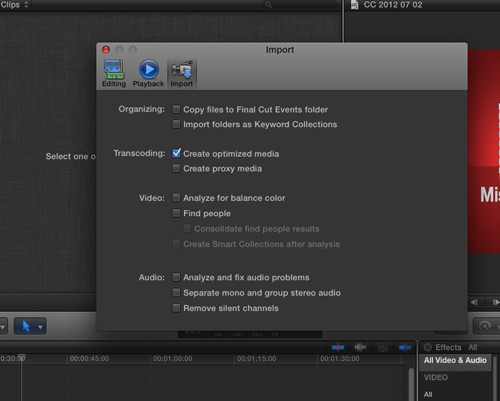
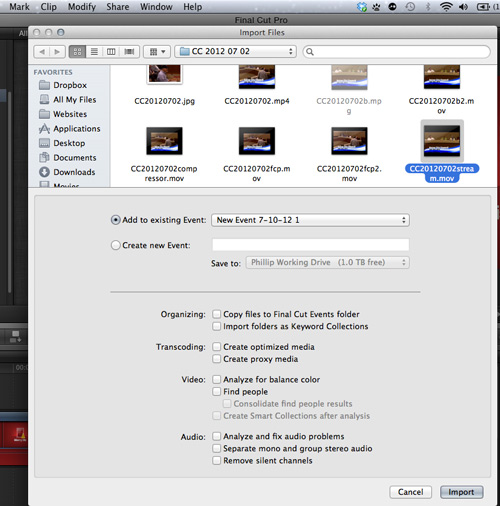
HI. I found I had this problem and it is not (I don't think?!) to do with the update. I believe it is your settings. When you import your clips do you make optimzed or proxy media copies?? If so, let me know and I'll explain further.
Please Log in to join the conversation.
10 Jul 2012 18:02 #11259
by Dinoman
Replied by Dinoman on topic Re: FCP Export Issue
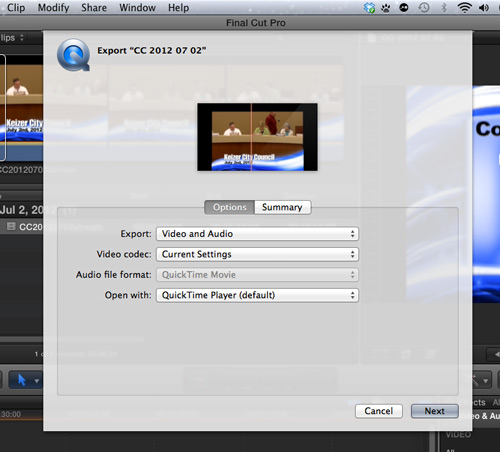
Thanks for the quick reply. Here are some screenshots showing the settings I have used.

Please Log in to join the conversation.
10 Jul 2012 19:01 #11262
by Dinoman
Replied by Dinoman on topic Re: FCP Export Issue
Good news...I figured out what was causing the problem. In the project properties it was set to full HD when the actual video was SD. After I changed to auto, it is back and working great. Thanks for your help.
Please Log in to join the conversation.
