


- Posts: 13
- Thank you received: 0
3 Post Moderation Rule for New Boarders (25 Jan 2021)
New boarders will have their posts moderated - Don't worry if you cannot see your post immediately.
Unable to share due to project showing as 0:00 total time
02 Jul 2012 10:20 #10761
by Serge
Unable to share due to project showing as 0:00 total time was created by Serge
Hi,
I wonder if someone could help me?
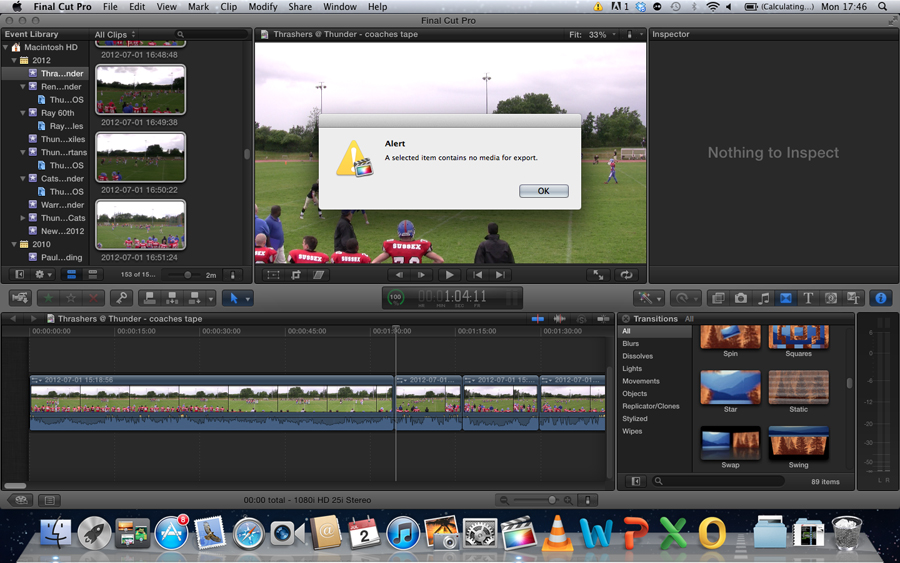
I imported files from an SD card, waited for the import to finish, then selected all and put on the timeline, but when I go to share it comes up with an error message, I don't know the exact wording as I'm at work now, but it was something like "no timecode to export" under the timeline it's showing total time as 0:00, but when I highlight a clip it shows the clip time.
I have already tried updating the software, deleting the project and starting a new one.
Any ideas?
Thanks in advance
I wonder if someone could help me?
I imported files from an SD card, waited for the import to finish, then selected all and put on the timeline, but when I go to share it comes up with an error message, I don't know the exact wording as I'm at work now, but it was something like "no timecode to export" under the timeline it's showing total time as 0:00, but when I highlight a clip it shows the clip time.
I have already tried updating the software, deleting the project and starting a new one.
Any ideas?
Thanks in advance
Please Log in to join the conversation.
- Tom Wolsky
-

- Offline
- Moderator
-

02 Jul 2012 12:14 #10765
by Tom Wolsky
Replied by Tom Wolsky on topic Re: Unable to share due to project showing as 0:00 total time
I think you're going to have to post some screen shots of what you're seeing, the dialog and what's happening in the timeline.
Please Log in to join the conversation.
02 Jul 2012 12:29 #10766
by Serge
Replied by Serge on topic Re: Unable to share due to project showing as 0:00 total time
Thanks for the reply, I'll do that when I get home tonight.
Please Log in to join the conversation.
02 Jul 2012 16:51 #10777
by Serge
Replied by Serge on topic Re: Unable to share due to project showing as 0:00 total time
Here is a screen shot.
Please Log in to join the conversation.

02 Jul 2012 17:49 #10780
by BenB
Replied by BenB on topic Re: Unable to share due to project showing as 0:00 total time
What screen shot? :ohmy:
Please Log in to join the conversation.
02 Jul 2012 20:01 - 02 Jul 2012 20:03 #10789
by BenB
Replied by BenB on topic Re: Unable to share due to project showing as 0:00 total time
Is the Timeline window active (Cmd-2).
Can't seem to make that error message come up.
Set your Dock to hide, you'll get valuable screen real estate for FCP X.
Can't seem to make that error message come up.
Set your Dock to hide, you'll get valuable screen real estate for FCP X.
Last edit: 02 Jul 2012 20:03 by BenB.
Please Log in to join the conversation.
- Tom Wolsky
-
- Offline
- Moderator
-
02 Jul 2012 20:46 #10794
by Tom Wolsky
Replied by Tom Wolsky on topic Re: Unable to share due to project showing as 0:00 total time
Trash your preferences and reboot.
Please Log in to join the conversation.
02 Jul 2012 20:52 #10795
by Serge
Replied by Serge on topic Re: Unable to share due to project showing as 0:00 total time
Thanks for your responses
@BenB I tried that, but still the same thing. Thanks for the dock tip as well.
@Tom, silly question, but how do I do that?
Thanks
@BenB I tried that, but still the same thing. Thanks for the dock tip as well.
@Tom, silly question, but how do I do that?
Thanks
Please Log in to join the conversation.
02 Jul 2012 21:19 #10800
by BenB
Replied by BenB on topic Re: Unable to share due to project showing as 0:00 total time
Digital Rebellion makes a free "Preference Manager" app to do this safely, easily, quickly.
Please Log in to join the conversation.
